A car issue never waits for your free time. It hits before work, during a school drop, or in the middle of a road trip. Then the real stress. You call a few garages. You wait. You still do not know who will come, how long it will take, or what the final bill will be.
That is why “book-a-mechanic” apps are getting serious attention in the US. The demand for mobile repairs is rising because people want service at home, office, or roadside, not a long wait at a shop. One market report estimates the mobile vehicle repair service market will be USD 4.27 billion in 2025 and may reach USD 6.51 billion by 2030.
In this guide, you will learn how to build an on-demand platform for mechanics in the US in 2026. We will cover the panels, key features, step-by-step build phases, and cost drivers in simple terms. This is made for founders planning on-demand mechanic app development, not for people who want only theory.
Table of Contents
- What is an On-Demand Mechanics App?
- Why On-Demand Mechanic Apps Are Revolutionising Automotive Services
- How On-Demand Mobile Mechanic App Works
- Benefits of an On-Demand Mechanics App
- Must-Have Features For Your On-Demand Mechanic App
- Step-by-Step Guide To Develop On-Demand Mechanic App
- Cost Estimation for Mechanic App Development
- Factors Affecting Development Pricing
- Conclusion
- FAQs
What is an On-Demand Mechanics App?
An on-demand mechanics app is a platform where people can book a mechanic like they book a cab. The customer picks the service, shares their location, selects a time, and gets updates until the job is done. Mechanics get job requests, accept nearby work, and manage schedules and payments from one place. In on-demand mechanic app development, the real value is trust and speed. Clear pricing, verified pros, and quick support make the app usable in real life.
- Customer Side: Choose service, share location, book slot, pay, rate.
- Mechanic Side: Accept jobs, navigate, update status, send invoice.
- Admin Side: Verify mechanics, manage pricing, handle disputes, track performance.
Why On-Demand Mechanic Apps Are Revolutionising Automotive Services
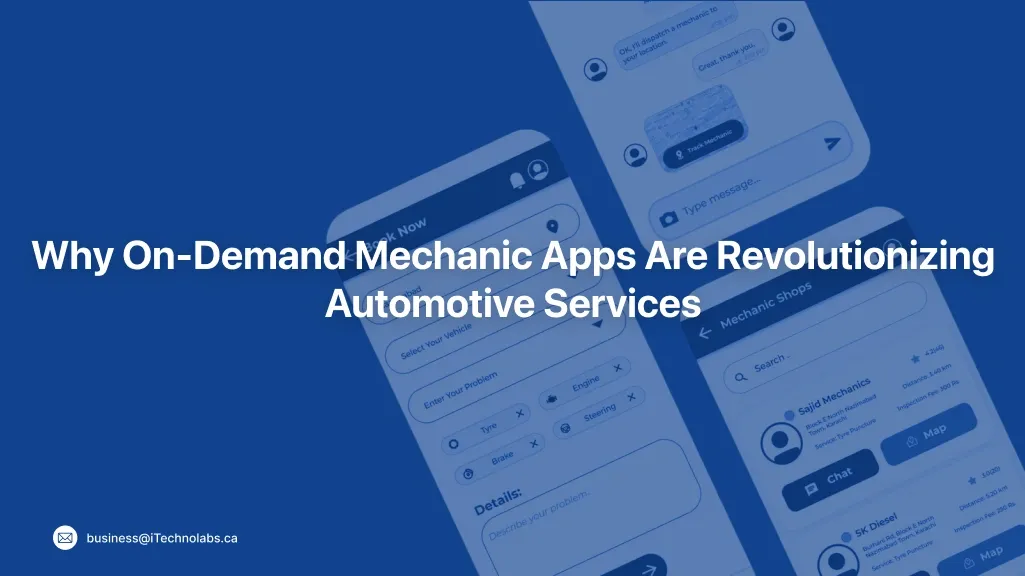
People do not want to sit in a waiting room for 3 hours just to hear, “Come back tomorrow.” They want the fix at home, at work, or on the roadside. That is why on-demand mechanic apps are growing fast in the US.
With on-demand mechanic app development, the shift is simple. Faster bookings, clearer pricing, and better trust. Customers can see who is coming, when they will arrive, and what the job will cost. Mechanics get steady jobs and fewer empty hours, and the platform gets a clean service record through invoices, photos, and reviews.
How On-Demand Mobile Mechanic App Works
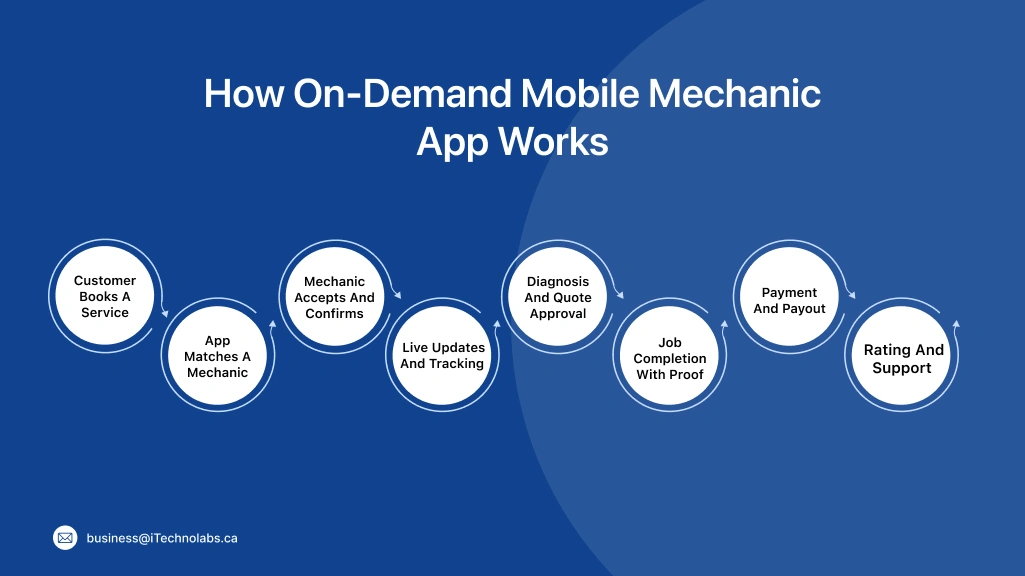
An on-demand mobile mechanic app works like a simple booking loop. In on-demand mechanic app development, this flow is the backbone because it controls speed, trust, and payments from start to finish.
- Step 1: Customer Books A Service: They pick the issue, share their location, choose a time, and add vehicle details.
- Step 2: App Matches A Mechanic: The platform checks distance, skills, availability, and ratings, then sends the job request.
- Step 3: Mechanic Accepts and Confirms: The mechanic accepts, shares ETA, and confirms tools or parts needed.
- Step 4: Live Updates and Tracking: Status updates show “On The Way,” “Arrived,” and “Work In Progress.”
- Step 5: Diagnosis and Quote Approval: The mechanic inspects, shares estimates, and takes approval for extra work.
- Step 6: Job Completion With Proof: Photos, notes, parts used, and a digital invoice get saved in the job record.
- Step 7: Payment and Payout: The customer pays in-app, and payout happens as per your platform rules.
- Step 8: Rating and Support: Reviews build trust, and support handles disputes, refunds, or complaints.
Benefits of an On-Demand Mechanics App
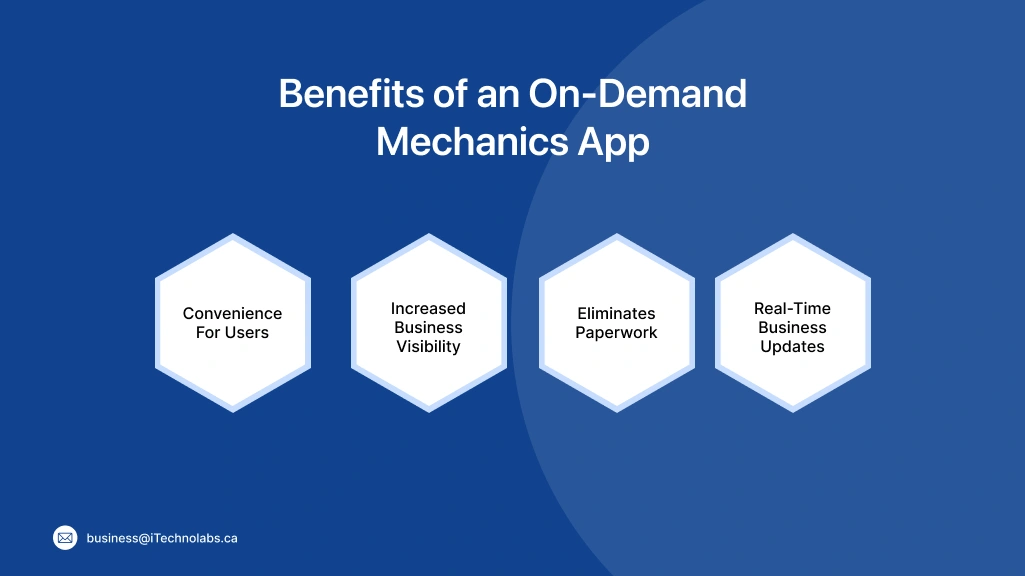
An on-demand mechanics app improves the full service journey, not just booking. It saves time for customers, creates steadier work for mechanics, and gives the business more control over quality and payments.
-
Convenience For Users:
People can book a mechanic from home or office, choose a time slot, and track ETA. They also get digital invoices and job history, so there is no confusion later.
-
Increased Business Visibility:
A strong on-demand mechanic platform helps you get discovered through location-based searches and reviews. Over time, ratings and repeat bookings build trust faster than flyers or cold calls.
-
Eliminates Paperwork:
Quotes, receipts, service checklists, and photos stay inside the app. This is a big win for on-demand mechanic app development because clean records reduce disputes and speed up payments.
-
Real-Time Business Updates:
Dispatch can see job status, mechanic location, and delays in one dashboard. Customers get alerts without calling, and teams handle exceptions faster. That is how platforms scale from a few mechanics to many.
Must-Have Features For Your On-Demand Mechanic App
The best mechanic apps are not packed with random features. They are built around trust, speed, and proof. Customers want a clear price, a verified mechanic, and live updates. Mechanics want easy job flow, simple payments, and fewer calls. If you are building the best on-demand platform for mechanics in USA, focus on features that reduce no-shows, avoid disputes, and keep the service record clean from booking to invoice.
Features of Customer Panel
Customer panel features should make booking feel quick and safe. The user should find the right mechanic, know the price and ETA, and keep proof of the job. No confusion, no chasing on calls.
- Register/Login: Simple sign-up with email, phone OTP, or social login. It should also support saved addresses and multiple vehicles.
- Tutorial and On-Boarding Screen: A short walk-through that shows how booking, payments, and support work. It reduces drop-offs in the first session.
- Search Filter: Filters for service type, location radius, price range, rating, availability, and vehicle type. This helps users pick fast without scrolling forever.
- Book Appointment: One clean booking screen with issue details, photos, preferred time, and notes. It should show cancellation rules clearly.
- Service Scheduling: Let users choose now or later, plus time slots. Add reminders so fewer people forget bookings.
- Real-Time Tracking: Live mechanic ETA with job status like “Accepted,” “On The Way,” and “Work Started.” It cuts “where are you” calls.
- Invoice Generator: Digital invoice with parts, labour, taxes, and warranty notes. It should stay saved in the customer’s history.
- Pop-up Notifications: Push alerts for booking confirmation, ETA changes, quote approval, job completion, and payment receipt.
- In-App Chat and Calling: Secure chat and masked calling so personal numbers stay private. This also helps support review conversations when needed.
- Rate and Review: Ratings, written feedback, and optional photo proof. Reviews help other users and keep quality in check.
Features of Admin Panel
Admin panel features should give you control without daily chaos. You should be able to manage users, track live jobs, handle payments, and keep service quality consistent.
- Customer and Mechanics Management: Create, verify, approve, suspend, and support both customers and mechanics. You can view profiles, documents, job history, and complaint logs from one dashboard.
- Multiple Garage Management: Add partner garages, set service zones, working hours, service categories, and job capacity. This helps you scale city by city without losing control.
- Real-Time Order and Field Tracking Management: Track active jobs on a live map, monitor ETAs, reassign tasks, and manage cancellations. It also helps you spot delays and resolve issues before customers get angry.
- Gallery Management: Manage mechanic profile photos, service images, and job proof uploads. Clean listings build trust and reduce disputes.
- Payment Details: Track payments, commissions, mechanic payouts, refunds, and invoices. Export reports for accounting and tax records.
- Rating and Review: Monitor ratings, flag repeated complaints, and remove fake reviews. Use feedback trends to improve service quality and training.
Features of Mechanic Panel
Mechanic panel features should help the mechanic accept jobs fast, reach the customer on time, and close the job with proof. It should feel simple on a busy day.
- Manage Service Requests: View new job requests, accept or reject, check distance, see issue details, and share ETA. Also show rules for cancellation and no-show.
- Profile Management: Update skills, service areas, working hours, documents, and bank details. Keep verification status visible so onboarding stays clear.
- Manage Services: Add service categories, pricing ranges, parts availability notes, and time estimates. This helps reduce quote fights later.
- Customer Location: Open navigation, view exact pin, and allow location updates if the customer moves. Add offline handling for weak network areas.
- Help and Support Panel: Quick access to support chat or call, dispute raise option, and payout help. Mechanics should also see platform policies in plain language.
Features of Garage Manager App Panel
A garage manager panel is for daily operations. It helps the owner manage mechanics, jobs, staff, parts, and customer updates from one place.
- Manage Mechanics List and Cost: Add mechanics, assign roles, set payout rules, track hours, and view job-wise earnings. It also helps the garage control labour cost per job.
- Real-Time Mechanics Tracker: See which mechanic is on which job, current status, and ETA. This helps you avoid double-booking and improve job turnaround time.
- Manage Staff: Manage shifts, attendance, leaves, and task assignments for office staff and helpers. Keep notes for performance and training.
- Customer Management: View customer details, booking history, service notes, and follow-ups. It supports repeat business and smoother complaint handling.
- Inventory Management: Track common parts, low-stock alerts, purchase logs, and parts used per job. It reduces delays caused by missing inventory.
- In-App Messaging and Calling: Chat and call customers and mechanics inside the app, with masked numbers. It keeps communication recorded and easier to audit.
Also, read: Mobile App Development Cost in 2026
Step-by-Step Guide To Develop On-Demand Mechanic App
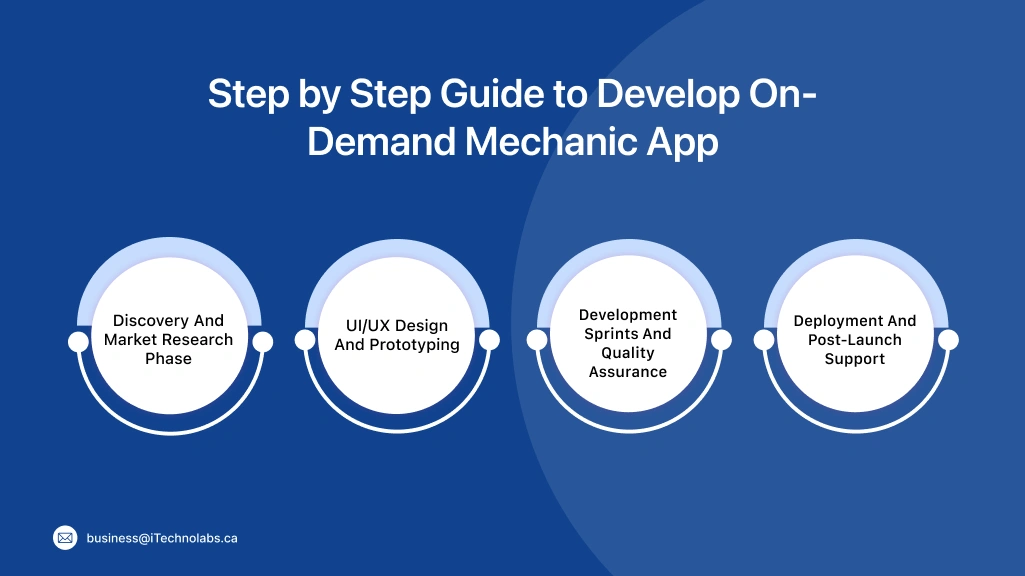
Building an on-demand mechanic app is not only about screens. It is about matching the right mechanic, setting clear pricing, and handling real-life issues like delays, no-shows, and refunds. This step-by-step guide breaks down how to plan, design, build, test, and launch an on-demand mechanic platform in the US, so it works smoothly for customers, mechanics, and garages.
-
Discovery And Market Research Phase
This is where you confirm what people actually book, and what mechanics can deliver. You study your target cities, service categories, pricing ranges, and competitor gaps. You also decide the business model, like commission, subscription, or lead fee. A clear discovery phase saves you from building features nobody uses.
-
UI/UX Design And Prototyping
Now you design the main flows for customers, mechanics, garage managers, and admin. You create wireframes and clickable prototypes to test booking, quote approval, payments, and support. This step helps you catch friction early, like too many fields, confusing pricing, or weak trust signals.
-
Development Sprints And Quality Assurance
Development happens in small sprints so you can ship and test in parts. QA is critical here because real-world cases are messy, like GPS drift, last-minute cancellations, or bad network. You test core flows, payments, chat, notifications, and role access. You also run performance tests so the app stays stable during peak demand.
-
Deployment And Post-Launch Support
Launch in phases, starting with one city or a limited mechanic group. Monitor bookings, delays, refunds, and support tickets daily. Post-launch support covers bug fixes, security updates, and small improvements based on real feedback. This is also when you refine onboarding, pricing rules, and service categories to improve retention.
Cost Estimation for Mechanic App Development
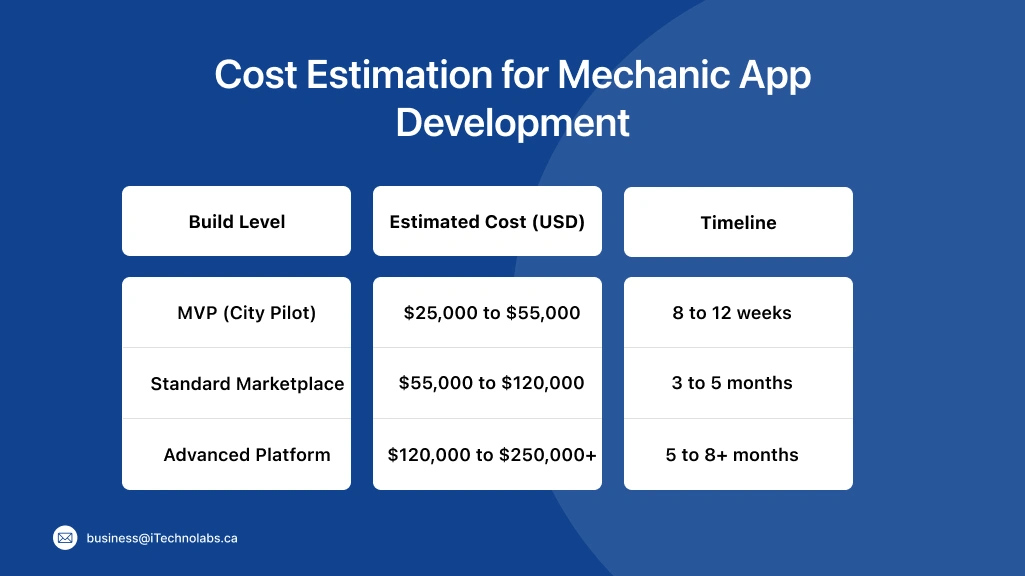
Cost estimation is the step where your idea becomes a real plan. The price depends on what you are building first: an MVP for one city, or a full marketplace with garages, payouts, and deep support tools. In on-demand mechanic app development, cost usually goes up because of maps, real-time tracking, payments, chat, verification, and heavy testing for edge cases like no-shows and refunds. The smart move is to price feature-wise, then launch in phases.
| Build Level | Estimated Cost (USD) | Timeline |
| MVP (City Pilot) | $25,000 to $55,000 | 8 to 12 weeks |
| Standard Marketplace | $55,000 to $120,000 | 3 to 5 months |
| Advanced Platform | $120,000 to $250,000+ | 5 to 8+ months |
Factors Affecting Development Pricing
Pricing is not only about “how many screens.” It is about real complexity, integrations, and long-term support. If you are building the best on-demand platform for mechanics in USA, these factors will decide your budget more than anything else.
-
Application Complexity And Features:
More roles, like customer, mechanic, garage manager, and admin, add more logic and testing. Features like live tracking, quote approval, refunds, and dispute workflows also push costs up.
-
Platform Selection Impact:
Building for iOS, Android, and web together costs more than starting with one platform. If you want fast delivery, many teams launch one platform first, then expand after the pilot.
-
Geographic Development Team Location:
Rates vary by region and seniority. A lower rate can still cost more if delivery is slow or quality issues create rework.
-
Annual Maintenance Requirements:
Apps need bug fixes, OS updates, security patches, and support ticket handling. Plan a yearly maintenance budget so you are not forced to pause improvements later.
-
Scaling Infrastructure Costs:
As bookings grow, you pay more for cloud, maps, SMS, push notifications, storage, and monitoring. Scaling costs also rise when you add more cities, more mechanics, and more real-time tracking.
Suggested Article: How to Build an On-Demand Flower Delivery App Like Floward?
Conclusion
Building an on-demand mechanic platform in the US in 2026 is not just about making an app. It is about making booking and service simple. Customers want a clear price, a trusted mechanic, and updates on time. Mechanics want steady work and fast payouts.
Start small. Launch in one city with a few common services. Test real issues like late arrival, no-shows, refunds, and parts not available. Fix these first, because this is what decides if people will use the app again.
Keep the basics strong. Make booking easy, support quick, and invoices clear. Then grow step by step into more cities. If you want expert help with on-demand mechanic app development, iTechnolabs can help you plan, build, and scale the platform.
FAQs
1. How much does it cost to build an on-demand mechanic platform in US?
The cost of developing an on-demand mechanic platform depends on factors such as features, platform complexity, integrations, and development approach. A basic MVP with core functionalities like service booking, mechanic profiles, payments, and GPS tracking may cost between $30,000 and $70,000. More advanced platforms with real-time diagnostics, AI-powered matching, multi-city management, and analytics can exceed $150,000. The final budget largely depends on your business goals and scalability requirements.
2. How does an on-demand mechanic platform make money?
Most on-demand mechanic platforms generate revenue by charging a commission on every completed service request. Some platforms also offer subscription plans for mechanics and repair shops, allowing them to receive more leads and visibility. Additional revenue streams may include booking fees, featured listings, emergency service charges, extended warranties, and advertising opportunities for automotive businesses.
3. What services should I start with in the first version?
When launching an MVP, focus on high-demand services that are easy to standardize and deliver consistently. Common starter services include battery replacement, jump starts, oil changes, brake inspections, tyre replacement, lockout assistance, and basic vehicle diagnostics. Starting with a limited set of services helps streamline operations, improve customer experience, and validate market demand before expanding.
4. How do you verify mechanics on the app?
Mechanic verification is essential for maintaining customer trust and service quality. The process typically includes identity verification, license or certification checks where applicable, insurance verification, background screening, and assessment of technical skills. Many platforms also require mechanics to complete onboarding procedures or trial jobs before gaining full access to customer requests.
5. How long does on-demand mechanic app development usually take?
The development timeline depends on the scope and complexity of the platform. A basic MVP can typically be built within 8 to 12 weeks, while a fully featured marketplace with advanced scheduling, fleet management, real-time tracking, customer support tools, and analytics may require 3 to 6 months or longer. Proper testing and optimization are also important factors that influence the overall timeline.