Repeat orders do not happen by luck. They happen when ordering feels easy, clear, and reliable, every single time. If the flow breaks once, many customers do not complain. They just switch.
That is why the right online ordering system for restaurants matters in 2026. Off-premise is no longer “extra sales.” It is routine. The National Restaurant Association found that 47% of adults pick up takeout at least once a week, and 37% order delivery weekly. When ordering becomes a weekly habit, small mistakes become big leaks.
Now the tricky part. Getting orders is easier than keeping customers. Restaurant Dive shared NCR Voyix data saying 58% of customers prefer ordering delivery on a restaurant’s own app or website. This guide lists 10 tools that can help you earn repeat orders, with notes on fit, setup effort, and what can quietly hurt brand trust if it is not configured well.
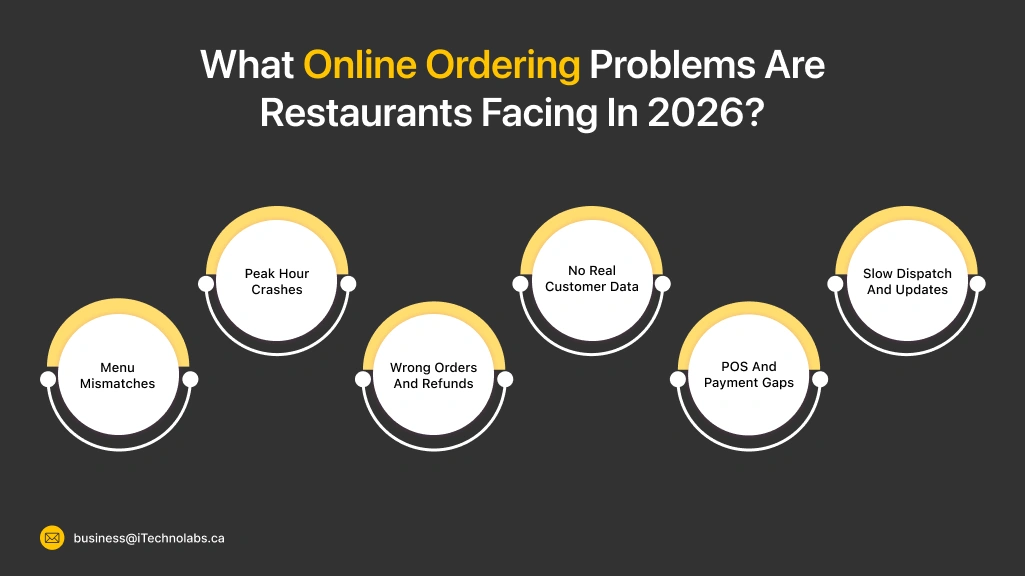
What Online Ordering Problems Are Restaurants Facing In 2026?
In 2026, online orders look normal on the surface. But many restaurants still fight daily chaos behind the screen. Menus go out of sync, items show as available when they are not, and peak hours break the flow. Refunds rise, staff gets stressed, and customers leave one star. A strong online ordering system for restaurants fixes these gaps by keeping orders, payments, and prep in one clear loop.
- Menu Mismatches: Prices, photos, and item stock do not match across channels.
- Peak Hour Crashes: Too many orders hit at once, and the system slows or fails.
- Wrong Orders And Refunds: Modifiers get missed, notes get ignored, and refunds add up.
- No Real Customer Data: Marketplaces own the customer details, not the restaurant.
- POS And Payment Gaps: Orders do not land properly in POS, and payouts feel messy.
- Slow Dispatch And Updates: Customers do not get clear status updates, so calls increase.
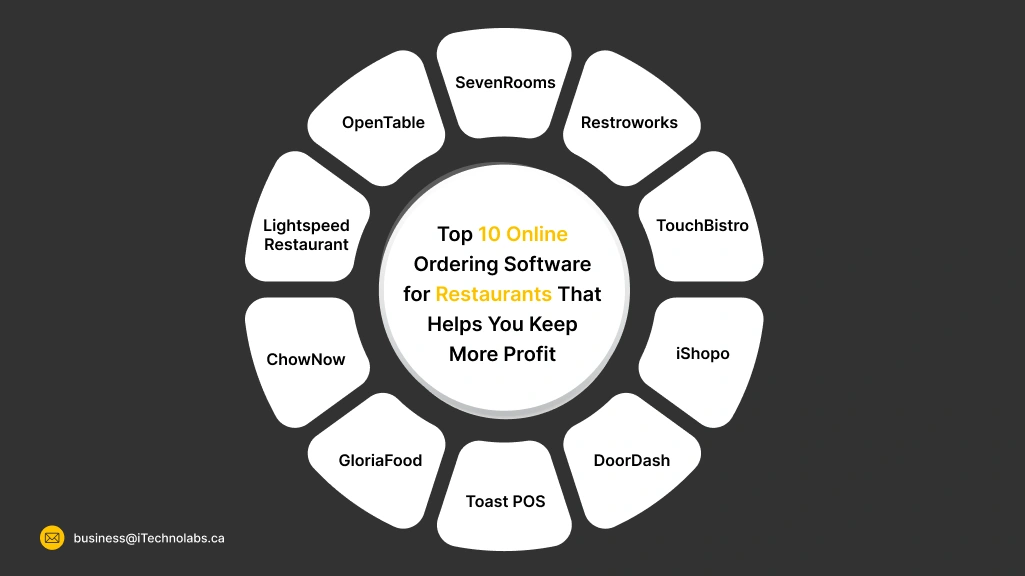
Top 10 Online Ordering Software for Restaurants That Helps You Keep More Profit
In 2026, the best online ordering tools do more than take orders. They help you run busy hours without panic. A good system keeps the menu clean, pushes orders to the kitchen fast, and makes payments smooth. The right online ordering system for restaurants depends on your size, budget, and how much control you want over customer data, offers, and repeat orders. Some fit quick-service, others fit full-service teams.
Toast POS
Toast POS is solid Restaurant Software for restaurants that want POS and online ordering to talk to each other properly. When Friday night gets busy, the real issue is not “more orders”. It is missed modifiers, wrong routing, and payments that do not match the kitchen tickets. Toast helps reduce that mess by keeping menu, checkout, and kitchen flow connected. It fits best for restaurants that want one system, not five logins.
Key Features
- Faster Kitchen Flow: Sends orders to the right prep station, so tickets do not pile up in one place.
- Online Ordering Control: Runs ordering on your own site, so you control items, timing, and offers.
- Menu And Modifiers: Handles add-ons and special notes better than many basic tools.
- Reports That Help: Shows what sells, what gets refunded, and what slows your kitchen.
Pricing
Toast shows a Starter option that can start at $0 per month, and paid POS plans that start around $69 per month. Final cost depends on hardware, add-ons, and payment processing.
Pros
- One Connected Setup: POS, online orders, and kitchen tickets stay in one flow.
- Built For Restaurants: Works well with combos, modifiers, and busy shift changes.
- Scales With More Locations: Can handle multi-location menus and reporting when you grow.
Cons
- Real Cost Can Rise: Hardware, add-ons, and processing can make it costlier over time.
- Setup Needs Care: Menu build and printer routing takes time, or staff will struggle.
- Not Always A Fit Outside The US: It is mainly US-focused, so check coverage before you commit.
Bonus For Resellers
Toast is easiest to resell when you also sell setup. Menu cleanup, kitchen routing, staff training, and support are where clients pay happily. If a brand wants deeper loyalty and custom UX, you can pair Toast with a Custom Food Ordering App that plugs into the same ordering flow.
DoorDash
DoorDash is a big Restaurant Software option when the main goal is reach. It can bring new customers fast, but it can also bring new problems, like higher fees, thinner margins, and less control over repeat buyers. In 2026, many restaurants use DoorDash for discovery, then push regulars to direct ordering on their own site. DoorDash also offers Online Ordering that can start at 0% commission (with payment processing fees), so you can keep more profit on direct orders.
Key Features
- Marketplace Reach: Puts your menu in front of people already searching for food nearby.
- Direct Online Ordering Option: Online Ordering can start at 0% commission, so website orders cost less than marketplace orders.
- Delivery Fleet Support: Handles delivery logistics and customer support, so your team is not stuck on calls.
- DoorDash Drive For In-House Orders: If you take orders yourself, you can still use DoorDash for delivery with per-delivery pricing.
Pricing
DoorDash pricing depends on the product you use. For Marketplace delivery orders, DoorDash lists plans with 15%, 25%, or 30% commission per delivery order. Online Ordering can start at 0% commission, where you mainly pay payment processing fees instead. DoorDash Drive pricing can be a per-delivery fee based on distance (example shown in their Drive API pricing).
Pros
- Fast Discovery: Helps new customers find you even if they have never heard your name.
- Less Delivery Headache: Driver network and support reduce day-to-day delivery stress.
- Flexible Setup Mix: Many restaurants run Marketplace + direct website ordering side by side.
Cons
- Margin Pressure: Marketplace commissions can cut deep into profit on delivery orders.
- Less Customer Ownership: Repeat customers often stay “inside the app,” so you get less control over loyalty.
- Hard To Stand Out: Competing listings and promos can make it feel like a price race.
Bonus For Resellers
DoorDash is easier to resell when you sell a transition plan, not just “sign up.” Help restaurants set up Marketplace for discovery, then shift repeat buyers to a direct site flow with Online Ordering. If the brand wants stronger loyalty, coupons, and a cleaner checkout, pair the setup with a Custom Food Ordering App that keeps customers closer to the restaurant, not the marketplace.
iShopo
iShopo is an advanced Restaurant Software for restaurants that want commission-free direct ordering and a branded experience. In 2026, the hard part is not getting orders. It is keeping repeat customers without paying a cut every time. iShopo focuses on a no-commission online ordering system, and it says you can go live in 10 minutes. It also connects with POS tools like Square, Toast, Clover, and Lightspeed, so menu and pricing stay aligned.
Key Features
- Commission-Free Direct Orders: Lets customers order from your own channels without commission fees to third-party platforms.
- Live In 10 Minutes: Promises a quick setup, so you can start taking orders fast.
- POS Sync That Stays Clean: Connects with Square, Toast, Clover, and Lightspeed so menu, pricing, and inventory sync automatically.
- Branded App And Web Ordering: Positions the product as branded mobile apps plus web ordering, so customers remember your name, not an aggregator.
Pricing
iShopo lists Basic Web Ordering: $49/ month per location, Growth & Marketing: $149/ month per location, and App Commerce: $249/ month per location. Exact cost still depends on what you enable, like app, web ordering, and POS setup needs.
Pros
- Zero-Commission: Helps protect margins because it is built around commission-free ordering.
- Customer Ownership Push: The platform messaging is clear about owning your customer connection and repeat orders.
- POS-Friendly Setup: POS integrations are a core selling point, so daily menu updates are less painful.
Cons
- Upfront Setup: Menu, branding, timing rules, and POS sync need careful setup.
- Consistent Promotion: Direct ordering grows when you push it on receipts, QR stands, and socials, or customers stay on marketplaces.
- Not A Marketplace For Discovery: It is a direct ordering play, so you still need your own marketing to bring new people in.
Bonus For Resellers
iShopo is easy to package as a “direct ordering switch.” Resellers can charge for onboarding, POS linking, menu cleanup, QR setup, and staff training. If a brand wants deeper loyalty, custom screens, and stronger brand feel, you can also pitch a Custom Food Ordering App layer on top of the same ordering flow.
TouchBistro
TouchBistro is built for busy dining rooms where staff needs speed at the table and clean tickets in the kitchen. It runs well for restaurants that want iPad-style POS with tools like tableside ordering and kitchen screens. The useful part is how it keeps front-of-house actions connected to back-of-house flow, so fewer orders get missed during rush. It is also strong for teams that want add-ons like online ordering, reservations, and loyalty, without rebuilding everything from zero.
Key Features
- Tableside Ordering: Staff can take orders, upsell, and split bills right at the table, faster than pen and paper.
- Menu Control: Build and update the menu quickly, so items and modifiers stay consistent.
- Kitchen Screens: Kitchen Display System helps track tickets and improve kitchen flow during peak hours.
- Online Ordering Add-On: Lets guests order directly, with settings for hours, wait times, delivery zones, and fees.
Pricing
TouchBistro lists pricing starting at $69 per month for its POS plan on its pricing page. Add-ons like online ordering and reservations are priced separately, depending on what you switch on.
Pros
- Rush-Ready Flow: Tableside ordering plus kitchen tools reduce back-and-forth and ticket confusion.
- Flexible Add-Ons: You can add online ordering, reservations, and more as you grow.
- Payment Options: Supports card, tap to pay, and digital wallets like Apple Pay and Google Pay through its payments setup.
Cons
- Add-Ons Can Stack Up: As you add more modules, the monthly bill can rise, so scope needs planning.
- Setup Needs Time: Floor plans, menu build, and routing need careful setup, or staff will feel friction.
- Region Fit Check: Some features and payments tools can vary by region, so confirm your exact availability early.
Bonus For Resellers
TouchBistro has partner paths like an Affiliate Partner Program, plus referral options that pay per successful referral. This makes it easier to bundle implementation services like menu setup, staff training, and hardware planning, instead of only “passing a lead.”
Restroworks
Restroworks fits restaurants that want one connected stack for POS, kitchen, inventory, and digital ordering. In 2026, the headache is not “taking orders.” It is syncing menus, tracking stock, and keeping reports clean across outlets. Restroworks, earlier known as Posist, positions itself as a unified restaurant tech platform used by 25,000+ restaurants. It is a strong pick for multi-location teams that want tighter control across front and back of house.
Key Features
- All-In-One Platform: Brings POS, kitchen, and back-office tools into one connected system.
- Marketplace Integrations: Offers a marketplace with 500+ integrations, useful if you run many tools already.
- API Access: Has an API portal, helpful when you need custom connections and reports.
- Digital Ordering Options: Supports digital ordering flows like QR ordering and connected online ordering setups.
Pricing
Restroworks does not show one flat public price in the snippet view. It pushes you to choose a plan based on needs and talk to the team for a quote, which is common for multi-module platforms and enterprise chains.
Pros
- Multi-Outlet Control: Works well when you need reports and controls across many locations.
- Deep Integrations: Large integrations library helps reduce manual work between tools.
- Process Discipline: Strong for kitchens and ops teams that want consistent routing, inventory checks, and reporting.
Cons
- Heavier Setup: It takes real effort to map menus, recipes, roles, and workflows, otherwise teams feel confused.
- Feels “Big System”: For very small restaurants, the number of modules can feel like overkill.
- Depends On Good Training: If staff skips training, mistakes show up in tickets, inventory, and reports, which hurts credibility fast.
Bonus For Resellers
Restroworks is easier to resell as an implementation package, not just a license. The real value is in onboarding, outlet rollout, integrations, and ongoing health checks. Their marketplace and API angle also gives resellers room to add custom work and support retainers.
SevenRooms
SevenRooms is made for restaurants that care about repeat guests and want more control over reservations, waitlist, and guest notes. In 2026, the big issue is not “empty tables.” It is missed bookings, long waits, and zero guest memory when the same person comes again. SevenRooms ties reservations with CRM and marketing tools, so hosts and managers can treat regulars better.
Key Features
- Reservations And Waitlist: Runs reservations plus waitlist management in one flow, built to increase covers and reduce chaos at the door.
- Guest CRM: Stores guest profiles and insights, so service feels personal, not random.
- On-Brand Booking: Lets you keep the booking experience on-brand across touchpoints, not like a generic marketplace page.
- Marketing Tools: Uses guest data for targeted campaigns, so you can pull people back on slow days.
Pricing
SevenRooms does not show a simple public pricing table on its main site. Review platforms commonly list pricing starting around $499 per month (varies by package and venue needs).
Pros
- Better Guest Memory: Staff can spot VIPs, allergies, and preferences, which protects the brand’s “we care” feeling.
- Smoother Front Desk: Waitlist and table flow tools reduce lobby chaos and awkward guest conversations.
- Repeat Revenue Focus: Built around turning first-timers into regulars with CRM plus marketing.
Cons
- Setup Takes Time: If guest tags, rules, and team training are weak, the system can feel messy and guests notice.
- Host-Stand Dependence: When the front desk is not disciplined, the best tools still look bad in front of guests.
- Premium Positioning: It can feel “too much” for very small places that only need basic bookings.
Bonus For Resellers
SevenRooms is easiest to sell as a guest experience upgrade, not just “reservation software.” Resellers can charge for setup, guest data cleanup, branding, staff training, and monthly performance checks. The DoorDash connection can also help when a restaurant wants one joined plan for in-store and off-premise growth.
OpenTable
OpenTable is the “big name” pick for reservations and getting discovered by diners who already search inside the app. In 2026, restaurants use it for two things. Filling tables and reducing no-shows. It also adds table management and guest relationship tools if you move up plans, so hosts can run smoother shifts and remember regulars. If your brand depends on steady dine-in traffic, OpenTable can be a strong lever.
Key Features
- Diner Network: Puts you in front of people actively looking to book a table.
- Table Management: Floor plans, waitlist, and POS integration tools (on higher plans) help reduce front-desk chaos.
- Guest CRM: Tracks guest details and visit patterns, so teams can treat regulars like regulars.
- Deposits And Holds: Supports deposits and credit card holds to cut no-shows for busy slots.
Pricing
OpenTable lists three plans for restaurants. Basic is $149/month, Core is $299/month, and Pro is $499/month.
Pros
- Stronger Discovery: Many diners start their search inside OpenTable, so it can help fill quiet slots.
- Cleaner Host Stand: Table tools and waitlist features reduce confusion during peak seating waves.
- Better Guest Handling: Guest relationship tools help personalize service and push repeat visits.
Cons
- Review Visibility Risk: OpenTable moved to showing reviewers’ first names and profile photos. This can raise trust, but it also means reviews feel more “real,” so a few bad ones can hit brand perception harder.
- Competitive Listing Pressure: Diners compare you next to similar restaurants on the same screen, so your photos, menu details, and availability need to stay sharp.
- Front Desk Discipline Needed: If the host team does not update wait times and tables properly, guests blame the restaurant, not the tool.
Bonus For Resellers
OpenTable has an Affiliate Program (mainly for partners who drive diners and bookings) and a Partner network for integrations. Resellers get the best results when they sell setup and ops playbooks, like floor plan setup, deposit rules, guest tags, and weekly reporting.
Lightspeed Restaurant
Lightspeed Restaurant works well for teams that want clean service flow from table to kitchen to payment. In 2026, a lot of restaurants struggle with small cracks, like slow ticket routing, messy modifiers, and staff doing “double entry” between screens. Lightspeed focuses on keeping orders, payments, and operations in one connected setup. It also supports tools like a Kitchen Display System, so the kitchen sees clear tickets instead of paper chaos.
Key Features
- Order Anywhere: Lets guests order in more ways, and keeps the flow connected to ops tools.
- Kitchen Display: Replaces paper tickets with a live screen, so the team stays in sync.
- Advanced Insights: Helps managers spot slow items, rush-hour bottlenecks, and refund patterns.
- Integrations Hub: Supports different product series and integrations, useful when you have other tools running.
Pricing
Lightspeed Restaurant pricing is mainly quote-based. Their pricing page highlights an “Enterprise” style plan where you “get a quote,” and notes that prices may vary depending on the business and industry, plus add-ons.
Pros
- Kitchen Clarity: KDS reduces miscommunication between front and back of house, which protects guest experience.
- Scales With Locations: Works better than patchwork tools when you have multiple outlets and need consistency.
- Flexible Stack: Integrations help you connect the tools you already use, instead of rebuilding everything.
Cons
- Training Matters: If staff is not trained well, small mistakes show up as wrong bills or delayed orders, and guests notice.
- Setup Time: Menu structure, floor flow, and kitchen routing need careful setup, or the system feels “heavy.”
- Version Confusion: Different series (K, L, U) can confuse teams if you don’t confirm what you are using and what it supports.
Bonus For Resellers
Lightspeed is easier to sell when you sell implementation. Hardware planning, menu build, kitchen routing, staff training, and ongoing checkups are where restaurants feel the real value. Integrations also open room for add-on services, like connecting delivery, accounting, or loyalty tools cleanly.
ChowNow
ChowNow is for restaurants that want direct online orders without giving away a chunk of every ticket as commission. In 2026, many owners use it like this. Keep delivery apps for discovery, but push repeat customers to your own website and branded app. ChowNow says restaurants can take commission-free direct orders and keep full access to diner data, which helps with repeat orders and loyalty. It is built for independents who want control, not dependence.
Key Features
- Direct Ordering: Takes commission-free orders on your website and branded app when Profit Protector is enabled.
- Rewards Program: Offers a rewards setup to push repeat orders from loyal diners.
- POS Integrations: Integrates with POS systems like Toast, Square, Revel, Clover, and more.
- Flex Delivery: Supports flat-rate delivery options so you can offer delivery without marketplace commissions.
Pricing
ChowNow’s official pricing page shows plans like Hub, and mentions extra fees like a $119 to $499 setup fee, plus 2.95% + $0.29 per transaction processing. It also lists a $99 annual Apple developer fee for branded mobile apps.
Pros
- Margin Protection: Direct orders stay commission-free, so you keep more profit on repeat buyers.
- Customer Data Access: You get diner details, so you can re-target and build loyalty outside marketplaces.
- Simplify Operations: Order aggregation and menu tools reduce the “three tablets” problem at the counter.
Cons
- Upfront Setup: Menu, branding, and rules need careful setup, or the ordering flow can look sloppy.
- Consistent Promotion: It grows when you push it on receipts, QR stands, and socials, or customers stay on marketplaces.
- Trust Friction: If the checkout feels slow on older phones, first-time buyers doubt the brand and exit.
Bonus For Resellers
ChowNow resells best when you sell the rollout, not just the tool. Onboarding, menu cleanup, Google ordering setup, POS connection checks, and ongoing promo calendars are the real service bundle. You can also package a Custom Food Ordering App later for brands that want deeper loyalty screens and a stronger “own-app” feel.
GloriaFood
GloriaFood is a direct ordering tool that feels light and quick. It is best for restaurants that want to start taking online orders from their own website and social pages, without paying commissions per order. GloriaFood says you can start taking orders within minutes and run commission-free online ordering. It also sits under Oracle now, which can reassure some owners who want a known parent brand.
Key Features
- Commission-Free Ordering: Lets you take unlimited online orders without commission per order.
- Website + Facebook Ordering: Adds ordering widgets to your site and Facebook page for direct orders.
- Order-Taking App: Accepts pickup and delivery orders on iOS/Android via the restaurant order-taking app.
- Client Mobile App Option: Offers a customer-facing mobile app option for branded ordering.
Pricing
GloriaFood positions its online ordering system as free (no setup fees, no commissions). For its POS offering, the site shows $49/month per location with a 2-year commitment, and it mentions a free POS starter kit with the subscription.
Pros
- Quick Start: You can get online ordering live fast, which helps when you need a solution this week, not next month.
- Margin Friendly: No commission per order helps protect profit on repeat customers.
- Simple For Small Teams: The flow is easy to manage from a phone or tablet, so staff does not feel overloaded.
Cons
- Basic Brand Feel: If you do not customise layout, photos, and menu copy, the ordering page can look “template-like,” and that can reduce trust.
- Promotion Still Needed: Direct ordering works best when you keep pushing it on receipts, QR stands, and socials, or customers drift back to marketplaces.
- Errors Show Publicly: If item timing, stock, or delivery rules are not set right, customers blame the restaurant, and it hits credibility fast.
Bonus For Resellers
GloriaFood is easy to resell as a “go-live fast” package. The money is in setup and ongoing care, like menu cleanup, photos, order rules, and weekly checks. If the client later wants deeper loyalty screens and a stronger brand experience, you can upsell a Custom Food Ordering App that keeps the same direct-order idea but looks more premium.
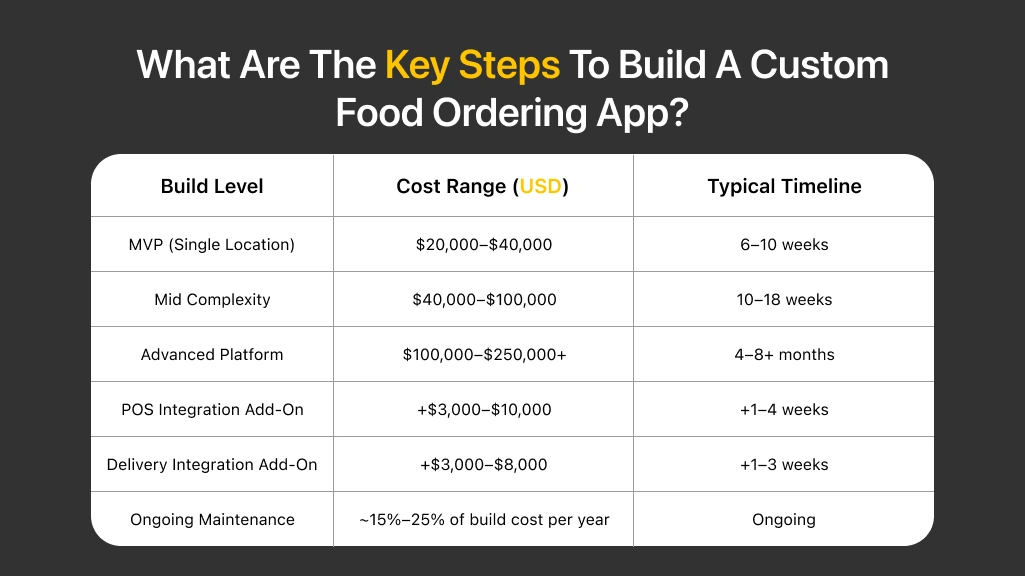
What Are The Key Steps To Build A Custom Food Ordering App?
Building a custom food ordering app is not only about screens and buttons. It is about making ordering feel simple, even on a busy Friday. On average, a single-restaurant app often lands around $20,000–$80,000, based on features and how much admin control you need. Bigger builds with tracking, loyalty, and deeper workflows can cross $100,000. In 2026, the best apps focus on fast checkout, clean menu control, and reliable updates from kitchen to customer.
| Build Level | Cost Range (USD) | Typical Timeline |
| MVP (Single Location) | $20,000–$40,000 | 6–10 weeks |
| Mid Complexity | $40,000–$100,000 | 10–18 weeks |
| Advanced Platform | $100,000–$250,000+ | 4–8+ months |
| POS Integration Add-On | +$3,000–$10,000 | +1–4 weeks |
| Delivery Integration Add-On | +$3,000–$8,000 | +1–3 weeks |
| Ongoing Maintenance | ~15%–25% of build cost per year | Ongoing |
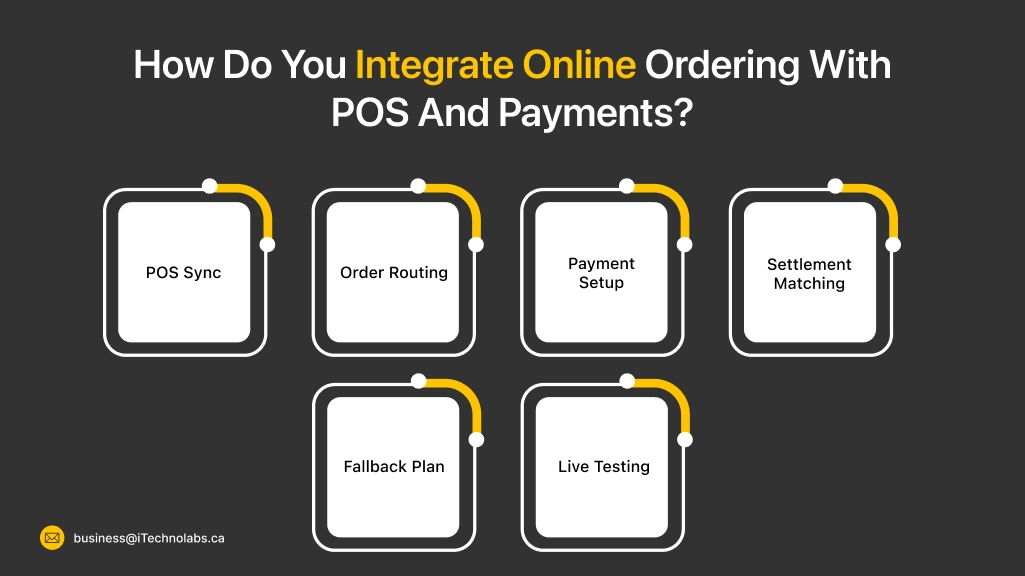
How Do You Integrate Online Ordering With POS And Payments?
Integrating online ordering with POS and payments is about one thing. No double entry. In 2026, restaurants lose time when orders sit in a tablet, then staff retypes them into POS. Clean integration pushes items, modifiers, taxes, and tips straight into the right kitchen station. Payments also need to reconcile with refunds and payouts, so reports match what hits the bank. Done right, your team moves faster and customers trust the process.
- POS Sync: Map menu items, modifiers, taxes, and combos so tickets match perfectly.
- Order Routing: Send orders to the right printer or kitchen screen based on item type.
- Payment Setup: Choose one gateway, then confirm tips, partial refunds, and chargebacks.
- Settlement Matching: Make payouts match each order, so shifts close without confusion.
- Fallback Plan: Keep manual mode ready for outages, so service does not stop.
- Live Testing: Place 10 test orders, try one refund, and verify POS totals end to end.
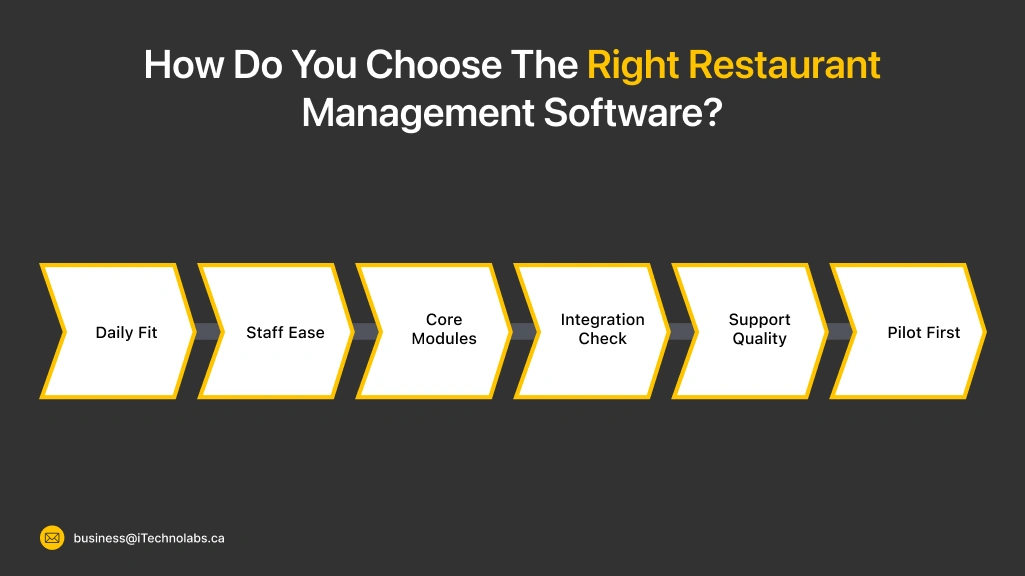
How Do You Choose The Right Restaurant Management Software?
Choosing the right restaurant management software is not about picking the most famous name. It is about picking what fits your daily rush. In 2026, the best tool is the one your staff actually uses without shortcuts. Start with your biggest leak, like order mistakes, slow kitchen flow, or messy reports. Then test two to three options in real conditions before signing a long contract. A short pilot saves money and stress later.
- Daily Fit: Check if it matches your service style, like dine-in, takeout, or delivery heavy.
- Staff Ease: Choose a tool that new staff can learn in a few shifts.
- Core Modules: Confirm POS, online ordering, KDS, inventory, and reporting basics first.
- Integration Check: Make sure it connects with payments, delivery, and accounting if needed.
- Support Quality: Test response time, refund handling, and escalation process.
- Pilot First: Run 10 test orders, one refund, and one busy-hour simulation before you commit.
What Trends Are Shaping Restaurant Software In 2026?
Restaurant software in 2026 is moving toward one clear goal. Make ordering and operations feel joined up, not stitched together. Off-premise is still huge, so restaurants are tightening menu control, kitchen timing, and delivery rules. Tech is also shifting toward easier loyalty, smarter data use, and cleaner online storefronts that load fast on any phone. The National Restaurant Association’s off-premise report highlights how ordering to-go is now a major behavior, not a side option.
- Unified Systems: POS, online orders, KDS, and inventory are being connected into one flow.
- Digital Storefronts: Better website ordering pages, faster checkout, fewer drop-offs.
- New Loyalty Models: Phone-number based loyalty and simpler signups are growing.
- Data Discipline: More focus on clean reporting and action steps, not just dashboards.
- Automation With Limits: Tools that reduce staff load, but still keep human control.
- Stronger Off-Premise Ops: Better pickup timing, order throttling, and delivery partner control.
Conclusion
Repeat orders do not come from having “an app.” They come from a calm, consistent experience. The menu stays accurate. The checkout works. The kitchen gets clear tickets. And customers get honest ETAs.
The tools in this list solve different problems. Some help you get discovered. Some help you run smoother shifts. Some help you pull customers back with direct ordering and loyalty. The best choice is the one that fits your daily workflow, not the one with the longest feature list.
Before you lock anything in, do two simple tests. Place 10 test orders on an older phone and on slow Wi-Fi. Then run one refund and one cancellation to see how support and payouts feel. When your online ordering system for restaurants passes these small tests, repeat orders usually follow, week after week.
FAQs
What is the best online ordering system for restaurants in 2026?
The best one depends on your goal. If you want discovery, a marketplace tool can help. If you want repeat orders, direct ordering with a strong checkout and clean menu control works better. Always test it during peak hours and on an older phone before you commit.
Should a restaurant use delivery apps and direct ordering together?
Yes, many do. Delivery apps help you get new customers. Direct ordering helps you keep them. The common plan is simple. Use apps for reach, then move repeat customers to your own link with QR stands, receipts, and in-store signage.
What features matter most to get more repeat orders?
Focus on basics that protect trust. Fast loading pages, clear ETAs, easy re-order, accurate modifiers, smooth refunds, and clean payment flow. Loyalty helps, but only after the ordering flow works without errors.
How do I choose between POS-first tools and online-ordering-first tools?
If your biggest problem is kitchen chaos and wrong tickets, go POS-first. If your biggest problem is high commissions and weak customer ownership, go online-ordering-first. Pick the tool that fixes your biggest daily leak first.
How can I test an online ordering platform before rolling it out?
Run a short pilot. Use 8–10 test orders across pickup and delivery, try peak-hour timing rules, and test one refund. Check how fast tickets hit the kitchen, how payouts look, and how support responds. If the system fails in testing, it will fail harder during real rush hours.