Salesforce is one of the world’s leading cloud platforms for businesses of all sizes. According to Statista, Salesforce holds 21.7% of the CRM market, ahead of competitors such as Microsoft, Oracle, SAP, and Adobe. The platform provides tools that help organizations manage customer relationships, streamline operations, and increase return on investment. Yet despite its popularity, not every business adopts it.
One of the main reasons is Salesforce cost. The platform offers multiple editions and pricing models, which can make it difficult to understand the total investment required. To make the right decision, companies need to evaluate how Salesforce pricing aligns with their goals, resources, and budget.
In this guide, we answer the question “How much does Salesforce cost?” by breaking down Salesforce products, pricing plans, and the factors that influence the overall cost.
TL;DR
- Salesforce cost varies widely by products, users, and customization.
- License fees are only part of the total investment.
- Implementation, integration, and support add significant hidden costs.
- Different Salesforce clouds serve sales, service, marketing, and commerce needs.
- Proper planning helps maximize ROI and control Salesforce spending.
Key Points
- Salesforce pricing depends on cloud products, user licenses, feature tiers, and additional tools, making careful planning essential for accurate budgeting.
- Beyond licenses, Salesforce cost includes implementation, data migration, customization, integrations, training, and ongoing support, which can significantly increase total investment.
- Sales Cloud, Service Cloud, Marketing Cloud, and Commerce Cloud each have different pricing models designed for specific business functions and growth stages.
- Choosing the right license mix and avoiding unnecessary add-ons helps businesses control Salesforce cost while still meeting operational requirements.
- Although Salesforce can be expensive, its scalability, automation, and data-driven insights often deliver strong long-term return on investment.
What is Salesforce CRM?
Salesforce CRM is a cloud-based customer relationship management platform that helps businesses manage interactions with customers across sales, marketing, and service. It provides a centralized system where organizations can store customer information, track communications, manage opportunities, and resolve service issues more efficiently.
By bringing multiple business functions into one platform, Salesforce improves collaboration between teams and ensures everyone works with the same up-to-date customer data. This unified approach helps companies deliver more personalized experiences, increase productivity, and make better, data-driven decisions.
Salesforce CRM includes a range of cloud-based products designed for different business needs. Sales Cloud helps manage leads, pipelines, and forecasting. Service Cloud supports customer service teams with case management and automation. Marketing Cloud enables targeted campaigns and customer engagement. Commerce Cloud powers ecommerce experiences. Data Cloud unifies customer data, Analytics Cloud delivers reporting and insights, and Einstein AI adds artificial intelligence for automation and predictions.
Each of these products has its own features, pricing structure, and Salesforce cost. Entry-level plans typically start at around $25 per user per month, while advanced enterprise solutions with AI and extensive functionality can exceed $15,000 per user per month. Additional Salesforce cost factors may include add-ons, integrations, premium support plans, and increased data storage or usage.
Overall, Salesforce CRM helps businesses streamline operations, strengthen customer relationships, and scale efficiently using a flexible, cloud-based platform.
Also Read : How Much Does AI Voice Chatbot Development Cost: A Complete Guide 2026
Salesforce License Types
Before we get into Salesforce pricing plans, it’s essential to understand Salesforce license costs. A Salesforce license determines the level of access each user has within a plan. The type of license you choose directly affects your monthly or annual costs, depending on the features and tools required for each role.
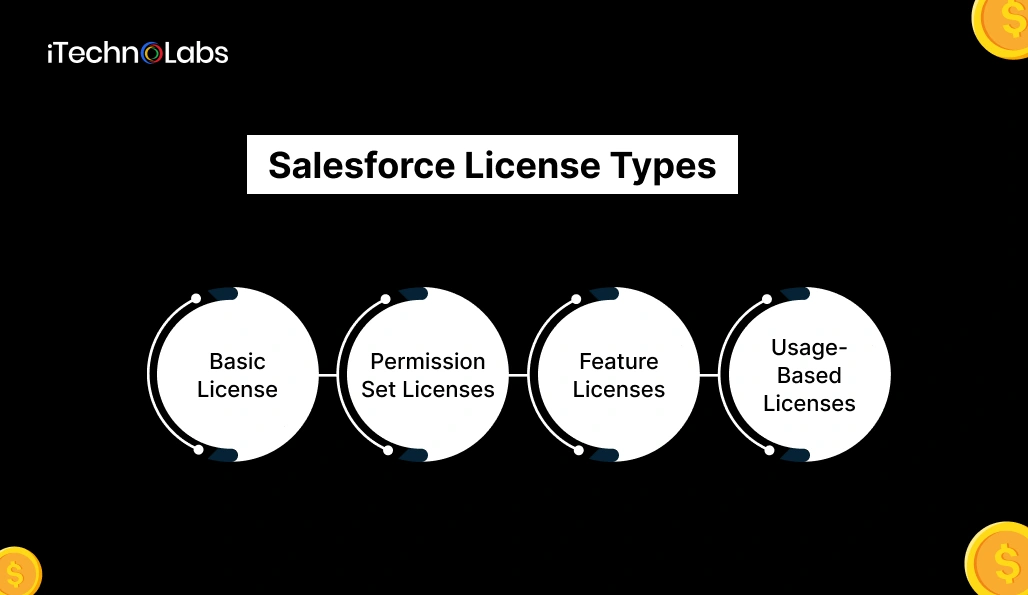
Here are the main Salesforce license types:
1. Basic Licenses:
Basic licenses determine the core features and standard objects users can access in Salesforce. Each user must be assigned one base user license, which defines their primary level of system access. These licenses control access to apps such as Sales Cloud or Service Cloud and determine what users can view, edit, and manage inside the platform.
2. Permission Set Licenses:
Permission Set Licenses allow users to access additional capabilities that are not included in their base user license. Instead of upgrading a user to a more expensive license, you can assign permission set licenses to grant specific advanced tools or functionality. A single user can be assigned multiple permission set licenses, making this a flexible and cost-effective way to extend access.
3. Feature Licenses:
Feature licenses provide access to specific Salesforce features or products that are not automatically included in a user’s main license. These are often tied to specialized tools such as Marketing Cloud features, Service Cloud capabilities, or other add-on functionalities. Users can be assigned multiple feature licenses depending on their job responsibilities.
4. Usage-Based Licenses:
Usage-based licenses are designed to track and control the consumption of certain features or resources. Instead of paying strictly per user, companies are charged based on usage limits, such as API calls, storage, or marketing sends. These licenses are commonly linked to Salesforce subscriptions or add-ons and require monitoring to avoid exceeding limits and increasing costs.
A well-planned combination of licenses helps organizations optimize their Salesforce investment, provide the right level of access to each team member, and ensure business needs are fully supported. You can find the complete and updated list of Salesforce licenses on the official Salesforce website.
Salesforce Pricing Plans
Salesforce offers both monthly and annual pricing options across its different clouds and tools. Most products include a 30-day free trial, allowing businesses to explore features before making a commitment. Salesforce pricing plans are designed to support companies of all sizes and growth stages, making it easier to choose the right combination of features, scalability, and support.
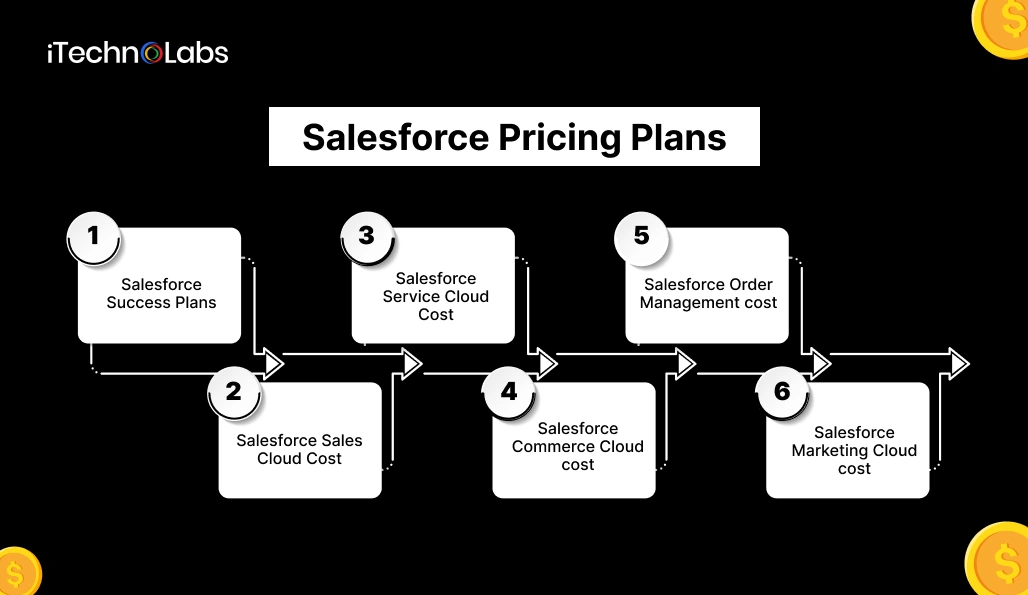
Let’s break down the Salesforce pricing model in detail.
1. Salesforce Success Plans
If you’re unsure where to begin with Salesforce or want to ensure a smooth and effective implementation, Salesforce provides Success Plans. These plans include services and resources that help businesses maximize the value of their Salesforce investment through expert guidance, training, troubleshooting, and ongoing system optimization.
Salesforce offers three Success Plans available across all Salesforce clouds:
Standard Success Plan
This plan is included with all Salesforce subscriptions and gives users access to a wide range of self-guided learning and support resources. It allows teams to explore knowledge articles, product documentation, and Trailhead training modules at their own pace, while also engaging with the Trailblazer Community for peer support, tips, and best practices.
Main features include:
- Self-service knowledge articles and documentation to help users solve common issues
- Trailhead learning modules for structured training and skill development
- Access to the Trailblazer Community to connect with other Salesforce users and experts
This plan is ideal for organizations with internal technical knowledge that can manage setup and optimization independently.
Premier Success Plan
This plan requires an additional fee, usually around 30% of net license costs, and is intended for organizations that need more hands-on guidance, faster response times, and access to expert support to ensure smooth implementation and ongoing system optimization.
Along with Standard features, it includes:
- 24/7 support for business-critical issues to reduce downtime
- Personalized guidance, including system health checks and best-practice recommendations
- Access to expert-led training and on-demand learning programs
This plan helps businesses improve adoption, prevent issues, and optimize performance.
Signature Success Plan
This plan comes with custom pricing and is designed for enterprises running complex Salesforce environments that require proactive support, strategic guidance, and close collaboration with Salesforce experts to ensure performance, scalability, and long-term success.
It includes:
- A dedicated Success Manager who provides proactive advice and long-term strategy
- Customer Success Score tracking to measure system performance and adoption
- Proactive monitoring and event management to prevent system disruptions
- Faster 24/7 support response times for critical issues
This is best suited for large organizations where Salesforce plays a mission-critical role.
Also Read : Best 3rd Party App Store Alternatives for iOS & Android
2. Salesforce Sales Cloud Cost
Salesforce Sales Cloud is a comprehensive customer relationship management (CRM) platform designed to help both B2B and B2C organizations streamline and manage their sales processes. It provides a centralized system where teams can store and access customer information, track leads, manage opportunities, and monitor the entire sales pipeline. By bringing all customer data into one place, Sales Cloud improves visibility, collaboration, and consistency across sales teams, helping them stay organized and focused on high-value activities.
In addition to core CRM capabilities, Sales Cloud offers automation and intelligence tools that reduce manual work and increase productivity. Sales representatives can automate routine tasks, track customer interactions across multiple channels, and receive insights that guide their next best actions. Built-in reporting and forecasting features help managers make data-driven decisions and predict revenue more accurately. Overall, Sales Cloud empowers teams to build stronger relationships, shorten sales cycles, and close deals more efficiently.
Starter Suite — $25/user/month
This plan is designed for small businesses that need essential CRM tools to organize customer data, track sales activities, and manage relationships more effectively. It provides a simple and structured way to store contact details, monitor leads and opportunities, and keep sales tasks organized, helping teams move away from spreadsheets and manual tracking toward a more efficient, centralized system.
It includes:
- Easy setup and onboarding
- Lead, account, contact, and opportunity management
- Email integration with Gmail or Outlook
- Task tracking and activity feeds
This edition is ideal for companies just starting their CRM journey.
Pro Suite — $100/user/month (billed annually)
This plan supports growing teams that need greater customization and more advanced reporting capabilities to manage expanding sales processes. It allows businesses to tailor fields, workflows, and dashboards to match their unique operations, while gaining deeper insights through detailed reports and performance tracking to support smarter, data-driven decisions.
It includes:
- Greater customization and automation to match business processes
- Real-time chat features
- Sales forecasting tools
- Sales quote creation
- Customizable reports and dashboards
This plan helps businesses move from basic tracking to structured, data-driven sales operations.
Enterprise — $175/user/month
Designed for mid-sized and large organizations with complex sales processes, this plan provides advanced tools for automation, pipeline management, and performance tracking. It supports multiple sales roles, longer deal cycles, and detailed forecasting, helping teams coordinate more effectively while giving leadership better visibility into revenue trends and overall sales performance.
Includes all Pro Suite features plus:
- Workflow automation to reduce manual work
- Advanced pipeline management and forecasting
- Conversation intelligence to analyze sales calls
- AI-powered sales tools
This plan improves productivity, visibility, and decision-making across sales teams.
Unlimited — $350/user/month
This plan is ideal for large enterprises that require extensive customization, high scalability, and premium support to manage complex sales environments. It enables organizations to adapt Salesforce to detailed business processes, support large user bases, and handle growing volumes of data, while also benefiting from enhanced services and resources that ensure stability, performance, and continuous improvement.
Includes all Enterprise features with:
- Predictive AI insights
- Sales engagement and conversation intelligence tools
- Premier Success Plan support
- Full sandbox environments for testing
- Additional data storage
- 24/7 support
- Configuration services
This edition supports large-scale sales operations and innovation.
Einstein 1 Sales — $550/user/month
This plan is designed for organizations that want to leverage advanced AI capabilities and unified data to drive smarter, faster decision-making across their sales operations. It connects customer information from multiple sources into a single view and uses intelligent automation and predictive insights to help teams prioritize opportunities, personalize engagement, and improve overall performance.
Includes all Unlimited features along with:
- Generative AI capabilities
- Sales planning and collaboration through Slack
- Performance management tools
- Data Cloud integration for a unified customer view
This is Salesforce’s most advanced AI-powered sales platform.
3. Salesforce Service Cloud Cost
Service Cloud is a powerful customer service platform that enables businesses to manage and resolve support cases across multiple communication channels, including email, phone, live chat, social media, and self-service portals. By centralizing all customer interactions in one system, it ensures that support agents have complete visibility into each customer’s history, preferences, and previous issues. This unified view helps teams respond more quickly, provide consistent service, and reduce the risk of miscommunication or repeated questions.
Beyond basic case management, Service Cloud includes tools that improve efficiency and customer satisfaction. Automation features help route cases to the right agents, trigger follow-ups, and reduce manual tasks. Knowledge bases and self-service options empower customers to find answers independently, lowering support volumes. Advanced reporting and AI-driven insights also help managers monitor performance, identify trends, and continuously improve service quality.
Starter Suite — $25/user/month
Designed for small teams starting to manage customer support in a more structured and organized way, this plan provides the essential tools needed to track customer issues, respond efficiently, and maintain service consistency. It helps businesses move from informal support methods like shared inboxes or spreadsheets to a centralized system where cases, customer details, and communication history are all managed in one place.
Includes:
- Case and task management
- Reports and dashboards
- Knowledge base
- Integrated email support
- Custom email templates
- Lightning App Builder
Pro Suite — $100/user/month
Built for scaling service teams that need more engagement tools, this plan adds advanced communication channels, automation features, and better case routing capabilities. It helps growing support teams handle higher volumes of customer requests efficiently while maintaining service quality, ensuring customers receive timely, consistent, and personalized support across multiple touchpoints.
Includes Starter features plus:
- Sales quoting and forecasting
- Service contracts and entitlements
- Omni-channel routing and supervisor tools
- In-app and web messaging
- Unlimited custom apps
- AppExchange access
Enterprise — $175/user/month
For businesses handling complex service operations, this plan provides advanced tools for automation, case management, and performance tracking. It supports larger teams, multiple service channels, and detailed workflows, helping organizations manage high case volumes efficiently while maintaining consistent service quality and gaining deeper insights into customer support performance.
Includes Pro features plus:
- Built-in AI for service agents
- Self-service help centers
- Workflow automation
- Custom service console apps
- Advanced case management and reporting
Unlimited — $350/user/month
For enterprises with high service volumes and complex needs, this plan delivers advanced automation, intelligent routing, and scalable infrastructure to support large support teams. It helps organizations manage thousands of customer interactions efficiently while maintaining fast response times, consistent service quality, and full visibility into performance across multiple regions and service channels.
Includes Enterprise features plus:
- 24/7 support
- AI-powered chatbots and Einstein Bots
- Premier Success Plan
- Developer Pro sandbox
Einstein 1 Service — $550/user/month
For organizations leveraging AI and unified data in customer service, this plan delivers intelligent automation, predictive insights, and a connected view of customer information across all touchpoints. It enables support teams to resolve issues faster, personalize interactions, and make data-driven decisions while reducing manual effort and improving overall service efficiency and customer satisfaction.
Includes Unlimited features plus:
- Digital engagement channels
- Service intelligence with Slack
- Einstein Copilot powered by generative AI
- Data Cloud integration
Also Read : Top 20 Instant Cash Loan Apps in UAE
4. Salesforce Commerce Cloud cost
Salesforce Commerce Cloud (SFCC) is a cloud-based ecommerce solution created to help businesses deliver personalized shopping experiences across multiple channels, including web, mobile, social media, and physical stores. It supports B2C, B2B, and direct-to-consumer (D2C) business models. The platform integrates deeply with Salesforce products and Customer 360, allowing organizations to unify customer data. As a result, sales, marketing, and support teams can provide seamless and consistent customer experiences.
Salesforce Commerce Cloud includes three primary solutions:
- B2B Salesforce Commerce Cloud
- B2C Salesforce Commerce Cloud
- D2C Salesforce Commerce Cloud
Salesforce Commerce Cloud pricing is based on Gross Merchandise Value (GMV). GMV represents the total value of products sold through a company’s platform during a given period, excluding returns, fees, and discounts. This means that as sales volume increases, the overall Salesforce cost also rises. Below is a detailed look at the pricing structure for each option.
B2C Commerce Cloud
B2C Commerce Cloud is built on the Salesforce Lightning platform and is designed for companies selling directly to consumers. It delivers personalized shopping journeys, seamless omnichannel integration, AI-driven product recommendations, and analytics tools that improve engagement and drive sales. The solution is offered in three editions: Growth, Plus, and Premium.
Growth
Costs 2% of GMV and is billed annually. This edition is suitable for mid-sized and large businesses looking to expand their ecommerce operations. Key features include:
- 5 websites
- 10 price books
- 1.2 million on-demand sandbox credits
- AI-powered shopping experiences
- Templates and composable storefronts
- Integrated marketing and commerce capabilities
- Core B2C ecommerce functionality
Plus
Costs 3% of GMV (billed annually). This edition is ideal for global enterprises that require unlimited scalability, advanced personalization, and social commerce integration. Features include:
- Unlimited websites
- Unlimited price books
- 2 million on-demand sandbox credits
- AI-driven shopping experiences
- Advanced personalization tools
- Social commerce integration
- Global scalability support
Premium
Pricing is available upon request (billed annually). This edition is intended for enterprises needing advanced analytics, security, automation, and support. Features include:
- Unlimited websites and price books
- Full order management
- 2 million on-demand sandbox credits
- Advanced analytics, automation, segmentation, and personalization
- Proactive support and monitoring
- Advanced customization options
- Data Cloud and AI functionality
Salesforce B2B Commerce Cloud cost
Salesforce B2B Commerce Cloud is designed for business-to-business transactions with more complex purchasing processes. Unlike B2C ecommerce, it focuses on bulk ordering, negotiated pricing, and customized catalogs tailored to specific customer groups. It offers six editions: Starter Suite, Pro Suite, Pay-As-You-Go, Growth, Advanced, and Premium.
Starter Suite
Starts at $25/user/month (billed monthly or annually). Transaction fees apply and vary by region and payment method. This plan suits small and medium-sized companies aiming to scale. Features include:
- Dynamic email marketing
- Basic reporting and analytics
- Preconfigured sales processes
- Product catalog management
- Personalized storefronts
- Simplified storefront builder
Pro Suite
Starts at $100/user/month (billed annually). Designed for businesses that need advanced ecommerce functionality, scalability, and Salesforce integrations. Includes everything in Starter plus:
- Advanced AI-driven personalization
- Real-time chat functionality
- Greater customization and automation
- Sales quoting and forecasting
- Managed checkout
- AppExchange access
Commerce Cloud Pay-As-You-Go
Costs 1% of GMV (billed monthly). Ideal for companies with fluctuating sales volumes that prefer usage-based pricing rather than per-user fees. Features include:
- No upfront platform costs
- 6 D2C storefronts
- Order Management Lite
- Payments support
Commerce Cloud Growth
Costs 1% of GMV (billed annually). Built for companies focused on expansion and advanced commerce capabilities. Includes:
- 6 storefronts
- Order Management Lite
- Analytics, automation, and segmentation
- 20 inventory locations
- 250k Data Cloud credits
- 60k Einstein AI requests
Commerce Cloud Advanced
Costs 2% of GMV (billed annually). Suitable for enterprises with high sales volumes needing more robust functionality. Features include:
- 10 storefronts
- Full order management
- Advanced analytics, automation, segmentation, and personalization
- 20 inventory locations
- 500k Data Cloud credits
- 120k Einstein AI requests
5. Salesforce Order Management cost
Salesforce Order Management helps businesses oversee the entire order lifecycle, from order capture to fulfillment and invoicing. It integrates with Salesforce products to streamline sales, service, and operational processes. Companies can manage orders, customer records, fulfillment workflows, inventory, payments, and customer service interactions.
Pricing is based on two editions:
Order Visibility
Costs 0.25% of GMV per order (billed annually), excluding fees and additional expenses. Designed for businesses needing better order tracking and system integration. Features include:
- 360-degree customer view
- Integration with Service Cloud
- Prebuilt integrations with B2C and B2B Commerce
- International localization support
Growth
Costs 1% of GMV per order (billed annually). Suitable for businesses with complex fulfillment networks. Features include:
- Distributed order management
- Omni-channel inventory (up to 50 locations)
- Full order lifecycle management
Also Read : Delivery App Pays the Most in 2026: Top Delivery Apps to Make Money
6. Salesforce Marketing Cloud cost
Marketing Cloud is a comprehensive marketing platform that enables organizations to manage and optimize customer interactions across multiple channels. It includes tools for email campaigns, marketing automation, analytics, and personalization within a unified system. These integrations help businesses create targeted campaigns, strengthen engagement, and drive growth through personalized customer journeys.
Salesforce Marketing Cloud consists of several key products:
- Marketing Cloud Growth Edition
- Marketing Cloud Engagement
- Marketing Cloud Account Engagement
Marketing Cloud Growth Edition (MCGE)
This is a streamlined, cost-effective version of Marketing Cloud with fewer features at a lower Salesforce cost. Built on the Salesforce core (Einstein 1) platform, it integrates with Data Cloud for unified customer data management.
Starter Suite — $25/user/month
Ideal for small businesses and startups managing simple email campaigns. Includes:
- Basic email marketing and analytics
- Prebuilt sales workflows
- Simple reporting
- Customer support
- Essential integrations
Pro Suite — $100/user/month
Best for mid-sized teams needing automation and AI insights. Adds:
- Einstein AI tools
- Real-time chat and service features
- Advanced integrations and customization
- Sales quoting and forecasting
- AppExchange access
Growth Edition — $15,000/org/month
Designed for large organizations needing scalability and advanced automation. Features include:
- Agentforce campaigns
- Multi-channel journeys
- Forms and landing pages
- Data Cloud integration
- Advanced Einstein AI tools
Advanced — $3,250/org/month
For organizations with complex marketing requirements. Includes Growth features plus:
- AI scoring and campaign intelligence
- Journey experimentation
- Conversational SMS
- Advanced segmentation and personalization
- Detailed analytics and reporting
Marketing Cloud Engagement
A B2C marketing automation platform for managing personalized communication across email, ads, push notifications, and social media.
Professional — $1,250/month
For small to mid-sized businesses focused on email marketing. Includes:
- Email marketing tools
- Content creation
- Analytics
- Sales Cloud integration
- 15,000 contact limit
Corporate — $4,200/month
For growing companies needing mobile messaging and journey orchestration. Includes:
- Journey orchestration
- AI-powered insights
- Einstein analytics
- Sales Cloud integration
- 45,000 contact limit
Enterprise — Custom pricing
For large global organizations with multiple business units. Includes:
- Advanced journey orchestration
- Multi-business unit support
- Global scalability
- Sales Cloud integration
- 500,000 contact limit
Marketing Cloud Account Engagement (Pardot) cost
This B2B marketing automation solution helps generate and nurture leads while tracking engagement and campaign effectiveness.
Growth — $1,250/month (10,000 contacts)
This plan includes essential tools to support lead generation and early-stage marketing efforts. Users get access to customizable email marketing templates, engagement tracking dashboards, and campaign performance reporting to measure effectiveness. Basic automation features help streamline repetitive tasks, while up to 50 landing pages and forms enable businesses to capture and manage new leads efficiently.
Plus — $2,750/month (10,000 contacts)
Think of this as moving from a basic meal to a well-balanced combo. You still get the essentials, but now with richer ingredients that improve flavor and impact. This plan adds advanced automation to streamline campaigns, attribution reporting to understand what’s driving results, and dynamic content that personalizes messaging for different audiences. It’s ideal for growing marketing teams that want smarter tools to increase engagement and measure performance more accurately.
Advanced — $4,400/month (10,000 contacts)
This plan is like a gourmet entrée with premium ingredients and more refined preparation. It builds on everything in the Plus edition and adds AI-powered automation to make campaigns more intelligent and efficient. A dedicated IP improves email deliverability, while business unit segmentation allows large teams or regions to operate independently. API integrations also enable deeper connections with other systems, creating a more powerful and flexible marketing setup.
Premium — $15,000/month (75,000 contacts)
This is the full fine-dining experience. Designed for enterprises, it includes predictive analytics that help forecast outcomes and guide strategy with data-driven insights. Premier Success support ensures expert assistance is always available, while performance SLAs provide reliability and confidence at scale. This plan is built for organizations running complex, high-volume marketing operations that need maximum performance, precision, and support.
How much does Salesforce cost in total? Hidden costs
The overall Salesforce cost goes beyond subscription licenses. Many businesses underestimate expenses related to consulting, support, and professional services. Without a well-defined strategy, unexpected challenges can arise, increasing costs and making it harder to streamline processes and spending. To properly calculate the full Salesforce investment, you should evaluate the following factors:
1. Identify your business needs and implementation approach
Start by defining your company’s requirements and selecting which Salesforce products — such as Sales Cloud, Marketing Cloud, or a combination — best support your operations. Consider the level of customization, automation, and third-party system integrations you’ll need. It’s also important to determine how many employees require access and what type of onboarding, training, and support will ensure a successful rollout.
When it comes to implementation, there are several paths:
- Self-implementation: Costs can start at $5,000 or more, but your internal team handles the entire process.
- Freelancers: Rates vary based on expertise, typically ranging from $25 to $250 per hour.
- In-house specialist: Hiring a Salesforce expert internally may cost between $80,000 and $170,000 per year.
- Consulting partners: Agencies providing end-to-end services usually charge $90 to $300 per hour.
Another key step is choosing the right Salesforce edition (Starter, Professional, Enterprise, Unlimited, etc.), as outlined earlier. Your selection should align with required features, number of users, company size, and available budget.
2. Estimate user licenses
Salesforce pricing mainly follows a per-user structure, with multiple tiers depending on the features needed. To estimate license expenses:
- Determine how many employees require access
- Assign license types based on job roles
For example, you might need 20 Sales Cloud licenses and 15 Service Cloud licenses. After identifying license counts, calculate monthly expenses. If you select a plan costing $75 per user per month for 10 users, your monthly Salesforce cost would be $750. Annually, this equals $9,000 ($750 × 12). This process helps ensure you purchase only the licenses you truly need. On average, Salesforce licenses range between $25 and $300 per user per month.
3. Data migration
If you are switching from another CRM to Salesforce, data migration services are required to transfer information accurately. This step is often considered a hidden Salesforce cost due to the preparation involved. Migration includes:
- Cleaning and organizing data
- Validating data accuracy
- Detecting and correcting inconsistencies
- Mapping records to the Salesforce structure
In some cases, automation tools are developed to schedule and manage data transfers. Migration expenses typically range from $10,000 to $50,000, depending on project complexity.
4. Customization
If your chosen Salesforce edition lacks required functionality, customization may be necessary. This can include:
- Add-ons: Additional tools like marketing automation (Pardot), analytics (Tableau), or AI (Einstein). These can increase Salesforce cost by $25 to $300+ per user per month.
- Custom development: Hiring developers to build unique features, objects, fields, or automated workflows. This can be done through consultants or in-house teams, both adding to overall expenses.
Customization projects typically range from $5,000 to $100,000 or more, depending on complexity and scope.
5. Integration
Salesforce is widely recognized for its integration capabilities. Through AppExchange, it connects with thousands of external applications, including third-party CRM systems, ERP platforms, and additional Salesforce products. Integrations help unify business operations within a single environment.
Integration costs depend on:
- The number of systems being connected
- The chosen method (third-party apps, APIs, or custom-built integrations)
- Overall project complexity
On average, integration expenses fall between $3,000 and $50,000, though smaller projects may cost less.
6. User training
A Salesforce deployment is only effective if your team can use the platform confidently. Training is essential for adoption and long-term success. Training costs vary based on:
- Number of participants
- Training depth
- User roles (end users vs. administrators)
- Delivery method (onsite, remote, or self-paced)
- Training duration
Typically, training expenses range from $500 to $5,000. For mid-sized organizations with multiple departments, the total may reach the higher end of this range.
7. Post-launch support
After implementation and onboarding, ongoing assistance may be required for several months. This includes technical support, troubleshooting, updates, and user assistance. Companies can either hire an internal Salesforce specialist or outsource to a Managed Services provider.
- Hiring an in-house expert may cost around $100,000 per year
- Managed Services offer a flexible alternative, providing expert support without full-time hiring
Managed support services generally range from $5,000 to $45,000 per project, depending on scope and contract duration.
7. Estimate the Total Cost of Ownership (TCO)
Once all expenses are identified, you can calculate the Total Cost of Ownership to understand the true Salesforce cost.
Formula:
Total Salesforce cost = (License cost per user × number of users) + consulting fees + add-ons + integrations + storage
It’s equally important to evaluate potential Return on Investment (ROI). While Salesforce requires a substantial initial investment, improved productivity, better customer experiences, and revenue growth often justify the expense over time.
By considering all these elements, businesses can develop a realistic estimate of the full Salesforce cost and plan their CRM investment more effectively.
Also Read : Discover Top OnlyFans Alternatives For Creators [2026]
Comparing Salesforce costs to other CRM platforms
Salesforce is one of the most powerful CRM systems worldwide, but it isn’t the ideal solution for every organization. The overall Salesforce cost and the platform’s advanced functionality can feel overwhelming for some businesses. For this reason, many companies explore alternative CRM platforms that may better match their budget and operational needs. Below is a comparison of several popular CRM solutions to highlight their key differences.
| Salesforce | Zoho CRM | Pipedrive | HubSpot | |
| Best for | Advanced analytics | Scalability | Automation | Scalability |
| Starting price | $25/user/month | $14/user/month | $14.90/user/month | Free (basic); paid plans from $50/user/month |
| Free trial | 30 days | 15 days | 14 days | Unlimited |
| Features | Comprehensive platform covering sales, service, and marketing in one system | All-in-one platform built around CRM | Sales-focused CRM emphasizing pipeline tracking and deal management | Inbound marketing and sales platform with built-in CRM |
| Strengths | Strong scalability, customization, and analytics capabilities | Affordable and accessible | User-friendly with clear visual sales pipelines | Easy to use with strong marketing and sales alignment |
| Weaknesses | Higher Salesforce cost, complex interface, steep learning curve | Advanced tools can be difficult to master | Fewer integrations and limited advanced features | Free CRM tiers have limitations for larger teams |
| Target users | Small businesses and enterprises | Small and medium-sized businesses | Small sales teams | Marketing-driven organizations |
| Verdict | Highly flexible CRM suitable for businesses needing deep customization | Feature-rich platform at a competitive price | Core CRM functionality with flexible pricing for small teams | Scalable and simple platform with a strong free offering |
Conclusion
In many cases, the answer is yes. Salesforce pricing varies widely across editions, offering different levels of tools and scalability. This flexibility makes it a viable solution for both small companies and large enterprises. Smaller organizations can begin with entry-level plans, while larger businesses may invest in advanced editions with expanded customization and automation features.
As your organization grows, you can add additional Salesforce products to extend functionality — all within a unified ecosystem that ensures smooth integration and efficient operations.
Ultimately, deciding whether Salesforce is worth the investment depends on your company’s objectives, budget, technical capabilities, and internal expertise. If you’re asking, “How much does Salesforce cost for my specific project?”, SoftTeco’s Salesforce specialists can guide you through the process and help you identify a solution that delivers maximum value while controlling your overall Salesforce cost.
FAQ
1. How expensive is Salesforce?
Salesforce cost varies significantly depending on the products, number of users, and features a business requires. Entry-level plans begin at $25 per user per month, while advanced enterprise editions with automation and AI capabilities can reach several hundred dollars per user, making total costs higher for large organizations.
2. How much does a Salesforce license cost?
A Salesforce license typically costs between $25 and $300 per user per month, depending on the cloud solution and edition selected. Licenses with advanced reporting, automation, and AI tools increase Salesforce cost. The final price also depends on contract terms, add-ons, and any additional platform capabilities required.
3. How much does Salesforce cost per month?
Monthly Salesforce cost depends on user count, chosen products, and optional add-ons. A small team using basic CRM tools may spend only a few hundred dollars each month, while larger enterprises using multiple clouds, integrations, and premium support can face monthly expenses totaling several thousand dollars.
4. How much does Salesforce cost for small businesses?
For small businesses, Salesforce cost can start at $25 per user per month with entry-level plans offering essential CRM features. However, expenses grow as additional users, integrations, and advanced tools are added. Even smaller teams should budget for implementation, training, and possible customization costs beyond licenses.
5. Does Salesforce offer a free version?
Salesforce does not provide a permanently free CRM plan. Instead, it offers free trials for most of its products, usually lasting 30 days. These trials allow companies to test features and evaluate Salesforce cost before making a financial commitment to a paid subscription plan.
6. What factors increase Salesforce cost the most?
The biggest contributors to Salesforce cost include the number of user licenses, higher-tier editions, custom development, third-party integrations, and data storage needs. Ongoing support services and advanced AI features can also raise costs significantly, especially for enterprises operating at scale across multiple departments and regions.
7. Can Salesforce cost be reduced over time?
Yes, Salesforce cost can be optimized by selecting the correct license types, removing unused features, and improving system efficiency. Regular audits, process automation, and working with experienced Salesforce consultants can help businesses control spending while still gaining strong value from the platform’s capabilities.