

Key Takeaways
- Budget 15–20% of the original build cost per year as a starting point. This is an industry rule of thumb, not a formal study.
- Two things move the number most: how many platforms you maintain and how many outside services (payments, maps, analytics) your app depends on.
- Platform rules are not optional. Apple has required Xcode 26 builds since April 28, 2026, and Google Play has required new apps and updates to target Android 16 since August 31, 2026.
- Skipping updates saves money for a few months and costs more when you catch up.
- Choose a maintenance model by workload and risk, not by hourly rate.
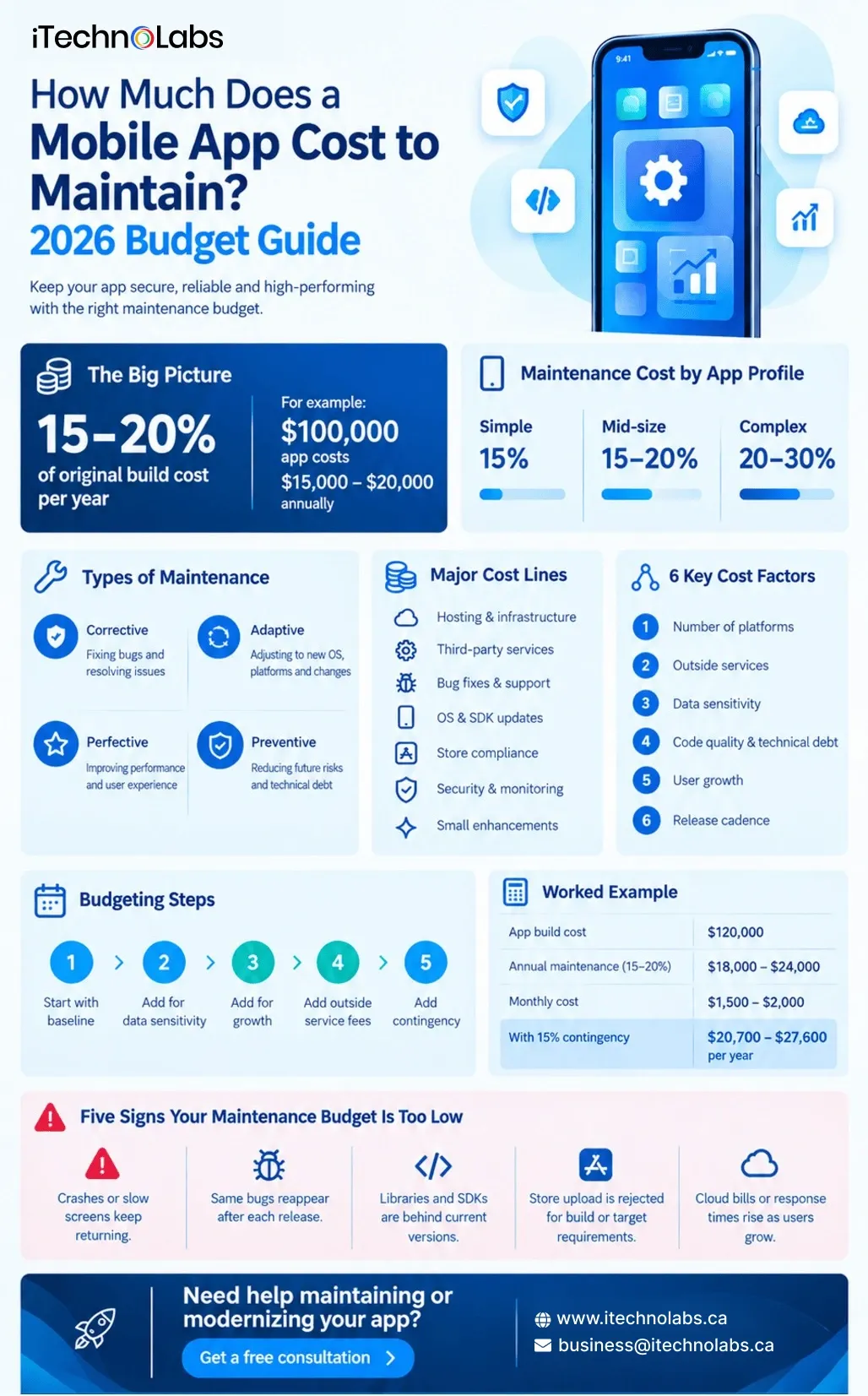
How much does a mobile app cost to maintain? A commonly used planning benchmark is 15–20% of the original build cost per year. For a $100,000 app, that works out to 15,000–20,000 annually. The actual cost can rise with platform count, integrations, security requirements, user growth, and application complexity.
Most owners plan the build budget with care and then meet maintenance for the first time in year two. Launch day is the start of the bill, not the end of it. Apple and Google change their rules every year, the services your app depends on change their prices and interfaces, and real users find bugs that testing missed. The 15–20% figure is a rule of thumb that agencies and analysts repeat widely. It is not a formal study, so use it as a starting point and test it against the breakdown below.
Table of Contents
- How much does a mobile app cost to maintain per year?
- What does mobile app maintenance include?
- Mobile app maintenance cost breakdown: where the money goes
- What makes app maintenance cost more or less?
- Hidden costs app owners miss
- In-house, retainer or pay-as-you-go: how to choose
- How to budget for app maintenance
- Maintain Your App Without Letting Costs Get Out of Control
- Conclusion
- FAQs
How much does a mobile app cost to maintain per year?
Start with your original build cost, because maintenance scales with how much software you have to keep running. Then place your app on this scale.
| App profile | Typical traits | Working budget (% of build cost per year) | Example on a $100,000 build |
| Simple | One platform or one shared codebase, light backend, few outside services | 15% | $15,000 |
| Mid-size | iOS and Android, backend, payments or login, push notifications | 15–20% | 15,000–20,000 |
| Complex | High traffic, regulated data, real-time features, many integrations | 20–30% | 20,000–30,000 |
On a $100,000 build, the mid-size row works out to roughly 1,250–1,667 a month. If you want to size the build side first, an app cost calculator gives you the base number for this percentage.
One caution: percentages flatter cheap builds. An app built quickly with little testing can cost far more than 15% to stabilise, because the first maintenance months go to fixing what was skipped. The percentage tells you where to start. It does not tell you where you will land.
What does mobile app maintenance include?
Maintenance covers four kinds of work:
- Corrective: fixing crashes, defects, and broken flows reported by users or monitoring.
- Adaptive: keeping the app working as iOS, Android, devices, and third-party services change.
- Perfective: small improvements based on user feedback, such as a new filter, a clearer screen, or a reworked checkout step.
- Preventive: updating libraries, cleaning up fragile code, and watching performance so problems surface before users find them.
Maintenance and support are not the same thing. Maintenance is engineering work on the app code, the backend, and the hosting. Support is helping users and handling incidents. Many providers bundle the two into one monthly fee, so ask how many of the hours are engineering and how many are help desk.
Mobile app maintenance cost breakdown: where the money goes
A flat percentage hides the cost lines underneath it. These are the lines to ask any provider, or your own team, to price separately.
| Cost line | What it covers | What makes it grow |
| Hosting and infrastructure | Servers, database, storage, backups | Traffic, media files, real-time features |
| Third-party services | Payments, maps, analytics, push messaging, login | Usage-based pricing, interface changes |
| Bug fixes and support | Crashes, defects, incident response | Weak test coverage, frequent releases |
| OS and SDK updates | Adapting to new iOS and Android versions and updated libraries | Native vs shared codebase, how far behind the app is |
| Store compliance | Meeting Apple and Google submission rules and privacy declarations | Policy changes, sensitive features |
| Security and monitoring | Patches, dependency reviews, crash and performance tracking | Payments, personal or health data |
| Small enhancements | Field changes, screens, filters from user feedback | Roadmap pace |
Hosting, deployment pipelines and monitoring are the work covered by DevOps and automation services, and they are worth pricing as their own line.
Platform rules you cannot skip in 2026
Two 2026 deadlines show why adaptive work is not optional. Since April 28, 2026, Apple requires every app uploaded to App Store Connect to be built with Xcode 26 or later, using the iOS 26 SDK or the matching SDK for iPadOS, tvOS, visionOS, or watchOS. An SDK, or software development kit, is the packaged tooling or code, from the platform or a third party, that your app is built with or includes.
From August 31, 2026, Google Play requires new apps and app updates to target Android 16 (API level 36) or higher. Existing apps must target Android 15 (API level 35) or higher to stay available to new users on devices running newer Android versions.
In practice, an app still built with older tooling cannot ship an update on either store until it is rebuilt against these requirements. The longer that rebuild waits, the more libraries and screens it has to catch up on at once. This is why a maintenance budget needs a platform-update line even in a year when you add no features.
What makes app maintenance cost more or less?
Six factors explain most of the gap between two apps with the same build cost.
1. Number of platforms: Native iOS and Android are two codebases with two update cycles. A cross-platform build with Flutter or React Native can reduce duplicated development work by sharing code, but you still need to test and release the app for each platform and account for platform-specific requirements.
2. Outside services: Payments, maps, analytics, push messaging, and login providers each add fees that grow with usage, and each changes its interfaces from time to time. More services mean more to monitor and retest.
3. Data sensitivity: Apps that handle payments, health records, or identity data need more security monitoring, access reviews, and documentation.
4. Code quality and technical debt: Technical debt means shortcuts in the code that make every later change slower. The CISQ 2022 Cost of Poor Software Quality report, citing Stripe data, puts the average developer’s time on technical debt at 13.5 of 41.1 hours a week, about a third. A messy codebase makes every maintenance hour buy less.
5. User growth: More users mean more database load, storage, and traffic. Hosting costs often step up when usage crosses a threshold, so plan the next step before you reach it.
6. Release cadence: Monthly releases need more testing and coordination than a twice-yearly update. Decide how fast the roadmap really has to move.
Hidden costs app owners miss
- Skipped updates compound. A small update done every few months is cheaper than one large catch-up when a store deadline forces it.
- Free tiers end. A service that is free or cheap during testing can become a real line item once your users arrive. Review third-party pricing every year.
- Emergency fixes cost more. Urgent work happens on the problem’s schedule, not yours, so it is harder to plan and often costs more than planned work.
- Year one surprises. The first months in production expose issues that testing never showed. Add a contingency line; 10–20% of the maintenance budget is a common starting point.
In-house, retainer or pay-as-you-go: how to choose
There are three common ways to organise maintenance. The cheapest hourly rate is not always the cheapest model once incidents and platform deadlines arrive.
| Model | Fits when | Watch for |
| In-house engineer or team | The app drives revenue, the workload fills a full-time role, and you need tight control of data | Hiring time, single points of failure, no spare DevOps or QA capacity |
| Monthly retainer with a development partner | Mid-size apps that need predictable monthly hours and have no internal DevOps | Vague scope; confirm what is included |
| Pay-as-you-go | Simple, stable apps that rarely change | Slow response in incidents, new engineers relearning the code, platform deadlines found late |
Answer three questions to narrow the choice. How many engineering hours a month does the app really need? What does an hour of downtime cost your business? Do you already have DevOps and QA capacity in-house?
Before signing a retainer, get these items in writing:
- Which work is included: bug fixes, OS and SDK updates, monitoring, store submissions, security patches, minor enhancements.
- Which work is quoted separately: new features, full security audits, redesigns.
- Response times for urgent issues, and how hours are reported each month.
- Who owns the source code, store accounts, and cloud accounts.
How to budget for app maintenance
Build the budget in five steps.
- Start with the baseline: Take 15–20% of the original build cost per year.
- Add for data sensitivity: Payments, health, or identity data need more security and documentation time.
- Add for growth: If users or traffic will grow, leave room for hosting steps.
- Add outside service fees: List every paid service and its usage-based pricing.
- Add contingency; Hold a buffer for the surprises of year one.
A worked example: for a $120,000 build, the baseline is 18,000–24,000 a year, or 1,500–2,000 a month. Adding a 15% contingency gives 20,700–27,600 a year. Replace the contingency with your own figure once you have production data.
Maintenance cost is also set before launch. Automated tests on key flows, crash and performance monitoring, and documented code all reduce year-one work.
Five signs your maintenance budget is too low
- Crashes or slow screens keep returning.
- The same bugs reappear after each release.
- Libraries and SDKs have fallen well behind current versions.
- A store upload is rejected for build or target requirements.
- Cloud bills or response times rise as your user base grows.
Any one of these is a reason to revisit the plan. Two or more is a reason to act this quarter.
Maintain Your App Without Letting Costs Get Out of Control
Mobile app maintenance becomes easier to budget when you know which technical work your application needs and which costs should be planned separately. iTechnolabs helps businesses maintain existing mobile applications across iOS, Android, React Native, and Flutter, with support for updates, bug fixes, backend systems, third-party integrations, performance monitoring, and ongoing technical improvements.
Our team can assess your existing application, review its technology stack and dependencies, identify maintenance risks, and help define a support model around your actual workload. iTechnolabs has delivered 500+ apps with a team of 300+ developers, supporting businesses that need ongoing application maintenance or larger modernization work.
Conclusion
Mobile app maintenance is an ongoing operating cost, not a one-time expense after launch. A practical starting point is 15% to 20% of the original development cost per year, but the right budget depends on your platforms, integrations, infrastructure, security requirements, user growth, release frequency, and codebase condition.
The most useful maintenance budget separates routine engineering from new feature development. It also accounts for platform updates, third-party services, infrastructure, security work, and unexpected issues instead of treating maintenance as a single annual percentage.
If your app is already live, review its codebase, dependencies, integrations, infrastructure, and upcoming platform requirements before setting the next year’s budget. That assessment can help you decide whether a monthly retainer, pay-as-you-go support, or a broader modernization plan makes the most sense.
The goal is not simply to reduce maintenance spending. It is to keep the app secure, compatible, reliable, and predictable to operate as your users and product evolve.
FAQs
1. How much does it cost to maintain a mobile app per year?
Most teams budget 15–20% of the original build cost per year, so a $100,000 app needs about 15,000–20,000 annually. Apps with payments, regulated data, or heavy traffic can need more. Treat the percentage as a starting point, then refine it with a cost-line-by-cost-line estimate.
2. Is app maintenance a one-time or an ongoing cost?
Ongoing. Apple and Google change their requirements every year, third-party services change their pricing and interfaces, and security issues appear after launch. Even an app with no new features needs regular updates to stay installable, secure, and compatible. Stopping maintenance does not remove the cost; it postpones it.
3. What is included in mobile app maintenance?
Typically bug fixes, operating system and SDK updates, security patches, hosting and monitoring, store submissions, and small improvements. New features, full security audits, and redesigns are usually quoted separately. Ask any provider to list inclusions and exclusions in writing before you sign.
4. Does a cross-platform app cost less to maintain than two native apps?
Often, yes, because one shared codebase means fewer duplicate fixes and updates. It does not remove platform work: you still test on iOS and Android separately and handle each store’s requirements. The saving depends on how much native functionality your app uses.
5. What happens if I stop maintaining my app?
The app stays installed for current users but starts to degrade. New operating system releases can break features, and unpatched libraries become security risks. Both stores reject uploads that miss their build requirements, and Google limits availability to new users for apps targeting outdated API levels.
6. Should I choose a retainer or pay-as-you-go maintenance?
Choose a retainer when your app has payments, user accounts, or a growing user base and needs predictable monthly capacity. Choose pay-as-you-go only for simple, stable apps that rarely change. Estimate monthly hours first, then compare how quickly each model responds when something breaks.
7. How can I reduce app maintenance costs?
Invest before launch: automated tests on key flows, crash and performance monitoring, documented code, and a limited number of outside services. Keep libraries current in small, regular steps instead of one large catch-up. Review third-party pricing every year so usage-based fees do not grow unnoticed.











