
Key Takeaways
- Enterprise portals put business data, tools, and daily workflows in one area for people to use.
- Portal requirements depend on user groups, business objectives, integration needs, and security obligations.
- Core features include role-based access, personalized dashboards, workflow automation, search, and reporting.
- Custom development provides greater control, while ready-made platforms may suit organizations with standard requirements.
- A structured development process helps manage requirements, integrations, testing, deployment, and continuous improvement.
Enterprise portal development connects employees, customers, partners, and business systems through a centralized digital platform. It simplifies access to information, streamlines workflows, and supports secure collaboration across the organization.
This guide covers portal types, essential features, integrations, development processes, cost factors, and key considerations for choosing a development partner.
Table of Contents
- What Is Enterprise Portal Development?
- Why Businesses Invest in Enterprise Portal Development
- Types of Enterprise Portals
- Enterprise Portal Architecture and Integration
- Custom Enterprise Portal Development vs. Ready-Made Platforms
- Enterprise Portal Development Process
- Security and Compliance in Enterprise Portal Development
- Common Challenges in Enterprise Portal Development
- How iTechnolabs Approaches Enterprise Portal Development
- Conclusion
- FAQs
What Is Enterprise Portal Development?
Enterprise portal development is the process of designing, building, and deploying a digital platform that gives authorized users access to business information, applications, and services through a unified interface.
Unlike a basic website, an enterprise portal typically supports authenticated users, role-based permissions, personalized experiences, and connections to internal business systems.
Depending on its purpose, a portal may provide access to employee services, customer accounts, supplier information, operational dashboards, documents, or business applications.
For example, an employee portal may connect HR services and IT support, while a customer portal may provide order tracking, billing information, and support requests.
The portal does not necessarily replace the systems that store business data. Instead, it creates a connected experience for accessing information and completing tasks across those systems through custom software development services.
Why Businesses Invest in Enterprise Portal Development
As organizations grow, information and workflows often become distributed across multiple applications. Employees may switch between systems to complete routine tasks, customers may rely on email for updates, and partners may use separate channels to exchange documents.
- Centralized Business Information: Bring data from business applications, databases, and documents into one interface. Employees can access invoices, approvals, and account details without switching between systems.
- Streamlined Workflows: Organize tasks, approvals, and notifications within a structured workflow, reducing reliance on disconnected communication channels.
- Improved User Experience: Use personalized dashboards, clear navigation, and responsive layouts to help users find information and complete tasks efficiently.
- Better Operational Visibility: Track requests, approvals, and service activity to identify delays, recurring issues, and opportunities for process improvement.
Types of Enterprise Portals
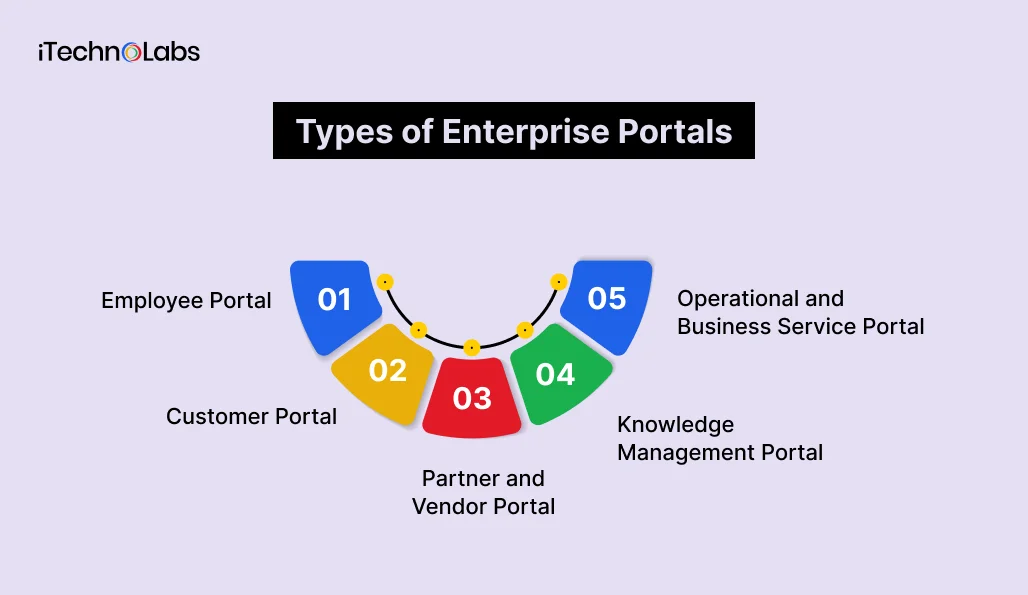
Enterprise portals serve different audiences and business functions. Selecting the right type starts with identifying who will use it, what they need to accomplish, and which systems must support their activities.
- Employee Portal
An employee portal gives staff access to internal information, workplace services, and business applications through a centralized interface.
Common capabilities include:
- Employee profiles and organizational information
- Leave requests and attendance services
- Payroll documents and HR policies
- Internal announcements and knowledge resources
- IT support requests and service tickets
- Department-specific tools and workflows
Employee portals are particularly relevant to organizations with distributed teams, multiple departments, or complex internal processes.
- Customer Portal
A customer portal provides authenticated users with access to account information, service details, transactions, and support resources.
Typical features include:
- Account and profile management
- Order or service status tracking
- Invoice and payment information
- Support ticket submission and tracking
- Knowledge bases and frequently asked questions
- Secure document exchange
A customer portal can support self-service by allowing customers to complete routine activities without contacting a support representative for every request.
- Partner and Vendor Portal
A partner or vendor portal connects an organization with external businesses involved in its operations, supply chain, or distribution network.
Depending on the business model, it may include supplier onboarding, purchase order tracking, invoice submission, product catalogs, contract management, and delivery coordination.
Access permissions should ensure that external users can view only the information and functions relevant to their relationship with the organization. Enterprise software development services can help connect these external workflows with internal business systems.
- Knowledge Management Portal
A knowledge management portal helps users find approved information, documentation, and organizational knowledge through a structured interface.
It may include searchable knowledge libraries, internal policies, technical documentation, and training resources.
Organizations exploring AI-powered search can also connect approved knowledge sources, provided that access permissions and information governance are maintained.
- Operational and Business Service Portal
An operational portal brings together information and workflows related to procurement, finance, project management, or field operations.
For example, an operations team may use a portal to review work orders, monitor service requests, access reports, and coordinate approvals.
These portals often require deeper integration with enterprise applications and specialized workflow logic.
Enterprise Portal Architecture and Integration
A portal’s architecture determines how its interface, business logic, data sources, and connected systems work together. The right approach depends on expected usage, integration complexity, security requirements, and the organization’s existing technology environment.
1. Frontend and Backend
The frontend includes dashboards, forms, search, and notifications, while the backend manages application logic, permissions, workflows, and data processing. A modular architecture supports future changes while keeping the system aligned with business requirements.
2. Data and Integration Layer
The integration layer connects the portal with ERP, CRM, HR, finance, and document management systems through APIs, middleware, or event-based communication. API integration services help manage data exchange, validation, synchronization, and error handling across connected systems.
3. Integration With ERP and CRM Systems
ERP integration connects purchase orders, invoices, inventory, and operational workflows, while CRM integration supports customer accounts, sales, and support activities. HR and finance integrations can streamline employee services, expense claims, and approvals.
Custom Enterprise Portal Development vs. Ready-Made Platforms
Organizations generally evaluate whether to build a custom portal, configure an existing platform, or combine both approaches.
| Consideration | Custom development | Ready-made platform |
| Functionality | Built around defined business requirements | Uses available platform capabilities and extensions |
| User experience | Greater control over interface and workflows | Depends on customization options |
| Integrations | Can be designed around required systems | Depends on supported connectors and APIs |
| Implementation | Requires engineering, testing, and planning | May reduce development work when requirements fit |
| Maintenance | Requires ongoing application ownership | Depends on platform support and customization |
| Flexibility | Architecture can be tailored to the use case | Depends on platform limits |
When Custom Development May Fit
Custom enterprise portal development may be appropriate when an organization has specialized workflows, complex integrations, distinctive user experiences, or requirements that existing platforms cannot adequately support.
It provides greater control over the solution but requires clear ownership of development, security, infrastructure, and ongoing maintenance.
When a Ready-Made Platform May Fit
A ready-made platform may be suitable when standard features meet most requirements, and the organization wants to configure an existing solution.
Before selecting a platform, assess licensing, integration capabilities, customization limits, data governance, scalability, and long-term support.
Enterprise Portal Development Process
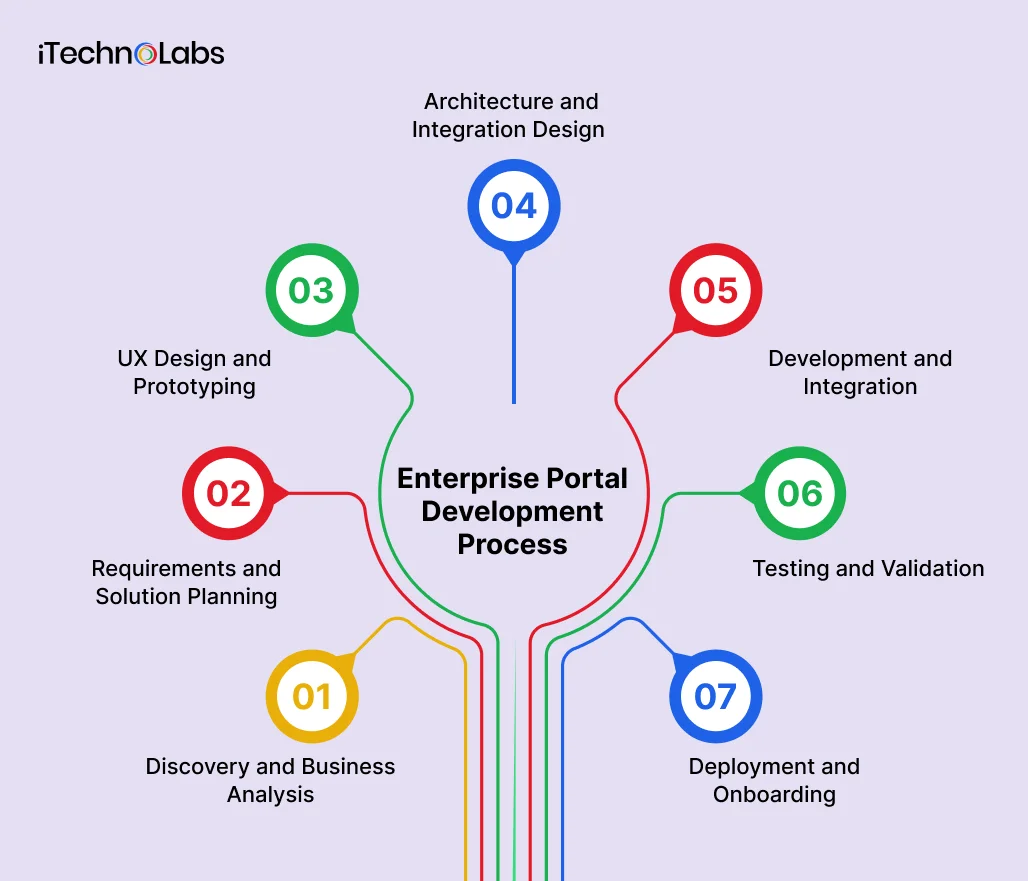
A structured development process helps align business objectives, user needs, technical requirements, and delivery expectations.
Step 1. Discovery and Business Analysis
Identify the business problem the portal should address. Document target users, current workflows, existing systems, pain points, and expected outcomes. A structured software development process helps translate these findings into clear requirements and delivery priorities.
Deliverable: Defined scope, prioritized requirements, and measurable objectives.
Step 2. Requirements and Solution Planning
Define user roles, permissions, workflows, integration needs, accessibility expectations, performance targets, and compliance considerations.
Evaluate whether a custom solution, existing platform, or hybrid approach aligns with the requirements.
Deliverable: Solution plan and prioritized feature backlog.
Step 3. UX Design and Prototyping
Create navigation structures, wireframes, and interactive prototypes to validate the user experience before full implementation.
Gather feedback from representative users and refine the interface.
Deliverable: Validated interface designs and user journeys.
Step 4. Architecture and Integration Design
Define application architecture, data flows, integration patterns, infrastructure requirements, and security controls.
Clarify which applications own specific data and business processes.
Deliverable: Architecture and integration plan.
Step 5. Development and Integration
Build the frontend, backend, user management, workflows, and required integrations.
Implement features in prioritized increments so stakeholders can review progress and provide feedback.
Deliverable: Working portal with planned core capabilities.
Step 6. Testing and Validation
Validate functionality, integration behavior, security controls, usability, accessibility, and performance.
Test realistic user journeys, including permission boundaries and service interruptions.
Deliverable: Tested release candidate and validation results.
Step 7. Deployment and Onboarding
Prepare the production environment, user access, support processes, and release communications.
Train users and administrators on the portal’s core functions. A phased rollout may help identify adoption issues before broader deployment.
Deliverable: Production portal with a defined support process.
Security and Compliance in Enterprise Portal Development
Enterprise portals may handle employee records, customer information, business documents, and financial data. Security should therefore be considered throughout design, development, deployment, and maintenance.
Authentication and Access Control
Authentication verifies user identity, while authorization defines access permissions. Features such as single sign-on, multifactor authentication, and role-based access control help protect portal access. Permissions should follow the principle of least privilege.
Data Protection and Monitoring
Protect sensitive data during storage and transmission using appropriate security controls. Define data retention, backups, and recovery practices. Audit trails and monitoring help track important activities, detect suspicious behavior, and identify technical issues.
Compliance Requirements
Compliance depends on the industry, location, data handled, and business obligations. Identify applicable privacy regulations, industry standards, and internal security policies early to ensure the portal meets relevant requirements.
Common Challenges in Enterprise Portal Development
Unclear Requirements
Different stakeholder expectations can make feature prioritization difficult.
- How to address it: Establish clear objectives, document user journeys, prioritize essential capabilities, and agree on acceptance criteria.
Complex Legacy Integrations
Older systems may have limited APIs, inconsistent data formats, or undocumented business rules.
- How to address it: Assess integration feasibility early and plan for data validation, error handling, and recovery.
Poor User Adoption
A portal may receive limited engagement if users find it difficult to navigate or cannot complete important tasks.
- How to address it: Involve users in design and testing, provide onboarding, and use feedback to guide improvements.
Security and Permission Gaps
Incorrect access rules can expose sensitive information or prevent users from completing authorized tasks.
- How to address it: Define roles carefully, test access boundaries, and review security controls throughout development.
Scope Expansion
Adding features without reviewing their impact can increase complexity and delay delivery.
- How to address it: Use a prioritized backlog and evaluate proposed changes against business objectives and available resources.
How iTechnolabs Approaches Enterprise Portal Development
iTechnolabs helps businesses plan, design, develop, and integrate software solutions around their operational requirements.
For enterprise portal projects, the focus is on connecting user experiences, business workflows, and existing systems through a solution aligned with organizational goals.
The engagement can cover requirements analysis, interface design, application development, system integration, testing, deployment, and ongoing improvements. The specific approach depends on the portal’s purpose, user groups, technical environment, security needs, and integration scope.
Conclusion
Enterprise portal development helps organizations create a connected digital experience for employees, customers, partners, and other authorized users. By bringing business information, applications, and workflows into a unified interface, portals can simplify access to services and support more consistent operations.
A successful portal starts with clearly defined business objectives, user needs, integration requirements, and security controls. The choice between custom development and a ready-made platform should reflect the organization’s workflows, technical environment, and long-term ownership needs.
For businesses planning an enterprise portal, a structured approach to discovery, architecture, development, testing, and continuous improvement helps keep the solution aligned with operational goals.
FAQs
- What is enterprise portal development?
Enterprise portal development involves building a centralized digital platform that connects users with business information, applications, and services. It can support employees, customers, suppliers, or partners through role-based access, personalized dashboards, workflows, and integrations with enterprise systems.
- What are the main types of enterprise portals?
Common types include employee portals, customer portals, partner and vendor portals, knowledge management portals, and operational portals. Each serves a different audience and purpose. The appropriate type depends on user needs, business workflows, information requirements, and connected systems.
- What features should an enterprise portal include?
Core features may include role-based access, personalized dashboards, workflow automation, document management, search, notifications, reporting, and responsive design. The required capabilities depend on the portal’s purpose, user groups, integration needs, and security requirements.
- How much does enterprise portal development cost?
Enterprise portal development cost depends on functionality, integrations, user roles, security requirements, infrastructure, and maintenance. A focused portal differs from a complex platform connecting multiple enterprise systems. A reliable estimate requires a defined scope and technical assessment.
- How long does it take to develop an enterprise portal?
The development timeline depends on the portal’s scope, design complexity, integrations, testing requirements, and deployment approach. A discovery and planning phase helps establish a realistic schedule based on requirements, dependencies, and acceptance criteria.
- Can an enterprise portal integrate with ERP and CRM systems?
Yes. An enterprise portal can integrate with ERP and CRM systems through APIs, middleware, connectors, or other supported methods. The integration design should define data ownership, access permissions, synchronization needs, and error handling.











