

Key Takeaways
- AI chatbots handle routine questions automatically, while live chat connects customers with human support agents.
- Live chat is better suited to complex problems that require judgment, empathy, or account-specific assistance.
- A hybrid model combines automated responses with human support when conversations need escalation.
- The right choice depends on query volume, support complexity, staffing, integration needs, and customer expectations.
- Measure resolution rates, customer satisfaction, response times, and total support costs before deciding.
The AI chatbot vs live chat decision depends on the support your customers need. AI chatbots can answer routine questions, retrieve information from connected systems, and guide users through defined tasks. Live chat gives customers access to human agents for complex problems and sensitive issues. Many small and midsize businesses benefit from combining both, with clear rules for transferring conversations to people.
The right support setup depends on query volume, issue complexity, staffing costs, and customer expectations. The goal is to resolve routine requests efficiently while keeping human assistance available when customers need it.
Table of Contents
- What Is the Difference Between an AI Chatbot and Live Chat?
- AI Chatbot vs Live Chat: Pros and Cons
- When Should Your Business Choose an AI Chatbot?
- When Is Live Chat the Better Option?
- Why a Hybrid AI Chatbot and Live Chat Model Often Makes Sense
- How to Choose the Right Customer Support Setup
- Security and Integration Considerations
- Build a Smarter Customer Support Experience with iTechnolabs
- Conclusion: AI Chatbot vs Live Chat
- FAQs
What Is the Difference Between an AI Chatbot and Live Chat?
An AI chatbot is software that interacts with customers through automated conversations. Depending on its design, it can answer questions, retrieve information, guide users through tasks, and collect details before escalating an issue.
Live chat connects customers with a human support agent through a website or app. The agent can ask follow-up questions, interpret context, and make decisions that require human judgment.
| Comparison | AI chatbot | Live chat |
| Availability | Can operate 24/7 | Depends on staffing and scheduled coverage |
| Response time | Often immediate | Depends on agent availability |
| Query handling | Routine questions and defined workflows | Complex or context-dependent problems |
| Personalization | Based on available context and system capabilities | Human judgment and conversation context |
| Operating costs | Requires setup, integration, monitoring, and maintenance | Requires agent time, training, and management |
| Consistency | Depends on knowledge quality and configuration | Depends on agent training and processes |
| Best suited for | Repetitive requests and self-service | Sensitive issues, exceptions, and nuanced requests |
The key distinction: AI chatbots automate suitable interactions, while live chat provides direct access to a person. Neither guarantees a better customer experience on its own. Results depend on implementation, support processes, and how well each option fits the customer’s needs.
AI Chatbot vs Live Chat: Pros and Cons
AI Chatbots
Advantages:
- 24/7 availability: Customers can access support outside business hours.
- Routine automation: Chatbots can answer common questions and retrieve information from connected systems.
- Consistent responses: Approved knowledge sources and instructions help standardize answers.
- Concurrent conversations: Chatbots can handle multiple requests, subject to system capacity.
Limitations:
- Answer accuracy: Poor knowledge sources or unclear questions can lead to incorrect responses.
- Limited judgment: Sensitive complaints and unusual situations may require a human agent.
- Ongoing maintenance: Integrations, testing, monitoring, and knowledge updates require resources.
Live Chat
Advantages:
- Human understanding: Agents can interpret ambiguous requests and respond with empathy.
- Complex problem solving: People can investigate exceptions and coordinate with other teams.
- Personalized support: Agents can use authorized customer history to tailor their responses.
Limitations:
- Staffing costs: Extended coverage requires sufficient agent availability.
- Waiting times: Customers may wait during busy periods.
- Variable service quality: Results depend on training, workload, and access to information.
When Should Your Business Choose an AI Chatbot?
An AI chatbot is worth considering when a significant share of support requests are repetitive, answers can be grounded in reliable information, and customers benefit from immediate self-service.
Common use cases include:
- Answering frequently asked questions about products, services, and policies.
- Providing order updates by retrieving information from connected systems.
- Collecting customer details before creating a support ticket.
- Helping users navigate documentation and troubleshooting steps.
- Routing incoming requests to the right department based on intent.
For example, an online retailer could use a chatbot to answer shipping questions and retrieve order status through an authorized integration. If a parcel is missing or a customer disputes a charge, the chatbot should route the conversation to a human agent.
The important consideration is whether the chatbot can provide a useful answer safely and accurately. Automating a question simply because it occurs frequently is not enough.
When Is Live Chat the Better Option?
Live chat is a stronger choice when customers need explanation, reassurance, or decisions that depend on circumstances rather than a standard answer.
It is particularly useful for:
- Resolving billing disputes and unusual account problems.
- Helping customers choose between complex products or services.
- Handling complaints where empathy and trust matter.
- Supporting high-value purchases that involve detailed questions.
- Investigating problems that require coordination across teams.
Consider a customer who has received the wrong item and needs an exception to the normal return policy. A human agent can review the circumstances, explain available options, and make an appropriate decision within the company’s rules.
If your business receives relatively few support requests and can respond quickly during the hours customers need help, live chat alone may be sufficient. You do not need AI simply because it is available.
Why a Hybrid AI Chatbot and Live Chat Model Often Makes Sense
For many SMBs, the most practical option is to use AI for routine interactions and reserve human agents for situations that need their attention.
- Customer starts a conversation
The chatbot identifies the question and gathers relevant details.
- AI handles routine requests
It answers from approved information or performs an authorized task.
- The system checks whether escalation is needed
Uncertainty, customer requests, sensitive issues, or failed resolution trigger a handoff.
Resolved
The customer receives an answer or completes the task.
Human handoff
An agent receives the conversation context and takes over.
Recommended workflow. Actual capabilities depend on the chatbot platform and integrations.
Microsoft’s customer support agent architecture guidance describes the use of configured knowledge sources and escalation workflows. For a successful handoff, agents should receive the conversation history and relevant customer details, while customers should have a clear way to request human assistance.
How to Choose the Right Customer Support Setup
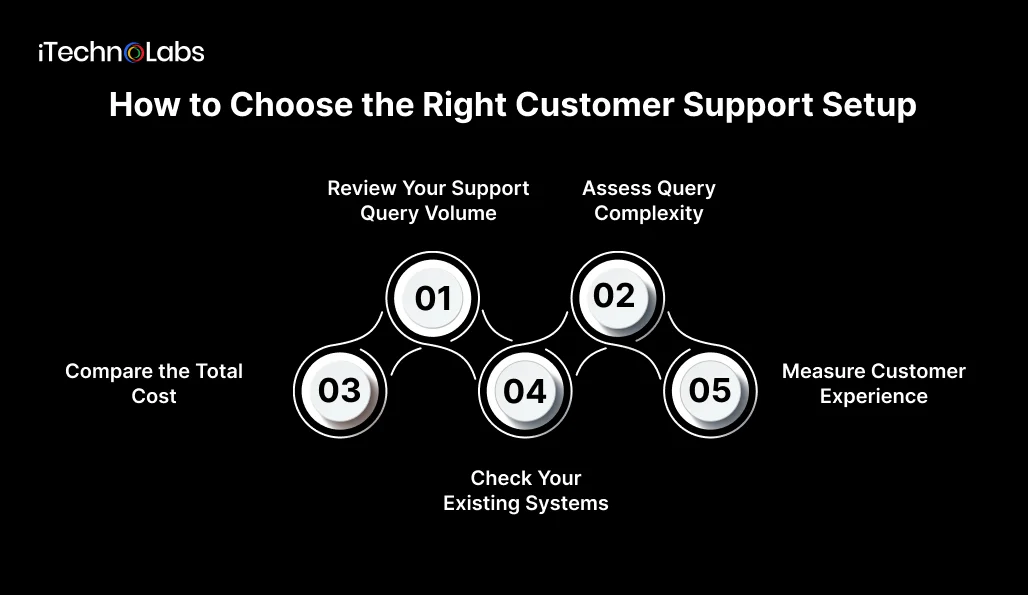
Before choosing a platform, review your existing support process. Start with these five factors.
- Review Your Support Query Volume
Look at the questions customers ask most often. If your team repeatedly answers the same basic questions, automation may reduce manual work. If requests are mostly unique and require investigation, prioritize live chat or a hybrid model.
- Assess Query Complexity
Separate requests into routine, moderately complex, and high-risk categories. Automate only those the system can handle reliably. Define clear escalation rules for billing disputes, sensitive information, and unresolved issues.
- Compare the Total Cost
Do not compare chatbot subscription fees with agent salaries alone. Include implementation, integrations, usage charges, maintenance, staff training, and the cost of correcting poor responses.
A chatbot may reduce some manual work, but savings depend on how many interactions it resolves successfully and how much ongoing supervision it needs.
- Check Your Existing Systems
Consider whether the support tool needs to connect with your CRM, order management system, knowledge base, ticketing platform, or customer account database.
An AI chatbot that cannot access the information needed to answer a question may provide little practical value. For custom requirements, explore custom software development services to understand how business systems can be connected around your workflows.
- Measure Customer Experience
Track first response time, resolution rate, customer satisfaction, escalation rate, repeat contacts, and cost per resolved conversation.
Review these measures before and after introducing automation. A faster initial response does not necessarily mean the customer’s problem was solved.
Security and Integration Considerations
Customer support systems may process names, contact details, account information, and conversation histories. Before deploying AI, establish what information the system can access, how it is stored, who can retrieve it, and how long it is retained.
Also consider:
- Data access: Limit access to the information and actions the chatbot needs.
- Accuracy: Test common questions, ambiguous requests, and unsupported queries.
- Escalation: Define when conversations should transfer to a human agent.
- Privacy: Explain AI usage to customers and establish appropriate data retention and access controls.
- Monitoring: Review failed conversations, customer feedback, and changes to business policies.
Before deployment, test the chatbot against realistic customer questions and confirm that its knowledge sources, access permissions, and escalation rules work as intended.
Build a Smarter Customer Support Experience with iTechnolabs
Implementing an AI chatbot is about more than automating customer conversations. It is about helping your support team resolve routine queries faster, giving customers access to information when they need it, and ensuring complex issues reach the right person.
iTechnolabs helps businesses plan and develop AI chatbot solutions around their customer support workflows. From answering frequently asked questions and connecting chatbots with CRM systems to retrieving information from business databases and routing unresolved queries to human agents, we help you identify where automation can make a practical difference.
Whether you want to add a chatbot to your existing live chat or build an integrated AI-powered support system, iTechnolabs can help you evaluate your requirements and plan the right solution.
Conclusion: AI Chatbot vs Live Chat
The AI chatbot vs live chat decision comes down to the support your customers need.
Choose an AI chatbot for routine questions and automated workflows. Choose live chat for complex problems that require human judgment. Consider a hybrid model when you need both efficiency and direct human assistance.
Start by automating a small set of repetitive requests, define when conversations must reach a human agent, and measure resolution rates, customer satisfaction, and cost per resolved conversation. Expand automation only when the results show a clear benefit for customers and your support team.
FAQs
- Is an AI chatbot better than live chat for customer service?
An AI chatbot is better for repetitive questions, immediate responses, and routine tasks that can be automated reliably. Live chat is better for complex problems, complaints, and situations requiring human judgment. A hybrid setup is often a practical choice for businesses that need to manage support volume while preserving access to human assistance.
- Can an AI chatbot replace live chat agents?
An AI chatbot can automate some support tasks, but it should not replace human agents for every situation. Customers may need help with unusual requests, sensitive issues, or problems the chatbot cannot resolve. Businesses should define escalation rules and make human assistance accessible whenever automation fails, or the customer requests it.
- Is live chat more expensive than an AI chatbot?
Live chat costs depend on staffing, coverage hours, training, and conversation volume. AI chatbots have costs associated with setup, subscriptions, integrations, usage, and maintenance. Neither option is automatically cheaper. Compare the total cost per successfully resolved conversation, including escalations and the time spent correcting unsuccessful interactions.
- Can AI chatbots and live chat work together?
Yes. A hybrid system can use AI to answer routine questions, gather customer details, and route requests before transferring unresolved conversations to human agents. Effective integration should preserve conversation history and collected information, so customers do not need to repeat themselves when an agent takes over.
- How do I measure whether a customer support chatbot is working?
Track resolution rate, customer satisfaction, first response time, escalation rate, repeat contacts, and cost per resolved conversation. Review unsuccessful answers and customer feedback regularly. Compare results with your existing support process to determine whether automation improves outcomes rather than simply increasing the number of conversations handled.
- What should I consider before implementing an AI chatbot?
Identify the tasks you want to automate, verify that reliable knowledge sources are available, and check integration requirements. Establish privacy controls, test answer accuracy, and define escalation rules before launch. Start with a limited set of common requests, monitor performance, and expand based on measured results.











