
Key Takeaways
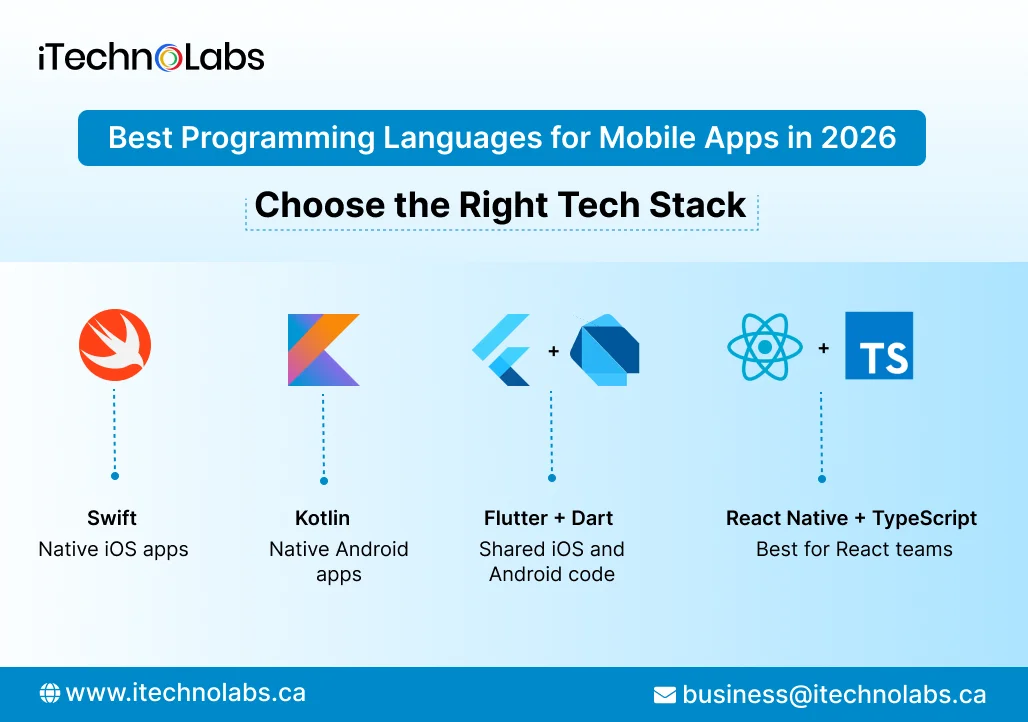
- Swift: A strong choice for native iOS apps that need direct access to Apple platform features.
- Kotlin: Google’s recommended starting point for modern native Android development.
- Flutter with Dart: A practical option for building iOS and Android apps from a largely shared codebase.
- React Native with TypeScript: Worth considering for teams already familiar with React and JavaScript or TypeScript.
- Choosing the right stack: Consider your target platforms, required integrations, team skills, budget, and long-term maintenance needs. No single programming language is right for every mobile app.
Choosing the best programming language for mobile apps in 2026 depends on your target platforms, product requirements, budget, and long-term roadmap. Swift is a strong choice for native iOS apps, Kotlin is Google’s recommended starting point for native Android development, and Flutter with Dart or React Native with TypeScript can support cross-platform apps through a largely shared codebase.
Table of Contents
- Swift: Best for Native iOS Apps
- Kotlin: Best for Native Android Apps
- Dart with Flutter: Best for Shared Cross-Platform Development
- TypeScript with React Native: Best for React Familiarity
- Which Programming Language Should You Choose?
- Native vs Cross Platform: What Is Better for a Startup?
- How to Select the Right Mobile App Technology Stack
- Turn Your Mobile App Idea Into a Product Ready to Launch With iTechnolabs
- Concluding Recommendation for 2026
- FAQs
Swift: Best for Native iOS Apps
Swift is Apple’s programming language for developing software across Apple platforms. SwiftUI provides a declarative approach to building interfaces and works alongside Apple’s existing UI frameworks.
If your startup is launching an iPhone-first product, Swift is a sensible choice when you need direct access to Apple platform capabilities and control over the native user experience.
Advantages of Swift
- Native access to Apple frameworks and platform features.
- Integration with SwiftUI for building modern user interfaces.
- Strong fit for products focused on the Apple ecosystem.
- Support for testing and maintaining a dedicated iOS codebase.
What to consider
A Swift based iOS application does not automatically provide an Android application. If Android is part of your launch plan, you will need a separate Android implementation or a broader cross-platform strategy.
Choose Swift when: Your initial market is concentrated on Apple devices, or your app depends heavily on platform-specific features and native interactions.
Kotlin: Best for Native Android Apps
Google recommends starting new Android development with Kotlin. Kotlin integrates with existing Java code, and Jetpack Compose is Google’s recommended modern toolkit for native Android interfaces.
Kotlin is a strong option when Android is your primary platform, and you want a codebase designed around Android’s native development ecosystem.
Advantages of Kotlin
- Direct access to Android APIs and platform capabilities.
- Compatibility with Java libraries and existing Java code.
- Support for Jetpack Compose and modern Android development workflows.
- A good fit for apps requiring close integration with Android devices.
What to consider
A native Kotlin application is primarily an Android implementation. Supporting iOS generally requires a separate iOS app, unless you adopt a broader approach such as Kotlin Multiplatform for sharing selected code.
Choose Kotlin when: Android is the main launch platform, your product requires native Android capabilities, or your existing engineering team already works with Kotlin or Java.
Dart with Flutter: Best for Shared Cross-Platform Development
Flutter is an open-source framework for building applications from a shared codebase. It uses Dart and supports mobile, web, desktop, and other target platforms.
Flutter can be attractive to funded startups that need to launch on iOS and Android while maintaining a largely shared application codebase.
Advantages of Flutter
- Shared application code across supported platforms.
- Flexible interface development and consistent visual design.
- Hot reload to help developers test changes during development.
- A single framework for products that may expand beyond mobile.
What to consider
Shared code does not eliminate platform-specific work. Native integrations, permissions, device features, testing, and release requirements still need attention. Your team should also verify that required libraries and integrations support the intended platforms.
Choose Flutter when: You want a consistent interface across iOS and Android, your team values shared implementation, and the product fits Flutter’s ecosystem.
TypeScript with React Native: Best for React Familiarity
React Native supports mobile application development using React concepts. Its current documentation identifies TypeScript as the default for new projects, while JavaScript remains supported.
Startups with existing React or TypeScript experience may find React Native a practical route to mobile development because their developers can apply familiar language and component patterns.
Advantages of React Native
- A shared codebase for much of the iOS and Android application.
- TypeScript support for clearer interfaces and static type checking.
- Familiar development patterns for teams already using React.
- Access to native platform functionality when required.
What to consider
React Native does not make every platform difference disappear. Native modules, dependency compatibility, platform-specific UI details, and performance-sensitive features can require specialist work.
Choose React Native when: Your team already uses React or TypeScript, you want to share application logic across platforms, and your required features fit the React Native ecosystem.
Which Programming Language Should You Choose?
The best programming language for mobile apps is the one that supports your product requirements without creating unnecessary engineering overhead.
| Your priority | Recommended starting point | Why |
| iOS-focused launch | Swift | Native Apple platform development |
| Android-focused launch | Kotlin | Native Android ecosystem |
| Shared iOS and Android code | Dart with Flutter | Common application code and flexible UI development |
| Existing React team | TypeScript with React Native | Reuses familiar development patterns |
| Existing Java Android application | Kotlin or Java | Kotlin can coexist with existing Java code |
| Complex platform-specific features | Native Swift and Kotlin | Direct access to each platform’s capabilities |
Treat this table as a starting point, not a final architecture decision. Prototype the most technically uncertain parts of your app before committing to a stack.
Native vs Cross Platform: What Is Better for a Startup?
Native development uses platform-specific technologies, such as Swift for iOS and Kotlin for Android. Cross-platform development uses a framework to share much of the application code between platforms.
Native development
Native development gives your team direct access to platform APIs and control over platform-specific behaviour. It can be appropriate for applications with demanding device integrations, specialised interfaces, or performance-sensitive features.
The tradeoff is maintaining separate implementations for iOS and Android when both platforms are required. That can affect staffing, testing, and release planning.
Cross-platform development
Cross-platform frameworks allow teams to share much of their code. This can simplify feature development across platforms and help maintain consistency.
However, shared code does not guarantee lower total costs or a faster launch. Platform-specific integrations, third-party dependencies, testing, and developer experience all influence the outcome.
For an MVP, compare the cost of building and maintaining the complete product rather than counting programming languages. A smaller codebase is useful only when it meets your functional, security, and user experience requirements.
How to Select the Right Mobile App Technology Stack
Before selecting a language, answer these five questions.
1. Which platforms must you support?
If your first release targets only iOS, Swift may be the most direct route. If Android is the priority, start by evaluating Kotlin. If both platforms are essential, compare Flutter and React Native against your requirements.
2. What features does the product need?
List required capabilities such as payments, camera access, background processing, Bluetooth, location services, offline access, and AI integration. Verify the available APIs and libraries before committing to a framework.
3. What skills does your team already have?
A team experienced in React and TypeScript may be able to adopt React Native more naturally. A team with strong native Android experience may prefer Kotlin. Existing skills can affect hiring, delivery planning, and long-term maintenance.
4. What will the product become?
An MVP may evolve into a complex platform with integrations, multiple user roles, analytics, and AI features. Select a stack that supports the likely roadmap without adding unnecessary complexity at launch.
5. Who will maintain the application?
Consider code ownership, testing practices, dependency updates, security reviews, release management, and the availability of future developers. The initial build is only one part of the product lifecycle.
Turn Your Mobile App Idea Into a Product Ready to Launch With iTechnolabs
Choosing the best programming language is an important step, but the right technology stack must also support your app’s features, user experience, integrations, and future growth.
At iTechnolabs, we help startups and businesses turn product ideas into mobile applications using native technologies such as Swift and Kotlin, as well as cross-platform frameworks such as Flutter and React Native.
Whether you are building your first MVP or planning an app for both iOS and Android, our team can help you evaluate your requirements, select a suitable technology stack, and plan the development process around your business goals.
The objective is to choose technology that fits your product today while giving your team a practical path to maintain and improve it over time.
Concluding Recommendation for 2026
The best programming language for your mobile app depends on your product requirements and engineering priorities.
- Choose Swift for an iOS-focused product that relies on Apple platform capabilities.
- Choose Kotlin for a native Android application.
- Consider Flutter with Dart when shared code and consistent interfaces across iOS and Android are priorities.
- Consider React Native with TypeScript when your team already works with React and wants to reuse familiar development patterns.
If you plan to launch on both iOS and Android, compare Flutter and React Native against your required integrations, interface needs, team skills, and maintenance plans. Choose native development when platform-specific requirements justify separate implementations.
Before committing to a technology stack, validate your most challenging integrations and assess how the application will be maintained after launch.
FAQs
1. What is the best programming language for mobile apps in 2026?
The best choice depends on your target platform and requirements. Swift suits native iOS development, Kotlin is Google’s recommended starting point for Android, and Dart with Flutter or TypeScript with React Native can support cross-platform applications. Compare integration needs, team skills, testing requirements, and long-term maintenance before deciding.
2. Is Swift better than Kotlin for mobile app development?
Neither is universally better. Swift is designed for development across Apple’s platforms, while Kotlin is the recommended starting point for native Android development. The right choice depends on which operating system you are targeting and the capabilities your application needs. Supporting both platforms may require two native implementations or a cross-platform strategy.
3. Is Flutter better than React Native?
Flutter and React Native both support cross-platform mobile development, but they use different technologies and development approaches. Flutter uses Dart and its own UI framework, while React Native uses React and JavaScript or TypeScript with native platform components. Evaluate your team’s skills, required integrations, interface needs, and maintenance plans before selecting one.
4. Can one programming language build apps for iOS and Android?
Yes, cross-platform frameworks can let developers share much of an application’s code across iOS and Android. Flutter uses Dart, while React Native supports JavaScript and TypeScript. Some native integrations and platform-specific behaviours still require separate work, so shared code should not be mistaken for identical implementation across every device.
5. Should a startup choose native or cross-platform development?
A startup should choose based on its first release requirements, available engineering skills, platform priorities, and expected product roadmap. Cross-platform development can reduce duplicated implementation, while native development provides direct platform-specific control. Prototype difficult integrations and estimate the complete maintenance cost before making the decision.
6. Can I change the programming language after launching my app?
Yes, but migration can require substantial engineering work. The effort depends on the current architecture, amount of reusable business logic, integrations, test coverage, and data dependencies. Before changing stacks, identify the specific limitation, compare incremental modernization with a rewrite, and assess migration risks, release disruption, and ongoing maintenance costs.











