

- Mobile application security extends beyond the device to APIs, backend services, third-party dependencies, and development pipelines.
- Use the OWASP Mobile Application Security Verification Standard as a structured baseline for defining and reviewing security controls.
- Test server-side authorization, session expiration, local data storage, and sensitive information in application logs.
- Integrate security checks throughout development instead of relying exclusively on a final penetration test.
- A security checklist is useful only when each control has a clear owner, a testable requirement, and evidence that it works.
App security best practices cover the measures used to protect mobile applications, user data, authentication, network communications, APIs, and backend systems from unauthorized access and misuse. Effective protection requires secure architecture, careful implementation, continuous testing, and ongoing maintenance across the application lifecycle. A secure login screen alone cannot protect an application whose APIs or data storage remain vulnerable.
For enterprise technology leaders, the challenge is not simply whether developers have implemented security features. It is whether those features work together under real conditions, including expired sessions, compromised devices, unexpected API requests, software updates, and third-party failures.
Table of Contents
Mobile App Security: What Developers Often Skip
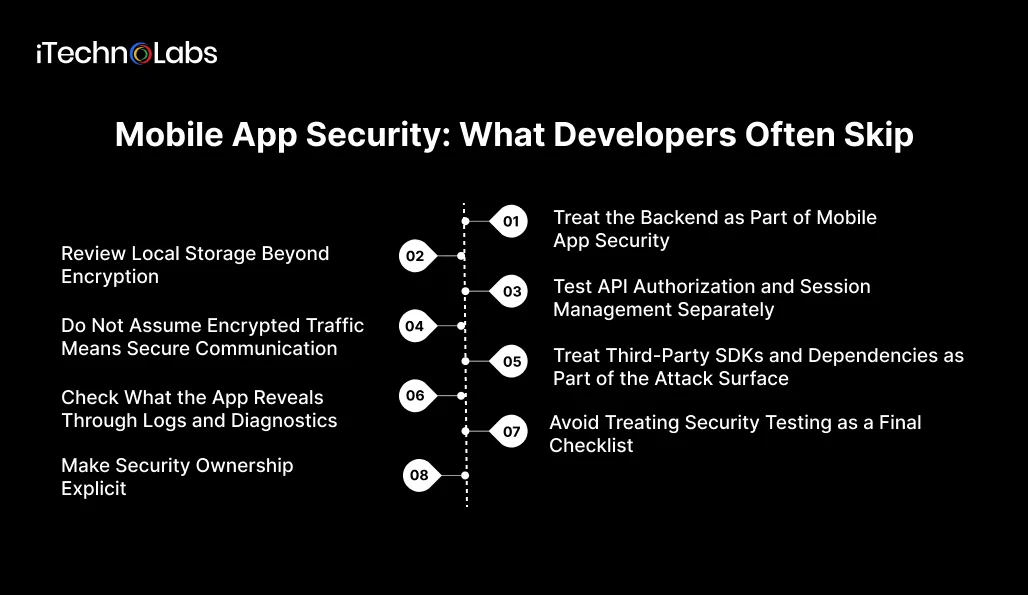
1. Treat the Backend as Part of Mobile App Security
A mobile application typically relies on backend services to authenticate users, retrieve information, and perform business operations. The OWASP Mobile Application Security Verification Standard covers authentication, authorization, network communication, storage, platform interaction, code quality, resilience, and privacy as distinct security areas.
A common architectural blind spot is treating the mobile interface as the primary security boundary. Hiding a button, restricting a screen, or checking a user’s role inside the application does not prevent someone from sending a request directly to an API.
Consider an enterprise application that allows employees to view customer records. The interface may display only records assigned to the signed-in employee. If the backend accepts a modified customer ID without checking ownership or permissions, an attacker could attempt to retrieve another customer’s information.
Enforce authorization on the server for every sensitive operation. Validate the authenticated user’s permissions against the requested resource and action. Test direct API requests independently of the mobile interface.
2. Review Local Storage Beyond Encryption
Mobile applications can store sensitive information in databases, preferences, files, caches, logs, backups, and other locations. OWASP identifies storage as a dedicated area of mobile application security because sensitive data may be exposed through application behavior and platform features.
Developers sometimes focus on whether a database is encrypted without first asking whether the information needs to be stored at all. Unnecessary copies of sensitive data increase the number of places that require protection.
A session token stored carelessly, a customer record retained in a temporary file, or a password accidentally written to a debug log can undermine otherwise careful security controls.
Review local storage using these checks.
- Store only the sensitive information the application genuinely needs.
- Use platform-appropriate secure storage for credentials, tokens, and cryptographic material.
- Avoid placing sensitive information in general-purpose preferences, shared storage, or unprotected files.
- Review caching, clipboard behavior, screenshots, backups, and temporary files.
- Define when local data must expire or be deleted, including after logout or account removal.
- Verify storage behavior on supported operating system versions and realistic device configurations.
Encryption remains important, but it does not compensate for unnecessary data collection, poor key management, or excessive access permissions.
3. Test API Authorization and Session Management Separately
Authentication establishes who a user is. Authorization determines what that user can access or do. OWASP includes both in its mobile security control model because they address different security requirements.
A successful login test proves very little about how an application handles a stolen token, a revoked account, an expired session, or a user whose permissions have changed.
For example, an administrator may remove an employee’s access while the employee still holds an active session. If the backend does not enforce updated permissions, the application may continue to allow operations that should no longer be permitted.
Include the following scenarios in security testing.
- Attempt to access another user’s resources by changing resource identifiers.
- Verify that expired, revoked, or invalid tokens cannot access protected operations.
- Check whether logout invalidates relevant sessions or refresh tokens according to the system’s design.
- Test password recovery, account lockout, multi-factor authentication, and sensitive account changes.
- Confirm that privileged actions require the appropriate authorization even when requests bypass the user interface.
- Review session duration and reauthentication requirements for high-risk operations.
Use a documented session policy and test it against the backend, not just the screens visible to users.
4. Do Not Assume Encrypted Traffic Means Secure Communication
Transport Layer Security helps protect data exchanged over a network, provided that the application validates the remote endpoint and uses secure connection settings. OWASP’s network security controls address secure communication and the risks of bypassing platform defaults.
HTTPS alone does not solve every communication problem. A misconfigured client, an improperly trusted endpoint, or sensitive information included in URLs can expose data even when an application appears to use encrypted connections.
Review the following areas.
- Require secure connections for production endpoints and reject invalid certificates.
- Remove development configurations that disable certificate validation.
- Check whether authentication tokens or sensitive personal information appear in URLs.
- Review redirects, WebView communication, and requests to third-party services.
- Confirm that debug builds and production builds use the intended network security policies.
- Evaluate certificate pinning only when the threat model justifies it and the team can maintain certificate rotation and recovery safely.
Security controls should be tested under realistic network conditions, including invalid certificates and unexpected redirects.
5. Treat Third-Party SDKs and Dependencies as Part of the Attack Surface
Mobile applications frequently include libraries and SDKs for analytics, crash reporting, payments, authentication, advertising, and other services. Each dependency can introduce code, permissions, data flows, or maintenance requirements that affect the application’s security.
A team may review its own source code carefully while overlooking the information collected or transmitted by an integrated SDK. A library that was appropriate when first added may also become outdated or receive changes that alter its behavior.
Maintain an inventory of direct and transitive dependencies. For each significant component, record its purpose, owner, version, data access, update policy, and security review status.
Use dependency scanning where appropriate, monitor vendor security advisories, and establish a process for assessing and updating vulnerable packages. Review SDK permissions and outbound data flows rather than assuming that a trusted vendor requires unrestricted access.
Include dependency changes in code review and release approval. If an SDK handles sensitive information, verify its configuration and data processing behavior against the application’s privacy and security requirements.
6. Check What the App Reveals Through Logs and Diagnostics
Application logs, crash reports, and diagnostic events can contain information that developers did not intend to expose. OWASP’s mobile security guidance includes protection of sensitive information stored or exposed by application behavior.
Debugging can create a hidden data exposure path. A development build might print authentication headers or customer details to help troubleshoot a problem. If the same logging behavior reaches production, diagnostic systems may receive information that should remain private.
Establish clear rules for diagnostic data.
- Never log passwords, access tokens, secret keys, or full authentication headers.
- Minimize personal and confidential information in crash reports.
- Apply access controls and retention policies to diagnostic platforms.
- Separate development logging from production logging.
- Review logs during testing with realistic user data and error conditions.
- Verify that error messages do not reveal internal implementation details unnecessarily.
Security reviews should inspect what leaves the application, not only what appears on its screen.
7. Avoid Treating Security Testing as a Final Checklist
The OWASP Mobile Application Security Testing Guide provides testing guidance for verifying mobile application security controls. Its approach covers static and dynamic analysis and recognizes that mobile security testing can include client applications, server-side components, and APIs.
A penetration test shortly before release can identify important vulnerabilities, but it cannot replace routine code review, dependency management, architecture decisions, and regression testing. If the same weakness reappears after a later change, the original test has not created a lasting control.
Build a layered testing process.
- During planning, document security requirements, sensitive data flows, trust boundaries, and likely threats.
- During development, review security-sensitive code and run appropriate static analysis and dependency checks.
- During testing, evaluate runtime behavior, API authorization, storage, network communication, and platform interactions.
- Before major releases, use a risk-based security assessment and independent penetration testing where appropriate.
- After release, monitor relevant security events, maintain dependencies, and establish a process for investigating and fixing reported vulnerabilities.
8. Make Security Ownership Explicit
Security gaps often persist when responsibility is spread across development, infrastructure, QA, and product teams without a clear owner for each control. A checklist cannot resolve this problem if nobody is accountable for implementation, evidence, and remediation.
For every important control, document four things.
- Owner: The person or team responsible for the control.
- Requirement: The expected behavior and the conditions under which it must hold.
- Verification: The test, review, or evidence used to demonstrate that it works.
- Remediation: The process for assigning, prioritizing, fixing, and retesting failures.
For example, the mobile development team may own secure local storage, while the backend team owns resource authorization and the platform team manages secrets used by deployment pipelines. Security and QA teams can define shared test requirements and verify that the controls meet agreed standards.
The exact division of responsibilities depends on the organization’s architecture and operating model. What matters is that ownership and escalation paths are documented rather than assumed.
A Practical Mobile App Security Review Checklist
Enterprise teams can use this checklist during an architecture review, release assessment, or development partner evaluation.
- Sensitive data collection and retention are documented.
- Local storage and credential handling use appropriate platform protections.
- Server-side authorization is tested independently of the mobile interface.
- Session expiration, token revocation, and logout behavior are verified.
- Network connections validate the remote endpoint and reject insecure configurations.
- Third-party SDKs and dependencies have documented owners and update processes.
- Logs and crash reports are reviewed for sensitive information.
- Security tests cover mobile behavior, backend services, and APIs.
- Security findings have assigned owners, remediation priorities, and retest evidence.
- Security requirements are reviewed when significant features or dependencies change.
A completed checklist is not proof that an application is secure. It is evidence of a review process. The quality of that evidence depends on the tests performed, the scope covered, and whether identified weaknesses were resolved.
Build Secure Mobile Applications with iTechnolabs
iTechnolabs provides mobile app development services across iOS, Android, React Native, and Flutter, alongside custom software development and cloud services.
Security decisions made during architecture and development can influence how an application handles sensitive information, manages access, and responds to changing business requirements. Addressing these considerations early gives technical teams a clearer basis for evaluating risks before release.
Whether you are planning a new enterprise mobile application or modernizing an existing product, iTechnolabs can discuss your technical requirements, application architecture, and development priorities with your team.
Conclusion
Mobile app security is not defined by a single feature or a final penetration test. It depends on how well authentication, API authorization, data storage, network communication, third-party dependencies, and security testing work together. Overlooking even one of these areas can leave gaps that are difficult to detect through routine functional testing.
For enterprise technology teams, the next step is to review security controls against the application’s architecture, identify untested assumptions, and establish clear ownership for fixing vulnerabilities. Using established frameworks such as OWASP MASVS can help structure that review and make security requirements easier to verify throughout development.
FAQs
- What are the most important app security best practices?
Start with secure data storage, server-side authorization, session management, encrypted network communication, dependency maintenance, and regular security testing. Prioritize controls according to the application’s data sensitivity, architecture, and threat model. Verify each control through testing rather than relying on implementation notes or developer assurances alone.
- How do you secure a mobile application’s API?
Require appropriate authentication, validate authorization for every sensitive operation, validate incoming data, apply rate limits where needed, and monitor relevant security events. Test direct requests that bypass the mobile interface. An API should independently enforce the permissions and business rules required to access each resource or perform each action.
- Is HTTPS enough to secure a mobile app?
HTTPS protects data in transit when the connection is configured correctly, and the client validates the remote endpoint. It does not prevent unauthorized API access, insecure local storage, excessive data collection, compromised dependencies, or stolen session credentials. Mobile application security requires controls across the device, network, backend, and development lifecycle.
- How often should mobile apps undergo security testing?
Perform security checks throughout development, with additional risk-based testing before significant releases and after material changes to authentication, data handling, APIs, or dependencies. The appropriate schedule depends on the application’s risk profile and release cadence. Critical findings should be addressed and retested before release decisions are made.
- What is the OWASP MASVS?
The OWASP Mobile Application Security Verification Standard is a framework for defining and assessing mobile application security controls. It covers areas including storage, cryptography, authentication and authorization, network communication, platform interaction, code quality, resilience, and privacy. Development teams can use it to structure requirements and evaluate whether important controls are present.
- Can a third-party SDK create security risks?
A third-party SDK can introduce additional code, permissions, data collection, and dependency maintenance requirements. Inventory the SDKs used by the application, understand what information they access and transmit, review their security update practices, and test their configuration. Restrict unnecessary permissions and replace or remove components that no longer meet security requirements.











