

Key Takeaways
- In most cases, AI can be added to the software you already run, with no rebuild.
- A first project works best when it covers one task for one team, and when you’ve timed that task beforehand.
- We always keep the AI apart from the main code. That way an outage at the AI provider doesn’t bring your app down too.
- Old cases your team has already handled make the best test material. Use a few hundred of them before anyone else sees the AI’s answers.
- During the first weeks, staff keep working as normal and the AI’s suggestions show up alongside. Nothing gets handed over until the numbers look right.
For how to integrate AI into an existing application, you connect it as a separate service that your app sends requests to. Your core code stays as it is. The work starts with one task and the data behind it. You test the AI on old cases first, then try it with a small group before everyone gets access.
We get this question a lot from business owners and IT managers. Their software does its job and the team is used to it. So when someone suggests adding AI features to software they’ve used for years, the first worry is that the whole system will have to go. In most cases it won’t. The AI can sit beside what they already have if it’s connected carefully.
Adding AI this way is already common. Gartner thinks 40% of enterprise apps will have task-specific AI agents built in by the end of 2026. In 2025, it put that number below 5%. Gartner has also said it expects over 40% of agentic AI projects to be cancelled by the end of 2027. Climbing costs and value nobody can pin down are two of the big reasons.
The ten steps below are the order we’d follow to stay out of that second group. Each one explains what needs doing and where teams tend to slip.
Table of Contents
How to Integrate AI Into an Existing Application
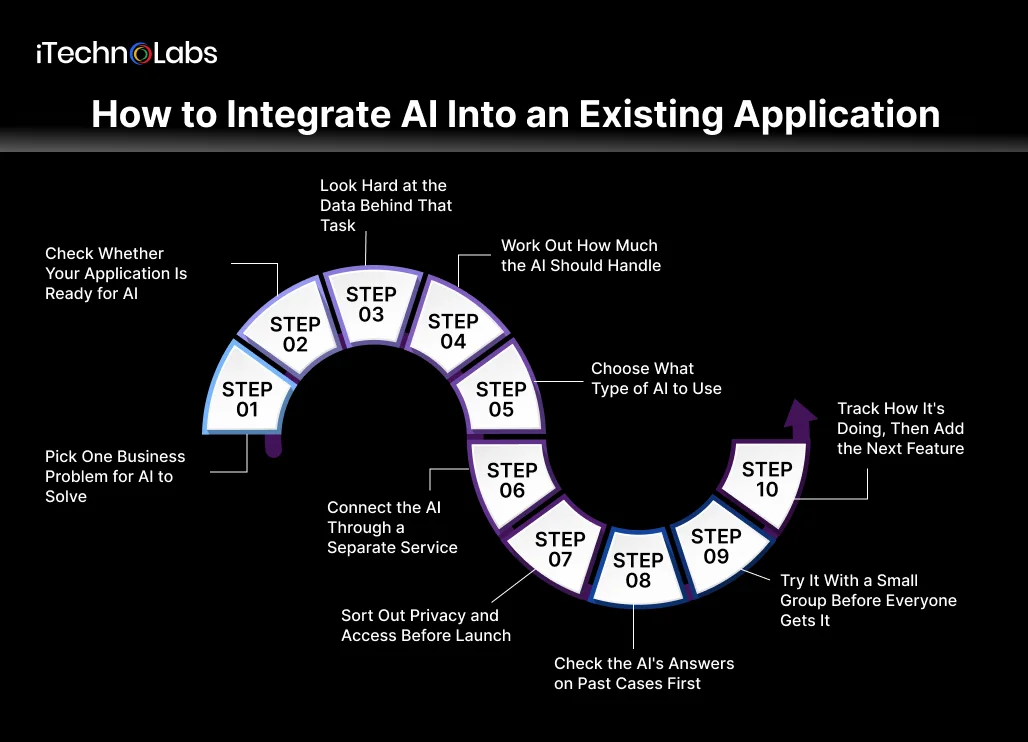
Here’s the AI integration process we follow on client projects, split into ten steps. Steps 1 to 5 happen before anyone writes code. They shape most of what comes later, so it pays to take your time with them. From Step 6, your developers build the connection and test it before staff start using it.
Step 1: Pick One Business Problem for AI to Solve
A lot of first meetings start with “we want AI in our app,” and that’s too loose to build anything from. Nobody can scope it or price it. Begin with one task that your staff repeat many times a week. Ideally it soaks up hours, and at least some of it is work an AI assistant could handle.
The best first tasks we’ve worked on were boring ones. Staff did them daily, anyone could describe them in a sentence, and when they went wrong, people noticed. A customer chasing a late reply is hard to miss. That kind of task gives you a clear answer within weeks on whether the AI is earning its keep.
Before development begins, time the task as it runs now. Check how long urgent items wait in the queue, and keep a count of errors over a normal week or two. Save those numbers. Months from now, they’ll be the only real proof that the AI made a difference.
It’s tempting to pick whichever idea gets the biggest reaction in a meeting. Usually that’s the wrong call. Saving two people an hour a day isn’t exciting, but it tends to pay for itself well before a showier feature does.
Step 2: Check Whether Your Application Is Ready for AI
Next, find out how other software can get data in and out of your system. The easiest case is an application with an API, which is a set of doors other software can use to read and write data. If your system has one, an AI service can plug in without anyone touching the core code.
Many older systems have no API but do have a well-organised database. In that case, a developer can add a database trigger. Each time a new record is saved, the trigger passes a copy to the AI service. It takes a bit more effort than an API. A rebuild would cost many times more.
Some systems need extra planning before any AI goes near them. The table below lists the five situations we run into most. If one of them describes your software, build the extra time into your plan from the start.
| Constraint | What it means | How to handle it |
| No API | Nothing outside the app can read or write its data | A database trigger, or a small bridge service |
| Fragile or unreadable database | Every change feels like it might break something | Fix that part of the system before the AI work |
| Instant answers | People expect a reply the second they click | Finish the AI work after the page loads, or use a faster model |
| Regulated data | You hold health, money or personal details | Share less with the AI and check the law first (Step 7) |
| Unstructured data | The useful facts are buried in notes or scanned PDFs | Budget extra time for cleanup (Step 3) |
We haven’t seen any of these stop an AI project outright. They do add weeks, and some of them add cost. If the system is old enough that people are nervous about touching it, modernising one piece first is often the smarter move. That’s usually where our custom software development team comes in.
Step 3: Look Hard at the Data Behind That Task
An AI model learns what good work looks like from past work. So before going further, find out whether your records actually show this task being done right.
Old records tend to look fine until someone reads them properly. On most projects we find the same few problems. Categories get renamed over the years, and two people will tag the same issue differently. The detail you need is sometimes buried at the end of a long note. The information exists, but someone has to tidy it up before the AI can learn from it.
Set aside proper time here. Find out which systems hold the data and who’s allowed to see it. Check, too, whether people recorded it the same way five years ago as they do now. After that, we’d pull a few hundred records and go through them by hand. You’ll spot things no report shows, like a category that quietly fell out of use.
Honestly, this step affects the final result more than which model you choose. Feed the AI wrong records and it picks up the same mistakes, then makes them faster than your staff ever did. Data cleanup is slow and a bit tedious. Every project we’ve seen that skipped it paid for that later.
Step 4: Work Out How Much the AI Should Handle
Teams usually connect AI to an existing app in one of four ways. What changes from one to the next is how much the AI is trusted to do before a person looks at it.
| Pattern | What the AI does | Risk level |
| Processing | Reads documents or forms and pulls out the details you need | Low |
| Decision support | Offers a suggestion that a staff member approves or changes | Low |
| Knowledge (RAG) | Answers questions by looking things up in your own documents | Medium |
| Action | Carries out tasks in your system without waiting for a person | High |
Our usual advice for a first project is decision support. In this setup the AI only proposes. Someone on your team reads each proposal and approves it or corrects it. A few weeks of that tells you far more about the AI than any demo will.
The action pattern looks like the biggest win, since it saves the most staff time. We’d still wait on it. If an AI acting alone gets something wrong overnight, your team could spend days putting it right. Once the simpler version has run on real work for a few weeks, you’ll know much better how far to trust it.
Step 5: Choose What Type of AI to Use
Next comes the question of which type of AI to use. For business apps, it nearly always comes down to one of these three.
The simplest is a ready-made model you reach through an API. It’s good at sorting, summarising and drafting, and all it needs from you is clear instructions plus a handful of sample cases.
RAG, short for retrieval-augmented generation, is for when answers must come from your own files. The AI searches your documents first and builds its reply from what it finds. Those files need to be stored somewhere it can search.
A custom or fine-tuned model suits specialist work that standard models keep getting wrong. It needs a lot of clean, labelled data, usually more than a business has on hand.
Most first features we build run on AI API integration. Our developers write instructions around the client’s business rules, test them on real cases and adjust until the answers hold up. RAG tends to arrive with a later feature, once the business wants the AI answering questions from its own policies or manuals.
That’s why we rarely start with a custom model. The iTechnolabs AI development team begins with an API and only looks at something heavier if testing shows the API can’t handle the job.
Step 6: Connect the AI Through a Separate Service
We’d never wire an app straight into an AI provider. We build a small separate service for that job. Your app sends its requests there, and the service passes them on to the model. Answers come back already formatted the way your app expects. If you ever change AI providers, the update happens in that one place.
That same service is where the dull but useful jobs go. We put spending caps on it, because one faulty loop can send thousands of requests in a night. We store the prompts in the same place, which makes them easy to update later. Every answer the AI gives is saved there as well. If a client reports a strange reply, our developers can look it up and see exactly what the AI was asked.
The fallback matters just as much. AI providers have outages, and some responses take several seconds. When that happens, the app should carry on the way it did before AI was added. Your staff handle things by hand for an hour or two, and customers carry on as usual.
Users shouldn’t have to wait on the AI either. When a customer submits a form, we show the confirmation page first. The AI picks up its share of the work a few seconds afterwards, once the customer has already moved on.
Step 7: Sort Out Privacy and Access Before Launch
Each time your app sends a request to the AI, some of your information goes with it. That often means customer names, phone numbers or account details. In Canada, the federal law that covers this for most private businesses is PIPEDA. Alberta, British Columbia and Quebec have their own laws for private companies. In Alberta, for instance, it’s the Personal Information Protection Act.
Privacy regulators across Canada have also put out principles for the responsible use of generative AI. A key one asks businesses to share as little personal information with these tools as possible. These are the five things we check on every project before launch:
- Only send the AI the details it needs for the task. Names and phone numbers can usually stay out.
- Go through the provider’s data terms. Some store what you send for weeks, and some use it to train future models. You’ll want to know which before any customer data goes their way.
- Set up the AI so it can only reach what the person asking is allowed to see. A sales rep, for example, shouldn’t be able to pull payroll details just by asking the AI for them.
- Watch out for prompt injection, where someone types instructions designed to make the AI ignore its rules. It sits near the top of the OWASP Top 10 for LLM Applications.
- Keep logs of what goes into the AI and what comes out. Delete them on the same schedule you use for the rest of your data.
Security reviews are part of how we work at iTechnolabs, and our ISO 27001 certification holds us to that. Our team builds these five checks in while the integration layer is still being designed. Adding them later is possible. It means reopening code that’s already live, though, and that work tends to grow once it starts.
Step 8: Check the AI’s Answers on Past Cases First
An AI model can get 95 cases right in a row and then miss the 96th without any sign of doubt. Because of that, we check a new AI feature much as a manager checks a new hire’s first few weeks of work. Every test uses a case where the right answer is already on record.
A few hundred old records with known outcomes is usually enough. We run each one through the AI and set its answer next to the real result. Going through the misses one by one tells you a lot. Some are harmless. A few would cost money or a customer, and those decide whether the feature is ready.
Your pass mark should come from those costly misses. We’ll often agree with a client that the AI has to flag every urgent case in the test set, even if it raises a few false alarms along the way. A false alarm wastes a minute of someone’s time. A missed urgent case can do real damage. Until the AI clears that bar, it stays with the project team.
Keep the test set after launch, too. Prompts get edited and models get swapped, and each time it’s worth running the old cases again. It’s a quick job, and problems found that way can usually be fixed the same day.
Step 9: Try It With a Small Group Before Everyone Gets It
For the first few weeks, we run the AI alongside the old process. Staff do their jobs exactly as before. The only change is a small box on screen showing what the AI would have done.
Surprises turn up here that testing never showed. A certain kind of request might confuse the AI every time. Replies could get slow on a busy Monday, or staff might simply stop reading the suggestions. Before the pilot begins, agree on what counts as good enough. We usually track accuracy on urgent items along with how often staff overrule the AI.
Your team matters as much as the tech here. Staff who have done this job for years know every strange exception, and they’ll spot bad answers before any dashboard does. Some will worry the AI is there to replace them. Others will write it off as a gimmick. Either way, they’ll stop paying attention to it.
Talk to them before the pilot starts, and ask them to point out every bad suggestion they see. Their corrections will do more to improve the prompt than anything else.
Even after a good pilot, we wouldn’t give the feature to everyone the next day. We usually start with one team or a few customers. The developers should be able to switch it off in seconds, and everyone should know how to go back to the old way. We widen access one group at a time, usually waiting a week or two between each.
Step 10: Track How It’s Doing, Then Add the Next Feature
Once the feature is in everyday use, someone on your side should look at how it’s doing every week. Is the team accepting most of the AI’s suggestions? Is the task faster than it was back in Step 1, and what is each request costing you? Watch the override rate closely. When staff start correcting the AI more than they used to, something has usually changed in its answers.
The companies behind these models change them every few months. Sometimes a feature that worked fine on Friday gives slightly different answers on Monday. Whenever your provider announces an update, put the test set from Step 8 through the AI again.
Keep an eye on the usage bill too. You pay for every request, so the bill grows as more people use the feature. What looks like a small change in a pilot with 50 requests a day can become a real line item once you reach 5,000.
Give the first feature a few steady months before you add another. Then go back to the list of ideas from Step 1 and pick the next one. You’ll already have the integration layer, the testing routine and the monitoring set up. Because of that, the second feature tends to go much faster than the first.
How Long Does Each Step of AI Integration Take?
How long this takes depends on your system, the state of your data and how much the AI is allowed to do. The table below shows typical ranges for one decision-support feature.
| Phase | Steps covered | Typical duration |
| Discovery and readiness | Steps 1 to 3 | 1 to 3 weeks |
| Design and build | Steps 4 to 7 | 3 to 6 weeks |
| Testing | Step 8 | 1 to 2 weeks |
| Pilot and staged deployment | Step 9 | 2 to 4 weeks |
| Ongoing monitoring | Step 10 | Continuous |
Cost follows the same drivers. Messy data adds the most time, followed by older systems with no API and features that handle sensitive information. Ongoing costs come from AI usage, which grows with volume, plus monitoring and occasional prompt updates. For a rough figure based on your own scope, try our AI cost calculator.
Why Choose iTechnolabs to Integrate AI Into Your Application?
Connecting AI to a live business system is mostly careful engineering. iTechnolabs has delivered more than 500 apps used by over 50,000 end users, with a team of 300+ developers across offices in Markham, Calgary and Ottawa.
Security and quality are built into how we work. We hold ISO 27001:2013 certification for information security and ISO 9001:2015 for quality management. We’re also a Government of Canada supplier under Procurement Supply Arrangement SA CW2395301.
iTechnolabs AI integration services cover every step in this guide, from the first readiness review to monitoring after launch. If you need senior technical direction before committing to a build, our fractional CTO service can help you plan the work first.
Conclusion
Most businesses can add AI to the software they already run. The work comes down to one clear problem, honest data, a separate layer that keeps the AI away from your core code, and a fallback for the days the AI has trouble.
The ten steps in this guide follow the order that keeps risk low. You start small and measure everything. People stay in control until the AI has earned more trust, and every change gets tested against real cases. Most failed AI projects skip at least one of these steps, usually the data audit or the pilot.
A good AI integration process makes one part of the business noticeably better while everything around it carries on as before. Your staff keep the tools they know. Your customers get a faster or smarter experience. Your core system stays stable, and you keep the freedom to change AI providers as the market moves.
If you’re weighing a rebuild against an integration right now, start with Step 1. Write down the one task you want AI to help with and how it works today. That single page will make every conversation with a development partner clearer, whether or not that partner is us.
Frequently Asked Questions
Can I add AI to my app without rebuilding it?
Yes, in most cases. AI usually runs as a separate service that your app sends requests to. Your core code stays the same. A rebuild only makes sense when the system has no way to share data, or when it is already too fragile to change safely.
How long does it take to integrate AI into an existing application?
A single, well-scoped feature usually takes a few weeks to a few months from first review to full launch. That includes testing and a pilot. Messy data and older systems without an API add the most time. Later features go faster because the groundwork is already in place.
Is my business data safe when it is sent to an AI model?
It can be, if you plan for it. Send only the data the task needs, check the provider’s storage and training terms, and keep your existing access rules. Canadian businesses also need to follow PIPEDA or their provincial privacy law, such as Alberta’s PIPA.
What data do I need before I add AI features to software?
You need real records of the task done well, with the correct outcome recorded. A few hundred clean records are often enough for testing. You don’t need years of perfect data, but you do need to know where your data lives and how reliable it is.
Can AI connect to my CRM or ERP system?
Usually, yes. Most modern CRM and ERP platforms have APIs that an AI service can read from and write to. Older or custom systems may need a database connection or a small middleware layer instead. The AI should always use the same access permissions as the people it works for.
Will adding AI slow down my application?
It shouldn’t, if the integration is built well. AI calls should run in the background so users don’t wait for them. A fallback keeps the app working normally if the AI service is slow or down. Users should only notice the new feature, never a delay.
What happens if the AI provider goes down or raises its prices?
A separate integration layer protects you here. Your app keeps working through its fallback during an outage. If prices rise or a better model appears, you change the provider inside that layer without touching the rest of your code. This is why direct connections to one provider are risky.
Do I need an in-house AI team to do this?
No. Most AI integration work is careful software engineering: connecting systems, protecting data, testing and monitoring. Many businesses work with a development partner for the build, then have their own team handle daily checks. You’ll still need someone internal who owns the feature and its results.











