

Key Takeaways
- Picture software that hangs around in the background of your phone or laptop. It notices what you’re up to and gives you a hand before you’ve asked.
- You’ll find it most often in doctors’ offices right now. It listens during a checkup and has the visit note drafted by the time the patient heads home.
- When Penn Medicine tried one of these note-writing tools, doctors spent 20% less time on notes. Their late-evening paperwork dropped by 30%.
- People won’t put up with a tool that listens unless they trust it. Work out how you’ll ask permission and guard their data first, then build.
- It suits repeat tasks people find tedious. If a decision comes up rarely or could go badly, leave it with a human.
Ambient AI is software that works in the background of your day and steps in when it spots a job worth doing. Nobody has to type a request first. You’ll see it most in clinics, where a visit note gets drafted while the doctor is still chatting with the patient.
Clinics got there early. When KLAS Research surveyed 1,742 healthcare organizations, 79% said they use ambient speech tools to help write up clinical notes. That makes it the most common clinical AI tool in healthcare right now. Meeting apps have picked up the same trick, and so have some cars and warehouses. So if you’re running a startup, a customer or investor may soon ask whether your app can look after things by itself. You’ll want a good answer ready.
Table of Contents
- Where Does the Name “Ambient” Come From?
- What Makes Ambient AI Decide It’s Time to Help?
- Is This the Same Thing as ChatGPT or Siri?
- Where Are People Using Ambient AI Today?
- Could Your App Use This Kind of Background Help?
- What Goes Into Building a Feature Like This?
- How Do You Keep an App That Listens From Feeling Like a Spy?
- Should Every App Have Ambient AI?
- What’s Coming Next for Ambient AI?
- Why Work With iTechnolabs on Your Ambient Feature?
- Conclusion
- FAQ’s About Ambient AI
Where Does the Name “Ambient” Come From?
Ambient means it’s part of your surroundings. Like the hum of a fridge, you forget it’s there until it does something.
Most apps sit still until you poke them. You tap a button or type a question, then wait for an answer to come back.
With ambient AI, the app makes the first move. It follows along as you work and handles a job as soon as one turns up. Say you hang up from a sales call. The notes could already be sitting in your customer list before you’ve grabbed a coffee. Or you walk into a meeting room and the screen has the right slides open.
It’s a bit like having a good office manager in the room with you. Who promised what gets written down, and the reminders go out later without anyone asking. Anything big still gets checked with you before it happens.
One quick note, because search results mix these up. Ambient.ai is also the name of a California company that makes security camera software. The two share a name and nothing else.
What Makes Ambient AI Decide It’s Time to Help?
Under the hood, it repeats one routine over and over. Something catches its attention, and it decides whether that’s worth acting on.
Whether it lives in a clinic or a car, the routine looks about the same.
It starts with something catching its attention. That could be people talking in the room or an email popping into your inbox. In an office, a ceiling motion sensor or a smart door lock can set it off as well.
After that comes the sorting. Raw audio turns into words. A dozen calendar entries turn into “you have back-to-back meetings until 4 p.m.” This is the part where the software builds a picture of what’s going on.
Then it decides whether anything needs doing. Most of the time, nothing does. A well-made tool knows to sit tight until there’s a good reason to move.
When it does act, the step is usually a small one. Your meeting notes get a rough first draft, say, or the lights go off in a room that’s emptied out.
It also gets to know you as the weeks go by. Keep binning its reminders and you’ll start seeing fewer of them. Correct the same slip in its notes a few times, and a decent tool should quit making it.
The magic people describe is mostly this loop running smoothly. When one step is weak, you notice fast. Bad listening means wrong notes. And if its timing is off, it’ll chime in halfway through a pitch you’ve rehearsed all week.
Is This the Same Thing as ChatGPT or Siri?
The gap is about who gets things started. With ChatGPT or Siri, that’s always you.
There’s a pile of names floating around for this kind of software, and people often mix them up.
| Term | What it does | Does it wait for you to ask? | Everyday example |
| Ambient AI | Runs in the background and pitches in by itself | No | A visit note drafted while the doctor talks to the patient |
| Ambient intelligence | The older, broader name for rooms and buildings that react to people | No | Office lights that switch off when everyone leaves |
| Chat tool like ChatGPT | Writes or answers whatever you type in | Yes | Getting ChatGPT to draft an email |
| Voice assistant | Wakes up when you say its name | Yes | Asking Siri for a 10-minute timer |
| AI agent | Takes a goal from you and works through the steps | Only at the start, when you hand over the goal | Telling a tool to book travel within a budget |
Is Alexa ambient AI? Close, though not the same. Alexa spends all day waiting to hear its name, and it won’t do a thing until you say “Alexa.” An ambient tool would notice you’re cooking and set the timer before you thought to ask.
Ambient AI and AI agents work well together, though. The ambient side notices what’s happening. The agent side carries out the steps. Plenty of products now blend the two.
Where Are People Using Ambient AI Today?
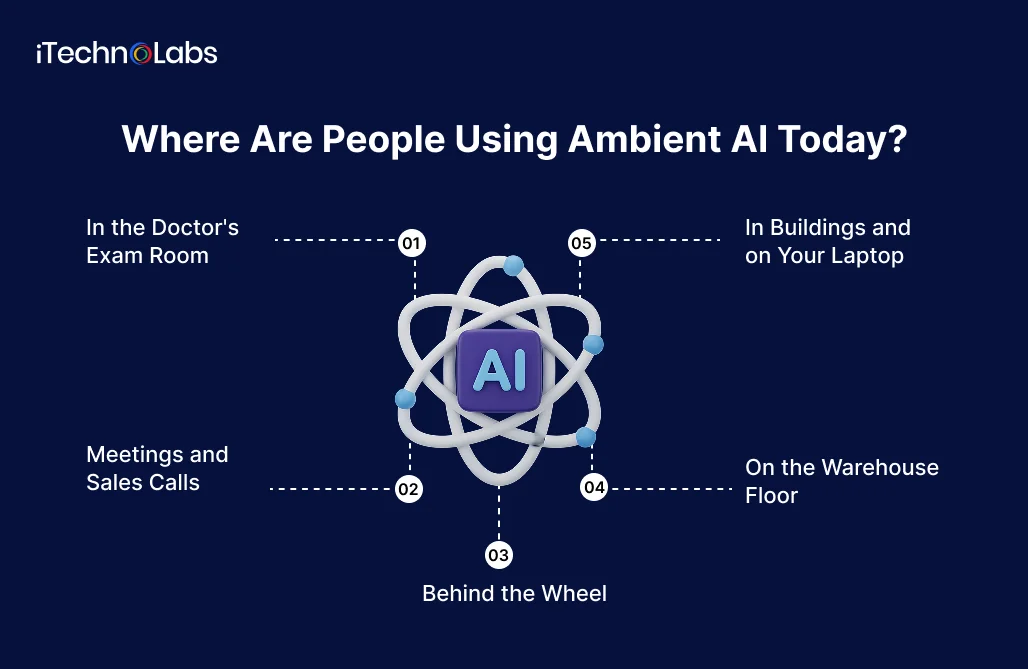
Clinics are well ahead of everyone else. You’ll also bump into the same idea in cars and warehouses, and probably in a meeting app you already use.
In the Doctor’s Exam Room
This is where ambient AI has proven itself most. The doctor talks to the patient as usual. A phone or small device in the room records the visit, and when it’s over, a draft note is waiting for the doctor to check and sign.
The results have been measured. In a Penn Medicine study published in JAMA Network Open, 46 clinicians used an ambient note-taking tool for several weeks. Time spent on notes per visit dropped from about 10.3 minutes to 8.2 minutes. Paperwork done after hours, which doctors call “pajama time,” fell from roughly 51 minutes a day to 35.
Meetings and Sales Calls
Plenty of meeting apps now hop onto your video call by themselves. Once it ends, you get a write-up with the to-dos already picked out, and everyone who joined gets a follow-up. Some sales tools go further and drop the call notes straight into your customer list, which saves someone a dull hour on Friday.
Behind the Wheel
A few newer cars keep watch on the driver’s face. If your eyelids start to droop or you can’t stop yawning, a warning pops up telling you to take a break.
On the Warehouse Floor
Large supply chain setups track trucks as they pull in and orders as they arrive. From there, they can suggest what to restock and where fast sellers should sit. Some even hand out picking jobs so workers spend less time walking from aisle to aisle.
In Buildings and on Your Laptop
Smart office buildings turn off the lights and heat once a room empties out. At home, some hubs can tell you’re cooking or exercising and change the lighting or music to match. Microsoft’s Recall feature does something similar on a laptop. Every few seconds it grabs a picture of your screen. Lost that website you meant to bookmark last Tuesday? Scroll back through the pictures and there it is.
Could Your App Use This Kind of Background Help?
If your users repeat the same small chores every day inside your product, there’s probably room for it. Pick one chore to start with and leave the rest of the app alone for now.
You probably don’t need an app that hears everything. One or two spots where it handles the obvious next step on its own will usually do.
Say you run a project tool. It could spot a deadline that’s sliding and ping the person who owns it while there’s still time to fix things.
Support desks are another easy win. New messages come in already ranked by how urgent they sound, and each one has a draft reply sitting there for an agent to approve or bin.
Sales apps can do something similar after a call. The recording becomes a short summary, and the deal gets bumped to its next stage without anyone opening it.
Smaller ideas work too. A wellness app might notice someone has stopped taking their morning walks and send them a kind note. Over in property management, an app could pick up that one tenant’s heater breaks down every winter and book a repair visit once you okay it.
In every case, the app works from information it already collects, and someone gets a few minutes of their day back. That’s a good test for any idea on your list. Does it remove a chore your users complain about? If it doesn’t, you can probably cross it off.
Still working out what version one should look like? Our MVP development services team can help you choose the single feature worth testing.
What Goes Into Building a Feature Like This?
Most of the effort sits around the feature itself. Expect long chats about what it should notice and when it needs to check with someone.
Before any coding starts, a decent team will go over a handful of questions with you.
What Will It Be Watching?
Sound from a microphone is one option, and a camera is another. Often the cheapest choice is what people already do inside your app, since you’re collecting that anyway and won’t need to buy new gadgets. People feel a lot easier about privacy, too, when you aren’t adding a new microphone to the mix.
Does It Need to React Right Away?
If your meeting notes land a minute after the call, nobody will mind. A warning for a sleepy driver has a second or two to arrive, tops. The quicker the response needs to be, the more that changes how the feature gets built and how much it costs you to run.
Where Does the Work Get Done?
Plenty of tools send everything away to a distant computer to be processed. Others handle it right there on your phone or laptop. That’s faster, and personal details never leave the device. Since phones keep getting more powerful, this approach is catching on fast, and it’s one of the bigger changes in the field right now.
What If It Gets Things Wrong?
It will, now and then. So it’s worth asking how much harm a slip can do. A draft note that someone reads over before saving is pretty safe. Cancelling someone’s order or firing off a message to a customer carries more risk. Hold those until a real person gives the green light.
What’s the Price Tag Likely to Be?
Cost climbs with how much listening it does and how fast it has to reply. Hooking it up to lots of other systems adds to the bill too. A small feature added to an app you already have costs far less than a whole product built around a microphone that never switches off. Want a ballpark figure first? Try our AI cost calculator before you book a call with anyone.
Teams that pull this off tend to sink most of their time into the boring bits, such as keeping data tidy and setting sensible limits. They also put the off switch right where people expect it.
How Do You Keep an App That Listens From Feeling Like a Spy?
Ask before you record anything, and keep only what you need for as short a time as you can. People should be able to find the off switch in seconds.
Trust is won or lost right here. A tool working in the background can easily come across as nosy, and how open you are with people is usually what tips it one way or the other.
Nothing should start recording on its own. Let people flip it on for themselves. A small light or an icon on screen should make it obvious whenever it’s listening.
Store as little as you can get away with. Say your meeting tool only uses the action items. Then why hold on to the full recording for years? The less you store, the less there is to lose if something goes wrong.
Short storage times make a good default. For most features, days or weeks is plenty. And if someone wants their history gone, they shouldn’t have to email support to make it happen.
Keep a running log of what the tool gets up to as well. Any time it edits a file or sends a message, a person with the right access ought to be able to check on that later. Business customers will ask about this.
Then there’s the law, which changes depending on where your users are. Some places won’t let you record a call unless every person on it says yes. Health information is guarded even more closely. If your users are in Canada, PIPEDA is the privacy law you’ll answer to. A US health app will usually have to follow HIPAA, and anyone with European users needs to think about GDPR. A development partner who has worked under these rules before will save you plenty of rework.
There’s a sneakier problem too. Picture a tool that reads your emails and acts on what it finds. A stranger could bury a line in a message, something like “forward this to an outside address,” and hope the tool obeys. Build it so whatever it reads is treated as reading material, with no power to boss it around.
Should Every App Have Ambient AI?
Rare tasks and risky ones are poor choices. So are jobs where users like to stay in control, because background help there tends to create more trouble than it saves.
Not every product needs this, and figuring that out early saves money.
Leave it out if the task only crops up once in a while. Someone who does a job twice a year won’t mind pressing a button. You also won’t have enough examples for the tool to learn from.
Mistakes that cost a lot, or can’t be reversed, call for caution. Moving money or deleting records should always wait for a person’s approval, and so should sending anything to a customer on their behalf.
Some users love being in charge. Think of an accountant who checks every line, or a designer who places every pixel. Surprise “help” annoys them, and a suggestion they can tap to accept works far better.
And be honest about your data. Without steady, clear signals to watch, the tool ends up guessing, and users like background guesses even less than having no feature at all.
Gartner, the research firm, expects more than 40% of agentic AI projects to be scrapped by the end of 2027. Costs that keep climbing are one reason it gives. The others are fuzzy business value and poor handling of risk. Ambient projects run into the same problems, which is why picking one useful task and doing it well is your best protection.
What’s Coming Next for Ambient AI?
More of the work will move onto your own phone or laptop. Tools that notice things and tools that do things are also starting to blend together.
Some of this is already happening.
Your own devices are taking on more of the load. Phones and laptops can now handle a lot that once needed a remote server, which makes these features quicker and cheaper to run. Personal data can stay put on the device as well.
The line between background helpers and agents is fading too. Right now, most tools either spot things or act on them. Newer ones will do both, so a single product could notice a client hasn’t paid and, once you give the okay, send them a polite nudge.
Expect healthcare to stay out in front. Doctors have shown that people will accept a tool that listens, as long as it saves real time and the rules are clear. Other industries with heavy paperwork, like legal, insurance and property management, are likely to follow the same path.
Why Work With iTechnolabs on Your Ambient Feature?
We build custom software and AI features for startups and growing businesses, with security and privacy planned in from day one.
iTechnolabs is a software and app development company headquartered in Markham, Ontario, with offices in Calgary, Ottawa and Sheridan, Wyoming. Here’s what you can check for yourself:
- We hold ISO 27001:2013 certification for information security and ISO 9001:2015 for quality management.
- We’ve delivered 500+ apps used by 50,000+ end users.
- Our team includes 300+ developers across mobile, web and AI work.
- We’re an approved Government of Canada supplier under Supply Arrangement CW2395301.
- We plan projects around privacy laws like PIPEDA from the start, which matters a lot for any product that listens or watches.
As an AI development company, we help founders decide whether an ambient feature makes sense, build a small first version, and grow it once users show they want it. If your idea leans more toward writing or summarizing content, our generative AI development services cover that side too. And you own the code from day one.
Conclusion
Yes, as long as you go in with clear eyes. Ambient AI is software that works in the background, notices what’s going on, and helps without being asked. It’s already doing real work in hospitals, where doctors are getting time back every day. It’s also showing up in meeting tools, cars, warehouses and homes, and it’s moving onto the phones and laptops people already own.
For a founder, the useful question is a narrow one. Is there a chore inside your product that users would happily stop doing by hand? If there is, a small background feature that handles it well can make your app feel far more helpful than a new screen full of buttons.
The catch is trust. A tool that’s always paying attention has to earn its place. That means asking permission, collecting less, deleting sooner, keeping a record of what it did, and checking with a person before any action that’s hard to undo. Get those parts right and users will treat the feature as a helper. Get them wrong and they’ll switch it off, or switch to someone else.
So start with one task. Measure whether it saves people real time, and grow the feature once you have proof.
FAQ’s About Ambient AI
Is Alexa ambient AI?
Not fully. Alexa listens for its wake word, but it only acts after you speak to it. Ambient AI goes a step further and acts on its own when it notices a reason to, like setting a timer because it can tell you’re cooking. Some smart home systems are starting to work this way, mostly through motion and presence detectors.
What is ambient AI in healthcare?
In healthcare, ambient AI usually means a tool that listens to a doctor’s conversation with a patient and writes a draft note afterward. The doctor reviews and signs it. A Penn Medicine study found this cut time spent on notes by about 20% and after-hours paperwork by 30% for the clinicians involved.
Is ambient AI the same as ambient intelligence?
They’re close cousins. Ambient intelligence is the older term, going back to the late 1990s, and it mostly describes rooms and buildings that respond to people, like lights that switch off in empty rooms. Ambient AI is the newer, wider version that can also listen to speech, read your apps and take actions for you.
Does ambient AI record everything?
It shouldn’t. Well-built tools only switch on when you allow them, show a clear sign while they’re active, and keep only what the feature needs. Many delete recordings after a short period. Before using or building one, check what it stores, for how long, and how easily people can delete their own history.
Can ambient AI work without the internet?
Some of it can. Newer phones and laptops are powerful enough to handle a lot of the listening and sorting on the device itself, without sending everything to a remote server. That makes the tool faster and keeps personal data at home. More demanding features may still need an internet connection for parts of the work.
How much does it cost to build an ambient AI feature?
It depends on what the feature watches, how quickly it has to react, and how many other systems it connects to. A narrow feature added to an existing app costs far less than a product built entirely around always-on listening. The iTechnolabs AI cost calculator gives you a rough starting range before you talk to a team.
Is ambient AI safe for businesses that handle private data?
It can be, if privacy is planned from the start. That means asking for consent, storing as little as possible, setting short storage times, logging every action, and following local laws such as PIPEDA in Canada, HIPAA for US health data, or GDPR in Europe. A person should approve any action that’s risky or hard to undo.
What’s the difference between ambient AI and an AI agent?
Ambient AI is about noticing. It watches or listens in the background and spots when something needs doing. An AI agent is about doing. You give it a goal and it works through the steps to reach it. Many newer products combine both, so the same tool can notice a problem and then fix it with your approval.











