

Key Takeaways
- AI automation is less error-prone and won’t get tripped up by a slight variation in emails and invoices, like RPA will.
- RPA breaks when a screen changes.
- AI agents are goal-oriented and flexible, like humans, and will need more supervision.
- Pick the approach based on how variable your incoming work is, and how damaging a mistake would be. Most companies use a combination of all three.
- For your first project, use automation to take over a repetitive, time-consuming task to free up your time to do more important work. Have someone check your output for quality assurance.
AI automation takes a job and makes decisions while working. It can tell what a customer’s email is asking for or catch an invoice total that doesn’t add up. Then it deals with it on its own.
Almost all businesses have experimented with it. Most prominent management consulting firms show that 88% of organizations use AI in at least one part of their business. Nearly two-thirds have not deployed it across the entire company.
The jargon doesn’t help. There’s a lot of confusing terminology in the artificial intelligence automation space and it’s understandable why people get confused about the difference between RPA, AI automation and AI agents. So, let’s take a look at each of them in plain English and consider the sorts of work they are good at.
Table of Contents
- What Is AI Automation?
- How Does AI Automation Work Inside a Business?
- How Is AI Automation Different from RPA?
- Where Do AI Agents Fit In?
- Which One Should You Use for Which Job?
- What Does AI Automation Look Like in Real Business Work?
- What Are the Risks, and When Is AI Automation Not Worth It?
- How Do You Start Without Getting Stuck at the Trial Stage?
- Why Choose iTechnolabs for AI Automation?
- Conclusion
- Frequently Asked Questions
What Is AI Automation?
Think of AI automation software as being able to read work and make a decision about what action to take. It lies between a simple script that does exactly what it’s told and a human being who is able to think for themselves and make decisions.
Hand it an invoice from a new supplier, laid out in a way it’s never seen before, and it will still be able to extract the amount. A total that looks wrong gets sent to someone on your team. The rest go straight through.
It’s also called intelligent automation, which means the same thing: traditional automation that is able to read and make decisions.
How Does AI Automation Work Inside a Business?
The software reads each new piece of work, and decides what to do with it. If there’s a high degree of uncertainty with the answer, then a person takes over.
A customer emails to say their parcel never arrived. The software finds the email, pulls up the order and works out whether they’d like a refund or a replacement.
Then it looks at your rules, say, instant refunds for anything under a certain amount. If the case qualifies, it replies, updates the order and closes the ticket.
Bigger orders, upset customers and anything confusing get passed to a person, along with a short note so they don’t start from scratch.
How Is AI Automation Different from RPA?
RPA needs the same steps on the same screens every time. AI automation doesn’t.
RPA is short for robotic process automation. There’s no actual robot. It’s software that copies what someone does on screen, such as moving a figure from one file into another system. It doesn’t understand any of the data it moves.
That makes it handy for something like a payroll export that looks identical every Friday. The trouble starts when someone moves a button or renames a column. The robot either stops or, worse, keeps going with the wrong data.
| RPA | AI automation | |
| What it needs | Same layout and same steps every time | Copes with different layouts and wording |
| Reading emails, scans and free text | Not on its own | Yes |
| When something changes | Often stops | Usually adjusts |
| Can it make a call? | No, it only follows rules you wrote | Yes, within limits you set |
| Setup effort | Lower | Higher, it needs examples and testing |
| Running cost | Lower | Higher |
Many teams run both, leaving RPA on the predictable steps and adding AI automation where the paperwork gets messy.
Where Do AI Agents Fit In?
An agent is different again. You tell it what you want done, and it works out the steps, opening whatever programs it needs along the way.
Think of three people in an office. One follows a checklist exactly. Another reads the post, figures out what each letter is about and files it, but sticks to the same set of jobs. The third is told “get this late payment sorted” and decides for themselves who to call and what to send.
| RPA | AI automation | AI agent | |
| What it does | Repeats the same steps | Reads and judges, then follows set steps | Chooses its own steps toward a goal |
| Best input | Neat forms, same layout | Emails, scans, free text | A clear goal and access to programs |
| If something changes | Often stops | Usually adjusts | Adjusts, but may surprise you |
| Checking its work | Easy | Fairly easy | Hardest, needs close watching |
| Typical running cost | Lowest | Middle | Highest |
| Example | Copy invoice numbers into the books | Read a messy invoice and flag odd ones | Chase a late invoice until it’s paid |
Since agents choose their own route, you can’t always predict what they’ll do, and checking their work takes longer.
Companies understand what effects agents can have. In the same McKinsey survey, 62% of the respondents said their organizations were experimenting with agents. Only 23% of the respondents said their organizations were scaling agents anywhere, and no more than 10% of the respondents said their organizations were scaling agents in any single function of the business.
Which One Should You Use for Which Job?
Two questions usually settle it. How tidy is the work coming in, and how bad would a mistake be?
| Your job looks like this | Start with |
| Same form, same steps, every time | RPA |
| Emails, scans or PDFs that vary, handled the same way each time | AI automation |
| Each case needs different steps to reach a clear goal | An AI agent, with a person watching |
| A bit of both | A mix: RPA for the steady parts, smart reading for the messy parts |
| A mistake would be costly or hard to undo | Add a person’s sign-off, whatever you pick |
An agent can also be pricier to run and slower to test. Using one where a basic script would do is a bit like paying a consultant to staple papers.

What Does AI Automation Look Like in Real Business Work?
You’ll find most of it behind the scenes, in shared inboxes, invoice piles and customer request queues.
In accounts, it reads every invoice no matter how it’s laid out, matches it to your purchase order and flags the ones that don’t line up. Your team only looks at those.
On a support desk, it reads each new message and works out what it’s about and how urgent it is. Simple questions get an answer straight away. Trickier ones go to a person with a short summary attached. Writing those replies is part of what our generative AI development services cover.
Insurers use it to go through claim forms and the notes attached to them. Anything missing gets picked up before a claims handler opens the file.
With contracts, it pulls out the dates and payment terms and points out wording that’s different from what you normally sign. A lawyer still makes the call but doesn’t have to dig for the important part. There are more examples across different teams in our guide on how AI is used in business processes.
What Are the Risks, and When Is AI Automation Not Worth It?
It can get things wrong, and it works best with fairly tidy records. It also costs more than a simple script, and some jobs are better left alone.
The software can sound sure of itself and still be wrong. Have a person check anything touching money or a customer’s account, at least until the results have held up for a while.
Bad data is another problem. If your customer list is packed with duplicates and old addresses, that’s what the software will work from. Tidy up your main records before you start.
Auditors can ask why something was approved or rejected, and you’ll need an answer. Make sure every decision is logged from the start, because adding a log later is a pain.
Skip it when a plain rule already does the job. A rule that says “send invoices over $5,000 to the finance lead” needs no smart software at all. The same goes for work that happens a few times a month, and for anything where one mistake would be severe and nobody could check it.
How Do You Start Without Getting Stuck at the Trial Stage?
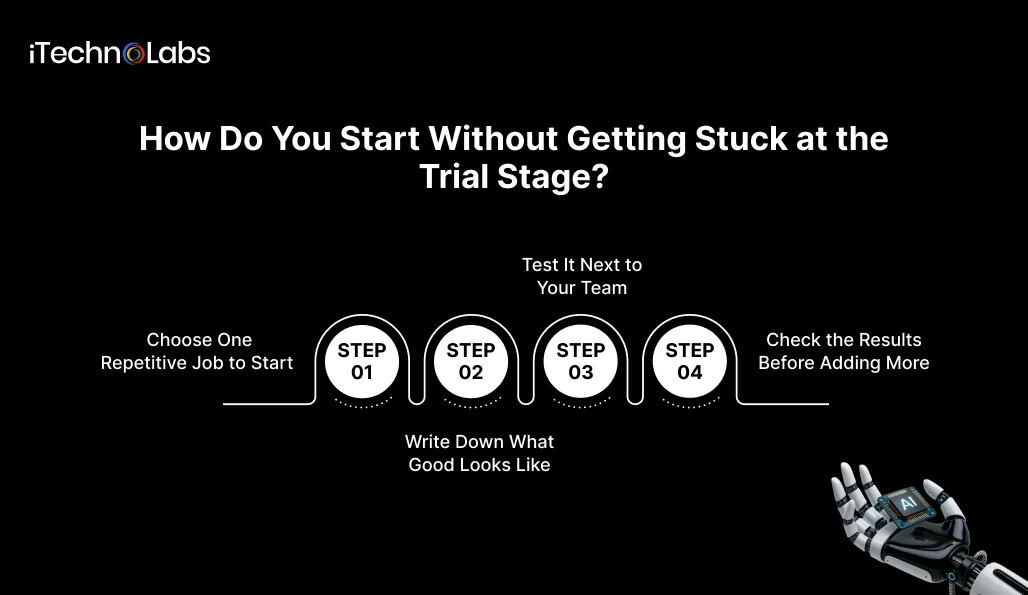
Keep the first project small, and decide up front how you’ll know it’s working.
Step 1: Choose One Repetitive Job to Start
Choose something your team does over and over every week that soaks up real hours. Ideally the paperwork looks roughly the same each time. Sorting a shared inbox is a good example. A report you put together once a quarter isn’t.
Step 2: Write Down What Good Looks Like
Before starting any construction project, write down how the current situation works. Show how long it takes to do the work, how many mistakes are made, and how long the customer has to wait. Then choose a performance standard to beat, so that you’ll be able to tell if the project was worth the cost.
Step 3: Test It Next to Your Team
For a few weeks, have the software and your team handle the same work side by side and compare the results. Where they don’t match, fix the software. Anything important should still get a person’s sign-off.
Step 4: Check the Results Before Adding More
Give it about a month. If the results hold, move on to the next job. If they don’t, sort out the first one before going further, since rolling a shaky setup out to more teams only spreads the problem.
Why Choose iTechnolabs for AI Automation?
iTechnolabs is an AI development company. Our offices are in Markham, Calgary and Ottawa, and in Sheridan, Wyoming.
We hold two ISO certifications: ISO 27001:2013, which covers keeping data safe, and ISO 9001:2015, which covers how we manage quality. We’re also on the Government of Canada’s supply arrangement (SA CW2395301). The team has more than 300 developers and has delivered over 500 apps.
If the automation has to work with software you already run, our custom software development services team can connect the two.
Conclusion
AI automation is ordinary software that can also read and make small decisions. That’s why it copes with emails, scans and forms that never look the same twice. RPA is still cheaper for jobs that never change. Agents fit when the goal is clear but the steps aren’t. Most businesses end up using a bit of each.
The easiest way in is a single job that eats hours every week. Write down how it runs now and test the software next to your team, with someone signing off. Add more only once the results stay steady.
Sticking at the trial stage is common. Almost every company uses AI in some way, but McKinsey found that few companies have deployed it organization-wide. Focusing on a small, defined task makes getting past the trial stage a lot easier.
Still can’t decide between the three? Bring us one real process and we will do the same with you. Once you see how complex the process really is and how much of a slip would cost, the right choice becomes evident.

Frequently Asked Questions
What Is AI Automation in Simple Words?
AI automation handles a chore for you and makes the small calls a person normally would. It could read an email and decide where it goes, check an invoice, or pick who should handle a request. You still set the rules and keep an eye on it.
Is RPA the Same as AI?
No. RPA is more or less a recorder. It replays a person’s clicks and typing in the same order, with no idea what any of it means. AI can read and make judgment calls. Lots of tools now bundle both, but RPA by itself isn’t AI.
What Is the Difference Between AI Automation and an AI Agent?
With AI automation, a person maps out the steps and the software reads and decides inside those lines. An agent is handed the goal and plans its own steps, choosing which programs to use. That freedom is useful, but it also means agents need closer supervision.
Can AI Agents Replace RPA?
Not for most jobs yet. When the work repeats the same way every time, a plain RPA robot is cheaper to run and easier to predict. Agents are more useful when the steps change from case to case. Many companies run both, with agents taking the odd cases and RPA the routine ones.
Does AI Automation Need a Person Checking It?
Yes, whenever the stakes are real. The software can sound confident and still get things wrong. Have someone approve anything involving money or customer accounts, and spot-check a sample of the rest. After it’s been reliable for a while, you can ease off on the low-risk jobs.
Which Jobs Suit AI Automation Best?
Look for work your team does many times a week that eats up real hours. The paperwork doesn’t have to be identical, which is the whole point. Reading invoices and sorting support emails are typical. If a job comes up rarely, or one simple rule covers it, you probably don’t need AI for it.
How Much Does AI Automation Cost?
Most of the price comes down to how messy the incoming work is and how many systems the software has to connect with. Automating one narrow job costs far less than rolling it out across the company. For a rough range on your own job, try our AI cost calculator.
Will AI Automation Take People’s Jobs?
Not at most companies, at least not soon. In McKinsey’s 2025 survey, 43 percent of respondents expected no change in headcount next year, 32 percent expected a drop, and 13 percent expected a rise. That still means about a third expect fewer staff, so it’s worth planning for.











