Key Takeaways
- Start with repetitive, rule-based processes that consume staff time and have clear inputs and outputs.
- Prioritize finance workflows such as invoice routing, expense reviews, and payment reminders when their rules are consistent and measurable.
- Use sales automation to capture leads, assign ownership, and trigger timely follow-ups.
- Automate operational updates and support ticket routing before attempting complex decisions that require judgment.
- Measure baseline performance before launch and retain human approval for financial commitments, exceptions, and sensitive decisions.
Business process automation examples show how businesses can use software to handle repetitive tasks, move information between systems, route requests, and track approvals. For small and midsize businesses, the best starting points are workflows with clear rules, frequent manual steps, measurable delays, and limited exceptions. The goal is to reduce avoidable work while keeping people responsible for important decisions.
Table of Contents
- What Is Business Process Automation?
- 12 Business Process Automation Examples Worth Prioritizing
- Finance Automation Examples
- Sales Workflow Automation Examples
- Operations Automation Examples
- Customer Support Automation Examples
- How To Prioritize Your First Automation
- How To Estimate Automation ROI
- Common Automation Mistakes To Avoid
- How iTechnolabs Helps You Turn Manual Workflows Into Automated Processes
- FAQs
What Is Business Process Automation?
Business process automation uses software to execute or coordinate recurring business activities according to defined rules. A workflow might start when a customer submits a form, an invoice arrives, or a support ticket is created. The system then performs configured actions, updates records, sends notifications, or requests approval.
Automation is most useful when a process follows a predictable pattern. It is less suitable when every case requires individual judgment, the underlying process changes frequently, or the required information is unreliable.
For example, a business can automatically route an invoice to the correct manager based on its amount and department. The manager still decides whether to approve the payment.
12 Business Process Automation Examples Worth Prioritizing
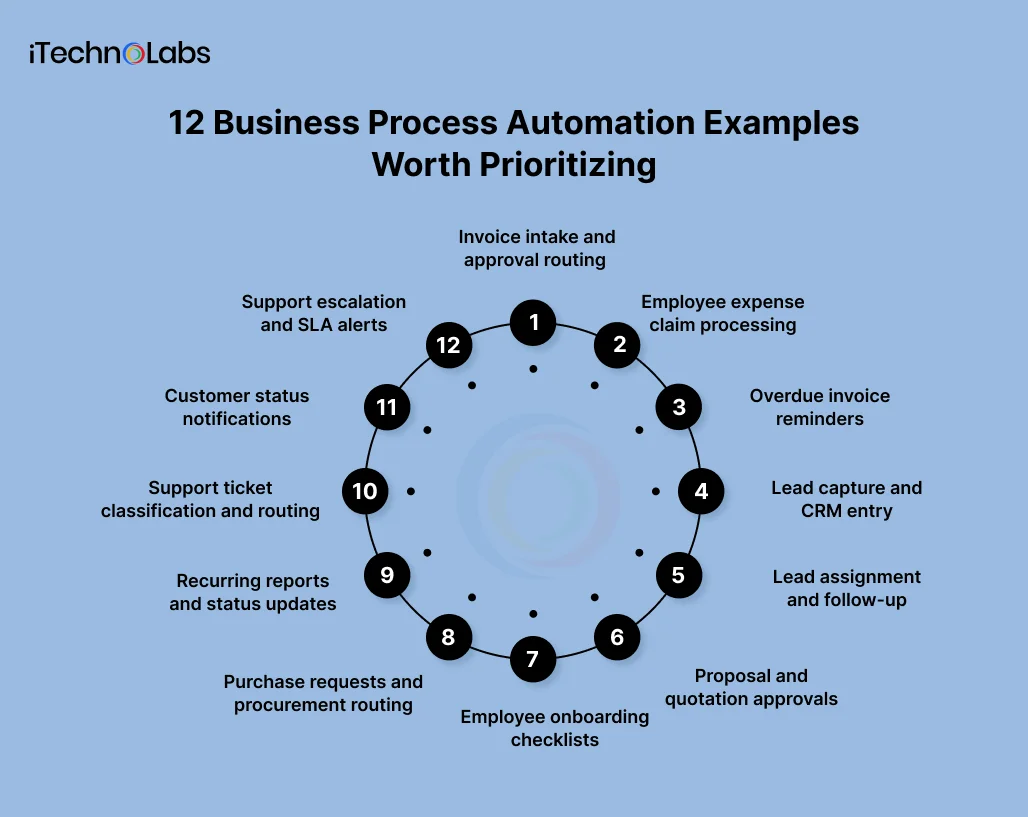
The following examples are grouped by finance, sales, operations, and customer support. Each identifies the trigger, action, human approval, and KPI to monitor.
These are illustrative workflows, not documented iTechnolabs client implementations or claims of guaranteed results. Exact integrations, approval rules, and implementation effort depend on the systems and processes already in place.
Finance Automation Examples
Best starting point: recurring administrative work with consistent financial rules and a clear audit trail.
1. Invoice intake and approval routing
Invoice processing often involves collecting documents, checking required fields, finding the correct approver, and tracking payment status. Automating the administrative steps can make outstanding items easier to manage.
- Trigger: A supplier invoice arrives by email or through a finance portal.
- Action: Extract or capture invoice details, check required fields, match the supplier against existing records, and route the invoice according to predefined rules.
- Human approval: A finance manager reviews exceptions, discrepancies, and invoices that require authorization.
- KPI: Average invoice processing time, exception rate, and percentage of invoices processed without manual data entry.
Begin with invoice intake and routing rather than automatically authorizing payments. Keep duplicate checks and exception handling in the workflow.
2. Employee expense claim processing
Expense claims can require employees to submit receipts, managers to review policy compliance, and finance teams to reconcile approved expenses.
- Trigger: An employee submits an expense claim.
- Action: Check mandatory fields, categorize the expense, flag missing receipts, and route the claim to the appropriate manager.
- Human approval: The manager approves or rejects the claim; finance reviews policy exceptions and unusual amounts.
- KPI: Average claim approval time, incomplete claim rate, and manual handling time per claim.
Use explicit expense thresholds and a documented escalation path. Do not treat a technically complete form as proof that a purchase is legitimate.
3. Overdue invoice reminders
Following up on unpaid invoices can become a recurring administrative task, particularly when staff must check due dates and write individual reminders.
- Trigger: An invoice passes its due date without a recorded payment.
- Action: Check the invoice status, send an appropriate reminder, log the communication, and schedule another follow-up if the balance remains outstanding.
- Human approval: Finance reviews disputed invoices, sensitive customer relationships, and accounts requiring escalation.
- KPI: Days sales outstanding, overdue invoice rate, and staff time spent on collections.
Synchronize the workflow with the accounting system so reminders are not sent after payments or credit notes have been recorded.

Sales Workflow Automation Examples
Best starting point: lead handling, consistent qualification rules, and follow-up tasks that are easy to miss.
4. Lead capture and CRM entry
When leads arrive through website forms, email, and campaign landing pages, sales staff may have to transfer the same information into a customer relationship management system, or CRM.
- Trigger: A prospect submits a form or enters a connected lead channel.
- Action: Create or update the CRM record, validate required fields, check for possible duplicates, and record the lead source.
- Human approval: Sales staff review uncertain matches, incomplete records, or sensitive qualification decisions.
- KPI: Lead entry time, duplicate record rate, and percentage of leads captured successfully.
Start with one lead source and verify the record mapping before connecting every channel.
5. Lead assignment and follow-up
A lead can sit untouched when ownership is unclear, or assignment depends on someone manually checking a shared inbox.
- Trigger: A new lead meets the agreed qualification criteria.
- Action: Assign an owner using territory, product interest, capacity, or another documented rule. Create a follow-up task and notify the salesperson.
- Human approval: A sales manager handles exceptions, disputed ownership, and high-value leads outside standard rules.
- KPI: Time to first response, unassigned lead count, and follow-up completion rate.
Define what happens when an assigned salesperson is unavailable. Include reassignment rules and a visible queue for overdue tasks.
6. Proposal and quotation approvals
Sales teams may need authorization before sending discounts, nonstandard payment terms, or proposals above an agreed value.
- Trigger: A quotation or proposal crosses a predefined approval threshold.
- Action: Send the document and relevant deal details to the authorized reviewer, track the decision, and notify the salesperson when a response is recorded.
- Human approval: The sales manager or designated finance authority approves exceptions and commercial commitments.
- KPI: Approval turnaround time, proposals awaiting approval, and quotation revision rate.
The same general pattern can be applied to quotation approvals when the required systems support it.
Operations Automation Examples
Best starting point: repeatable requests, routine updates, and internal coordination between teams.
7. Employee onboarding checklists
Onboarding requires several tasks to happen in the right order, including preparing equipment, scheduling orientation, and assigning access requests.
- Trigger: HR records a confirmed start date for a new employee.
- Action: Generate a checklist, assign tasks to relevant departments, send reminders, and track completion.
- Human approval: HR or the responsible manager confirms required access, policy acknowledgments, and completion of mandatory steps.
- KPI: Time to complete onboarding tasks, overdue task rate, and checklist completion rate.
Automate task coordination, not unrestricted access provisioning. Access rights should follow the company’s security policy and authorization process.
8. Purchase requests and procurement routing
Purchase requests often move between employees, budget owners, procurement, and finance. Unclear ownership can make the process difficult to track.
- Trigger: An employee submits a purchase request.
- Action: Validate required fields, check the budget category, route the request by amount or department, and record its status.
- Human approval: The budget owner or procurement manager approves purchases according to delegated authority.
- KPI: Purchase request turnaround time, requests returned for missing information, and policy exception rate.
Keep supplier selection, contractual exceptions, and purchases outside approved limits under human control.
9. Recurring reports and status updates
Teams sometimes spend time collecting data from multiple systems, formatting reports, and reminding colleagues to submit updates.
- Trigger: A scheduled reporting deadline arrives or a source system updates.
- Action: Retrieve approved data, populate a standard report, flag missing inputs, and notify report owners when information is incomplete.
- Human approval: The report owner checks the figures, context, and conclusions before distribution to decision-makers.
- KPI: Report preparation time, missing data rate, and on-time report delivery.
Automate data collection and formatting first. Preserve a review step for financial summaries, forecasts, and reports used to make material business decisions.

Customer Support Automation Examples
Best starting point: routing and status communication, while preserving human handling for complex or sensitive cases.
10. Support ticket classification and routing
A support team can lose time assigning incoming requests to the correct department, particularly when requests arrive through multiple channels.
- Trigger: A customer creates a support ticket.
- Action: Categorize the request using predefined fields or classification rules, assign the appropriate queue, and set the initial priority.
- Human approval: Support staff reviews uncertain classifications, urgent cases, and complaints requiring specialist attention.
- KPI: Time to first response, reassignment rate, and tickets routed to the correct team on first assignment.
Start with clear categories and a fallback queue. If AI is used to classify messages, test its accuracy and make uncertain cases visible to staff.
11. Customer status notifications
Customers may contact support simply to ask whether an order, service request, or delivery has progressed.
- Trigger: A verified status changes in the relevant business system.
- Action: Send a notification using an approved template, update the communication history, and provide the next expected step where known.
- Human approval: Staff review delayed, disputed, or exceptional cases before sending sensitive explanations.
- KPI: Status-related support contacts, notification delivery rate, and customer follow-up volume.
Send notifications only when the source system confirms the change. Do not generate delivery dates or promises that the business cannot verify.
12. Support escalation and SLA alerts
Service level agreements, or SLAs, define expected response or resolution times. A team can miss a deadline when tickets remain unnoticed in a queue.
- Trigger: A ticket approaches its response deadline, breaches a defined threshold, or remains unresolved beyond a set period.
- Action: Notify the ticket owner, escalate to the next responsible team, and record the escalation.
- Human approval: The support manager decides on exceptional priority changes, customer commitments, and service credits.
- KPI: SLA compliance rate, overdue ticket count, and average escalation time.
Define business hours, severity levels, pause conditions, and escalation ownership before enabling alerts. Otherwise, the workflow may generate noise without improving service.
How To Prioritize Your First Automation
The best first workflow is not necessarily the most complex or the most visible. It is the one where a manageable implementation can solve a recurring problem and produce a measurable result.
Evaluate candidate workflows using the following five-step process.
- Measure the current process: Record task frequency, average handling time, delays, rework, and exception rates.
- Check process consistency: Identify whether staff follow documented rules or make different decisions for similar cases.
- Map the systems involved: List where the data originates, where it must go, and which integrations are required.
- Define approval boundaries: Decide which actions can happen automatically and which need human authorization.
- Set a success metric: Choose a baseline KPI and a target before building the workflow.
Automation prioritization scorecard
Score each candidate from 1 to 5 against the criteria below. The weights are a proposed internal evaluation model, not a published industry benchmark.
| Criterion | Weight | Score of 5 means |
| Business impact | 30% | Addresses a costly delay, recurring bottleneck, or material business risk |
| Frequency and volume | 25% | Happens often and creates substantial cumulative work |
| Implementation readiness | 20% | Rules, data, ownership, and system access are clear |
| Exception simplicity | 15% | Most cases follow a predictable path |
| Risk manageability | 10% | Errors can be detected, contained, and corrected |
Calculate the weighted score as follows:
Score = sum Rating / 5 x Weight
The result is a score out of 100.
How To Estimate Automation ROI
A credible return on investment estimate requires actual baseline costs, implementation costs, ongoing costs, and measured benefits. Without those inputs, a business cannot reliably claim a particular percentage saving or payback period.
Begin with a simple model.
Annual hours saved = Tasks per year x Minutes saved per task / 60
Then estimate the financial benefit:
Annual net benefit = Annual measurable benefits – Annual operating costs
For a fuller ROI calculation:
ROI = Benefits – Total costs / Total costs x 100
Include development, integration, licenses, testing, maintenance, monitoring, and staff training in the cost estimate. Count time saved as a financial benefit only when it translates into a meaningful outcome, such as reduced overtime, avoided hiring, or additional productive capacity.
If a workflow saves time but payroll and output remain unchanged, the business has gained capacity, but not necessarily an equivalent cash saving.
Common Automation Mistakes To Avoid
- Automating a broken process: Fix unclear ownership and inconsistent rules before coding the workflow.
- Removing approvals too early: Automate routing and checks before allowing the system to make consequential decisions.
- Ignoring exceptions: Build a clear manual review path for incomplete records, unusual amounts, and failed integrations.
- Measuring activity instead of outcomes: Count errors, processing time, service quality, and business value rather than flows executed alone.
- Skipping monitoring: Track failures, permissions, duplicate actions, and changes to connected systems after launch.
For businesses with multiple systems or specialized requirements, custom software development may be relevant when off-the-shelf automation cannot accommodate the process. The appropriate approach depends on the existing technology, requirements, and cost of maintaining the workflow.

How iTechnolabs Helps You Turn Manual Workflows Into Automated Processes
iTechnolabs builds and modernizes software products, including custom software and AI-enabled applications. For businesses dealing with repetitive tasks, disconnected systems, and manual approval processes, the right automation approach starts with understanding how the existing workflow operates.
Automating a single task can help, but the greater opportunity often lies in connecting the systems and people involved in an entire process, from the initial request to approval, execution, and reporting.
iTechnolabs can help your business assess workflow requirements and explore a suitable approach, whether that means connecting existing applications, developing custom workflow software, or incorporating AI where it serves a defined business purpose.
Identify your first automation opportunity. Start with one recurring process, establish how much time it consumes, and identify which steps can be automated without removing essential human oversight.
FAQs
- What are the best business process automation examples for small businesses?
Good starting points include invoice routing, expense claim processing, lead capture, appointment or task notifications, employee onboarding checklists, and support ticket assignment. Choose a process that happens frequently, follows consistent rules, and has a measurable baseline. Begin with one contained workflow before expanding automation across departments.
- How do I calculate ROI from workflow automation?
ROI compares the financial benefits of an automation with its total costs. Measure the time saved, error reduction, and other attributable benefits, then subtract implementation and ongoing operating costs. Use actual baseline data and results after launch. Do not assume every saved staff hour becomes a cash saving or promise a payback period without evidence.
- Is business process automation difficult to implement?
Complexity depends on the number of systems involved, data quality, process consistency, security requirements, and exception handling. A notification triggered by a form submission is usually a more contained starting point than a workflow spanning finance, inventory, and customer systems. Map dependencies and test the simplest useful version before expanding its scope.
- Which tasks should not be fully automated?
Keep human oversight for decisions involving significant financial commitments, unusual transactions, legal obligations, sensitive customer complaints, access permissions, and material exceptions. Automate data collection, routing, reminders, and routine checks where appropriate, but define who can authorize the final action. The right boundary depends on the business’s risk tolerance and applicable requirements.
- Do automated workflows still need human approval?
Yes, when the business process or its risk controls require it. Approval steps can be built into an automated workflow, so designated people receive requests, review supporting information, and approve or reject the next action. Microsoft documents this pattern in its Power Automate approvals guide. Approval rules should be defined before implementation.
- Should I use an automation platform or build custom software?
An existing automation platform may suit a process that uses supported applications and straightforward rules. Custom software may be appropriate when the workflow requires specialized business logic, complex integrations, or greater control over data and permissions. Compare implementation cost, ongoing maintenance, integration limits, security, and future requirements before selecting an approach.
- How long does it take to automate a business process?
There is no universal implementation timeline. A contained workflow with documented rules and accessible data differs significantly from a multi-system process with legacy applications, complex permissions, and several approval stages. Estimate the effort after mapping the process, checking integration options, defining acceptance criteria, and identifying exceptions. Validate the estimate with a scoped implementation plan.
- How can I tell whether automation is working?
Compare performance before and after launch using the same KPI definitions. Depending on the workflow, track processing time, error rates, manual interventions, overdue requests, service levels, and total operating cost. Review failed runs and exceptions as well as successful ones. Keep the workflow only when the measured outcome supports the original business objective.