Key Takeaways
- SUNMI makes Android-based checkout machines, so an app for them is built much like a phone app, with extra work to reach the printer, scanner and customer screen.
- Most projects either build a fresh app or adjust an Android app you already have so it runs properly on SUNMI hardware.
- Apps reach the machines through SUNMI’s own app store after a review, and you can send a new version to a few stores before the whole chain gets it.
- Your app usually hands the card part over to a payment app run by a bank or payment company. That way your app never sees the card number.
- Get the real devices on your desk early. A printer or scanner that behaves on one model can act up on the next.
SUNMI POS software development is the work of building the app that runs on SUNMI’s tills and handhelds, the ones you’ve probably paid at in a café or corner shop. Underneath, they’re Android devices. So most of the job looks like making a phone app, plus hooking it up to the printer, scanner, card reader and customer screen.
Ever had a waiter bring a little handheld to your table and print the bill right there? Odds are it was a SUNMI. The company was founded in 2013, and its machines now ship to more than 200 countries and regions. Over 54,000 partner companies build on its hardware, from shops and restaurants to healthcare and finance firms. If you sell software to retailers or restaurant owners, a lot of them already have one of these sitting by the till. What’s often missing is an app built around how their shop runs day to day.
Table of Contents
- What Is SUNMI POS Software Development?
- Which SUNMI Devices Can Your App Run On?
- What Can a Custom App Do on SUNMI Hardware?
- Do You Need a New App, or Can Yours Be Reworked?
- What Does SUNMI Give Developers to Work With?
- What Does Building a SUNMI POS App Look Like From Start to Finish?
- Which Tools Do Developers Use for SUNMI Apps?
- What Mistakes Slow Down SUNMI POS Projects?
- What Drives SUNMI POS Software Development Cost?
- How Do You Keep Payment and Customer Data Safe?
- Why Choose iTechnolabs for Your SUNMI POS App?
- Conclusion
- FAQs
What Is SUNMI POS Software Development?
SUNMI is a hardware company based in Shanghai. Its machines run SUNMI OS, which is Android tuned for shop and restaurant work. Anything an Android phone app can do, a SUNMI app can do too. On top of that it can print receipts, scan barcodes and show a total on a second screen facing the customer.
Development work on SUNMI usually falls into one of three jobs. Some teams build a brand-new checkout app. Others already have an Android app and need it to use the SUNMI printer and scanner properly. And some run a web product, like an online ordering system, and want new orders to pop out of the kitchen printer automatically.
Each of these is a different size of project. Knowing which one you’re in saves a lot of back and forth with your developers later.
Which SUNMI Devices Can Your App Run On?
SUNMI makes a handful of device lines, and they differ more than you’d expect. A handheld’s screen is a fraction of the size of a countertop till’s, for example. Settle on the models you’ll support first, then start on the screen designs.
| Device type | Example models | Where it’s used | What it means for your app |
| Handheld | V2, V2s, V2 PRO | Orders at the table, delivery, line busting | Small screen with a built-in receipt printer |
| Countertop till | T2, T2 MINI, D2s PLUS, T3 PRO, D3 PRO | Main checkout counter | Bigger screen, and some models add a second screen facing the customer |
| Kiosk | Self-order stands | Fast food and quick-service counters | Customers use it alone, so it has to be very easy to follow |
| Scanner | L2K, M2 MAX | Stockrooms and warehouses | Mostly scanning, little or no printing |
SUNMI devices only take Android apps, and an iPhone or iPad app won’t install on them. If your product was first built for iPad, you’ll need an Android version as well.
What Can a Custom App Do on SUNMI Hardware?
Picture a pizza place at eight on a Friday. Someone’s ordering at the counter, eyeing the small screen turned their way as the total creeps up. They tap their card, and a ticket comes out in the kitchen almost straight away. Out back, the delivery driver picks up a handheld, scans the slip taped to the box and leaves.
Every part of that evening can live inside one app on SUNMI machines. A custom app can:
- print receipts, kitchen tickets and price labels
- scan barcodes and QR codes, including from loyalty cards and phone screens
- show order details on a customer-facing screen
- read weights from a SUNMI scale, which delis and grocers need
- send card payments to a payment app and get the result back
- keep selling when the internet drops, then catch up once it’s back
That last one gets overlooked a lot. Café wifi tends to fail at the worst moment, usually mid lunch rush. If the till locks up every time the wifi blinks, staff will be scribbling orders on paper as a backup before the week is out.
Do You Need a New App, or Can Yours Be Reworked?
Which way you go decides most of the price and how long the work takes. Most teams end up choosing one of these four routes.
| Option | Good fit when | Watch out for |
| Start a fresh Android app | It’s a brand-new product, or the current one is a headache to change | This is the slowest route, though every screen ends up built around how your customers work |
| Rework the Android app you’ve got | Your app already runs fine on Android phones or tablets | Expect some clean-up of older code before the printer and scanner behave |
| Build once for Android and iPhone | You also run an iPhone app for owners, managers or customers | Printer and scanner add-ons are often made by other developers, not SUNMI |
| Run a web page in the browser | You only need simple screens | A browser usually can’t reach the printer or scanner without extra work |
If you’re still testing whether shops will pay for your idea, a smaller first version makes sense. Our MVP development services page explains how that first cut is usually scoped.
What Does SUNMI Give Developers to Work With?
SUNMI runs a developer portal with free building blocks for its hardware. Developers call this the SUNMI SDK. It’s a set of ready-made code pieces, so your team doesn’t have to work out the printer from scratch.
You’ll find pieces for the receipt printer and barcode scanner, plus the scale and the customer screen. If a business runs dozens of tills, SUNMI’s online tools let one person look after all of them from a single place and sort out problems without driving to each store. There’s a camera kit too. It can spot faces, products or barcodes, and it can listen for spoken commands.
To use any of it, you first register as a SUNMI partner and then get a developer role on that account. Signing up is quick, so there’s no reason to leave it for launch week.
What Does Building a SUNMI POS App Look Like From Start to Finish?
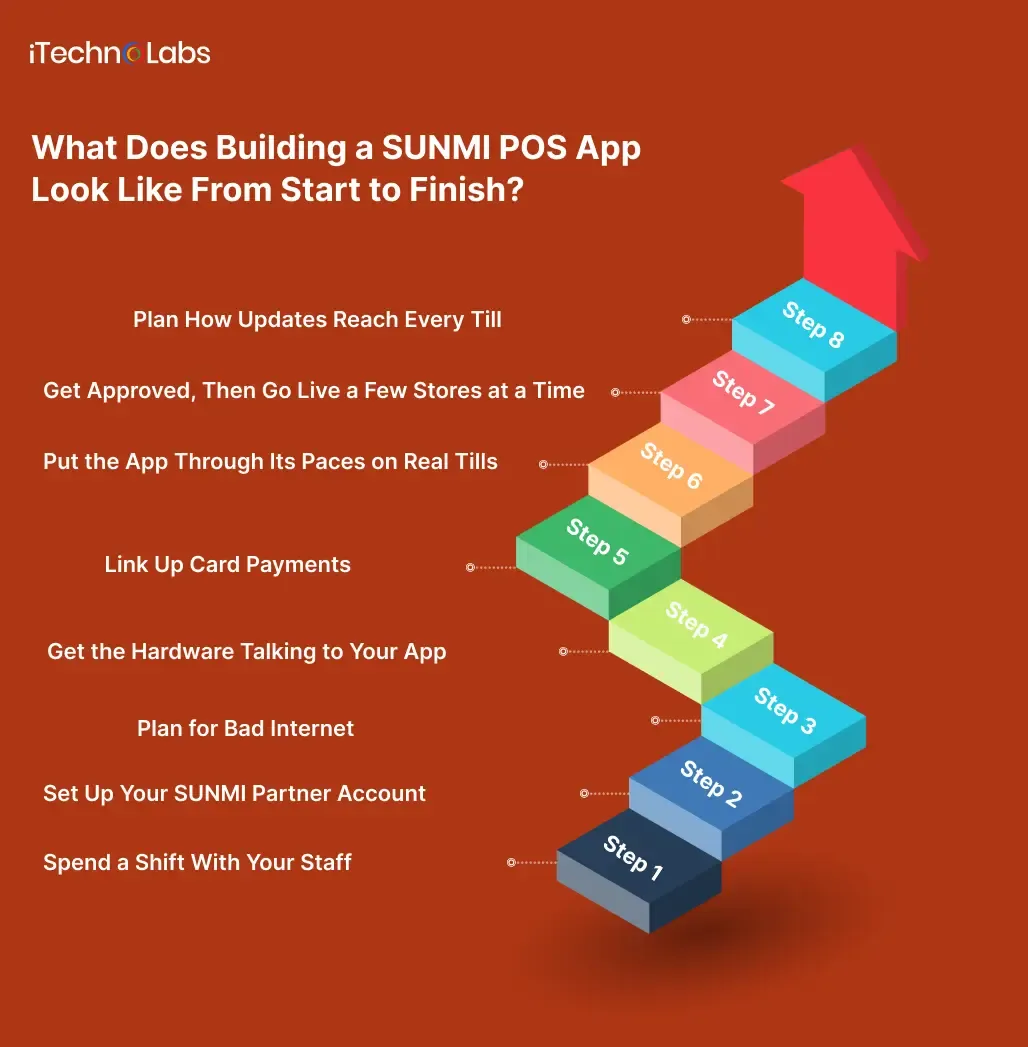
Your project will have its own twists. Still, the smoother ones tend to move through these stages in about this order.
Step 1: Spend a Shift With Your Staff
Before anyone draws a single screen, go and stand behind the counter with the people who’ll use the app. Watch a cashier close a busy shift. Ask the kitchen how tickets reach them now. You’ll find small habits, like folding a ticket a certain way, that tell you what the screens and printouts need to look like.
This is also when you pick your device models. A café might need two countertop tills and three handhelds. A grocery store might need tills with scales and a scanner for the stockroom.
Step 2: Set Up Your SUNMI Partner Account
You’ll register at partner.sunmi.com and go through a company check. There’s a reason to do this early. SUNMI devices are linked to a partner account when they’re sold. If that partner hasn’t allowed outside installs, staff can only add apps through SUNMI’s own store. You want your account ready long before your app is.
Step 3: Plan for Bad Internet
Decide now what happens when the connection drops. The app should keep a copy of every sale on the till itself, then pass it to head office once the line comes back. Trying to add that in the last few weeks eats time and money, which is why it goes in the plan before anything gets built.
Step 4: Get the Hardware Talking to Your App
Here’s where your developers hook the app into SUNMI’s hardware. Receipts get designed to fit the narrow paper roll. The scanner gets set up so a scan lands in the right box on screen. If your tills have a customer screen, it gets its own simple layout showing items and the total.
Step 5: Link Up Card Payments
Most SUNMI checkout apps don’t handle card details themselves. Your app passes the amount to a payment app made by a bank or payment company. That app takes the card and tells your app whether it went through. Peach Payments works this way, for instance. It keeps its payment app separate and leaves your app to you. Pick a payment partner early on, because who you go with can limit the devices you use and the countries you sell in.
Step 6: Put the App Through Its Paces on Real Tills
No laptop setup behaves like a real receipt printer. One well-used SUNMI add-on opens without trouble on a normal phone, then fails the moment it’s asked to print or scan. Order at least one of every model you mean to support and try hard to break things. Run off a hundred receipts in a row, scan a scrunched-up label under a dim bulb, and pull the router plug halfway through a sale to see how the app copes.
Step 7: Get Approved, Then Go Live a Few Stores at a Time
Once you’re happy with it, the app goes up on the SUNMI partner site and into the review queue. If it runs on payment terminals, someone at SUNMI may need to check it by hand before it appears in the store. After approval, you can send it to a handful of devices before everyone else. Pick a couple of shops that won’t mind the odd hiccup, fix whatever they report and widen it from there.
Step 8: Plan How Updates Reach Every Till
You’ll keep improving the app, and each till has to end up on the latest version. After SUNMI signs off on an update, you push it out from your partner account. For handhelds that go missing, tools like Scalefusion let you set up, lock and keep an eye on SUNMI devices from a distance.
Which Tools Do Developers Use for SUNMI Apps?
Most SUNMI apps are written with Android’s own building tools. That’s the most direct route to the hardware, and it’s a sound choice when the till app is the only app you have.
Some teams use Flutter or React Native instead. These let one team write an app once and run it on both Android and iPhone. On SUNMI, that only pays off if you also have an iPhone app, say one that lets owners check the day’s sales from home. iTechnolabs’ Flutter team and our React Native app development company page cover how those projects usually run.
A word of caution. Many printer and scanner add-ons for these tools are written by independent developers. One of the better-known React Native add-ons states plainly that it isn’t an official SUNMI project. That doesn’t make it bad. It does mean someone on your team should read through it before your whole checkout depends on it.
What Mistakes Slow Down SUNMI POS Projects?
The most common one is testing only on a laptop. Everything looks fine until the first real device arrives, and then the printer misbehaves two weeks before launch.
Receipts in Arabic catch out a lot of teams selling into the Gulf. A popular SUNMI printer add-on warns that its text mode may not join Arabic letters or print them right-to-left correctly. One fix is to draw the receipt as a picture inside the app and print that instead. Find out early, though, because redesigning receipts late is a pain.
Launch plans often forget SUNMI’s review. If your sales team has promised a go-live date, leave room for at least one round of changes after SUNMI looks at the app.
And plenty of teams think about updates only after launch. By then, fifty stores are on the old version and nobody’s sure how to move them. Sort out the update process while you’re still building.
What Drives SUNMI POS Software Development Cost?
Price depends on scope far more than on SUNMI itself. These are the things that move the number most.
| What you need | Why it changes the price |
| How many device models you support | Each model needs its own testing and sometimes its own screen layouts |
| Card payments | Connecting a payment app adds work and a round of checks with the payment company |
| Working without internet | Saving sales on the device and syncing later takes careful building |
| Receipts in more than one language | Arabic and other right-to-left languages may need receipts printed as images |
| Links to other systems | Stock, accounting and online ordering each add their own connection |
| An owner’s dashboard | Reports and settings on the web or phone are a second product to build |
For a rough number based on your own feature list, try our app cost calculator.

How Do You Keep Payment and Customer Data Safe?
Card data comes with strict rules set by the card industry, known as PCI DSS. Letting an approved payment app handle the card itself shrinks how much of those rules apply to your app. That’s one big reason most SUNMI apps work this way.
Customer data is a separate question. If you sell to Canadian businesses, their customers’ personal details fall under Canada’s privacy law, PIPEDA. The rules change from country to country. Wherever you sell, collect only the customer details the app needs and keep them locked down. Shops should know exactly what your app gathers, so spell it out for them.
And then there’s the handheld tucked in a waiter’s apron. These get knocked off tables, and every so often one goes home in the wrong bag. Build in a way to lock or wipe a missing device from a dashboard.
Why Choose iTechnolabs for Your SUNMI POS App?
We’ve delivered more than 500 apps used by over 50,000 people, with a team of 300+ developers. Our work runs under ISO 27001:2013 for information security and ISO 9001:2015 for quality. We’re also an approved Government of Canada supplier under Supply Arrangement CW2395301.
Our offices are in Markham, Calgary and Ottawa in Canada, and Sheridan, Wyoming in the US. Our custom software development team builds checkout apps alongside the dashboards, stock systems and ordering tools that sit behind them. So the app on the counter and the system in the back office come from the same people.
Conclusion
For most software companies selling to shops and restaurants, yes. The hardware is already on a lot of counters, it runs Android, and SUNMI gives developers free tools to reach the printer, scanner and screens. That cuts out a lot of guesswork compared with building for a till nobody has heard of.
The hard parts sit around the edges. You need a partner account set up early, a payment partner chosen before the build gets far, and real devices on your desk for testing. Receipts in other languages need thought. So does the moment your app has to work without internet, and the day you need to update a hundred tills at once.
Handle those early and the rest of the build feels a lot like any other Android project. Teams that put them off often lose launch week to printer problems, when they’d hoped to be signing up stores. Begin with a shop or two that know you well, pay attention to what the staff there grumble about, and grow from there. Still torn between a fresh build and fixing up the app you’ve got? Put that question to your developers before anything else.
FAQs
1. Can SUNMI Devices Run iPhone Apps?
No. SUNMI machines run on Android, so iPhone and iPad apps won’t install on them. If your business also has an iPhone app for owners or managers, a shared tool like Flutter can help one team look after both. The checkout app itself still needs an Android version.
2. Will My Current Android Checkout App Work on a SUNMI Device?
It will often open and run, since SUNMI devices are Android underneath. The printer, scanner and customer screen won’t work until your developers connect them using SUNMI’s free developer tools. Plan a round of testing on each model you sell, because small hardware differences show up fast.
3. How Long Does SUNMI Take to Review an App?
SUNMI doesn’t publish one fixed timeline for every device. Apps for payment terminals may also need a manual check before they appear in the store. The safest move is to ask SUNMI about your device series early. Then leave room for at least one round of changes in your launch plan.
4. Can a SUNMI POS App Keep Working Without Internet?
Yes, if it’s built that way from the start. The app saves each sale on the device and sends it to your main system once the connection comes back. Adding this late is slow and costly, so decide on it during planning, before anyone starts designing screens.
5. Should I Use Flutter or Build Only for Android?
If the checkout app is your only app, building straight for Android keeps things simple. If you also run an iPhone app for managers or customers, Flutter lets one team share most of the work. Either way, check any printer add-on carefully, since many aren’t made by SUNMI.
6. How Do I Update the App on Hundreds of Devices?
Once SUNMI approves an update, you release it from your partner account and the devices pick it up. You can send it to a small group of stores first, watch for problems, then roll it out to everyone. Device management tools can also lock lost handhelds.
7. Do I Need a SUNMI Partner Account to Publish My App?
Yes. You register at partner.sunmi.com, pass a company check and then submit your app for review. SUNMI devices are linked to a partner account when sold, and some can only install apps through SUNMI’s store. Set the account up before development starts so it never holds up launch.
8. Can SUNMI Printers Print Receipts in Arabic?
They can, but it takes some care. At least one popular printer add-on warns that its text mode may not join Arabic letters or run them right-to-left properly. One fix is to draw the receipt as an image inside the app and send that picture to the printer instead.