Key Takeaways
- AI automation works best when your business has clearly defined processes, accessible data and measurable operational problems.
- Before investing in AI, identify repetitive tasks, review existing software and check whether your business data is reliable.
- Your employees need clear responsibilities, practical training and a way to review AI generated outputs.
- Security, privacy, human oversight and vendor accountability should be part of the implementation plan.
- Start with one manageable workflow, measure the results and expand only when the first implementation performs reliably.
AI automation for small businesses can reduce repetitive administrative work, improve workflow coordination and help teams handle information more efficiently. However, successful implementation depends on more than choosing an AI tool. Your processes, data, existing software, employees, budget and security controls must be ready to support it.
For an SMB owner, the first question should not be which AI platform to purchase. It should be whether the business has the right operational foundation to use automation effectively.
This checklist will help you assess that foundation before committing time and money to an AI automation project.
Table of Contents
AI Automation Checklist for Small Business
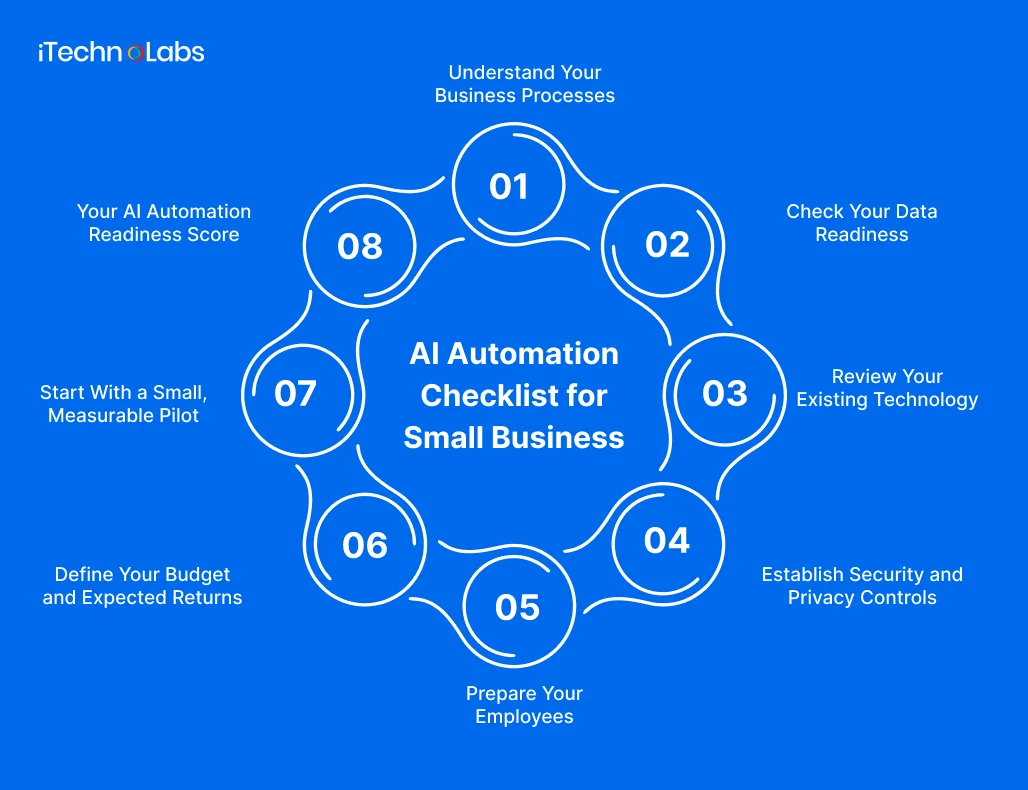
1. Understand Your Business Processes
AI automation should solve a specific operational problem. Automating an unclear or inefficient process can make existing problems harder to manage.
Start by examining how work moves through your business.
Readiness checklist
- Have you documented your main business workflows?
- Can you identify tasks employees repeat every day or week?
- Do you know where manual data entry happens?
- Have you identified delays caused by approvals or departmental handoffs?
- Can you identify tasks that regularly create errors or require rework?
- Do employees follow a reasonably consistent process for completing these tasks?
- Can you identify who owns each workflow?
What to look for
Common opportunities include invoice processing, appointment scheduling, customer enquiry management, document classification, order updates and internal reporting.
For example, an SMB receiving customer enquiries through email, website forms and social media may spend considerable time reviewing messages and forwarding them to the right employee.
An automated workflow could classify enquiries, collect relevant information and route requests to the appropriate team member.
The process still needs defined rules and an employee responsible for handling unusual cases.
A business with documented and repeatable workflows is generally in a better position to evaluate automation than one where every employee follows a different process.
2. Check Your Data Readiness
AI automation depends on the information it receives. If customer records are outdated, documents are inconsistent or important information is scattered across different systems, automation may produce unreliable results.
The Canadian government’s SME AI Adoption Blueprint identifies data quality, fragmented systems and access to suitable infrastructure as important adoption challenges.
Readiness checklist
- Is your customer information stored in an organised system?
- Are important records accurate and regularly updated?
- Can employees access the information required to complete their work?
- Are duplicate customer and supplier records identified?
- Do you have clear rules for storing and sharing business information?
- Are important documents available in usable digital formats?
- Do you know which data contains confidential or personal information?
- Can you control who accesses sensitive business records?
What to look for
Consider a company that stores customer details in spreadsheets, email inboxes and separate accounting software.
Before automating customer communication, it should establish which records are authoritative, how information is updated and how different systems share data.
You may not need a large AI training dataset for every automation project. Many business workflows can use existing records, approved documents and controlled system integrations.
However, the quality and accessibility of that information must match the task.
Clean up essential business records before investing in advanced AI features. This can reduce unnecessary integration and troubleshooting work.
3. Review Your Existing Technology
Your current software determines how easily a new automation workflow can connect with your business.
A business using separate CRM, accounting, inventory and customer support systems should understand how information moves between them before selecting an automation platform.
Readiness checklist
- Do you know which software your employees use daily?
- Can your existing systems exchange information?
- Do important applications provide APIs or supported integrations?
- Are your software subscriptions and permissions up to date?
- Can your current infrastructure support the proposed workflow?
- Do you know whether existing software already includes automation features?
- Have you identified systems that may need modernization?
- Is there a plan for handling integration failures?
What to look for
Suppose your sales team updates a CRM while the finance team maintains separate billing records.
An automated workflow could transfer approved customer and order information between systems, reducing repeated data entry.
However, the integration must account for duplicate records, failed updates, permission restrictions and changes to existing software.
Not every SMB needs custom AI software. Existing automation features or third party integrations may be sufficient for straightforward workflows. Custom development becomes worth evaluating when business requirements, system complexity or integration limitations demand greater control.
Explore custom software development if your existing systems cannot support the workflows your business needs.
4. Establish Security and Privacy Controls
Automation can involve customer information, employee records, financial documents and internal business data.
Sending this information to an AI platform without reviewing its data handling practices can introduce unnecessary risks.
Readiness checklist
- Have you identified the sensitive information used in each workflow?
- Do you know where your business data is stored and processed?
- Have you reviewed the AI vendor’s privacy and security policies?
- Are access permissions limited to authorised employees?
- Do you have a policy explaining what employees can share with AI tools?
- Are important activities recorded through suitable audit logs?
- Is there a process for reporting security incidents?
- Have you identified tasks that require human approval?
- Have you reviewed applicable privacy and industry regulations?
What to look for
A customer service automation tool may need access to names, email addresses, order details and support conversations.
Before implementation, determine which information the system actually needs, who can access it and whether the vendor’s data handling practices meet your requirements.
Businesses should assess the legal requirements applicable to their customers, locations, industries and data processing activities.
Useful guidance includes
- The Canadian Office of the Privacy Commissioner’s AI and privacy guidance,
- The UK’s Information Commissioner’s Office AI and data protection guidance
- The UAE government’s National Cyber Security Policy for Artificial Intelligence.
Do not give an AI system unrestricted access to business information simply because an integration makes it technically possible.
5. Prepare Your Employees
AI automation changes how work gets completed. Employees need to understand which tasks the system will handle, where their responsibilities remain and how to report problems.
Without employee involvement, even a technically successful implementation can create confusion.
Readiness checklist
- Have you explained why the business is considering automation?
- Have you involved employees who currently manage the target workflows?
- Do employees understand what the automation will and will not do?
- Is someone responsible for reviewing automated outputs?
- Have you identified training requirements?
- Can employees report incorrect results or unexpected behaviour?
- Have you documented how exceptions will be handled?
- Is there a process for reviewing employee feedback?
What to look for
Consider automating the first stage of customer enquiry processing.
The system may classify messages and assign them to the appropriate department. However, employees should know how to correct incorrect classifications and manage enquiries that require individual attention.
The objective should be to improve how employees work, not simply introduce another system they must monitor.
Employee participation also helps uncover practical workflow requirements that may not be visible to business owners during initial planning.
6. Define Your Budget and Expected Returns
AI automation should have a clear business justification.
The cost of implementation is not limited to purchasing software. It may include integration, custom development, employee training, maintenance, security reviews and ongoing platform usage.
Readiness checklist
- Have you allocated a budget for implementation?
- Have you considered ongoing subscription and usage costs?
- Do you understand potential integration expenses?
- Have you identified the employees involved in implementation?
- Can you estimate the time currently spent on the target process?
- Have you identified the errors, delays or costs you want to reduce?
- Have you defined measurable success criteria?
- Is there a budget for future maintenance and improvements?
What to measure
Before introducing automation, record the current performance of the workflow.
Depending on the process, useful measurements may include:
- Time required to complete a task.
- Number of enquiries processed.
- Manual data entry requirements.
- Frequency of processing errors.
- Time taken to respond to customers.
- Number of tasks waiting for approval.
For example, if employees spend several hours each week preparing reports manually, measure the time involved before introducing automated report preparation.
After implementation, compare the results against the original baseline.
Do not assume that every automated task will produce immediate financial savings. Some benefits may come from faster responses, better visibility or reduced administrative effort.
7. Start With a Small, Measurable Pilot
You do not need to automate your entire business at once.
A focused pilot allows your team to test whether a proposed solution works under actual operating conditions before expanding it.
Readiness checklist
- Have you selected one clearly defined workflow?
- Is the workflow suitable for a controlled pilot?
- Have you documented expected inputs and outputs?
- Have you defined acceptable error levels?
- Is there an employee responsible for monitoring the pilot?
- Can the team review automated and manual results?
- Is there a fallback process if the system fails?
- Have you defined when the pilot should be expanded, revised or stopped?
What to look for
A business might begin by automating document classification or internal enquiry routing rather than attempting to automate an entire customer service department.
During the pilot, monitor output quality, processing time, exceptions, and employee feedback.
Keep human approval for decisions involving money, sensitive information, or significant customer consequences until the system has been properly evaluated and appropriate controls are established.
Expand automation only after the pilot demonstrates that the workflow meets its intended business requirements.
8. Your AI Automation Readiness Score
Use the following simple assessment to understand where your business currently stands.
Count one point for every checklist item you can confidently answer yes to across the seven readiness areas.
| Score | Readiness indication |
| 0–15 | Foundation needs attention |
| 16–25 | Early preparation |
| 26–35 | Building implementation readiness |
| 36–44 | Strong operational readiness |
| 45–56 | Advanced readiness |
These score bands are an indicative self-assessment tool created for this article. They are not a validated industry benchmark or a guarantee of implementation success.
A higher score suggests that your business has addressed more of the operational requirements for AI automation. However, it does not replace technical, security, or legal assessment. Even businesses with lower scores can begin preparing by improving their existing workflows, data quality and internal processes.
Why Choose iTechnolabs for AI Automation?
AI automation delivers value when it addresses real operational challenges and works with the systems your business already depends on. Choosing the right development partner can help you move from identifying automation opportunities to implementing solutions that fit your workflows.
At iTechnolabs, we help businesses build, modernize and integrate AI-powered digital products. Our team works across AI development, custom software development, AI agent development, and system integration to address specific business requirements.
Whether you want to automate customer enquiries, streamline internal operations, connect disconnected business applications, or introduce AI into an existing product, we can help you evaluate the technical requirements and plan an appropriate implementation.
How iTechnolabs can support your AI automation journey:
- AI automation development: Build AI-powered workflows around your business processes and operational requirements.
- AI agents and LLM integration: Develop intelligent systems that process information, support business tasks and interact with existing applications.
- Custom software development: Build internal platforms and business applications when existing tools cannot meet your requirements.
- System integration: Connect your CRM, ERP, and other business applications to improve information flow.
- AI modernization: Assess existing software and identify opportunities to introduce AI capabilities.
FAQs
- How do I know if my small business is ready for AI automation?
Your business may be ready to explore AI automation when it has clearly defined workflows, reliable information, suitable software, employee support and an identifiable business objective. You should also have a budget, security controls and a way to measure results. Missing requirements should be addressed before expanding implementation.
- What processes should small businesses automate first?
Start with repetitive, time consuming workflows that have predictable objectives and accessible information. Examples include invoice processing, customer enquiry routing, document classification and appointment reminders. Choose a process where mistakes can be reviewed and corrected without creating serious financial, operational or customer consequences.
- Does AI automation require custom software?
No. Many businesses can begin with existing software features or third party automation platforms. Custom software development becomes useful when existing tools cannot support specific workflows, integrations, data requirements or security controls. The right approach depends on the complexity of the business process and its technical environment.
- How much does AI automation cost for a small business?
AI automation costs depend on workflow complexity, software subscriptions, integrations, data preparation, security requirements and ongoing maintenance. A small workflow using existing software generally requires a different investment from a custom AI system connected to several business applications. Define the requirements before requesting an estimate.
- Is AI automation safe for customer and business data?
AI automation can introduce privacy and security risks if sensitive information is shared without appropriate controls. Review vendor data handling practices, restrict access, establish employee policies and maintain human oversight. Businesses should also assess applicable privacy, cybersecurity and industry requirements before deploying an automated workflow.
- How should an SMB start implementing AI automation?
Begin by documenting one repetitive business process and measuring its current performance. Review the information and software involved, identify potential risks, select an appropriate solution and run a controlled pilot. Monitor results, gather employee feedback and expand only when the workflow performs reliably.