Key Takeaways
- AI agents can manage multi-step business workflows that require contextual decisions and interaction with software systems.
- Customer support, sales, finance, IT, and document processing offer practical starting points for implementation.
- AI agents introduce risks involving data access, incorrect actions, security vulnerabilities, and accountability.
- Successful implementation requires clear business objectives, controlled permissions, testing, monitoring, and human approval.
- Businesses should begin with a focused use case before expanding agent capabilities across departments.
AI agents for business are software systems that use artificial intelligence to understand objectives, make decisions, interact with connected applications, and complete multi-step tasks. Unlike conventional automation, they can adapt their actions to changing information. Businesses can use them for customer support, sales operations, finance, IT, and internal workflows, provided appropriate security and human oversight are in place.
Table of Contents
- What Are AI Agents and How Do They Work?
- AI Agent Use Cases Across Business Functions
- When Should a Business Use an AI Agent?
- AI Agent Risks and Security Challenges
- How to Implement AI Agents in Your Organisation
- Build vs Buy: Choosing the Right AI Agent Approach
- SMB vs Enterprise: Different Implementation Priorities
- Choosing an AI Development Partner
- How iTechnolabs Helps Businesses Build and Implement AI Agents
- Conclusion
- FAQs
What Are AI Agents and How Do They Work?
An AI agent is a software system that uses an AI model to interpret information, determine what needs to happen next, and take actions through approved tools or integrations.
A conventional application follows predefined instructions. An AI agent can evaluate context and select different actions depending on the situation.
For example, a conventional customer support workflow might send every refund request to the same department. An AI agent could examine the request, retrieve the relevant order information, check the refund policy, determine whether the request meets predefined conditions, and prepare the next action.
A business AI agent generally includes five components:
- AI model: Interprets instructions, evaluates information, and determines the next step.
- Instructions and policies: Define the agent’s responsibilities, boundaries, and permitted behaviour.
- Knowledge and data access: Provides information from approved documents, databases, and business applications.
- Tools and integrations: Allow the agent to interact with CRMs, ERPs, APIs, communication platforms, and other systems.
- Monitoring and memory: Maintain relevant task context and provide visibility into actions and outcomes.
The important difference is that an agent can move beyond answering questions to performing defined tasks.
AI Agent Use Cases Across Business Functions
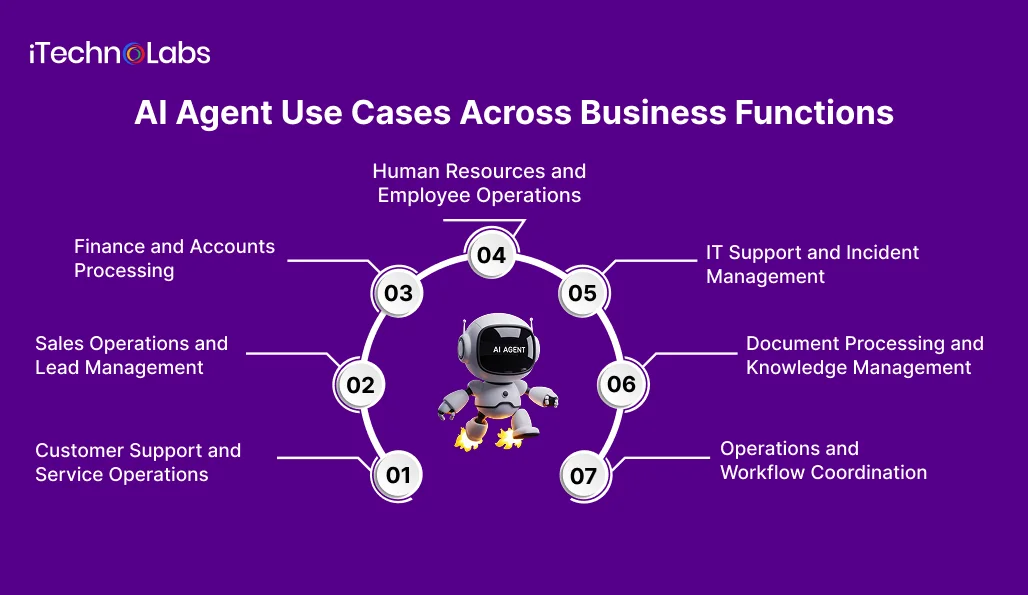
The value of AI agents depends on the business process they support. A useful implementation begins with a repetitive or information-intensive workflow where multiple steps require contextual decisions.
Here are seven areas where organisations can evaluate potential applications.
1. Customer Support and Service Operations
Customer service teams handle repetitive requests involving orders, account information, product questions, and service issues.
A customer support agent can:
- Understand incoming customer requests.
- Retrieve information from approved knowledge sources.
- Check order or account details through connected systems.
- Prepare responses based on company policies.
- Escalate sensitive or unresolved requests to human representatives.
For example, an eCommerce business could use an agent to retrieve an order’s delivery status, explain the applicable return policy, and prepare a response.
Refund approvals, account changes, and other sensitive actions should follow defined authorisation rules.
2. Sales Operations and Lead Management
Sales teams often spend considerable time researching prospects, maintaining CRM records, and preparing follow-ups.
An AI sales agent can support these activities by:
- Reviewing incoming enquiries.
- Extracting relevant company and contact information.
- Classifying leads against predefined qualification criteria.
- Updating CRM records.
- Preparing personalised follow-up drafts.
- Notifying sales representatives when human intervention is required.
The agent should not independently make unsupported claims or send sensitive commercial commitments.
3. Finance and Accounts Processing
Finance departments work with invoices, purchase orders, payment records, and expense documentation.
An AI agent can assist with:
- Extracting information from invoices.
- Matching documents against purchase orders.
- Identifying missing information.
- Flagging unusual transactions.
- Preparing reconciliation summaries.
- Routing exceptions to the appropriate finance employee.
Payment execution and financial approvals should remain subject to established controls and authorised human approval.
4. Human Resources and Employee Operations
HR teams manage onboarding, employee queries, policy documents, and administrative requests.
An internal HR agent can retrieve approved policy information, guide new employees through onboarding requirements, and route requests to the correct department.
It can also help employees locate relevant information without requiring HR staff to respond manually to every routine question.
Access restrictions are essential because employee records and personal information require appropriate protection.
5. IT Support and Incident Management
Enterprise IT teams receive requests involving access, software issues, system availability, and technical troubleshooting.
An IT agent can:
- Classify incoming support tickets.
- Retrieve relevant technical documentation.
- Suggest troubleshooting steps.
- Collect diagnostic information.
- Route incidents based on severity.
- Prepare incident summaries.
Actions involving production systems, privileged accounts, or infrastructure changes should require appropriate approval and change controls.
6. Document Processing and Knowledge Management
Businesses store information across contracts, reports, policies, proposals, and internal databases.
An AI agent connected to approved knowledge sources can retrieve relevant documents, extract important information, compare records, and prepare summaries.
For example, a procurement team could use an agent to locate supplier documents, identify missing fields, and prepare a review checklist.
Retrieval-augmented generation (RAG) can provide access to relevant business knowledge, while an agent can decide when to retrieve information and which approved actions to take next.
7. Operations and Workflow Coordination
Operational teams often coordinate tasks across several applications and departments.
An operations agent could monitor incoming requests, identify incomplete information, update workflow records, and notify the responsible employee.
For example, a logistics business could use an agent to collect shipment updates, identify delivery exceptions, and prepare escalation requests.
The system should distinguish between recommending an action and executing it. Not every operational decision should be delegated to an autonomous system.
When Should a Business Use an AI Agent?
Not every business process needs an AI agent. Selecting the wrong approach can increase development costs and introduce unnecessary complexity.
Use this framework to evaluate the available options:
| Business requirement | Recommended approach |
| Fixed rules and predictable steps | Traditional workflow automation |
| Searching documents and answering questions | RAG-based AI assistant |
| Contextual decisions across multiple steps | AI agent |
| Sensitive decisions requiring accountability | Human-led process with AI assistance |
An AI agent becomes more relevant when a workflow requires contextual reasoning, multiple system interactions, changing inputs, and decisions about what to do next.
Before implementation, assess:
- How frequently the workflow occurs.
- How much manual work it requires.
- Whether the necessary business data is accessible.
- Which applications the agent must interact with.
- Whether incorrect actions could create financial, legal, or operational consequences.
- Whether the process has clear escalation and approval requirements.
A well-defined workflow is a better starting point than an organisation-wide mandate to introduce AI.
AI Agent Risks and Security Challenges
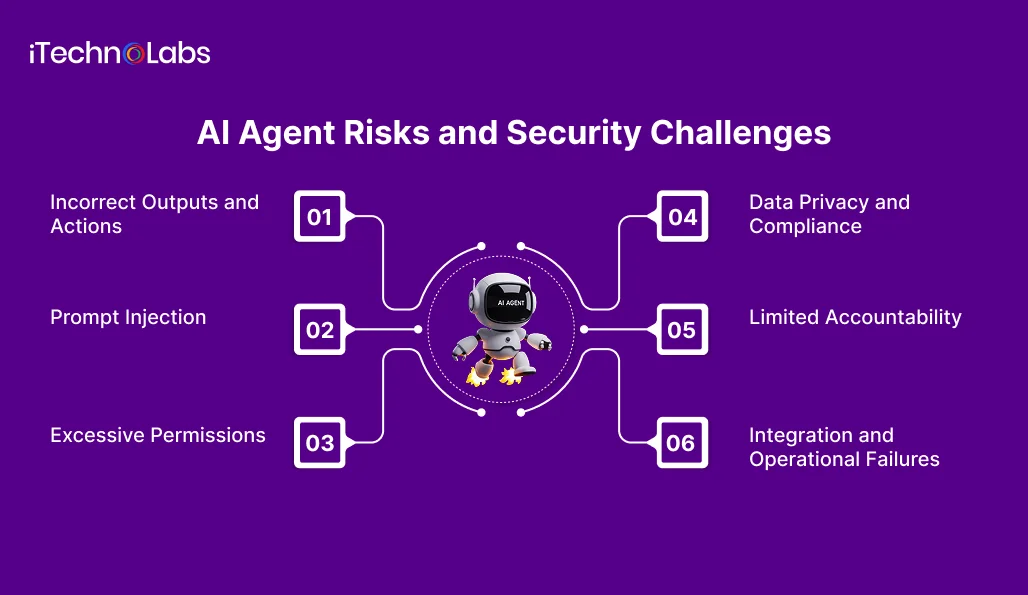
AI agents can access information and interact with business applications. This creates a different risk profile from a chatbot that only generates text.
The joint cybersecurity guidance published in May 2026 by CISA, the Canadian Centre for Cyber Security, the UK National Cyber Security Centre, and other partner agencies highlights the importance of managing agent-specific threats.
Businesses should consider the following risks before deployment.
1. Incorrect Outputs and Actions
An agent can misunderstand instructions, retrieve inaccurate information, or select an inappropriate action.
Control: Validate important outputs, establish confidence thresholds, and require approval for consequential actions.
2. Prompt Injection
Malicious instructions embedded in documents, emails, or external content may influence an agent’s behaviour.
Control: Treat retrieved content as untrusted input, separate instructions from data, validate tool calls, and test against adversarial inputs.
3. Excessive Permissions
An agent with unrestricted access to business applications may expose sensitive information or perform unauthorised operations.
Control: Apply least-privilege access, use dedicated identities, restrict available tools, and separate read permissions from write permissions.
4. Data Privacy and Compliance
Agents may process customer records, employee information, financial documents, or confidential business data.
Control: Define approved data sources, establish retention rules, protect sensitive information, and review applicable privacy and regulatory requirements.
For Canadian operations, assess PIPEDA and applicable provincial privacy laws. UK organisations should consider UK GDPR and the Data Protection Act 2018. US and UAE requirements depend on the industry, data, and relevant jurisdictions.
5. Limited Accountability
When an agent interacts with multiple applications, it can become difficult to determine why an action occurred or who authorised it.
Control: Maintain audit logs, record tool calls, assign clear ownership, and establish escalation procedures.
6. Integration and Operational Failures
An agent may encounter unavailable APIs, incomplete records, permission errors, or inconsistent information between connected applications.
Control: Introduce error handling, retries, monitoring, fallback workflows, and human escalation.
The objective is not to eliminate all autonomy. It is to define how much autonomy is appropriate for each task and where human control must remain.
How to Implement AI Agents in Your Organisation
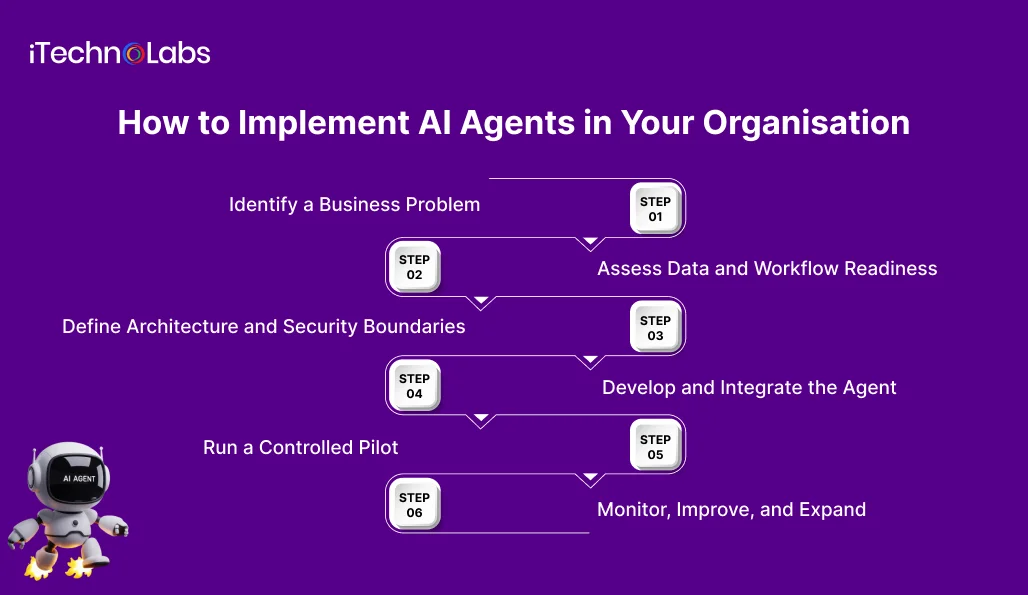
Successful AI agent implementation requires more than connecting an AI model to business software. The organisation must define the workflow, data access, permissions, integrations, and operational controls.
A practical implementation process involves six stages.
Step 1: Identify a Business Problem
Start with a specific operational challenge.
Examples include repetitive customer enquiries, manual invoice classification, CRM administration, and internal knowledge retrieval.
Document the existing process, the people involved, the systems used, and the outcome the business wants to improve.
Step 2: Assess Data and Workflow Readiness
Review the information the agent needs to complete its tasks.
Check whether the relevant data is accurate, accessible, current, and properly permissioned.
Identify dependencies on external applications, legacy software, APIs, and internal databases.
A workflow that depends on incomplete or inconsistent information may require data improvements before agent development begins.
Step 3: Define Architecture and Security Boundaries
Choose the AI model, knowledge retrieval approach, integration architecture, and available tools.
Define the agent’s responsibilities and establish:
- Approved data sources.
- User and system permissions.
- Tool access restrictions.
- Human approval points.
- Audit and monitoring requirements.
- Error handling and escalation rules.
For complex environments, multiple specialised agents may be appropriate. However, additional agents also introduce coordination and governance requirements.
Step 4: Develop and Integrate the Agent
Build the agent around the approved business workflow.
Integrations may include CRM platforms, ERP systems, internal databases, document repositories, and communication applications.
The agent should interact with these systems through controlled interfaces rather than unrestricted access.
Test individual components and the complete workflow before allowing the agent to perform real business actions.
Step 5: Run a Controlled Pilot
Start with a limited use case and a controlled group of users.
Evaluate the agent against agreed criteria, including:
- Task completion accuracy.
- Quality of outputs.
- Successful integration with existing applications.
- Frequency of human intervention.
- Error and escalation rates.
- Operational cost.
Compare results with the existing process. Do not assume that a successful demonstration means the system is ready for production.
Step 6: Monitor, Improve, and Expand
Once the pilot meets its acceptance criteria, plan a controlled production rollout.
Monitor performance, review access permissions, test system updates, and investigate failures.
Expand into additional workflows only when the existing implementation is reliable, and the business case remains clear.
Build vs Buy: Choosing the Right AI Agent Approach
Businesses can adopt existing agent platforms, customise available frameworks, or commission a purpose-built system.
The right approach depends on workflow complexity, integration requirements, security expectations, internal expertise, and long-term ownership.
| Evaluation factor | Existing platform | Custom-built agent |
| Initial setup | Often faster | Requires engineering |
| Workflow flexibility | Depends on platform | Designed around business requirements |
| Integration | Depends on supported connectors | Can support specific systems and APIs |
| Data control | Depends on provider and configuration | Can be designed around organisational requirements |
| Maintenance | Shared with platform provider | Requires ongoing engineering support |
| Best suited for | Standardised workflows | Complex or business-specific workflows |
A platform may be sufficient for straightforward internal processes. Custom development becomes more relevant when the agent needs to work with legacy applications, specialised business rules, multiple data sources, or tightly controlled permissions.
Before choosing, evaluate the total cost of ownership, including development, model usage, integration, infrastructure, monitoring, maintenance, and security reviews.
SMB vs Enterprise: Different Implementation Priorities
SMBs and enterprises can use similar agent technologies, but their implementation priorities differ.
For SMBs: Start with one well-defined process that creates repetitive administrative work. Prioritise affordability, ease of maintenance, integration with existing software, and a clear path to measuring business value.
For enterprises: Focus on architecture, identity management, data governance, integration standards, auditability, regulatory requirements, and coordination across departments.
Enterprise implementations may also require centralised agent management, documented approval processes, and integration with existing security operations.
Both audiences should avoid expanding agent permissions or autonomy faster than their ability to monitor and govern the system.
Choosing an AI Development Partner
Building a business AI agent involves decisions about architecture, model selection, data access, software integration, testing, and ongoing maintenance.
A suitable development partner should be able to explain how the proposed agent will work within your existing systems, what it can access, which actions require approval, and how its performance will be monitored.
iTechnolabs provides AI agent development, AI integration, RAG, and custom software development capabilities.
Its engineering approach can be explored through its AI Agent Development services and AI Transformation services.
The right starting point is a defined business workflow, not a predetermined technology stack.
How iTechnolabs Helps Businesses Build and Implement AI Agents
Choosing the right AI agent is only one part of an implementation. Businesses also need to consider system architecture, data access, application integrations, security controls, and ongoing maintenance.
At iTechnolabs, we help businesses move from AI adoption ideas to practical software implementations. Our AI development capabilities cover AI agent development, LLM integration, retrieval-augmented generation (RAG), and custom software development.
Whether you are an SMB looking to automate an internal workflow or an enterprise planning to introduce AI agents across existing business systems, our engineering team can help with:
- Custom AI agent development: Design agents around specific business processes, operational requirements, and defined responsibilities.
- Enterprise system integration: Connect AI agents with existing CRM, ERP, databases, APIs, and internal applications.
- RAG implementation: Enable agents to retrieve relevant information from approved business documents and knowledge repositories.
- Security-focused architecture: Define access permissions, data boundaries, approval workflows, and monitoring requirements.
- Testing and deployment: Evaluate agent behaviour, validate integrations, address errors, and prepare controlled production deployments.
Our approach starts with understanding your business requirements rather than selecting an AI model or technology prematurely.
Conclusion
AI agents can help businesses manage complex workflows, coordinate information across applications, and reduce repetitive operational work. However, successful implementation depends on choosing the right use case, establishing appropriate security controls, and defining where human oversight remains necessary.
For SMBs, the best starting point is usually a focused workflow with a clear operational objective. Enterprise organisations should also consider integration architecture, data governance, access management, auditability, and long-term maintenance before expanding agent capabilities.
The important decision is not how many AI agents your organisation can deploy. It is which business problems they should solve and how reliably they can solve them.
Start with one business process, evaluate its suitability for agent-based automation, and establish measurable acceptance criteria before moving into production.
If you are exploring AI agents for customer support, sales operations, finance, internal workflows, or enterprise software integration, iTechnolabs can help you assess the technical requirements and define a suitable development strategy.
FAQs
- What are AI agents for business?
AI agents for business are software systems that use artificial intelligence to interpret objectives, make contextual decisions, and perform tasks through approved tools and integrations. They can support workflows across customer service, finance, sales, HR, IT, and operations, with human oversight applied according to the sensitivity of each task.
- How can businesses use AI agents?
Businesses can use AI agents to manage customer enquiries, qualify sales leads, process documents, retrieve internal information, classify support requests, and coordinate operational workflows. The most appropriate application depends on the process, available data, integration requirements, and the consequences of an incorrect action.
- What business processes are best suited to AI agents?
AI agents are most suitable for multi-step workflows involving changing information, contextual decisions, and interaction with multiple systems. Examples include customer service resolution, document processing, sales administration, and IT ticket handling. Fixed, predictable tasks may be better handled through conventional automation.
- What are the biggest risks of implementing AI agents?
The main risks include inaccurate outputs, prompt injection, excessive system permissions, unauthorised data access, incorrect actions, and limited accountability. Businesses can reduce these risks through restricted permissions, secure integrations, human approval, audit logs, continuous monitoring, and regular security testing.
- How much does it cost to implement an AI agent?
AI agent development costs depend on workflow complexity, model selection, integration requirements, data readiness, security controls, and ongoing infrastructure. A focused agent connected to one business system will generally require less engineering than a multi-system enterprise deployment. A technical assessment is necessary before estimating project costs.
- How do businesses integrate AI agents with existing software?
Businesses can connect AI agents to existing applications through APIs, approved connectors, databases, and middleware. The integration design should define what information the agent can retrieve, which actions it can perform, how authentication works, and how errors or unauthorised requests are handled.
- Should businesses build custom AI agents or use existing platforms?
Existing platforms are often suitable for standardised workflows and common integrations. Custom development is more appropriate when an organisation needs specialised business logic, integration with legacy systems, specific security controls, or greater control over the agent’s behaviour. The decision should consider ownership, maintenance, flexibility, and total cost.
- How can enterprises secure and monitor AI agents?
Enterprises should assign dedicated identities, enforce least-privilege permissions, restrict tool access, and protect sensitive data. They should also maintain audit logs, test for prompt injection, monitor agent actions, define human approval requirements, and establish incident response procedures. Governance must continue throughout the agent’s operational lifecycle.