Key Takeaways
- Workflow automation follows your instructions to the letter, in the same order each time. That keeps running costs low, and you can always check what it did.
- AI automation can make sense of messy stuff like emails or a phone photo of a bill. It bends where rules can’t, though now and then it gets things wrong.
- Most real jobs are a mix. Usually the rules push the job from step to step. AI gets used at the point where someone would otherwise read an email or form.
- If your current process is messy, automation will copy the mess. Write the steps down and fix them before you hire anyone to build it.
- Begin with a single task and run it for about a month, then look at the results before choosing what to automate next.
If you’re comparing AI automation vs workflow automation, think about how much judgment a task needs. Workflow automation follows rules like “send the manager an email whenever a form comes in.” AI automation is for things a rule can’t read, such as a scanned bill or a cranky customer email. With a small team, set up rules first.
A lot of businesses have tried AI already. McKinsey’s 2025 State of AI survey found that 88% of respondents said their organization uses it regularly in at least one area. Only 39% saw any effect on earnings. Sometimes AI gets used where it was never needed. A job that three simple rules could cover ends up costing more each month, and the answers aren’t even consistent.
None of this requires learning tech terms. Go through a normal week and notice which jobs happen the same way each time, and which ones need someone to read something and decide. Once you know that, picking the tool is the easy part.
Table of Contents
- How Does Workflow Automation Work Day to Day?
- When Do You Need AI Automation?
- What Sets AI Automation Apart From Workflow Automation?
- How Would Each Option Handle a Pile of Supplier Bills?
- Which Jobs in Your Business Suit Rules, and Which Suit AI?
- When Should You Combine the Two?
- What Tends to Go Wrong With Each Type?
- How Much Will It Cost, and How Can You Tell It Paid Off?
- How Do You Choose? A 10-Minute Scorecard
- How Do You Start Without Wasting Money?
- Why Choose iTechnolabs for Automation Projects?
- Conclusion
- FAQs
How Does Workflow Automation Work Day to Day?
In workflow automation, software moves a job along from step to step based on rules you set up in advance. If your work looks much the same from one day to the next, it’s a good match.
An online order is a good example. The buyer needs a receipt and the warehouse needs a packing list, and in a lot of small businesses someone still does both by hand. Workflow automation sends both as soon as the order comes in.
The rules are usually simple if-this-then-that statements. For instance, any order over $500 waits for the manager’s okay, and a form without a phone number gets sent back. After that the software follows them every time, whether it’s Friday at 5pm or Monday morning.
Here are a few you’ve probably seen:
- A visitor fills in the contact form on your site. Their details go into your customer list and a welcome email goes out.
- Staff ask for time off, the request reaches their manager, and payroll hears about it once it’s approved.
- A bill hasn’t been paid after 7 days, so the customer gets a reminder. If it’s still unpaid at 14 days, they get another.
- Customers with an appointment tomorrow get a text reminder.
Because it always does the same thing, it’s easy to test, and weeks later you can still see exactly what happened. Problems start when it meets something new. Say a supplier switches to a new bill layout, or a customer writes “pls cancel” in a message instead of clicking the cancel box. There’s no rule for that, so the job either stalls or goes to the wrong place.
A lot of teams lose hours every week copying details from one screen to another and chasing people up. Our custom workflow automation services handle that sort of work, often with no AI needed.
When Do You Need AI Automation?
AI automation uses software that can read untidy information and make a best guess about it. Think of an email written in someone’s own words, or a photo of a form. It covers the steps rules can’t, with the catch that it’s sometimes wrong.
Business paperwork is rarely tidy. You get crumpled receipts photographed on a phone, long rambling emails from customers, and PDFs where every supplier puts the total somewhere different. A rule can’t read any of that. AI automation can.
It gets good at this by studying a large number of examples. That’s how it can tell “my parcel never showed up” and “where’s my order??” are the same complaint, even with almost no words in common. Give it a scanned bill and it’ll find the amount, the date and the supplier’s name. It can even write a rough first reply for someone on your team to look over.
Keep in mind that it’s always guessing. Set up properly, it gets most things right. Even so, ask the same question on Monday and again on Tuesday and the answers can differ a little. It also sounds every bit as confident when it’s wrong. So put a check in front of any AI step that touches money or customers.
Then there are AI agents, a term you’ll probably hear from software sellers. These are AI tools that take a few steps on their own, like reading a customer’s message, looking up their order and sending an update. They can save real time, but they need clear limits on what they’re allowed to do. Gartner predicts that over 40% of these agent projects will be canceled by the end of 2027. If you’re thinking about one, start small. Our page on AI agent development shows how limits and human checks get built in.
What Sets AI Automation Apart From Workflow Automation?
Workflow automation only ever does what its rules say. AI automation makes its own call on information that doesn’t fit a rule.
| Workflow automation | AI automation | |
| How it decides | Follows rules you wrote | Makes a best guess based on patterns |
| What it works with | Neat, predictable information like forms, dates and set boxes | Messy information like emails, photos, scanned papers and chats |
| Same result every time? | Yes | Mostly, but not always |
| Setting it up | Map the steps and write the rules | Map the steps, gather examples and test its guesses |
| Monthly cost | Usually low and steady | Often goes up the more you use it |
| When it gets confused | Stops, or sends the job to the wrong place | Gives a wrong answer that can look right |
| Checking its work later | Easy, because you can see which rule it followed | Harder, unless you keep a record of what it read and decided |
| Upkeep | Change the rules when your process changes | Check its mistakes regularly and correct it if they start to increase |
Ask yourself whether a brand-new employee could do the job on their first day using a checklist. If they’d manage fine, rules can manage too. If they’d need a few weeks to learn what “normal” looks like, AI is probably worth a look.
How Would Each Option Handle a Pile of Supplier Bills?
Comparisons on paper only help so much. A real job makes it clearer, so follow one wholesale business’s supplier bills through each setup.
The business gets its supplier bills by email. Some are neat PDFs. Many are photos someone snapped on a phone in the warehouse, slightly out of focus, with a thumb creeping into the frame. Today a staff member opens each bill and keys the details into the accounts software. Then they compare it with what was ordered and chase the manager for approval.
Rules by Themselves
A set of rules can pick out every email with an attachment and file it in the correct folder. It can also remind the manager to approve it. That alone saves some clicking. But a rule can’t read a photo of a bill. Someone still types the supplier, amount and due date by hand. If every supplier sent the exact same file layout you could go further, but few suppliers will agree to that.
AI on Its Own
An AI tool can read each bill, photo or not, and pull out the details. Now picture it also paying the bill on its own. If it reads $185.00 as $1,850, the money is gone before anyone looks. That’s an awkward call to make to your accountant, and an even more awkward one to the supplier asking for it back.
Rules and AI Together
Here, AI does the reading and rules do the checking. Once the AI has lifted the details off the bill, a rule holds them up against the order you placed. When the numbers line up and the total is under a limit you’ve chosen, the bill goes straight onto the approval list. Anything that seems off goes to a real person with the bill attached. That might be a supplier you’ve never used, a price that’s crept up or a total that doesn’t add up.
Nobody types bills in anymore. Your team only looks at the ones that need a human eye, and there’s a record of every step when tax season comes round.
Which Jobs in Your Business Suit Rules, and Which Suit AI?
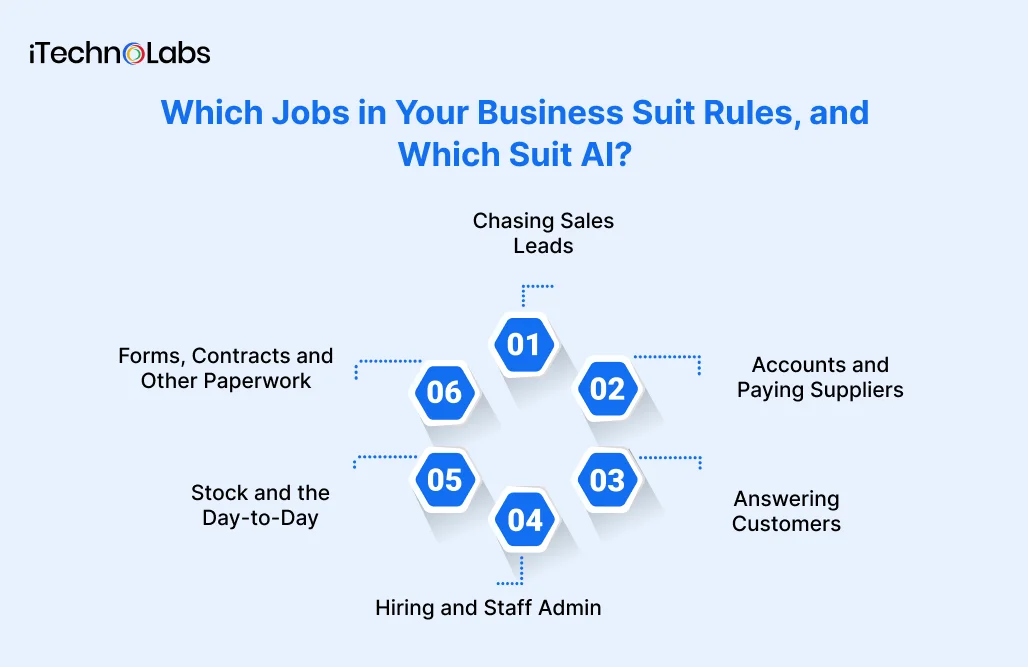
Every department has some work that runs to a script and some that needs reading first. Here’s roughly how that looks in each area.
Chasing Sales Leads
Rules can drop each new lead into your customer list and hand it to whoever covers that area. And if two days go by without a reply, they’ll send a follow-up for you. AI helps when leads write in their own words. It can read “we need 40 units by March for our new store” and tag it as a large, urgent order. That way it doesn’t sit behind a student asking for a brochure.
Accounts and Paying Suppliers
Reminders to pay, approvals and the month-end report are all jobs for rules. They need to happen the same way each time and leave a clean paper trail. Where AI fits is at the very start, reading each bill or receipt and lifting out the numbers. The decision to pay should stay with your rules and a person.
Answering Customers
AI is handy for working out what a customer wants and filing the message under refund, delivery, complaint or something else. It can draft a reply too. Rules then send each type to the right person and make sure nothing waits longer than the reply time you promise. Anything angry, or anything involving money, should reach a human.
Hiring and Staff Admin
Rules can run onboarding checklists, chase missing documents and approve leave. AI is useful for getting through a big batch of job applications or turning a long CV into a short summary. Choosing who to hire, or who to let go, needs to stay with a person. It’s fairer that way, and it keeps you on the right side of employment law.
Stock and the Day-to-Day
Stock counts, reorder levels and delivery dates all hang on exact numbers, which is rule territory. Where AI helps is noticing when something’s off, like a product suddenly selling three times faster than normal. Placing the reorder should still be a rule’s job.
Forms, Contracts and Other Paperwork
Contracts, forms, ID documents and claims rarely show up in one neat format. AI can read through them and pull out the bits you care about. Rules then make sure nothing required is missing, file everything away and raise a flag when there’s a gap. Our guide to AI in business process automation has more examples of this kind of document work.

When Should You Combine the Two?
Lots of jobs involve reading something and then checking it against a rule. Those are the jobs where it pays to use both.
It helps to split the job by who’d normally do each part. Sorting incoming mail is a reading task, so that’s AI. Following the checklist afterwards is rule work. And spending money still needs a manager’s okay.
A customer email shows how this plays out. The message comes in. AI reads it and works out that it’s a refund request for an order from last week. A rule checks the order: it was delivered, it’s within 30 days, and it’s under $100. That clears it, so the refund goes out and the customer gets a confirmation email. Had the order been $900, or two months old, the same rule would have passed it to a person instead.
Businesses tend to see better results from AI when they rethink the steps around it too. According to McKinsey’s 2025 survey, redesigning the way work gets done ranked among the strongest contributors to meaningful business results from AI. Adding a new tool to an old, awkward process usually doesn’t get you very far.
Already have a process that works and only want AI on a step or two? Our AI automation solutions page shows how we add it to the systems you’re using now.
What Tends to Go Wrong With Each Type?
Each type breaks in its own way. Spotting how it breaks tells you which safety checks to put in place.
When Rules Let You Down
Rules have a habit of multiplying. You begin with ten. Every time an odd case comes up someone adds an exception, and two years later you could have two hundred rules nobody fully understands. Should the person who set them up leave, even small changes get risky.
Rules also can’t cope with surprises. Anything that doesn’t fit drops out of the flow, sometimes without anyone noticing. The fix is a simple catch-all. Whatever the rules can’t place goes to a named person, and someone checks that pile every day.
Where AI Automation Trips Up
With AI, the worst kind of mistake is one that looks correct. A complaint could get filed as a thank-you note, or a 7 read as a 1. Since the tool never sounds unsure, people slowly start trusting it without checking.
Running costs can also climb. Many AI tools charge per use, so the bill goes up in busy months. If customer information passes through the tool, find out where it’s kept and who has access. Get the provider’s answer in writing.
Watch the labels, too. Some software sellers slap “AI” on almost anything these days, even tools that only follow a handful of rules. Ask for a demo using a messy, real example from your own business, and be careful if they can’t manage it.
The Problem Neither One Fixes
A tool can’t repair a process that doesn’t work to begin with. Confusing approval steps stay confusing after you automate them. They only happen faster. Write the steps out first and cross off anything you don’t need.
How Much Will It Cost, and How Can You Tell It Paid Off?
The price comes down to how big and how messy the job is. A bit of simple math each month tells you whether it’s paying for itself.
Any honest quote starts with someone looking at the actual task. These are the things that move the price up or down:
- The number of steps in the job, plus all the “unless” cases.
- How many separate tools need to share information, like your email, accounts software and customer list.
- How messy the incoming information is. Clean forms are cheap to handle. Handwritten notes are not.
- How often it runs. Many AI tools charge each time they’re used, so volume hits that side harder.
- How much checking by a person you want built in.
- Who looks after it once it’s live, and how often your process changes.
Generally, the rule steps are cheaper to build and far cheaper to keep running. AI steps cost more to set up and test, and they come with an ongoing usage bill. That’s one more reason to keep AI to the steps that need it.
To check whether it paid off, run this sum each month:
(Hours saved × hourly cost of that person) + cost of mistakes avoided − monthly running costs = monthly gain
Divide the build cost by your monthly gain. The answer is roughly how many months it takes to pay for itself.
Take a made-up example. Say a task takes your team 40 hours a month, and their time costs you $30 an hour. Automation brings that down to 10 hours. You’ve saved 30 hours, worth $900. If running costs are $150 a month, you gain $750. A $6,000 build would pay for itself in eight months. Your numbers will be different, so plug in real ones.
For a rough starting figure on AI projects, try our AI cost calculator.
How Do You Choose? A 10-Minute Scorecard
Pick one task you’d like to automate. Answer these six questions about it honestly, and the right approach usually becomes clear.
| Question | If yes | If no |
| 1. Does the information arrive in the same layout every time? | Rules can handle it | AI may be needed to read it |
| 2. Does any step need someone to read and understand words, photos or handwriting? | Add AI at that step only | Stick with rules |
| 3. Would a mistake cost real money, upset a customer or break a law? | Keep a person approving that step | Let it run on its own once tested |
| 4. Does the task happen dozens of times a week or more? | Worth automating | May not be worth the build cost yet |
| 5. Do the steps change every few months? | Keep the build simple so changes stay cheap | A fuller build is fine |
| 6. Is the process written down and working well today? | Ready to automate | Fix it on paper first |
Now look at your answers together. No reading steps at all means workflow automation is enough. One or two reading steps means rules with AI at those points. And a “no” on question 6 means you should stop and sort out the process before spending anything.

How Do You Start Without Wasting Money?
Start with one task and grow from there. These five steps keep the risk small.
Step 1: Write Down How the Job Works Today
Sit with the person who does the task and walk through it together. Note every step, every tool they open and every “well, it depends” moment. Those moments are where the tricky parts hide.
Step 2: Automate the Plain Rule Steps First
Sending, copying, reminding, filing. Get these running on rules before you touch AI. You may find a good chunk of the time savings sits right here, at the lowest cost.
Step 3: Add AI to One Reading Step
Pick the one step that needs reading or sorting and eats the most time. Try AI there. Test it on a few hundred real examples from your business, including the ugly ones.
Step 4: Keep a Person on Anything Risky
Payments, refunds above a set amount, anything legal and anything a customer sees without review all need a human sign-off. Build that in from day one. You can loosen it later, once you trust the results.
Step 5: Measure for a Month, Then Grow
Track hours saved, mistakes caught and how often the AI needed correcting. If the numbers hold up after a month, move on to the next task. Our guide to automating your operations walks through how to pick what comes next.
Why Choose iTechnolabs for Automation Projects?
We build the rules, the AI steps and the human checks to work together. You can also check the certifications behind how we work.
iTechnolabs is an AI development company with offices in Markham, Calgary and Ottawa in Canada, and Sheridan, Wyoming in the US. We work with businesses across the US, Canada, the UK and the UAE.
A few facts you can verify:
- We hold ISO 27001:2013 certification, the international standard for keeping information secure. That matters when an automation reads customer or financial details.
- We hold ISO 9001:2015 certification for quality management, which covers how we plan, test and deliver projects.
- We’ve delivered more than 500 apps, used by over 50,000 people.
- Our team has more than 300 developers.
If plain rules will do the job, we’ll say so before we quote you for AI.
Conclusion
Start with workflow automation for the steps that follow a pattern. For most teams that’s a big share of the manual work: sending, copying, reminding and filing. It’s cheaper to build and cheaper to run, and you can always see what it did and why.
Then look for the one or two places where someone has to read and understand something before the job can move on. A bill that arrives as a photo. A customer email written in a hurry on a phone. Those are the spots where AI automation earns its cost. Put rules around it, and keep a person on anything that touches money or a customer’s trust.
Choosing between AI automation and workflow automation gets much easier once you look at the actual task instead of the label on the software. Write the steps down and run the scorecard on one task. If the results hold up for a month, move on to the next one. Growing one task at a time usually costs less than buying a big AI system and hoping it fits the way your business runs.

FAQs
What Is the Main Difference Between AI Automation and Workflow Automation?
Workflow automation follows fixed rules you set, so it does the same thing every time. AI automation reads messy information, like emails, photos and scanned forms, and makes a best guess about what it means. Rules suit predictable steps. AI suits steps that need reading or judgment, and its work should be checked before anything costly happens.
Is AI Automation Better Than Workflow Automation?
Neither one is better across the board, because they solve different problems. Workflow automation is cheaper, more predictable and easier to check, so it fits steps that follow a pattern. AI automation is worth paying for when a step involves messy information a rule can’t read. Plenty of businesses end up using both on the same task.
Can a Small Business Use AI Automation?
Yes. You don’t need a big IT team or a huge budget to start. Pick one task that takes a lot of hours and has a reading step, like sorting customer emails or pulling details off bills. Test AI on that step alone, keep a person checking the results, and expand once it proves itself.
Do I Have to Replace My Current Software?
Usually not. Most automation connects the tools you already use, such as your email, accounts software, spreadsheets and customer list. The rules and AI steps sit between them and pass information along. Replacing a tool only makes sense when it can’t share its information at all, and that’s worth checking early.
Will Automation Replace My Staff?
In most small businesses, automation takes over the repetitive parts of a job rather than the whole job. Your team spends less time copying and chasing, and more time with customers. You’ll still need someone to check AI results and handle the odd cases the rules send their way, so people stay in the loop.
Which One Costs Less to Run?
Workflow automation usually costs less to run. Once the rules are built, the monthly cost tends to stay steady. AI tools are often billed by how much you use them, so costs rise as your volume grows. That’s why it makes sense to keep AI to the few steps that need it and run the rest on rules.
How Do I Know Which Task to Automate First?
Choose a task that happens often, follows mostly the same steps and eats a noticeable chunk of your team’s week. Bill handling, lead follow-ups and appointment reminders are common places to start. Leave tasks where a mistake would be very costly until you’ve tested automation somewhere safer. Write the steps down before anyone builds anything.
Are AI Agents the Same as AI Automation?
AI agents are one type of AI automation. An agent can take several steps on its own, such as reading a message, looking up an order and sending a reply. That makes agents useful, but riskier than a single AI step. Give any agent clear limits on what it can do, and keep a person approving anything involving money.