

Key Takeaways
- AR puts extra computer info over your real view. VR shuts out the outside world and swaps it for a made environment.
- Enterprise use cases include workforce training, remote assistance, product visualization, maintenance, and collaborative design.
- The right technology depends on the task, device availability, integration requirements, and measurable business value.
- Security, privacy, accessibility, and deployment costs must be considered before an enterprise rollout.
- A focused pilot helps determine whether AR or VR solves a real operational problem before wider investment.
AR VR app development use cases range from immersive employee training and remote equipment support to virtual product demonstrations and interactive property experiences. For enterprise technology leaders, the strongest opportunities are tasks where spatial information, realistic simulations, or hands-free guidance can improve an existing workflow. The right application starts with a measurable business problem, not the technology itself.
For enterprise teams, these technologies can support customer experiences, employee development, product engineering, and field operations. Their value depends on whether the experience improves a process enough to justify development, equipment, maintenance, and adoption costs.
Table of Contents
10 AR/VR App Development Use Cases for Businesses
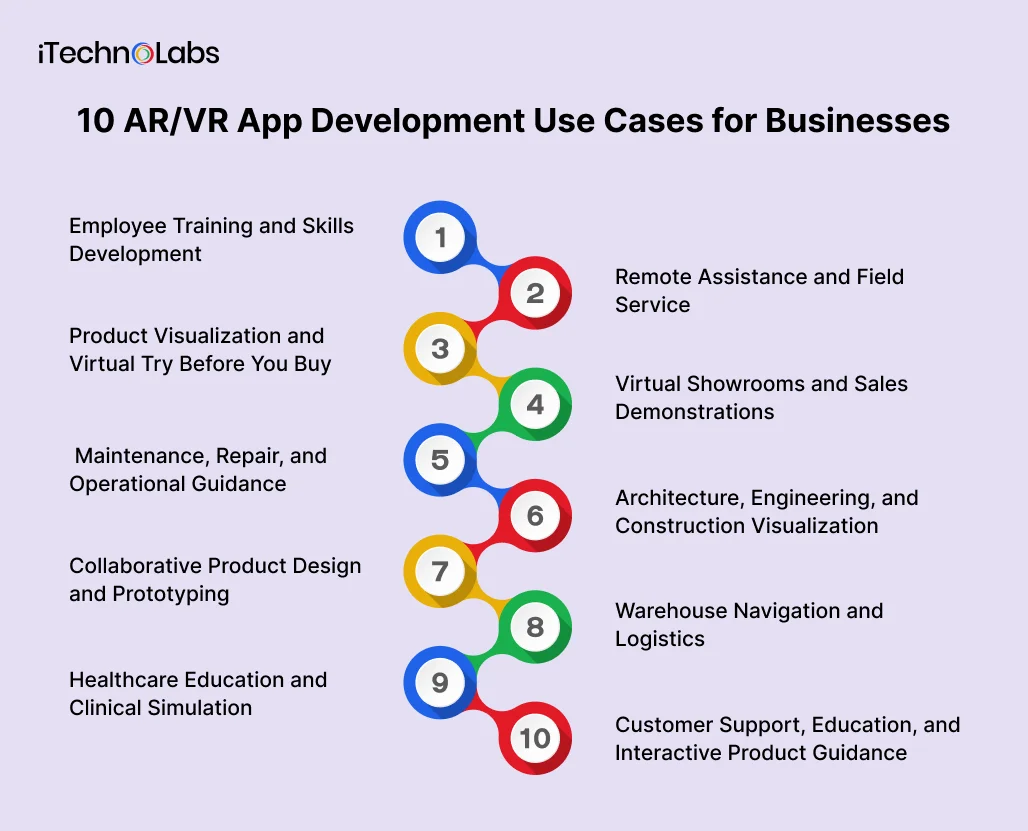
- Employee Training and Skills Development
VR training applications let employees practise tasks in simulated environments before performing them in the workplace. Businesses can recreate equipment operation, emergency procedures, customer interactions, and other situations that may be expensive, dangerous, or difficult to reproduce during conventional training.
For example, a manufacturer could create a virtual training module in which new employees learn a machine’s operating sequence and practise responding to simulated faults.
An enterprise training app may include guided scenarios, interactive assessments, instructor dashboards, progress tracking, and learning management system integration.
Business value: More consistent training delivery and repeatable practice without requiring every exercise to take place on real equipment.
What to evaluate: Training completion, assessment performance, time to proficiency, and knowledge retention compared with the existing method.
- Remote Assistance and Field Service
AR applications can help field technicians receive contextual instructions while working on equipment. A remote specialist may guide a technician through a video session, annotate a shared view, or provide digital instructions linked to the equipment being serviced.
Consider an industrial maintenance team supporting equipment at several locations. Instead of relying exclusively on phone instructions, a technician could use an AR-enabled device to view component labels, repair sequences, or relevant documentation.
Useful features include secure video communication, visual annotations, equipment identification, access to maintenance records, and integration with service management software.
Business value: Better access to specialist knowledge and more consistent field procedures.
What to evaluate: First visit resolution, mean time to repair, repeat service calls, and the frequency of escalations to specialists.
- Product Visualization and Virtual Try Before You Buy
AR product visualization lets customers see digital representations of products in their surroundings or on their own appearance before making a purchase.
Furniture retailers can allow shoppers to place a virtual sofa in a room. Equipment suppliers can show the approximate footprint of a machine in a facility. Consumer brands can offer virtual try-on experiences for suitable products.
A business application might include a product catalogue, 3D asset viewer, size and configuration controls, product information, and a path to request a quote or purchase.
Business value: Customers can understand product appearance, scale, and configuration before committing to a purchase.
What to evaluate: Product interactions, qualified enquiries, conversion rates, return reasons, and the accuracy of digital product representations.
The important distinction is that visualization supports decision-making. It does not guarantee a sale or eliminate the need for accurate product information.
- Virtual Showrooms and Sales Demonstrations
VR showrooms let buyers explore products, facilities, or environments that may be expensive, distant, or impractical to visit physically.
An industrial supplier could demonstrate a production line to prospective customers. A property developer could present an unbuilt apartment. A sales team could walk a buyer through different product configurations in a shared virtual environment.
Enterprise features may include guided tours, multi-user sessions, product configuration, presentation controls, lead capture, and customer relationship management integration.
Business value: Sales teams can demonstrate complex offerings without depending entirely on physical samples or site visits.
What to evaluate: Qualified meeting rates, sales cycle length, customer engagement, and the cost of delivering each demonstration.
Virtual showrooms work best when they answer questions that a conventional presentation or video cannot answer as effectively.
- Maintenance, Repair, and Operational Guidance
AR can place contextual instructions over physical equipment, helping employees identify components, follow inspection sequences, and access relevant documentation.
For example, a maintenance application could display the next inspection step after a technician identifies a machine. It might also show safety warnings, component diagrams, or a link to the equipment’s maintenance history.
For enterprise deployments, the application may need asset management integration, equipment identifiers, role-based access, offline instructions, and audit logs.
Business value: Easier access to procedural knowledge at the point of work.
What to evaluate: Inspection errors, procedure completion, maintenance time, and adherence to approved instructions.
A key limitation is accuracy. Instructions must correspond to the correct equipment model and configuration. An AR overlay should not replace required safety procedures or qualified technical judgment.
- Architecture, Engineering, and Construction Visualization
AR and VR applications can help project teams understand buildings, facilities, and infrastructure before construction or modification.
VR supports immersive reviews of building layouts and proposed designs. AR can overlay digital building information onto a physical site, helping teams compare plans with visible conditions where the necessary spatial alignment is available.
A project application may include 3D model viewing, model annotations, issue tracking, design version management, and integration with building information modelling systems.
Business value: Earlier identification of design conflicts and clearer communication between stakeholders.
What to evaluate: Issues identified before construction, rework attributable to design coordination, review cycle time, and stakeholder feedback.
Spatial alignment and model quality matter. A visualization is only useful when it reflects the right design version and the limitations of the underlying data are understood.
- Collaborative Product Design and Prototyping
VR design applications allow engineers, designers, and stakeholders to inspect and discuss three-dimensional concepts together. Teams can review proportions, spatial relationships, ergonomics, and design alternatives before committing to physical prototypes.
For example, an automotive design team could review a vehicle interior in VR while participants in different locations provide feedback on component placement and visibility.
Potential features include 3D model import, shared review sessions, annotations, design comparisons, access controls, and connections to existing product lifecycle management workflows.
Business value: More accessible design reviews and earlier feedback on spatial or usability problems.
What to evaluate: Design review time, the number of issues discovered before physical prototyping, and the effort needed to revise models.
VR does not eliminate physical testing, engineering analysis, or manufacturing validation. It provides another environment in which design decisions can be examined.
- Warehouse Navigation and Logistics
AR can support warehouse employees by displaying picking instructions, identifying storage locations, or presenting contextual information about inventory.
A mobile device or suitable wearable could show the next destination, item identifier, quantity, and task status. The application may connect to a warehouse management system to retrieve assignments and record completed actions.
Useful capabilities include barcode scanning, indoor positioning where supported, inventory lookups, task prioritization, and offline recovery procedures.
Business value: Clearer access to picking and inventory information during operational tasks.
What to evaluate: Picking accuracy, order completion time, walking distance, training requirements, and device-related interruptions.
Indoor positioning is not universally accurate. A deployment should test the actual warehouse layout, network conditions, lighting, device ergonomics, and worker safety requirements.
- Healthcare Education and Clinical Simulation
AR and VR applications can support medical education, anatomy visualization, procedural rehearsal, and selected clinical training scenarios.
A training institution could let learners examine a three-dimensional anatomical model or practise a simulated procedure in a controlled environment. Instructors could use assessments and scenario controls to review performance.
Potential features include structured learning modules, 3D anatomy assets, assessment records, instructor controls, and integration with learning management platforms.
Business value: Repeatable learning experiences for tasks that require spatial understanding or procedural practice.
What to evaluate: Assessment results, skill retention, learner feedback, and performance against established teaching methods.
Clinical applications require additional scrutiny. Patient privacy, medical accuracy, professional oversight, accessibility, and applicable regulatory requirements must be addressed. A training simulation should not be presented as a validated clinical tool without appropriate evidence.
- Customer Support, Education, and Interactive Product Guidance
AR applications can help customers understand how to assemble, install, configure, or use products. VR can provide immersive onboarding and educational experiences when learning benefits from a simulated environment.
For example, an equipment manufacturer could offer an app that identifies a component and displays a step-by-step setup guide. A software or hardware company could create a virtual product orientation for customers who need to understand a complex system.
Features might include searchable product documentation, 3D instructions, interactive tutorials, multilingual content, support escalation, and analytics.
Business value: More accessible product guidance and additional ways to deliver customer education.
What to evaluate: Support ticket volume, successful self-service completion, onboarding time, and customer satisfaction.
Digital guidance should complement reliable documentation and human support, especially when incorrect instructions could cause damage or create safety risks.
How to Choose the Right AR or VR Approach
Not every business problem needs a headset or a fully immersive experience. The best approach depends on what the user needs to see, do, and understand.
| Requirement | Recommended approach | Why |
| Display instructions over real equipment | AR | Keeps the physical task visible while adding digital guidance |
| Practise high-risk or difficult scenarios | VR | Creates a controlled environment for repeated simulation |
| Inspect a design from different viewpoints | VR | Enables immersive spatial reviews |
| Visualize a product in a customer’s room | AR | Places a digital product in the real environment |
| Support remote technicians | AR or mobile-assisted guidance | Connects real-world tasks with contextual information |
| Train users on a complex process | AR, VR, or a combination | The choice depends on whether physical context or full simulation matters more |
Microsoft’s enterprise mixed reality guidance identifies training, simulation, manufacturing, prototyping, and immersive shopping as established application categories.
For enterprise CTOs, the technology decision should follow the workflow analysis. If a conventional mobile application can solve the problem with less friction, immersive technology may not be justified.
What Enterprises Should Evaluate Before Building an AR/VR App
An enterprise AR/VR application involves more than creating a 3D environment. It must fit the organization’s devices, data systems, security requirements, and operating procedures.
Device and platform compatibility
Determine whether users will access the application through smartphones, tablets, headsets, or supported wearables. Assess device availability, performance, ergonomics, battery life, and the conditions in which the application will run.
Enterprise integration
Identify the systems the app must connect to, such as ERP, CRM, learning management, asset management, or warehouse management platforms. Define how the application will retrieve information, update records, and handle integration failures.
Security and privacy
AR/VR applications may process camera feeds, spatial maps, voice recordings, user interactions, and other sensitive information. Establish data minimization, access controls, retention policies, encryption, and appropriate consent mechanisms.
Accessibility and user adoption
Consider employees who wear prescription glasses, have mobility or visual limitations, or cannot comfortably use a headset for extended periods. Provide alternative workflows where necessary and test with the people who will use the application.
Maintenance and content management
Three-dimensional assets, device operating systems, SDKs, and enterprise APIs change over time. Plan for compatibility updates, content revisions, device management, performance monitoring, and ongoing support.
How to Measure the Business Value of AR/VR
A business case should connect the application to a measurable operational or commercial objective.
- Training: Measure time to proficiency, assessment performance, training completion, and knowledge retention.
- Operations and maintenance: Track repair time, repeat visits, inspection errors, and escalation frequency.
- Sales and customer experience: Monitor qualified enquiries, conversion rates, engagement, returns, and support requests.
- Engineering and design: Evaluate review time, design issues found before production, and avoidable rework.
Establish a baseline before development, then run a limited pilot with representative users. Compare the results against the existing workflow and include development, hardware, integration, training, maintenance, and support costs.
A pilot should have defined success criteria, a clear owner, and a decision point for expansion, revision, or discontinuation. This makes the investment easier to evaluate than relying on engagement metrics alone.
How iTechnolabs Can Help You Build an AR/VR Business App
Turning an AR/VR concept into a practical business application requires the right technology, thoughtful product design, and a clear understanding of your workflows. iTechnolabs helps businesses plan and develop digital products around their operational needs, from mobile application development and custom software to third-party integrations and AI capabilities.
Whether you are exploring immersive employee training, AR-powered field assistance, virtual product demonstrations, or interactive customer experiences, the first step is defining the use case, technical requirements, and expected business outcomes.
Ready to explore AR/VR for your business? Connect with iTechnolabs to discuss your application idea and identify a practical starting point.
Conclusion
AR and VR applications can help businesses improve training, simplify complex workflows, support product visualization, and make collaboration more effective. The right use case depends on the problem being solved, the users involved, existing systems, and the measurable value the application can deliver.
For enterprise teams, the best starting point is a focused pilot with clear success criteria. Test the experience with real users, evaluate its impact against the current process, and address security, integration, accessibility, and maintenance before expanding deployment.
FAQs
- What are the most common AR/VR app development use cases for businesses?
Common AR/VR app development use cases include employee training, remote maintenance assistance, product visualization, virtual showrooms, warehouse navigation, engineering reviews, and customer education. Enterprises should prioritize applications that address a defined operational or customer problem and can be evaluated through measurable outcomes rather than adopting immersive technology solely for novelty.
- What is the difference between AR and VR in business applications?
Augmented reality adds digital information to a view of the real world, making it useful for equipment guidance, product visualization, and field service. Virtual reality creates an immersive digital environment suited to simulations, training, and design reviews. The right option depends on whether users need to interact with their surroundings or practise within a simulated environment.
- Which industries can benefit from AR and VR applications?
Manufacturing, healthcare education, retail, real estate, construction, logistics, and professional training are potential areas of application. The strongest opportunities depend on the workflow, the accuracy of available digital assets, and the cost of implementation. Businesses should validate each use case with representative users before committing to a larger deployment.
- How do enterprises choose between mobile AR and a VR headset application?
Choose mobile AR when users need digital guidance while viewing or interacting with their physical surroundings. Consider a VR headset when immersive simulation or three-dimensional collaboration is central to the task. Device availability, accessibility, operating conditions, software integration, and ongoing support costs should all influence the decision.
- What security risks should businesses consider when developing AR/VR applications?
Businesses should assess camera access, spatial data, voice recordings, identity information, and connections to internal systems. Appropriate safeguards include data minimization, encryption, role-based access, retention limits, and secure integration. The exact controls depend on the application, its users, the information processed, and applicable privacy and security requirements.
- How can a business determine whether an AR/VR application is worth the investment?
Start with a specific business problem and establish baseline measurements before development. Build a focused pilot, compare results against the existing process, and account for software, hardware, integration, training, and maintenance costs. Expand only when the evidence supports the business case and the application meets its security and usability requirements.











