Key Takeaways
- Business process automation (BPA) uses software to handle repetitive, rule-based business activities with less manual intervention.
- The best automation opportunities are processes with repeatable steps, frequent handoffs, predictable rules and measurable operational problems.
- Successful implementation starts with process mapping and business requirements, not selecting an automation platform.
- Businesses should choose between workflow platforms, robotic process automation (RPA), custom integrations and AI based on the nature of the process.
- Monitoring, security controls, exception handling and human approvals should be part of the initial implementation plan.
Business process automation helps businesses reduce repetitive manual work, connect disconnected systems, and make everyday operations more consistent. For small and mid-sized businesses, the goal is not simply to automate as many tasks as possible. It is to identify processes that consume time, create avoidable errors, or slow down important business decisions, then implement technology that addresses those problems.
However, successful automation requires more than choosing a tool and configuring a workflow. Businesses need to understand how their existing processes work, identify the right opportunities, select suitable technology, and plan for integration, security, testing, and ongoing improvement.
This guide explains how to approach business process automation step by step. You will learn which processes are worth automating, how to evaluate automation opportunities, how to choose between ready-made platforms and custom solutions, and how to measure the results. Whether you are starting with a single workflow or planning a broader automation initiative, this framework can help you make informed implementation decisions.
Table of Contents
- What is Business Process Automation?
- Which Business Processes Should You Automate First?
- How to Assess Business Process Automation Opportunities
- A Step-by-Step Business Process Automation Implementation Framework
- Off-the-Shelf Automation or Custom Development: Which Should You Choose?
- Security, Governance and Human Oversight
- How to Measure Business Process Automation Success
- Common Business Process Automation Implementation Mistakes
- Why Choose Business Process Automation Services by iTechnolabs
- Conclusion
- FAQs
What is Business Process Automation?
Business process automation (BPA) uses software, integrations and predefined rules to execute repetitive business activities with reduced manual intervention. It connects tasks, people and applications so information moves through a defined process, from the initial request to the final outcome.
For an SMB or mid-market company, this might mean automating invoice approvals, customer onboarding, employee records, purchase orders or sales follow-ups.
The objective is not to remove people from every process. It is to reduce unnecessary manual work, improve consistency and give employees more time for decisions that require experience and judgment.
Business Process Automation vs. Workflow Automation vs. RPA
These terms are related, but they describe different parts of an automation strategy.
| Approach | What it does | Example |
| Business process automation | Coordinates an entire business process | Automating procurement from request to approval |
| Workflow automation | Connects tasks and moves work between people or systems | Assigning a customer enquiry to the right sales representative |
| Robotic process automation (RPA) | Uses software bots to perform repetitive actions in applications | Extracting information from a document and entering it into an existing system |
| AI-powered automation | Uses AI to interpret information or support decisions within a workflow | Classifying incoming customer messages before routing them |
A business may use all four approaches within one operational process. The right combination depends on the systems involved, the complexity of the workflow, and the level of human judgment required.
Which Business Processes Should You Automate First?
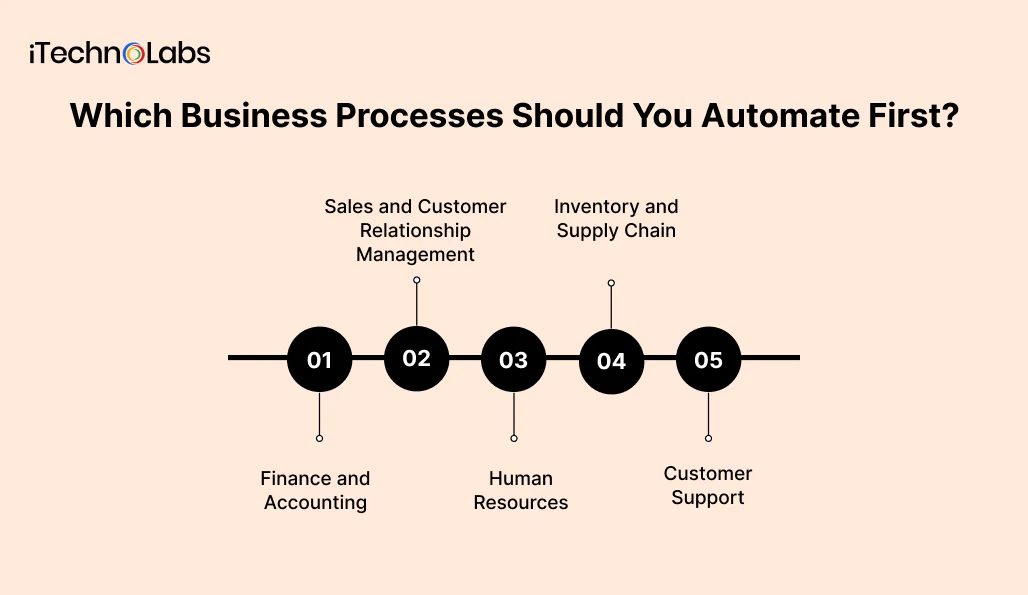
Start with a process that happens frequently, follows identifiable rules, and creates a measurable operational problem when handled manually.
Avoid choosing a project simply because a particular department wants an automation tool. First identify where work gets delayed, information gets duplicated, or employees spend time performing repetitive activities.
Here are practical starting points.
1. Finance and Accounting
Finance teams often manage recurring activities involving invoices, payments, expenses, and financial records.
Potential automation opportunities include:
- Invoice capture and data extraction.
- Purchase order matching.
- Expense approval routing.
- Payment reminders.
- Financial report preparation.
- Reconciliation support.
For example, an invoice workflow could capture supplier information, check required fields, match the invoice against a purchase order and route exceptions to an accountant.
A person should still review discrepancies and approve payments according to the company’s financial controls.
2. Sales and Customer Relationship Management
Sales teams frequently move information between communication tools, spreadsheets and customer relationship management (CRM) systems.
Potential automation opportunities include:
- Lead assignment based on predefined rules.
- Follow-up reminders.
- Customer record updates.
- Sales pipeline notifications.
- Meeting confirmation messages.
- Lead qualification support.
These workflows are useful starting points because their activities and handoffs can often be clearly defined. However, customer communication and sales decisions may still require human involvement.
3. Human Resources
HR departments manage recurring processes that involve employees, documents, approvals and internal communication.
Examples include:
- Employee onboarding.
- Document collection.
- Leave request routing.
- Employee record updates.
- Interview scheduling.
- Offboarding checklists.
An onboarding workflow, for instance, can trigger account creation requests, assign training activities, collect required documents and notify the relevant department when each task is complete.
4. Inventory and Supply Chain
Businesses managing products, suppliers or warehouse operations can consider automating:
- Purchase order creation.
- Inventory threshold notifications.
- Supplier communication.
- Order status updates.
- Stock reconciliation.
- Shipment notifications.
The automation should connect with the existing inventory or ERP system rather than introduce another disconnected source of information.
5. Customer Support
Customer support teams handle incoming requests, repetitive questions and ticket assignments.
Possible automation opportunities include:
- Ticket categorisation.
- Request assignment.
- Priority-based routing.
- Customer notifications.
- Status updates.
- Escalation reminders.
AI can assist with interpreting unstructured messages, but sensitive complaints, refunds and unusual requests should have appropriate human review.
How to Assess Business Process Automation Opportunities
Not every repetitive activity deserves an automation project.
Before investing in software, evaluate each candidate process using five practical criteria.
- Process frequency: How often does the activity happen?
- Manual effort: How much employee time does it consume?
- Error exposure: What happens when information is entered incorrectly or a step is missed?
- Process consistency: Does the activity follow repeatable rules, or does every case require different judgment?
- Business impact: Does the process affect customer experience, financial control, delivery speed or operational visibility?
Use the following assessment to compare opportunities.
| Assessment area | Questions to ask |
| Frequency | Does the process happen daily, weekly or occasionally? |
| Effort | Which steps require repeated manual work? |
| Errors | Where do mistakes or missing information occur? |
| Complexity | Are the rules clear and documented? |
| Integration | Which existing systems must exchange information? |
| Risk | What could happen if automation makes an incorrect decision? |
A process with high transaction volume but unclear rules may need redesign before automation. A smaller process with clear rules and a costly error point may be a better first project.
A Step-by-Step Business Process Automation Implementation Framework
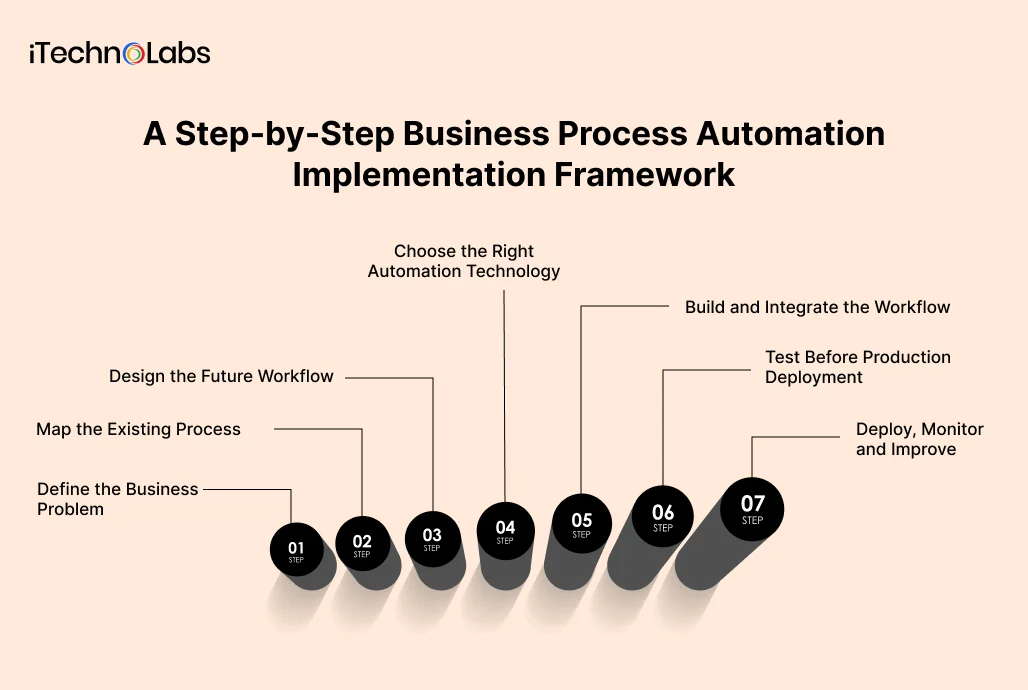
Use the following seven-step framework to move from an operational problem to a controlled automation deployment.
Step 1: Define the Business Problem
Start by identifying the specific problem the business wants to solve.
Avoid vague objectives such as improving productivity or modernising operations.
Instead, define the problem in operational terms.
For example:
- Employees enter customer details into multiple systems.
- Purchase approvals remain pending because requests are sent through email.
- Finance teams manually collect information from different sources.
- Customer support requests are assigned inconsistently.
- Managers lack visibility into the status of internal requests.
Document the current process, the people involved, the systems used and the outcome the business wants to improve.
Deliverable: A documented business problem and an agreed automation objective.
Step 2: Map the Existing Process
Before changing the technology, understand how the work currently happens.
Create a process map that identifies:
- The event that starts the process.
- The person or system responsible for each task.
- Information required at each stage.
- Decisions and approval points.
- Applications involved.
- Exceptions and failure scenarios.
- The event that completes the process.
For example, a purchase approval process may look like this:
Employee request → Manager review → Budget verification → Finance approval → Purchase order creation → Supplier notification
Document what happens when the request is incomplete, exceeds the available budget or requires additional approval.
Mapping the existing process often exposes unnecessary steps and unclear responsibilities. These problems should be addressed before software development begins.
Deliverable: An approved current-state process map.
Step 3: Design the Future Workflow
Now define how the process should work after automation.
Determine which activities should happen automatically and where a person needs to review or approve an action.
For each workflow stage, specify:
- Trigger conditions.
- Required input data.
- Business rules.
- Responsible users.
- Approval requirements.
- Notifications.
- Exception handling.
- Expected output.
Consider the purchase approval example again.
A future workflow might automatically validate the request, check the approval threshold, send it to the correct manager and notify finance after approval.
A request containing missing information should return to the employee rather than continue through the process.
Deliverable: A future-state workflow specification.
Step 4: Choose the Right Automation Technology
Select technology according to process requirements, existing software, integration needs, security requirements and maintenance capacity.
There is no single platform that fits every business process.
| Technology | Best suited for | Considerations |
| No-code automation | Straightforward tasks and standard integrations | Platform limits and licensing |
| Low-code platforms | Workflows requiring configurable logic | Governance and connector availability |
| RPA | Repetitive actions across existing applications | Interface changes can affect reliability |
| API integrations | Direct communication between applications | API availability, authentication and data compatibility |
| Custom software | Specialised workflows and business-specific requirements | Development, testing and ongoing maintenance |
| AI-powered automation | Unstructured information and selected judgment-support tasks | Accuracy testing, human review and data governance |
For example, Microsoft Power Automate can support workflows involving Microsoft applications and connected services. UiPath provides an RPA option for processes involving repetitive application interactions.
Custom development may be more appropriate when existing platforms cannot support the required business logic, integration or user experience.
Before choosing a platform, evaluate:
- Compatibility with existing CRM and ERP systems.
- Integration and API availability.
- Licensing and operational costs.
- Data storage and access requirements.
- Workflow complexity.
- Expected maintenance effort.
- Vendor dependency and future flexibility.
Deliverable: A documented technology selection with its business and technical justification.
Step 5: Build and Integrate the Workflow
Once requirements and technology are approved, implementation can begin.
A typical development process includes:
- Workflow development: Configure or develop the automation according to the approved process specification.
- System integration: Connect the relevant CRM, ERP, accounting software, databases and communication applications.
- Business rule implementation: Configure routing conditions, approval thresholds, validation rules and notifications.
- Access control: Define which users and systems can access information or perform specific actions.
- Exception handling: Specify what happens when an application becomes unavailable, data is missing or an action fails.
Deliverable: A working automation integrated with the required business systems.
Step 6: Test Before Production Deployment
An automation that works in a demonstration environment may still fail when it encounters real business conditions.
Testing should cover more than the successful completion of the standard workflow.
Use a structured testing process.
| Testing area | What to verify |
| Functional testing | Each workflow step performs its intended action |
| Integration testing | Data moves correctly between connected applications |
| Exception testing | Missing data and failed actions are handled correctly |
| Permission testing | Users can access only authorised information and actions |
| Performance testing | The workflow handles expected transaction volumes |
| User acceptance testing | Employees can complete their responsibilities correctly |
Test normal requests, incomplete submissions, duplicate records, rejected approvals and unavailable integrations.
Ask the employees who will use the workflow to review the process before production deployment.
Deliverable: Documented test results and business acceptance.
Step 7: Deploy, Monitor and Improve
Deployment is not the end of implementation.
Once an automation is live, monitor whether it performs as expected and whether employees can manage exceptions.
Track:
- Successful and failed workflow executions.
- Processing time.
- Pending approvals.
- Manual interventions.
- Integration errors.
- Exception frequency.
- User feedback.
Microsoft’s Automation Center documentation provides examples of monitoring workflow runs, process maps, errors, and work queue performance.
Assign an internal owner to review automation performance, investigate recurring failures and approve changes to business rules.
Deliverable: A monitored production workflow with a defined maintenance and improvement process.

Off-the-Shelf Automation or Custom Development: Which Should You Choose?
Choosing between ready-made automation tools and custom development is an important implementation decision.
The right option depends on how closely your process matches the capabilities of available software.
When Off-the-Shelf Tools Make Sense
Consider ready-made tools when:
- The process follows standard business rules.
- Existing applications provide suitable connectors.
- The workflow does not require extensive customisation.
- Licensing and platform limits fit your operational needs.
- Your internal team can manage the configuration.
For example, connecting a form submission to a CRM record and sending an internal notification may not require custom software development.
When Custom Workflow Automation Makes Sense
Custom development may be appropriate when:
- Your business follows specialised approval rules.
- Multiple systems require complex data exchange.
- Existing platforms cannot support the required workflow.
- You need a specific operational interface.
- Several departments depend on the same coordinated process.
- You need greater control over application behaviour and integration logic.
Do not choose custom development simply because it offers more flexibility. Compare the long-term cost, implementation effort, maintenance requirements, and business value against available platforms.
Security, Governance and Human Oversight
Automation changes how business information moves through an organisation. That makes security and governance part of implementation planning.
Establish the following controls before deploying workflows that handle customer, employee, financial or commercially sensitive information.
- Access management: Give users and automated processes only the permissions required to perform their responsibilities.
- Data protection: Define how information is collected, transferred, stored and retained.
- Audit trails: Record important workflow actions, approvals, status changes and failures.
- Human approvals: Keep people involved in sensitive financial, legal and customer-related decisions where required.
- Exception management: Define who investigates failed processes and how operations continue when automation is unavailable.
- Change management: Document who can modify workflow logic, integrations and access permissions.
Businesses operating across the US, Canada, UK and UAE should also assess applicable privacy and data protection requirements based on their activities, customer locations and information handled.
How to Measure Business Process Automation Success
Automation should be evaluated against the business problem it was designed to solve.
Establish baseline measurements before implementation so that the business can compare operational performance after deployment.
Consider these key performance indicators (KPIs).
| KPI | What it measures |
| Process completion time | Time required to complete the workflow |
| Manual touchpoints | Number of steps requiring employee intervention |
| Error rate | Frequency of incorrect or incomplete outcomes |
| Automation success rate | Percentage of workflow executions completed successfully |
| Exception rate | Frequency of cases requiring manual investigation |
| Approval turnaround | Time spent waiting for required approvals |
| Cost per transaction | Operational cost associated with completing a process |
For example, a company automating invoice processing should examine processing time, manual corrections, exception frequency and approval delays.
Do not assume automation has improved performance simply because fewer employees are performing data entry.
A successful automation should improve the actual business process, not merely move manual work from one department to another.
Common Business Process Automation Implementation Mistakes
Even well-planned automation projects can encounter problems when important operational requirements are overlooked.
Automating an Inefficient Process
Review and simplify the existing process before automating it. Otherwise, unnecessary approvals and poor handoffs may become embedded in the new workflow.
Selecting Technology Too Early
Document the business requirements first. Selecting a platform before understanding integrations, exceptions, and security needs can lead to expensive changes.
Ignoring Existing Systems
Evaluate how the automation will communicate with current applications. Disconnected tools can create duplicate records and inconsistent information.
Removing Human Oversight
Keep appropriate approval and review points for financial transactions, sensitive records and decisions that require judgment.
Failing to Monitor Performance
Assign ownership, establish monitoring requirements and define how workflow failures will be investigated.
Trying to Automate Everything at Once
Begin with a clearly scoped process. Validate its performance, gather user feedback and expand the automation programme based on what the implementation teaches you.
Why Choose Business Process Automation Services by iTechnolabs
Choosing the right automation approach involves understanding your business processes, existing software, integration requirements, and long-term operational goals. iTechnolabs helps businesses explore and implement technology solutions aligned with these needs.
iTechnolabs offers custom workflow automation services, alongside custom software development and robotic process automation solutions. These capabilities can support businesses looking to connect applications, streamline repetitive workflows, and address process requirements that may not be fully met by off-the-shelf tools.
Whether you need to improve an existing workflow, integrate business applications, or assess the feasibility of a custom automation solution, the starting point should be a clear understanding of your current operations.

Conclusion
Business process automation is most effective when it starts with a clear business problem rather than a technology decision. Automating repetitive tasks can help reduce manual effort, improve process consistency, and give employees more time to focus on work that requires judgment and attention.
For SMBs and mid-market businesses, a practical starting point is to review existing workflows, identify recurring bottlenecks, and prioritize processes based on business impact, complexity, and implementation effort. From there, choose technology that fits your current systems, involve the people who use the process, and establish measurable goals before deployment.
Automation should also be treated as an ongoing improvement process. Regular monitoring, employee feedback, security reviews, and workflow adjustments help ensure that an automated process continues to support business needs as operations change.
The right implementation does not have to automate everything at once. Start with a well-defined workflow, measure its impact, and use those findings to guide the next phase.
If you are evaluating which business processes to automate or how to connect your existing systems, a workflow discovery discussion can help clarify the opportunities and the next steps.
FAQs
- What is business process automation?
Business process automation uses software, integrations and predefined rules to execute repetitive business activities with less manual intervention. It can coordinate tasks across departments, connect applications, route approvals and monitor process completion while keeping people involved where decisions require human judgment.
- Which business processes should an SMB automate first?
SMBs should assess repetitive processes involving finance, HR, sales, customer support and inventory management. Prioritise activities with frequent manual work, clear rules, recurring delays or error exposure. Start with a manageable process that has an identifiable business objective and measurable baseline.
- What is the difference between BPA and RPA?
Business process automation coordinates broader business processes, while robotic process automation uses software bots to perform repetitive actions within applications. RPA can be one component of a larger BPA strategy, particularly when existing software lacks suitable integration options.
- How much does business process automation cost?
Business process automation costs depend on workflow complexity, platform licensing, system integrations, custom development, security requirements, and ongoing maintenance. A simple application connection has different requirements from a multi-department workflow. Businesses should define scope and technical requirements before requesting a project estimate.
- How long does business process automation implementation take?
Implementation timelines depend on the number of workflow steps, application integrations, business rules, testing requirements and deployment complexity. A straightforward workflow may require considerably less work than a custom process involving multiple systems and approval levels. A discovery assessment helps establish a realistic delivery plan.
- Can business process automation work with existing CRM and ERP systems?
Yes. Automation can connect with existing CRM and ERP systems through available APIs, connectors, integration platforms or custom software components. Compatibility depends on the systems involved, available interfaces, permissions and data structures. The integration approach should be confirmed during technical assessment.
- Is AI necessary for business process automation?
No. Many business processes can be automated through predefined rules, triggers, integrations and conventional software. AI is useful when a workflow needs to interpret documents, classify unstructured information or support more complex decisions. Its use should be justified by the business requirement and supported by suitable human oversight.
- How do you measure the success of business process automation?
Compare operational performance before and after implementation using process completion time, manual touchpoints, error frequency, exception rates, approval turnaround and cost per transaction. Review these measurements regularly to determine whether the automation is solving the original business problem.