

Key Takeaways
- Computer vision can classify images, detect and track objects, extract text, and analyse video.
- Manufacturing inspection, retail inventory, warehouse tracking, and document processing are practical starting points for many operations teams.
- Start with one repetitive task that has clear success criteria and accessible image or video data.
- Model quality depends partly on the quality and quantity of representative training data.
- Test a pilot under real operating conditions before investing in a full deployment.
Computer vision development use cases help businesses turn images and video into actionable information. Using AI models to detect objects, classify images, read text, and track activity, companies can automate visual inspections, monitor inventory, process documents, and identify operational issues. The right application depends on the task, available data, required accuracy, and how results fit existing workflows.
For an SMB owner, the important question is not whether computer vision is advanced enough. It is whether a specific visual task consumes enough time, creates enough errors, or carries enough operational risk to justify automation.
Table of Contents
What is Computer Vision, and Why Does It Matter to Businesses?
Computer vision is a field of artificial intelligence that enables software to extract information from images and video. Depending on the application, a system can identify an object, locate a defect, read printed text, count products, or recognise patterns across video frames.
Many businesses already collect visual data through security cameras, inspection stations, mobile devices, scanners, and product photography. The challenge is turning that information into something employees can use without manually reviewing every image.
Evaluate computer vision when a workflow depends on repeated visual checks and the output can trigger a useful business action, such as flagging a damaged item, updating a stock record, or routing a document for review.
10 Computer Vision Development Use Cases for Business
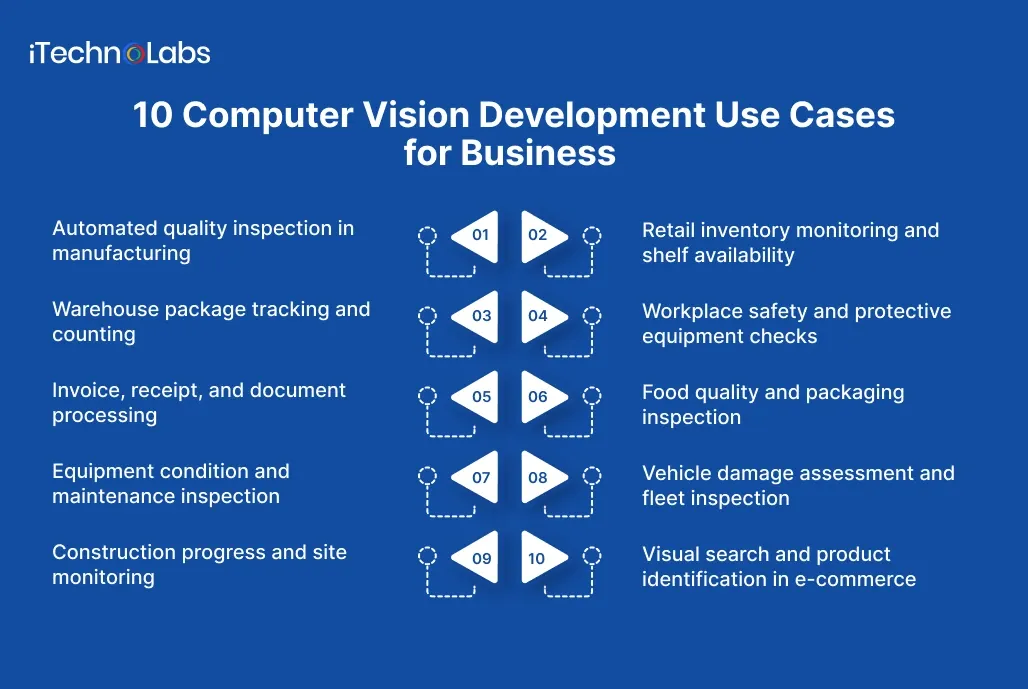
1. Automated quality inspection in manufacturing
Computer vision systems can inspect products on production lines to identify visible defects, inconsistencies, and packaging problems. Microsoft’s manufacturing guidance describes AI-powered quality inspection as an application for detecting defects earlier in production.
A small manufacturer may need employees to inspect each component, label, weld, or finished product. Repetitive checks can be difficult to maintain consistently across shifts, particularly when production volume increases.
A pilot could focus on one product type and a defined set of visible defects. Cameras capture images, a model classifies potential problems, and the system flags uncertain or defective items for human review.
Measure defect detection precision, missed defects, false alarms, inspection time, and the cost of rechecking items. Lighting, camera positioning, product variation, and rare defects must be considered before expanding the system.
2. Retail inventory monitoring and shelf availability
Image recognition can identify products and help businesses check whether expected items are present on retail shelves. Microsoft documents product recognition as a way to improve the efficiency of manual shelf checks.
For retailers, stock records do not always tell the whole story. A product may be recorded as available in the inventory system while its shelf is empty, misplaced, or poorly arranged.
Use shelf images to identify missing products, empty spaces, misplaced stock, or visible display issues. Integrate validated findings with inventory software or a task management system so staff know what needs attention.
Start with a limited product range. Similar packaging, changing promotions, occluded items, and inconsistent camera angles can affect recognition accuracy. Treat the system as an additional source of stock information, not an automatic replacement for inventory reconciliation.
3. Warehouse package tracking and counting
Computer vision can detect and track objects across video frames, supporting applications such as logistics monitoring and material handling.
Warehouses often rely on barcode scans and manual counts. These remain useful, but missed scans or misplaced packages can create discrepancies that take time to investigate.
Cameras positioned at a packing station, conveyor, or loading area could identify packages, count objects crossing a defined point, or flag unexpected movement. The resulting events can be matched with warehouse management records.
Define the exact event to capture before choosing a model. Counting a package at a conveyor is a different problem from tracking it through multiple rooms. Validate performance when packages overlap, labels are obscured, or lighting changes, and retain barcode or manual checks where they provide necessary confirmation.
4. Workplace safety and protective equipment checks
Computer vision can analyse video streams to identify objects and events. Industrial AI applications include monitoring safety conditions and detecting activity in work environments.
In facilities where protective equipment is required, supervisors cannot always observe every work area continuously. A visual monitoring system can help surface potential safety issues for review.
A carefully scoped application could flag a missing hard hat in a designated zone, detect entry into a restricted area, or identify an obstruction in an access route. Alerts should direct a trained employee to review the event and follow the site’s established safety procedures.
Before deployment, establish camera coverage, acceptable alert thresholds, data retention rules, and worker privacy safeguards. Do not treat model predictions as definitive proof of misconduct or rely on automated detection alone for critical safety decisions.
5. Invoice, receipt, and document processing
Optical character recognition, or OCR, extracts text from images and scanned documents. Combined with image classification, it can support document digitisation and automated data entry.
SMB finance and operations teams may spend time transferring information from invoices, delivery notes, receipts, and forms into business software. Errors can occur when information is entered repeatedly by hand.
A document vision workflow can identify a document type, extract relevant fields, and send the results into an approval process. For example, invoice details could be compared with purchase order records before a finance employee approves payment.
Test the workflow on documents from different suppliers, including low-quality scans, handwritten notes where relevant, unusual layouts, and missing fields. Validate extracted amounts, dates, and identifiers before they affect accounting or payment systems.
6. Food quality and packaging inspection
Image classification and object detection can be applied to visual inspection tasks, including checking products and packaging for inconsistencies. Computer vision capabilities support both classification and detection of objects within images.
Food producers and distributors may need to check package seals, label placement, product appearance, and visible contamination indicators. These tasks differ by product and production environment.
Begin with a narrowly defined visual check, such as identifying a missing label or detecting a packaging component in the wrong position. Connect alerts to an existing quality assurance process, where an employee can verify the finding and record corrective action.
Computer vision cannot establish every food safety condition from an image. Microbial contamination, internal product quality, and other nonvisual properties may require laboratory tests or specialised sensors. Keep those controls in place.

7. Equipment condition and maintenance inspection
Computer vision can analyse images for visible anomalies, while broader predictive maintenance systems may combine machine data, sensors, and operational records. Microsoft’s manufacturing guidance describes maintenance applications that correlate equipment data to identify potential problems.
Maintenance teams may be able to use visual evidence to prioritise inspections, particularly when equipment is distributed across a facility or difficult to examine frequently.
A pilot could identify visible corrosion, surface damage, fluid leaks, or changes in a known component’s appearance. Pair image findings with maintenance logs and sensor readings when available.
Do not assume that visible damage always predicts failure or that an apparently normal image means equipment is safe. Establish inspection criteria with qualified maintenance personnel and validate alerts against confirmed findings.
8. Vehicle damage assessment and fleet inspection
Image classification and object detection can support visual analysis of vehicles, parts, and other objects. Image processing is also used to organise and analyse photographs in insurance and related workflows.
Fleet operators, vehicle rental companies, and repair businesses often need to document vehicle condition at collection, return, or maintenance. Differences in lighting and photo angles can make manual comparisons difficult.
A mobile application could guide users through a consistent photo capture process and flag potential scratches, dents, cracked lights, or other visible damage for review. Comparing before and after images may help employees investigate discrepancies.
Use standardised capture angles where possible. Validate the system across vehicle colours, weather conditions, camera quality, and damage severity. Human inspection remains important for disputed assessments and safety-critical components.
9. Construction progress and site monitoring
Video analysis can be used to monitor physical environments, detect objects, and analyse activity over time. Microsoft’s video analysis guidance includes monitoring and classifying objects in recorded footage.
Construction managers often need to understand whether work has progressed as planned, whether materials are available, and whether an area requires attention. Site visits and manual reporting provide useful information but may not capture every change between inspections.
Use periodic site photographs or fixed camera feeds to document visible progress, identify material movement, or flag changes in a designated area. Compare observations with project schedules and site reports rather than using image analysis as the sole measure of completion.
Dust, changing weather, moving equipment, temporary obstructions, and different camera angles can make comparisons unreliable. Agree on capture locations and review criteria before building automated progress reporting.
10. Visual search and product identification in e-commerce
Computer vision can attach descriptive metadata to images, classify product photographs, and make image collections easier to search. Microsoft documents image classification use cases in retail and e-commerce.
Customers do not always know the name or category of the item they want. They may have a photograph of a similar product but struggle to find it using text search alone.
A visual search feature can let customers upload an image and retrieve visually similar products from a catalogue. A product recognition workflow can also help sellers categorise uploaded images and identify missing listing attributes.
Define similarity carefully. Matching colour or shape does not necessarily mean that two products have the same specifications, compatibility, or price. Combine image matching with catalogue metadata, filters, and standard product search so users can narrow results reliably.
How to Choose the Right Computer Vision Project
Not every visual task needs a custom AI model. The best starting point is a workflow where visual information is essential, manual effort is recurring, and the cost of errors can be measured.
Evaluate candidate projects against these five criteria.
| Evaluation criterion | What to check |
| Business impact | How much time, rework, waste, or delay does the current task create? |
| Data availability | Can you access representative images or video from normal operating conditions? |
| Measurable accuracy | Can you define acceptable missed detections and false alarms? |
| Workflow integration | Where should a detection or classification result go next? |
| Deployment feasibility | Can cameras, lighting, connectivity, privacy controls, and hardware support the system? |
Choose one clearly defined workflow, collect representative samples, and establish a baseline before development. Test the model on images it has not seen during training. Review its failures with the people who perform the task today.
Microsoft’s documentation for custom vision systems notes that model performance depends on the quality and volume of training data, and that production samples can support subsequent evaluation and retraining.
What should a computer vision pilot measure?
Set acceptance criteria before development begins. Depending on the use case, measure:
- Detection precision, meaning how often flagged items are actually relevant.
- Recall, meaning how many relevant defects or events the system identifies.
- False alarms and missed detections, especially when errors carry different costs.
- Processing speed and whether results arrive in time to support the workflow.
- Human review time, integration effort, and the cost of operating the system.
A model that performs well on a prepared sample may behave differently under production lighting, changing product designs, crowded scenes, or poor camera positioning. A pilot should test those conditions before the business commits to wider deployment.

Implementing Computer Vision Without Disrupting Operations
A practical implementation plan should move through five stages.
- Define the problem. Document the existing workflow, the decision the system must support, and the cost of errors.
- Assess the data. Review image quality, available examples, privacy constraints, and the range of conditions the model must handle.
- Build a focused prototype. Choose an appropriate model and test it against a defined set of requirements.
- Integrate the output. Connect detections to the relevant inventory, quality, document, or operations workflow.
- Validate and monitor. Test real operating conditions, track errors, and establish a process for reviewing and improving model performance.
The model is only one component of the project. Cameras, data preparation, application interfaces, integrations, security, monitoring, and employee workflows all influence whether the system proves useful in practice.
Why Choose iTechnolabs for Computer Vision Development?
iTechnolabs provides AI development and custom software development services for businesses building or modernising digital products. Its service portfolio includes dedicated computer vision development services for organisations exploring visual AI applications.
A successful computer vision project requires more than selecting an AI model. It also requires understanding the business problem, preparing suitable data, integrating model outputs with existing systems, and validating performance before deployment.
When evaluating a development partner, look for a team that can connect the technical implementation to measurable business requirements and explains how the proposed system will be tested, integrated, and maintained.
What iTechnolabs Brings to the Conversation
- Business-focused implementation: A clearly scoped engagement can help your team assess feasibility, define acceptance criteria, and identify technical risks before committing to a larger deployment.
- Established delivery experience: iTechnolabs reports delivering more than 500 apps and supporting over 50,000 end users. These are company-reported figures, not computer vision-specific project results.
Conclusion
Computer vision gives businesses a way to turn images and video into useful operational information, from identifying product defects and tracking inventory to processing documents and monitoring equipment. Its value depends on how accurately it handles real operating conditions and how effectively its outputs connect with existing business workflows.
For SMBs, the best starting point is not automating every visual task at once. It is identifying one recurring problem where manual inspection consumes time, errors create costs, or teams lack timely information. A focused pilot can help determine whether computer vision is practical, what improvements are achievable, and what it will take to deploy it reliably.
Before investing in a full implementation, assess your data, define measurable success criteria, test the model under real working conditions, and establish human oversight for important decisions. With the right scope and implementation plan, computer vision can become a practical part of your business operations rather than an isolated AI experiment.

FAQs
1. What are the most common computer vision development use cases for businesses?
Common computer vision development use cases include manufacturing inspection, retail shelf monitoring, warehouse tracking, document processing, workplace safety monitoring, vehicle inspection, and visual product search. The appropriate application depends on the images available, the decision the system needs to support, the cost of errors, and how results fit the existing workflow.
2. How can computer vision help a small business?
Computer vision can help a small business automate repetitive visual checks, identify potential errors, and convert images into structured information. Examples include checking product labels, counting items, extracting invoice details, and documenting vehicle condition. Start with a task that occurs regularly and has a measurable cost when performed manually.
3. Does computer vision require custom AI model development?
Not every computer vision project requires a model trained from scratch. Existing vision services and pretrained models may support standard image analysis tasks, while specialised applications may need fine-tuning or custom training. The choice depends on the task, available data, required accuracy, deployment constraints, and the performance of existing tools.
4. How accurate are computer vision systems in real business environments?
Accuracy varies with the task, training data, image quality, operating conditions, and evaluation method. A model’s test results do not guarantee the same performance in production. Businesses should evaluate precision, recall, false alarms, and missed detections on representative data, then validate performance under real operating conditions before relying on automated outputs.
5. Can computer vision integrate with existing business software?
Computer vision outputs can be connected to business applications through APIs, data pipelines, and application integrations. For example, validated detections can feed inventory records, quality dashboards, or document approval workflows. Define where each result should go, who can act on it, and what validation is required before connecting the system to operational records.
6. How much does computer vision development cost?
There is no single reliable price for every computer vision project. Costs depend on data collection and labelling, model complexity, camera and hardware requirements, integrations, deployment location, security controls, and ongoing monitoring. Request a scoped assessment based on your workflow and sample data instead of relying on a generic price range.
7. How long does a computer vision project take?
Timelines vary with project scope, data readiness, integration requirements, and the amount of testing needed. A prototype using prepared data is a different undertaking from a production system integrated with multiple cameras and business applications. Agree on pilot deliverables and acceptance criteria before estimating the schedule for full deployment.
8. What risks should businesses consider before implementing computer vision?
Relevant risks include inaccurate detections, biased or incomplete training data, changes in operating conditions, privacy concerns, security exposure, and integration failures. Establish access controls, data retention rules, human review for consequential decisions, ongoing performance monitoring, and a fallback process for system errors before production deployment.











