

Today, technology is upgrading fast, and businesses want to keep up with the trend. The best way is to integrate smart tools in your system to make your process easier and faster. Here DeepSeek Implementation comes into picture. DeepSeek is a recently launched free AI-powered chatbot. DeepSeek Implementation can make your websites and apps work better by searching for the right information. This tool can handle large datasets and help you improve your services.
But how does DeepSeek Implementation work? We will provide you with a complete overview of the integration process. Let’s start.
Table of Contents
Step-by-Step Guide for DeepSeek Implementation
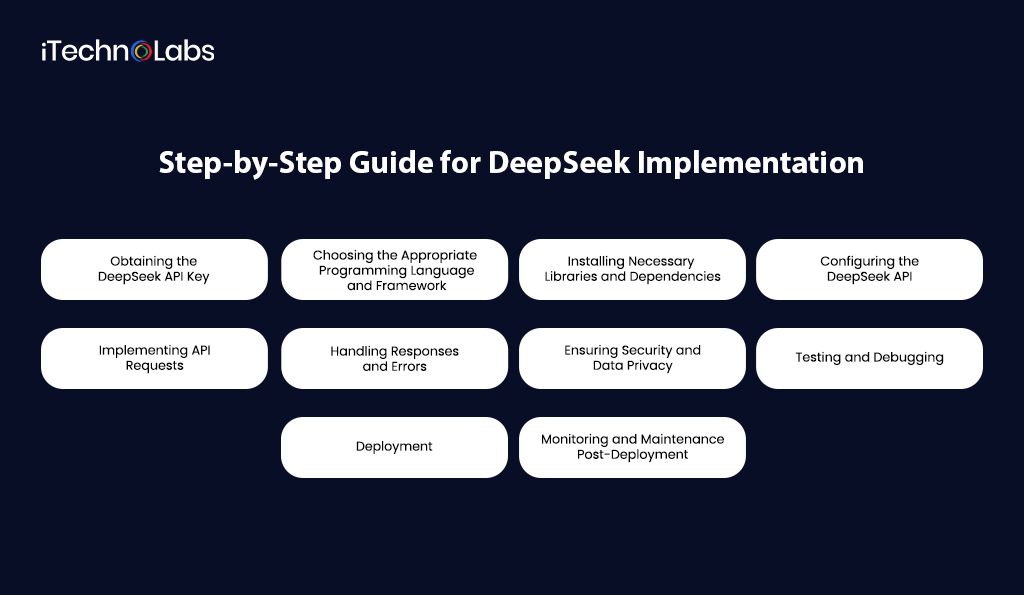
Obtaining the DeepSeek API Key
The first thing that you’ll need is an API key. It is similar to a special password that lets your app talk to DeepSeek. Here’s how to get it:
- Sign Up: Go to the official DeepSeek website and create an account.
- Log In: After signing up, log in to your dashboard.
- Find API Section: Look for the API section where you’ll see an option to generate a new key.
- Generate API Key: Click the button, and DeepSeek will give you a unique code.
- Keep It Safe: Copy this key and save it somewhere secure. You’ll need it during the setup.
Optimize Your AI Potential with DeepSeek Implementation!
Choosing the Appropriate Programming Language and Framework
Now, decide which programming language you want to use. This is the language your app is built on, like:
- JavaScript (for websites)
- Python (great for data tasks)
- Java or Swift (for mobile apps)
Pick the one that matches your app. Also, choose a framework if needed, like React for web apps or Django for Python projects.
Installing Necessary Libraries and Dependencies
To help your app work with DeepSeek, you need to install some libraries—these are like tools that make coding easier.
- Open Your Code Editor: Use apps like VS Code or PyCharm.
- Use a Package Manager: For example, in Python, you’d use pip. In JavaScript, you’d use npm.
- Run the Command: Type commands like pip install requests or npm install axios to add the needed libraries.
- Check Installations: Make sure everything is installed correctly before moving on.
Configuring the DeepSeek API
Now, it’s time to connect your app to DeepSeek.
- Add Your API Key: In your app’s code, find the part where APIs are set up. Paste your API key here.
- Set API Endpoint: This is the address where your app will send requests. You’ll get this from DeepSeek’s documentation.
- Adjust Settings: You might need to tweak things like data format, language, or search filters based on what you need.
Implementing API Requests
Next, you’ll make API requests, which means asking DeepSeek for information.
- Write the Code: Use simple code to send a request. It’s like writing a letter asking for specific details.
- Add Details: Include things like what you’re searching for, the type of data you need, etc.
- Send the Request: Run your code, and DeepSeek will send back the information you asked for.
Handling Responses and Errors
After sending a request, DeepSeek will reply with data. Sometimes, things might go wrong, so you need to handle errors too.
- Check the Response: If everything works, you’ll get the data you need in a neat format like JSON.
- Handle Errors: If there’s a mistake (like a wrong API key), your app will show an error message.
- Write Error Handling Code: Add code to catch these errors so your app doesn’t crash.
Ensuring Security and Data Privacy
It is highly recommended to keep your data safe. Follow these to secure your data:
Protect Your API Key: Do not share your API key publicly. You can store it in environment files.
Use HTTPS: It makes it difficult to steal data.
Limit API Access: Only give access to your API to trusted apps.
Monitor Activity: Regularly check for unusual behavior or unauthorized access.
Testing and Debugging
Testing helps you find problems before they affect real users. Debugging is fixing those problems.
- Test Different Scenarios: Try different inputs to see how DeepSeek responds.
- Check for Errors: Use error messages to identify what’s wrong.
- Use Logs: You need to record logs to show the activity of your app. It makes it easier to track issues.
Deployment
Once you perform testing, it’s time for deployment.
- Prepare the Environment: Make sure servers and databases are ready.
- Check Configurations: Ensure all API keys, endpoints, and security settings are correct.
- Deploy in Stages: Roll out changes slowly to catch any unexpected issues before full release.
Monitoring and Maintenance Post-Deployment
You should regularly monitor your app after deployment:
- Regular Monitoring: You can use tools to monitor your app.
- Update APIs When Needed: DeepSeek might release new features or security updates, so keep your system up-to-date.
- Fix Issues Quickly: Respond to any errors or bugs as soon as possible to keep users happy.
- Review Analytics: Look at user data to understand how the integration is performing and where improvements can be made.
Also, read: How to Solve Homework Assignments with OpenAI’s ChatGPT 2026
How iTechnolabs Can Assist You with DeepSeek Implementation?
iTechnolabs can help you with seamless DeepSeek Implementation for your app or website. Our skilled developers will manage everything from setup to deployment to ensure everything works smoothly. We ensure setup is quick, secure, and reliable. We also provide ongoing support to keep your system updated and solve any technical issues. So, are you ready to make your apps smarter? Contact iTechnolabs today for DeepSeek Implementation in your existing system.
Conclusion
You may find DeepSeek integration difficult at first, but with the right steps, it will be simple and smooth. The guide provided you with complete information on how to get started. DeepSeek Implementation enhances your user experience and lets you find information quickly. Whether you’re a beginner or tech expert, these steps will make your integration process hassle-free. If you need expert support, iTechnolabs is ready to assist you. So, what are you waiting for? Start your journey today!
Frequently Asked Questions About DeepSeek Implementation
1. What is DeepSeek?
DeepSeek is an AI model platform designed for natural language processing, reasoning, coding assistance, and automation tasks. It can be integrated into web apps, mobile apps, enterprise systems, or SaaS platforms to enable AI-powered features.
2. What are the key steps in implementing DeepSeek?
A typical DeepSeek implementation process includes:
-
Define your use case (chatbot, code assistant, automation, etc.)
-
Choose deployment method (API or self-hosted model)
-
Set up backend infrastructure
-
Integrate DeepSeek API or model
-
Design frontend UI/UX
-
Implement prompt engineering and testing
-
Optimize performance and security
-
Deploy and monitor
Each step ensures a stable and scalable AI integration.
3. Do I need coding experience to implement DeepSeek?
Yes. Implementing DeepSeek requires backend and frontend development knowledge, API integration skills, and an understanding of AI model interaction. A development team or AI engineer is typically required for production deployment.
4. Can DeepSeek be integrated into mobile apps?
Yes. DeepSeek can be integrated into:
-
iOS apps (Swift)
-
Android apps (Kotlin/Java)
-
Cross-platform apps (Flutter, React Native)
-
Web applications
The integration is usually handled through API calls from your backend server.
5. What are common use cases for DeepSeek?
Popular implementation use cases include:
-
AI chatbots
-
Customer support automation
-
Code generation tools
-
Content generation
-
Data analysis assistants
-
Workflow automation
-
Educational AI tutors
The use case determines the architecture and cost.
6. How long does it take to implement DeepSeek?
Implementation timelines vary:
-
Basic API integration: 2–4 weeks
-
Custom AI-powered app: 2–4 months
-
Enterprise-scale deployment: 4–8+ months
Timeline depends on complexity and system requirements.
7. Why should I integrate DeepSeek into my app or website?
DeepSeek Implementation makes apps and websites faster, smarter, and more efficient. It helps deliver accurate results, improves user experience, and automates various processes. Businesses can save time, enhance productivity, and boost overall performance by integrating DeepSeek into their systems.
8. Is DeepSeek Implementation difficult for beginners?
No, DeepSeek Implementation is not very difficult for beginners when proper guidance is followed. Developers can integrate it step by step using available documentation and tools. Expert assistance can also simplify the process and ensure smooth and error-free implementation.
9. What are the key requirements for DeepSeek Implementation?
To proceed with DeepSeek Implementation, you mainly need a valid API key, stable internet connection, and a proper development environment. Basic programming knowledge and compatible software tools are also helpful for ensuring smooth integration and efficient system performance.
10. How long does it take to integrate DeepSeek?
The time required for DeepSeek integration depends on the complexity and size of the application. Simple systems may take only a few hours, while advanced or enterprise-level applications can require several days for complete setup, testing, and customization.
11. Is DeepSeek Implementation secure?
Yes, DeepSeek provides strong security features to help protect data and system operations. When integrated properly and combined with best security practices, it ensures safe communication, secure data handling, and reliable performance for apps, websites, and business platforms.
12. Can I customize DeepSeek Implementation for my business needs?
Yes, DeepSeek Implementation is highly flexible and customizable according to business requirements. Developers can modify settings, workflows, and features to match specific goals. This helps businesses achieve better performance, improved efficiency, and a more personalized user experience.
13. How can iTechnolabs help with DeepSeek Implementation?
iTechnolabs has a team of experienced developers who assist with DeepSeek Implementation, customization, and troubleshooting. The company also provides ongoing technical support, maintenance, and optimization services to ensure smooth integration and reliable long-term system performance.











