

Key Takeaways
- MCP servers provide a standard way for AI applications to access approved business tools, data, and reusable prompts.
- Enterprise MCP architecture should reflect the sensitivity of connected systems, required integrations, identity controls, and operational requirements.
- Security must be designed into the server through authentication, authorization, input validation, least privilege, and controlled execution.
- A production-ready MCP implementation needs more than working tool calls. It requires testing, monitoring, deployment controls, and ongoing maintenance.
- The right starting point is a defined business workflow, followed by a scoped proof of concept and a measured path to production.
An MCP server development guide helps enterprise technology leaders understand how to connect AI applications with business systems while maintaining control over data access, permissions, and execution. The Model Context Protocol (MCP) provides a standardised way for AI applications to interact with approved tools and resources, making it easier to design integrations around existing enterprise architecture.
For CTOs and IT directors, the challenge extends beyond connecting an AI model to an API. A production-ready implementation must account for authentication, authorisation, sensitive data, system compatibility, monitoring, and operational reliability. Without these controls, an integration that works during a proof of concept may introduce unnecessary risks when deployed across business workflows.
The right approach starts with a defined business use case, a clear integration strategy, and security requirements established before development begins. Understanding these decisions helps organisations determine whether a custom MCP server fits their architecture and how to move from an initial prototype to a controlled production deployment.
Table of Contents
- What is MCP Server Development?
- How MCP Servers Work in An Enterprise Architecture
- When Should a Business Build An MCP Server?
- An MCP Server Development Guide for Enterprise Teams
- Security Risks CTOs Should Evaluate
- How to Evaluate An MCP Development Partner
- Plan Your Enterprise MCP Server Development with iTechnolabs
- Conclusion
- FAQs
What is MCP Server Development?
MCP server development is the process of building a server that lets AI applications discover and use approved tools, access relevant business data, and work with reusable prompts through the Model Context Protocol. An enterprise MCP server connects AI capabilities to existing systems while enforcing the security, permissions, and operational controls required for production use.
For a CTO or IT director, the main question is not simply whether an AI model can call a tool. It is whether that interaction can happen reliably, securely, and within the organisation’s existing technology architecture.
A server might expose selected customer records from a CRM, retrieve internal documentation, or initiate an approved workflow. Each capability needs a clearly defined purpose, a controlled interface, and an appropriate permission model.
How MCP Servers Work in An Enterprise Architecture
MCP establishes a common protocol between an AI application and a server that exposes capabilities. Instead of building a separate custom integration for every compatible AI client, developers can implement a server around a defined set of business functions.
The main components are:
- MCP host: The AI application in which the user works.
- MCP client: The component that communicates with an MCP server.
- MCP server: The service that exposes approved tools, resources, and prompts.
- Business systems: The CRM, ERP, databases, document platforms, and APIs that supply information or execute operations.
The server acts as a controlled integration layer. It should not automatically receive unrestricted access to every connected system.
Tools, resources, and prompts
These three server capabilities serve different purposes.
- Tools allow an AI application to request an operation, such as retrieving an order status, checking inventory, or creating a support ticket.
- Resources expose contextual information, such as approved documentation, reference data, or records that the application can retrieve.
- Prompts provide reusable templates for common interactions, helping standardise how users initiate particular tasks.
The distinction matters because reading information and changing business records carry different risks. A read-only operation may need limited access, while approving a payment or modifying a customer record requires stricter controls.
The official Model Context Protocol documentation explains these server capabilities and their respective roles.
When Should a Business Build An MCP Server?
An MCP server is worth evaluating when an organisation wants AI applications to interact with existing systems through defined, reusable interfaces.
Consider these potential use cases:
- Enterprise knowledge access: Retrieve approved policies, product documentation, or internal technical references.
- CRM and ERP workflows: Look up customer information, order details, or inventory through authorised operations.
- Engineering productivity: Allow AI tools to retrieve project information, inspect approved repository data, or assist with defined development workflows.
- Customer support: Retrieve relevant case history and prepare responses for human review.
- Business operations: Coordinate routine tasks across connected applications while preserving approval requirements.
These are illustrative use cases, not documented iTechnolabs client outcomes.
Before investing in development, assess whether MCP solves a genuine integration problem. If a single application needs one simple API connection, a direct integration may be sufficient. If multiple compatible AI clients need consistent access to a growing set of business capabilities, an MCP server may offer a more suitable architecture.
An MCP Server Development Guide for Enterprise Teams
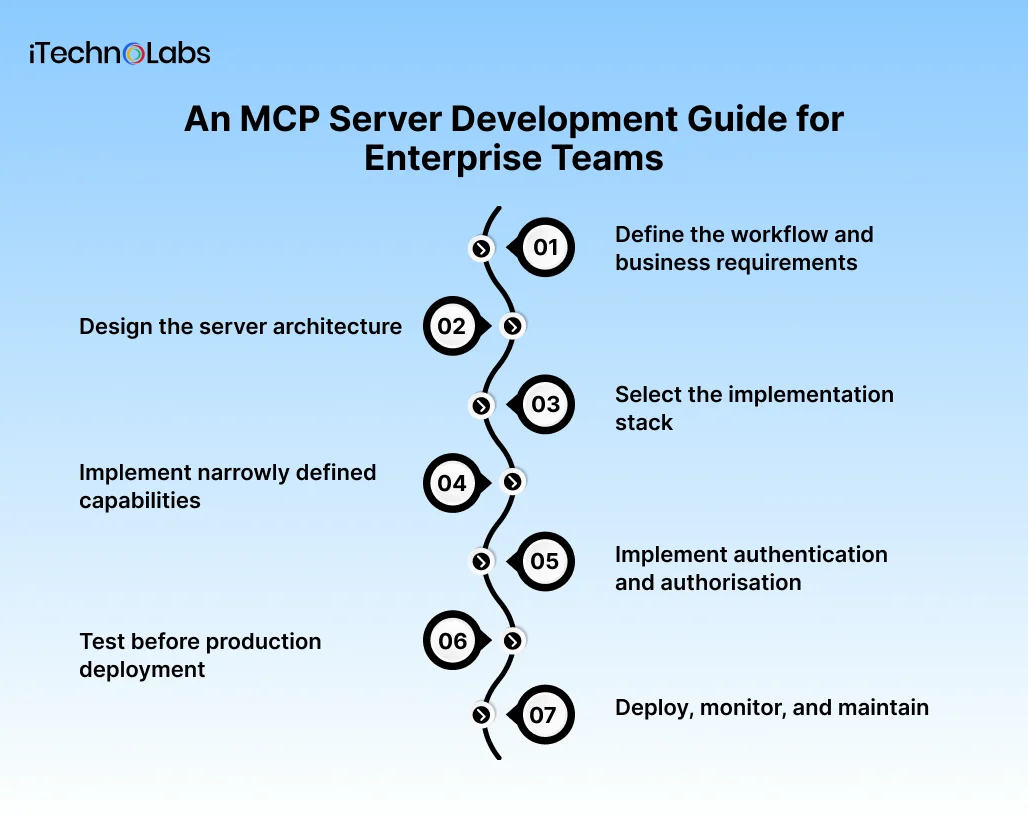
1. Define the workflow and business requirements
Start with the business process, not the protocol.
Identify the users, systems involved, information required, and actions the AI application should be permitted to perform. Document what success looks like and which activities must remain under human control.
For example, a support assistant might retrieve an order, summarise its status, and prepare a proposed response. Issuing a refund could remain a separate operation requiring explicit approval.
Define the initial scope, measurable acceptance criteria, data boundaries, and failure conditions before selecting a technology stack.
2. Design the server architecture
Map the MCP server to the existing application architecture.
Decide which systems it will connect to, whether existing APIs can be reused, how credentials will be managed, and where business rules should execute. Keep business logic in appropriate application services rather than duplicating it across tool handlers.
Choose a deployment model based on the environment. A local server may suit a developer workstation or controlled internal workflow. A remotely hosted server may be more appropriate when multiple authorised users or applications need shared access.
The architecture should also account for concurrency, request timeouts, service availability, logging, and downstream API failures.
3. Select the implementation stack
Choose a supported MCP SDK that fits the team’s language, runtime, and hosting environment.
The official TypeScript SDK documentation describes server development using tools, resources, prompts, and supported transports. Other official SDK documentation is available for languages including Python, Go, Java, and C#.
Evaluate the following before committing:
- Compatibility with the intended MCP clients.
- Support for the required transport and authentication approach.
- Integration with existing APIs, identity providers, and observability tools.
- Team experience, maintenance requirements, and deployment constraints.
- Testability and support for the protocol features the application needs.
Avoid choosing a stack solely because a small demonstration works. The production implementation must fit the organisation’s operational and security requirements.
4. Implement narrowly defined capabilities
Create a small set of clearly named tools with documented inputs, expected outputs, and explicit failure behaviour.
Validate incoming arguments against defined schemas. Enforce business rules in the server or downstream service, and return structured, useful errors when an operation cannot be completed.
Keep permissions separate by operation. A tool that reads an invoice should not automatically inherit permission to edit or approve it.
Where an operation changes business data, design for duplicate requests, timeouts, partial failures, and safe retries. Make consequential actions distinguishable from read-only operations.
5. Implement authentication and authorisation
Enterprise access controls must determine who can connect, which data they can access, and which operations they can execute.
For remote HTTP-based servers, follow the applicable MCP authorisation specification and established OAuth security practices. Validate access tokens for the intended resource, use HTTPS, protect credentials, and avoid forwarding incoming tokens directly to downstream APIs.
The official MCP authorisation specification documents the protocol’s HTTP authorisation approach and associated requirements.
Use least privilege, enforce permissions close to the resource being accessed, and maintain audit records for sensitive operations. An authenticated connection alone does not establish that every requested action is authorised.
6. Test before production deployment
Test the server as an application component, not just as a protocol endpoint.
Include unit tests for tool handlers, integration tests for connected systems, and compatibility tests with intended MCP clients. Validate malformed inputs, expired credentials, insufficient permissions, unavailable dependencies, and unexpected downstream responses.
Security testing should cover unauthorised access, injection risks, sensitive data exposure, and attempts to trigger actions outside the approved scope.
Also test operational behaviour: timeouts, rate limits, concurrent requests, retries, and recovery after a service interruption. Define measurable acceptance criteria before the pilot begins.
7. Deploy, monitor, and maintain
Production readiness requires operational ownership.
Establish appropriate logging, metrics, alerts, secret rotation, dependency updates, and incident response procedures. Track tool failures, latency, authorisation denials, and downstream service errors without logging sensitive payloads unnecessarily.
Version the server’s capabilities and document changes that may affect connected clients. Introduce new operations through controlled releases, with a rollback path when a deployment causes unexpected behaviour.
A server that works in a development environment is not automatically ready for enterprise use.
Security Risks CTOs Should Evaluate
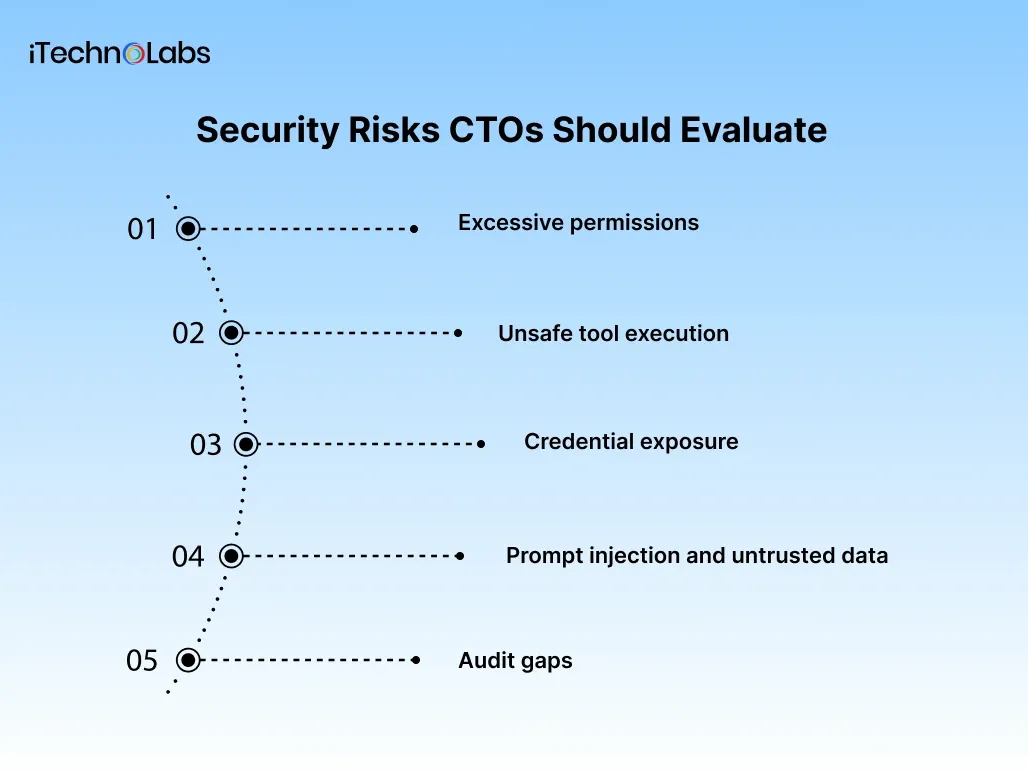
MCP introduces an interface through which AI applications can access data and request actions. The security design must account for both the protocol and the systems behind it.
- Excessive permissions: A compromised or misused tool could access more information than necessary. Restrict permissions to the minimum required for each operation.
- Unsafe tool execution: Validate inputs, enforce business rules, and require appropriate human approval for sensitive actions.
- Credential exposure: Protect secrets, validate tokens, and prevent credentials from appearing in logs or being passed indiscriminately between services.
- Prompt injection and untrusted data: Treat retrieved documents and external content as potentially untrusted. Do not let instructions embedded in data override access controls or business rules.
- Audit gaps: Record who initiated an operation, which tool executed, whether it succeeded, and which approval controls applied, subject to privacy and retention requirements.
The MCP security guidance outlines responsibilities for server developers, client developers, and operators. Security controls must be implemented in the actual application rather than assumed to be guaranteed by the protocol.
How to Evaluate An MCP Development Partner
When assessing an implementation partner, ask for evidence of how the team approaches architecture, integration, and security.
A useful evaluation should cover:
- Experience integrating APIs, databases, identity systems, and existing enterprise applications.
- A documented approach to tool permissions, input validation, and sensitive operations.
- A test plan that includes failure scenarios and security validation.
- Clear ownership of source code, deployment environments, documentation, and ongoing maintenance.
- An agreed delivery scope, acceptance criteria, and production readiness checklist.
Ask the team to explain how it would connect one representative workflow, control its permissions, test failure cases, and operate the service after release.
Plan Your Enterprise MCP Server Development with iTechnolabs
Building an MCP server for an enterprise environment requires a clear understanding of existing systems, AI integration requirements, security boundaries, and production deployment needs. The right implementation approach should reflect your organisation’s architecture and the business workflows you want to improve.
iTechnolabs provides AI development and custom software development services that can support organisations evaluating AI integrations, agent workflows, and connections between existing business applications. Our approach begins with understanding your technical requirements, identifying integration dependencies, and defining an implementation scope aligned with your operational needs.
Whether you are evaluating an initial MCP proof of concept or planning a broader AI integration initiative, a technical discussion can help clarify the architecture, security considerations, and development priorities.
Conclusion
MCP server development gives enterprises a structured way to connect compatible AI applications with approved business tools, resources, and workflows. However, successful implementation depends on more than protocol compatibility. Architecture, access controls, integration quality, testing, and operational ownership determine whether an MCP server is suitable for production use.
For CTOs and IT directors, the most practical starting point is a clearly defined workflow with limited permissions and measurable acceptance criteria. Validate the integration through a focused proof of concept, test security and failure scenarios, and establish monitoring and maintenance procedures before expanding access to additional systems.
The objective is to introduce AI capabilities without compromising the controls that protect enterprise data and business operations. A deliberate implementation plan helps technology leaders evaluate the trade-offs, manage risk, and make informed decisions about where MCP fits within their existing architecture.
FAQs
1. What is an MCP server used for?
An MCP server exposes approved tools, resources, and prompts to compatible AI applications. It can connect an AI workflow to business APIs, internal documentation, or selected data sources. The server provides a defined interface, while application-level permissions and business rules determine which information and operations are available.
2. How long does MCP server development take?
The timeline depends on the number of integrations, authentication requirements, data sensitivity, workflow complexity, testing needs, and deployment environment. A narrowly scoped proof of concept is different from a production service with multiple systems and governance requirements. Estimate the schedule after documenting the initial scope and acceptance criteria.
3. Is MCP secure enough for enterprise applications?
MCP can be used in enterprise architectures, but security depends on implementation and operations. Authentication, authorisation, token validation, least privilege, input validation, monitoring, and appropriate approval controls must be designed and tested. Organisations should assess the server, its connected systems, and the permissions granted to each operation before deployment.
4. What is the difference between an MCP server and a traditional API?
A traditional API exposes application endpoints for software clients. An MCP server exposes capabilities through a protocol designed for compatible AI applications to discover and use tools, resources, and prompts. An MCP server can call existing APIs behind the scenes, so adopting MCP does not necessarily require replacing established application services.
5. Should a business build a custom MCP server or use an existing one?
The decision depends on the required capabilities, available integrations, security requirements, and level of control needed. An existing server may be suitable when its permissions and behaviour meet your requirements. Custom development may be appropriate when workflows, data boundaries, or business rules require tailored implementation and governance.
6. How should an enterprise start an MCP project?
Begin with one business workflow, identify the systems and data involved, define permitted operations, and establish measurable acceptance criteria. Build a limited proof of concept, test security and failure scenarios, and evaluate operational requirements before expanding. A technical discovery session can help determine the appropriate architecture and delivery scope.











