
Key Takeaways
- Custom software pays off when the time your team spends on workarounds exceeds the time your tools save.
- The seven signs: re-keyed data, a spreadsheet acting as your system of record, a process bent to fit the tool, a workflow that defines your business, licence and workaround costs outpacing growth, compliance gaps, and hard platform limits.
- Score yourself on the seven signs. Three or more is a signal to scope a build.
- Three situations where you should not build: the need is common, configuration is untested, or nobody owns the process.
- Choose between buying, configuring, integrating and building by weighing how much the workflow matters to your business against what the workaround costs.
Knowing when to build custom software becomes important when your existing tools start creating more work than they remove. Common signs include repeated data entry, spreadsheet-dependent processes, slow reporting, or critical workflows that off-the-shelf software cannot support effectively.
The global custom software development market was valued at $35.42 billion in 2023 and is projected to reach $103.91 billion by 2032, growing at a 12.9% CAGR, according to Fortune Business Insights. This growth reflects the increasing demand for software built around specific business workflows, integrations, and operational requirements.
This guide covers seven signs that your business may be ready for custom software, along with three situations where building it may not be the right decision.
Table of Contents
Seven Signs Your Business Needs Custom Software
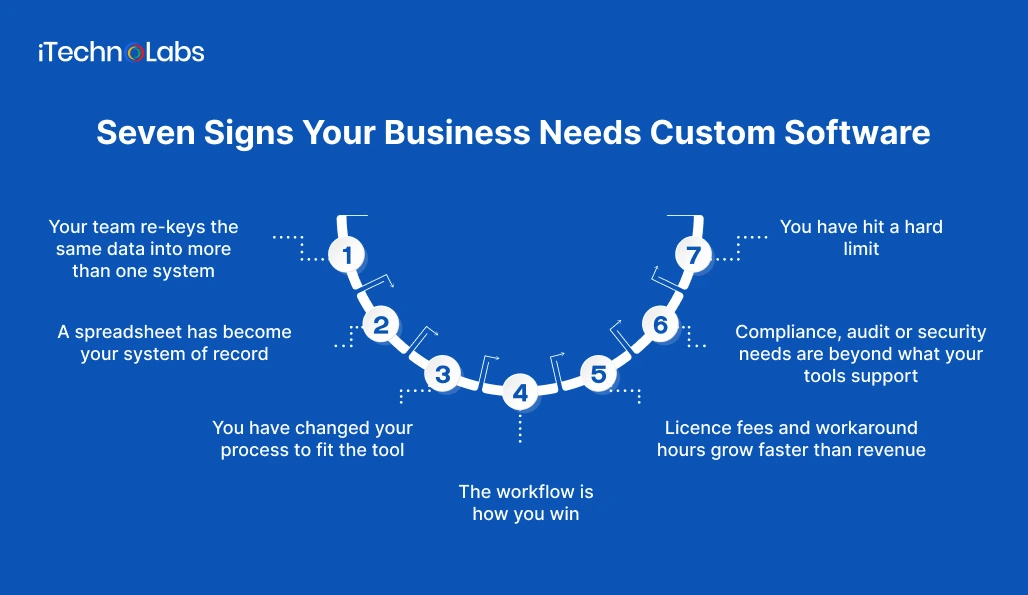
1. Your team re-keys the same data into more than one system
What it looks like: A confirmed order in your sales tool gets retyped into a warehouse sheet, then again into an invoice. A customer’s address changes and someone updates it in three places, or forgets one.
Test question: If we stopped re-entering data tomorrow, how many hours per week would we recover?
What custom software changes: A single workflow layer writes the data once and passes it to each system that needs it. Errors from duplicate entry drop because there is only one entry.
2. A spreadsheet has become your system of record
What it looks like: Pricing logic lives in a file that one person understands. The file exists in seven versions. Decisions about stock, staffing, or quotes depend on numbers nobody can audit.
Test question: If the person who maintains this file left on Friday, what would break on Monday?
What custom software changes: A proper database with user roles, input validation, and change history replaces the file. Spreadsheets remain useful for analysis. The warning sign is when they carry operational decisions.
3. You have changed your process to fit the tool
What it looks like: Staff skip required fields, paste details into free-text notes, or keep a side document because the software has no place for what they actually do. Sales promises something the system can’t record.
Test question: Which steps do we perform only because the software requires them?
What custom software changes: The software follows your business rules rather than the other way around. Training gets shorter because the screens match how people already work.
4. The workflow is how you win
What it looks like: Your quoting method, dispatch rules, scheduling logic, or onboarding sequence is the reason customers choose you. It currently runs on generic tools.
Test question: Could a competitor replicate this workflow by subscribing to the same product?
What custom software changes: You encode the workflow in software built specifically around your business rules. This gives you greater control over how the process works and evolves instead of relying on the same generic workflow available to every customer of the product. Confirm in the contract who owns the code and other deliverables before you sign anything.
5. Licence fees and workaround hours grow faster than revenue
What it looks like: Seat tiers, add-on modules and paid connectors keep stacking up. Someone on staff has become the unofficial administrator who keeps the tools talking to each other.
Test question: If we add up licence fees, connector fees and the hours spent on workarounds, does the total rise faster than our headcount or revenue?
What custom software changes: Spending shifts from recurring licences to a build cost plus ongoing maintenance. Be honest in the comparison: custom software has its own running costs, so the sign only counts if the full workaround cost is higher.
6. Compliance, audit or security needs are beyond what your tools support
What it looks like: A regulator, client, or insurer asks who changed a record and when, and you can’t answer. You handle health, financial, or personal data and need granular access control, data residency, or a full audit trail.
Test question: For any record in our system, can we prove who changed it, when, and why?
What custom software changes: Controls are designed into the software from the first release instead of bolted on. Look for a development partner that works under certified information security and quality processes.
7. You have hit a hard limit
What it looks like: A user cap blocks the next hire. Reports slow to a crawl at current data volumes. The vendor won’t build the integration you need, and the feature has sat on their roadmap for two years.
Test question: What is the next thing we can’t do, and is it on the vendor’s committed roadmap?
What custom software changes: You set the roadmap. Limits become design requirements that get built in, not support tickets that wait in a queue.
Score Yourself: How Many Signs Apply?
Count one point for each sign above that describes your business today.
| Score | What it suggests | Next step |
| 0 to 2 | Your current tools mostly fit. Custom software is unlikely to pay back yet. | Tighten configuration and revisit in six months. |
| 3 to 4 | Workarounds are costing real time. A build deserves a proper estimate. | Document the two costliest workflows and request a scoping session. |
| 5 to 7 | You are likely paying more to avoid a build than a build would cost. | Prioritise by sign 4 and sign 5, then scope the first release. |
Three Signs You Do Not Need Custom Software Yet
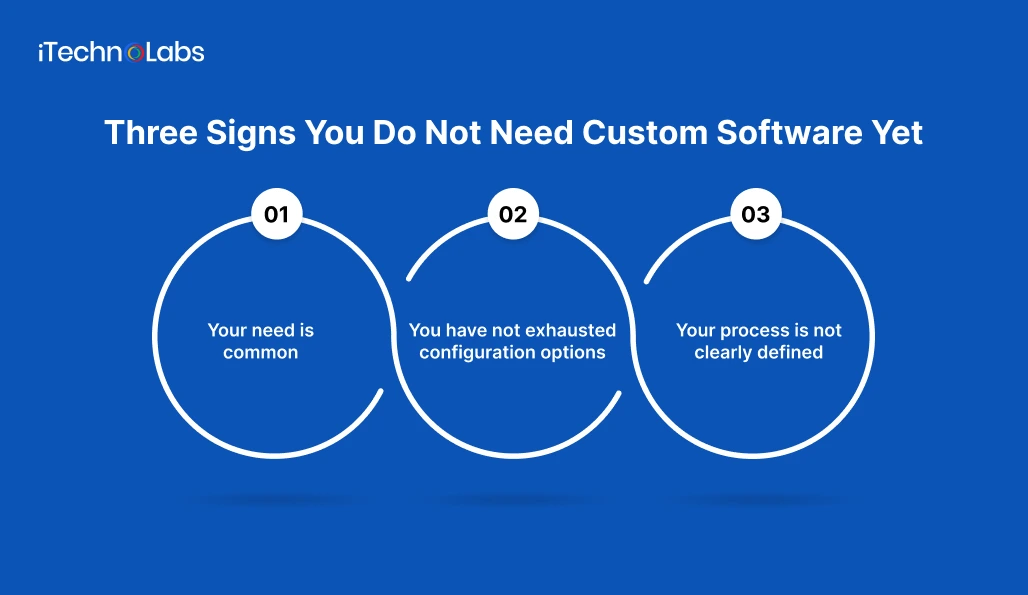
Custom software can solve serious operational problems, but building too early can create unnecessary cost and complexity. Before starting development, make sure the problem actually requires a custom solution.
1. Your need is common.
Payroll, basic bookkeeping, email marketing, project management, and standard CRM functions are already well served by established software. Building these capabilities yourself usually means taking on development, security, maintenance, updates, and support for something you could buy and deploy much faster. If an existing product meets most of your requirements, buying it is usually the smarter choice.
2. You have not exhausted configuration options.
A software limitation is not always a reason to replace the product. The feature you need may already exist behind a different setting, subscription tier, workflow rule, API, or integration. Before deciding that your current platform cannot support the process, review its configuration options and speak with the vendor or implementation partner. You may be able to solve the problem without building anything new.
3. Your process is not clearly defined.
Custom software turns business rules and workflows into technology. If different teams follow different processes, responsibilities are unclear, or managers disagree about how a task should work, development will not fix the underlying problem. Document the current workflow, agree on how it should operate, and define ownership before writing requirements. Otherwise, the software may simply automate an inefficient or disputed process and make it harder to change later.
The key question is not whether your current software has limitations. It is whether those limitations are important enough, persistent enough, and specific enough to justify building a system around them.
Build, Configure, Integrate or Buy: Which Fits?
| Option | Best when | Watch for |
| Buy as is | The need is common, and the product fits with no changes | Paying for features you never use |
| Configure | The product is close, and settings or a plan upgrade closes the gap | Configuration that grows so complex nobody maintains it |
| Integrate | Your tools are right individually but don’t share data | Brittle connections that break when a vendor changes its API |
| Build custom | The workflow is strategic, compliance is strict, or limits block growth | Unclear scope, no process owner, no plan for maintenance |
A practical rule: the closer a workflow sits to the reason customers choose you, the stronger the case for building it. The further it sits from that reason, the stronger the case for buying.
How iTechnolabs Can Help You Build the Right Custom Software
iTechnolabs helps businesses turn critical workflows into custom software when existing tools no longer fit. The team can assess your current systems, map workflows, identify integration gaps, and define an MVP around the problems that matter most.
From business analysis and UI/UX design to development, testing, deployment, integrations, and ongoing maintenance, iTechnolabs can support the full custom software development lifecycle. The focus is on building software around your business rules, users, data, and operational requirements rather than adding another generic tool to your stack.
Conclusion
Custom software is not automatically the answer to every software limitation. The stronger question is whether your current tools are costing more in workarounds, inefficiency, risk, and lost opportunities than a purpose-built solution would cost to create and maintain.
Start by scoring your business against the seven signs. Three or more indicate that a proper build assessment is worth considering. If your need is common, configuration options remain unexplored, or the underlying process is unclear, solve those issues first. Pasted markdown
Then compare your options honestly. Buy when an existing product fits. Configure when a small adjustment closes the gap. Integrate when your current tools work well but cannot share data. Build custom when the workflow is strategically important, existing limits are holding you back, or your requirements cannot be handled effectively by available products.
FAQs
1. How do I know if my business needs custom software?
Look for repeated manual work, data typed into several systems, spreadsheets running critical decisions, and tools you’ve had to bend your process around. If three or more of the seven signs in this guide describe your operations, request a scoping session to price a build against the cost of your current workarounds.
2. Is custom software worth it for a small business?
It can be, when the workflow is central to how you compete or the workarounds cost more than the build. For common needs such as payroll or bookkeeping, existing products usually win. Compare the full annual cost of your current workarounds with a scoped estimate before deciding.
3. How much does custom software development cost for a business?
Custom software development typically costs between $10,000 and $100,000+, depending on the features, complexity, integrations, and security requirements. A basic application may cost less, while a complex enterprise platform can exceed this range. Define your core requirements and request a detailed estimate covering development, deployment, and ongoing maintenance.
4. How long does it take to develop custom business software?
Custom software development typically takes 2 to 6 months for a small to mid-sized business application. A basic solution may take 4 to 8 weeks, while complex platforms with multiple integrations can take 6 to 12 months or longer. The timeline depends on project scope, technical requirements, testing, and feedback cycles.
5. Can custom software work with the tools we already use?
Yes. Custom software is often built to connect to an existing CRM, accounting package, or ERP through its APIs, so you keep what works and replace only what doesn’t. Confirm during scoping that each tool offers a documented integration, because a vendor without one limits what is possible.
6. What is the difference between custom and off-the-shelf software?
Off-the-shelf software is built for many customers and configured to fit. Custom software is built around one organisation’s workflows, rules, and data. Off-the-shelf costs less to start and carries licence fees. Custom software costs more to start, fits exactly, and requires its own maintenance.











