
Key Takeaways
- AI agents can handle multistep tasks by interpreting information, choosing actions, and using connected tools within defined limits.
- The best first project solves one measurable business problem, such as qualifying leads or answering internal questions.
- Successful AI agent development depends on reliable data, clear permissions, testing, and human oversight.
- Founders should validate a narrow use case before investing in a complex, autonomous system.
AI agent development helps founders build software that can interpret information, make decisions within defined boundaries, and complete multistep tasks using connected tools. From qualifying sales leads to automating customer support, AI agents can reduce repetitive work and free teams to focus on growth. The right approach starts with a clear business problem, measurable goals, and safeguards that keep the agent under control.
Table of Contents
- What Is AI Agent Development?
- What Can AI Agents Do for a Startup?
- How to Build an AI Agent Without a Technical Background
- What Does AI Agent Development Cost?
- Common Risks Founders Should Plan For
- When Should You Work With an AI Development Partner?
- Build AI Agents That Solve Real Business Problems
- Conclusion
- FAQs
What Is AI Agent Development?
AI agent development is the process of building software that uses artificial intelligence to understand a goal, work with relevant information, choose actions, and complete tasks through connected tools. For founders, it offers a way to automate multistep workflows without manually handling every step, provided the agent operates within clear permissions and safeguards.
An AI chatbot typically responds to a question. An AI agent can go further by retrieving information, updating a business system, or coordinating several steps toward a defined outcome.
The distinction matters when your startup needs more than a conversational interface. You might want software that qualifies incoming leads, checks customer records, drafts follow-up messages, and sends suitable prospects to your sales team.
The goal is not to remove people from every decision. It is to reduce repetitive work while keeping important decisions under human control.
What Can AI Agents Do for a Startup?
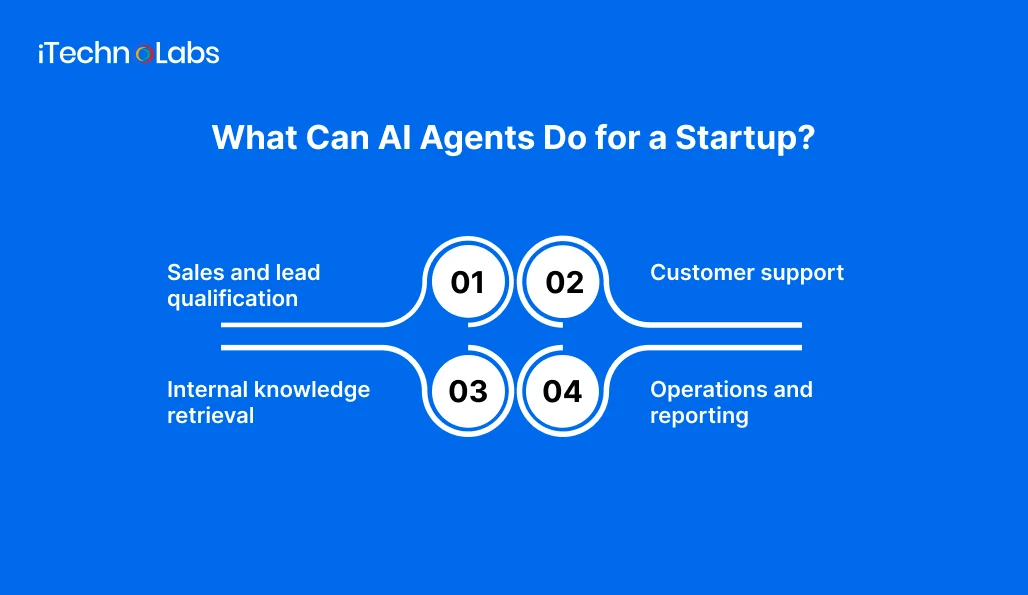
AI agents are most useful when a workflow involves repeated decisions, multiple information sources, and actions that follow identifiable rules.
1. Sales and lead qualification
An agent can review incoming enquiries, extract details about a prospect, compare them with your qualification criteria, and prepare a summary for your sales team. With suitable CRM permissions, it can also create or update records.
Keep pricing commitments, sensitive negotiations, and unusual customer requests subject to human review.
2. Customer support
A support agent can search approved product documentation, answer routine questions, retrieve order information, and prepare a response for a customer. When it cannot find a reliable answer, it should escalate the conversation instead of inventing one.
3. Internal knowledge retrieval
Startups often spread information across documents, project tools, policies, and customer records. An internal agent can retrieve relevant information and summarize it for employees, reducing the effort required to locate answers.
Access controls matter here. Employees should only receive information they are authorized to see.
4. Operations and reporting
An agent can collect information from connected systems, summarize exceptions, prepare recurring reports, and flag tasks that need attention. A person can review the output before it triggers a consequential action.
For a startup, these use cases can be more valuable than building a general-purpose agent that attempts to handle everything.
How to Build an AI Agent Without a Technical Background
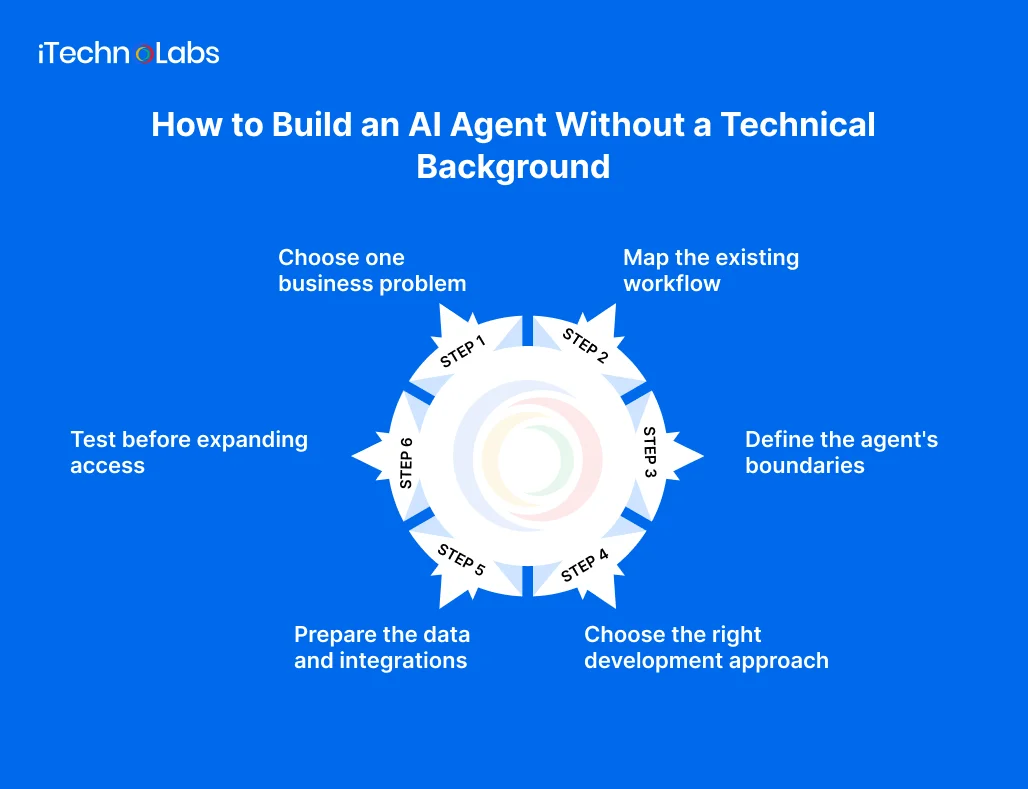
You do not need to write code to define the problem, evaluate the business case, or oversee development. You do need to make clear decisions about what the agent should accomplish and what it must not do.
Step 1. Choose one business problem
Start with a workflow that consumes time, follows a reasonably consistent process, and has an outcome you can measure.
For example, if your sales team spends hours reviewing inbound leads, define the agent’s job as collecting lead information, checking qualification criteria, and preparing a prioritized review queue.
Avoid vague goals such as making sales smarter or automating the business. A specific task gives your development team something testable to build.
Step 2. Map the existing workflow
Write down what happens today, from the initial trigger to the final result.
Identify the information required at each step, the systems involved, the decisions people make, and the situations that require exceptions. This exercise helps determine whether you need an AI agent, conventional automation, or a combination of both.
If a fixed sequence of rules can handle the process reliably, conventional automation may be simpler and cheaper.
Step 3. Define the agent’s boundaries
Decide what the agent can read, what it can change, and which actions require approval.
For example, a lead qualification agent might be allowed to read enquiry forms and CRM records, summarize prospects, and recommend a lead category. Sending external emails or changing commercial terms could require human approval.
These boundaries should be designed into the system, not left to a written instruction alone.
Step 4. Choose the right development approach
Your options depend on the workflow’s complexity, the systems it must connect to, and the level of control you need.
- No-code tools: Suitable for straightforward tasks that fit the platform’s available integrations and controls.
- Low-code development: Useful when visual workflow design needs some customization, conditional logic, or additional integrations.
- Custom AI agent development: Appropriate when the agent needs specialized business logic, custom integrations, detailed access controls, or closer integration with an existing product.
You can start with a hosted AI model and existing business tools instead of training a model from scratch. Select the model, integration layer, and workflow design based on actual requirements.
Step 5. Prepare the data and integrations
An agent is only as useful as the information and actions available to it.
Identify the approved documents, databases, APIs, and business applications it needs. Check whether the data is current, consistent, accessible, and appropriately permission.
Your development team may use retrieval-augmented generation, commonly called RAG, to let the agent retrieve relevant information from approved sources. APIs allow it to exchange information with other applications.
Neither approach guarantees accuracy. Data access, retrieval quality, permissions, and error handling all need testing.
Step 6. Test before expanding access
Test the agent against realistic examples, including incomplete requests, conflicting information, unexpected inputs, and attempts to access restricted data.
Measure task completion, factual accuracy, escalation quality, response time, and cost per completed task. Compare those results with the existing process.
Begin with a limited pilot. Keep human approval for consequential actions, record what the agent does, and establish a clear way to stop or reverse problematic actions where possible.
What Does AI Agent Development Cost?
AI agent development typically costs $5,000 to $80,000 for many custom business projects, while complex enterprise systems can exceed $300,000. The final price depends on workflow complexity, integrations, security requirements, testing, and the level of autonomy the agent needs. These are indicative market estimates, not fixed industry rates.
Typical development budgets vary by project scope:
- $1,500 to $5,000: A focused, single-purpose agent for tasks such as lead qualification or basic support automation.
- $5,000 to $25,000: A multistep agent workflow connecting several tools or coordinating tasks.
- $75,000 to $300,000 or more: Complex enterprise systems requiring extensive integrations, security controls, monitoring, and multiple coordinated agents.
These ranges reflect estimates published by development providers, so actual quotes can vary significantly.
Before requesting an estimate, define:
- The first workflow and its expected outcome.
- The applications and data sources the agent must access.
- The actions it can perform without approval.
- The expected usage and response volume.
- The testing, monitoring, maintenance, and support requirements.
Ask development partners to separate initial development costs from recurring model usage, hosting, third-party software, and ongoing maintenance. A small pilot can help validate assumptions before you commit to a broader rollout.
Common Risks Founders Should Plan For
AI agents introduce risks beyond those of ordinary rule-based automation because model outputs can be incorrect or inconsistent.
Incorrect answers: Require approved information sources, evaluate answers against test cases, and give the agent a clear escalation path when evidence is insufficient.
Data exposure: Apply least privilege access, protect credentials, and ensure the agent cannot retrieve information outside its permitted scope.
Unexpected actions: Limit tool permissions, validate inputs, and require approval for sensitive or irreversible actions.
Prompt injection: Treat instructions found in external documents, websites, and user-supplied content as untrusted. Test whether they can manipulate the agent into disclosing data or taking unauthorized actions.
Unclear returns: Track the time saved, task quality, exception rate, and total operating cost. Do not assume that automating a task automatically makes it profitable.
The NIST AI Risk Management Framework and its Generative AI Profile provide useful guidance for identifying and managing AI-related risks.
When Should You Work With an AI Development Partner?
A AI agent development partner can help when the agent needs custom integrations, access to business-critical data, application-level security, or a reliable path from prototype to production.
Look for a team that will question the use case before recommending technology. It should be able to explain the architecture in plain language, document permissions and failure scenarios, define measurable acceptance criteria, and provide a plan for monitoring the agent after launch.
You should also retain clear ownership of your application code, data, accounts, and deployment environment under the agreed contract.
For a broader view of your options, explore AI development services. If your agent needs to become part of a larger business application, custom software development may also be relevant.
Build AI Agents That Solve Real Business Problems
Turning an AI idea into a working product takes more than choosing a model. You need a clear use case, reliable data, the right integrations, and safeguards that keep the agent aligned with your business goals.
iTechnolabs helps businesses plan and build AI agents, integrate large language models (LLMs), and connect AI capabilities with existing software. Whether you are validating a startup idea or automating an established workflow, our team can help define a practical scope and development approach.
Conclusion
AI agent development does not have to begin with a complex, fully autonomous system. Start with one repetitive workflow, define what success looks like, and establish clear limits on the actions the agent can take. Test it against real scenarios, measure its performance, and keep human oversight where decisions carry risk.
For founders, the best first agent is not the one that does the most. It is the one that solves a specific business problem reliably and delivers measurable value. Once that value is proven, you can expand its capabilities with greater confidence.
FAQs
- Do I need coding skills to build an AI agent?
No. Founders can define the business problem, map the workflow, set success criteria, and choose the agent’s boundaries without writing code. No-code tools can support simple use cases. Custom integrations, security requirements, and complex workflows may require an experienced development team.
- How is an AI agent different from a chatbot?
A chatbot primarily responds to user inputs, while an AI agent can also use tools, retrieve information, and execute defined steps. The difference depends on the system’s actual capabilities. A chatbot with integrations may perform actions too, so evaluate the workflow rather than relying on the product label.
- Should my startup build a custom AI agent or use an existing tool?
Use an existing tool when it supports your workflow, integrations, security requirements, and expected volume. Consider custom development when you need specialized business logic, deeper integration, or greater control. Test both against the same requirements before committing to a larger investment.
- How long does AI agent development take?
The timeline depends on the scope, data readiness, integrations, security requirements, and testing needs. A narrow prototype using existing tools may take substantially less time than a production agent connected to multiple business systems. Define a pilot scope and request a timeline based on its specific deliverables.
- Can AI agents work with my existing software?
Yes, if the required systems expose suitable APIs, connectors, or other supported integration methods. Access permissions, data formats, rate limits, and vendor restrictions can affect what is possible. Confirm these constraints early, especially when the agent must read or update CRM, support, finance, or internal systems.
- How do I measure whether an AI agent is successful?
Compare its performance with your existing workflow. Track completion rate, accuracy, time saved, cost per task, escalation rate, and user satisfaction. Include monitoring and maintenance costs in the calculation. A successful agent should improve a defined business outcome without introducing unacceptable security, quality, or operational risks.











