Key Takeaways
- Cell phone app development is the process of turning your idea into a downloadable app for people to use.
- The phone is not a small laptop. A weak signal and a low battery change the way in which you need to construct an app.
- Most startups have one app that runs on iPhone and Android. It’s cheaper than two.
- It costs Apple $99 per year to list your app. Google charges $25 (one-time fee) to list your app.
- A startup app typically costs between US$18,000 and US$210,000+ and a nominal sum annually thereafter.
Cell phone app development is the work of turning your idea into an app people can download on their iPhone or Android phone. It covers planning, design, building, testing, and getting the app approved by Apple and Google. Most apps take three to eight months to build and cost US$18,000 to $210,000 or more.
Maybe you’ve got a great idea for an app but you’ve never written a line of code. That’s fine. Most of the founders we talk to are in the same boat. They know who the app is for and what it should fix. It’s the building part that feels confusing.
Good news first. Your future users are already holding their phones. Pew Research Center found that 91% of adults in the U.S. own a smartphone. For 16% of them, the phone is the only way they get online, because they don’t have internet at home.
So let’s walk through how a phone app gets made, in normal words. You’ll know what to ask an app team and what it should cost before you ever book a meeting.
Table of Contents
- What Is Cell Phone App Development?
- Why Is Building for a Phone Different From Building a Website?
- Which Kind of Phone App Should Your Startup Build?
- What Can a Phone App Do That a Website Can’t?
- What Are the Steps in Cell Phone App Development?
- What Tools Are Used to Build a Cell Phone App?
- What Do Apple and Google Need Before Your App Goes Live?
- How Much Does Cell Phone App Development Cost?
- How Do You Keep Your Users’ Information Safe?
- Why Choose iTechnolabs for Cell Phone App Development?
- Conclusion: So, Should Your Startup Build a Phone App?
- Frequently Asked Questions
What Is Cell Phone App Development?
It’s the whole job of making an app, from the first chat about your idea to the day people can download it.
What makes an app unique from a website? While a website waits to be discovered an app lives on your home screen. It can also send you a notification that will pop up even if your device is not opened. It can access your device’s camera so a person can just take a picture of a receipt instead of having to type it in.
Let’s say you’re starting a dog walking business. Your website tells people what you do and what you charge. Your app goes further. A busy dog owner books a walk in two taps, watches the walker on a map, and gets a photo of a happy dog when the walk is over. That’s the kind of thing that makes people stick with you.
Some people call this “mobile app development.” Others say “smartphone app development.” It’s the same work with a different name. If you want to dig deeper, our complete guide to mobile app development covers more.
Why Is Building for a Phone Different From Building a Website?
Think about how you use your own phone. You hold it in one hand on the bus, and you check it while you wait in line for coffee. Sometimes you’re in a basement and the signal keeps cutting out. People use apps the same way, so a good app team plans for all of this before building anything.
| What’s different about a phone | What it means for your app |
| People tap with one thumb | Buttons need to be big and easy to hit |
| The signal drops in lifts and basements | The app should save what people were doing until the signal comes back |
| The battery runs out | An app that eats battery usually gets deleted |
| The phone asks people for permission | Your app has to say why it needs the camera, or people tap “Don’t Allow” |
| There are thousands of Android phones | The app has to be tested on lots of screen sizes |
| Apple and Google decide who gets in | Nobody can download your app until they say yes |
| Phones get a big update every year | Your app needs a check-up after each one |
That “Don’t Allow” pop-up gets many first-time founders. Imagine a food delivery app that pops up a “Allow location access?” dialog the second you launch it. No explanation, no context, many will tap “no” and now the app has no idea where they are. Now imagine that dialog popping up just as you’re about to tap “Where’s my order?” That probably sounds reasonable to most.
Which Kind of Phone App Should Your Startup Build?
There are three ways to go, and each one changes your budget.
- Two separate apps. You build one app for iPhone and another one for Android. Each one feels right at home on its phone. The problem is you’re paying twice, and every fix after launch has to be done twice too.
- One app that works on both. The team builds it once, and it runs on iPhone and Android. Most startups go this way now because it’s cheaper and easier to look after. It’s what we suggest to most of our clients, and you can learn more on our page about building one app for iPhone and Android.
- A website that acts like an app. People save it to their home screen, and it opens a lot like an app. It’s the cheapest place to start. The catch? It can’t do everything a real app can, and nobody will find it in the App Store.
You might hear someone say an app that works on both phones is “just a website in disguise.” Years ago, that had some truth to it. It doesn’t anymore. A good team today can build one app that you download from the store and that runs smoothly on both phones.
| Your situation | Best choice |
| You need iPhone and Android on a normal budget | One app that works on both |
| Your app is a game or uses the camera all the time | Two separate apps |
| You want to test your idea on the cheap | A website that acts like an app |
| Nearly all your users have the same kind of phone | Start with that phone only |
There’s one small trade-off with an app that works on both phones. When Apple or Google adds a brand-new feature, your app may have to wait a little before it can use it. Most startups never notice. If your whole idea needs the newest features on day one, tell your app team early.
What Can a Phone App Do That a Website Can’t?
The best reasons to build an app are the things a website can’t do well. Every one of them makes your app more useful. Every one of them also adds work.
We pulled the effort levels below from our own projects. Treat them as a rough guide, not a quote.
| Feature | What it does for your users | How much work it adds |
| Lock screen reminders | Tells people about bookings or deals | Low |
| Face or fingerprint login | Lets people skip the password | Low |
| Camera and photos | Lets people scan a card or receipt | Low to medium |
| Maps | Shows places nearby or tracks a delivery | Medium |
| Paying inside the app | Lets people pay without leaving | Medium to high |
| Works with no signal | Keeps working offline and catches up later | High |
| Live tracking or live chat | Changes on screen the moment something happens | High |
Most founders are surprised by this part. The features that look easy are often the hardest ones to build. Take “works with no signal.” To your user, it only means the app didn’t lose the form they were halfway through. Behind the scenes, though, the app has to hold on to everything, wait for the signal, and then send it all without mixing anything up.
Curious what your own list might cost? Our app cost calculator gives you a rough number in a few minutes.
What Are the Steps in Cell Phone App Development?
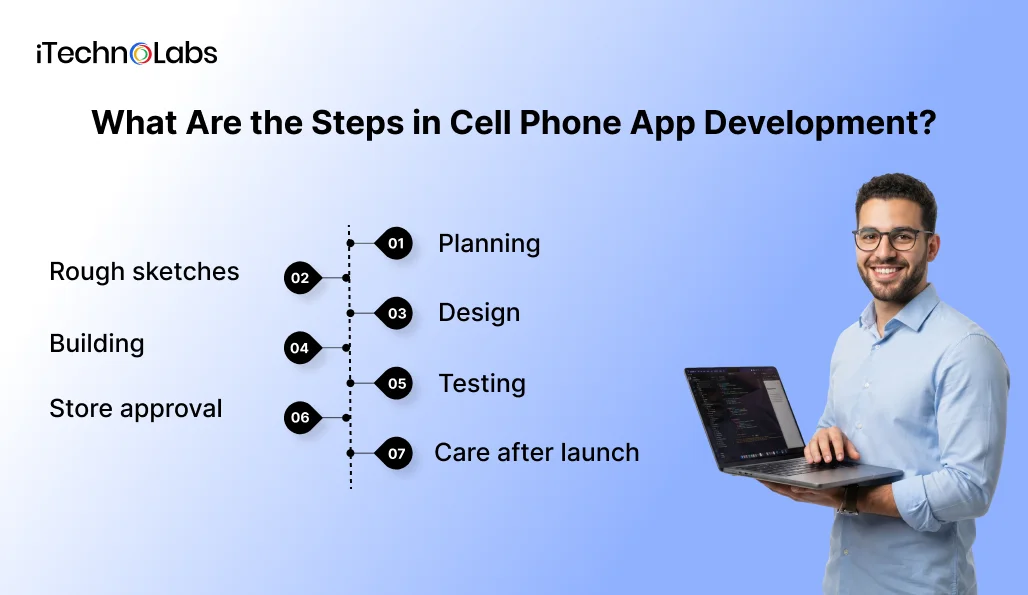
Nearly every app goes through the same seven steps. Teams use different names, but the order hardly changes. Skipping a step won’t save you money, by the way. The problem comes back later, and by then it costs more to fix.
- Planning. The team gets to know your idea and who it’s for. Then you decide together what the first version needs and what can wait. This is the cheapest time to change your mind, so don’t rush it.
- Rough sketches. Before any colors or logos, the team draws plain boxes for each screen. Moving a button at this point takes a few minutes.
- Design. Now the sketches turn into real screens with your colors and logo. You’ll often get a sample you can tap through on your own phone, which is a fun moment for most founders.
- Building. This is the longest step. The team builds the screens people tap on. They also build the hidden part that keeps track of things like accounts and orders.
- Testing. Testers try the app on old phones and new ones. They’re looking for anything that crashes or slows down.
- Store approval. Your app goes to Apple and Google for a check. If the reviewers send anything back, the team fixes it.
- Care after launch. Real users always find problems the testers missed. The team keeps fixing things, keeps the app working when phones update, and adds what your users ask for.
This is how long each step usually takes in our own projects:
| Step | Simple app | Bigger app |
| Planning | 1 week | 2 weeks |
| Rough sketches | 1 to 2 weeks | 2 to 3 weeks |
| Design | 2 to 3 weeks | 4 to 6 weeks |
| Building | 6 to 8 weeks | 14 to 20 weeks |
| Testing | 1 to 2 weeks | 3 to 4 weeks |
| Store approval | 1 week | 1 to 2 weeks |
| Total before launch | About 3 months | About 7 to 8 months |
Care after launch never stops, so it isn’t in these totals. Our mobile app development process guide shows what each step costs if you’d like to plan ahead.
What Tools Are Used to Build a Cell Phone App?
Every app is made with a set of tools. App teams call this the “tech stack.” You won’t have to pick these yourself. Still, it helps to know a few names so you can follow along in meetings.
It’s a bit like opening a shop. Some tools build the shop floor your customers see. Others run the back room where you keep stock and records. Then there’s the building itself, which you rent.
| Part of your app | What it does, in simple words | Tools teams often use |
| The iPhone app | The screens people tap on an iPhone | Swift, Apple’s own tool for iPhone apps |
| The Android app | The same thing for Android phones | Kotlin, the tool Google suggests for Android |
| One app for both phones | Built once, works on iPhone and Android | Flutter (made by Google) or React Native (made by Meta, the company behind Facebook) |
| The back room | Handles logins and orders that users never see | Node.js or Python |
| The records | Where your users’ details are saved | PostgreSQL, MongoDB, or Firebase |
| The building | The rented online space your app lives in | Amazon Web Services, Google Cloud, or Microsoft Azure |
| Reminders | Sends alerts to people’s phones | Apple’s and Google’s own alert tools |
| Payments | Takes cards and phone wallets | Stripe, Apple Pay, or Google Pay |
| Maps | Shows places and tracks deliveries | Google Maps or Mapbox |
You don’t need to know how any of these work. Ask your app team one thing instead: “Why did you pick these tools for my app?” A good team will answer in plain words and tie it back to your budget or your users.
One more thing. Try to stick with popular tools. If you ever need to switch app teams, a new team can pick up the work much faster. Rare tools can leave you stuck with the only team that knows how your app works.
What Do Apple and Google Need Before Your App Goes Live?
You can’t just upload your app and hit go. Apple and Google check every app first, and both charge for an account.
Apple charges US$99 a year. Google charges US$25 one time. That’s small money next to the cost of building an app, but don’t forget that Apple’s fee comes back every year.
Apple moves pretty fast. Apple says it checks at least half of all apps within a day, and 90% within two days. Where apps get stuck is being unfinished. Apple says more than 40% of the hold-ups come from apps that aren’t complete. Think of apps that crash, still have sample text in them, or don’t give the reviewer a way to log in.
Before Apple or Google will say yes, you’ll need:
- A privacy policy that says what you collect and why.
- An easy way for people to contact you for help.
- A clear reason every time your app asks for something personal, like location.
- Screenshots that match what your app does.
Also, open both accounts in your company’s name, not in one team member’s name. People leave jobs, and you don’t want your app stuck in someone else’s account.
How Much Does Cell Phone App Development Cost?
The price comes down mostly to how many features you want. Even so, real numbers help you plan. These are the ranges we use on our own projects.
| Type of app | What it usually has | Cost (USD) | Time |
| Basic app | A few screens and one main job | $18,000 to $42,000 | 8 to 14 weeks |
| Standard app | User accounts, reminders, and links to a few other services | $42,000 to $105,000 | 16 to 28 weeks |
| Advanced app | Payments, live updates, and smart features | $105,000 to $210,000+ | 28 to 48 weeks |
The build isn’t the only bill. Keep these in mind too:
- Yearly care. From our own projects, set aside about 15% to 20% of the build cost each year for fixes and updates.
- Store fees. US99ayearforApple,andUS25 once for Google.
- Outside services. Things like maps and text messages often charge based on how much your app uses them.
- Hosting. A monthly fee for the online space where your app keeps its data.
Want the full picture of costs after launch? Read our article on how much a mobile app costs to maintain.
How Do You Keep Your Users’ Information Safe?
People keep their whole lives on their phones. Photos, bank details, where they’ve been. When your app touches any of that, they’re trusting you with it.
The easiest way to stay safe is to ask for less. If your app doesn’t need someone’s contacts, don’t ask for them. Less information means less that can go wrong, and fewer people tapping “Don’t Allow.”
Whatever you collect has to be locked up, both on the phone and on its way to your system. People should also be able to delete their account easily. Apple now expects this from any app that lets people sign up.
There are laws, too. In Canada, a law called PIPEDA says how businesses must handle personal information. In the U.S., some states, like California, have their own rules. If your users live in both countries, your app has to follow both.
That’s one reason we hold ISO 27001 certification. It means an outside expert has checked how we keep information safe, so you don’t have to take our word for it.
Why Choose iTechnolabs for Cell Phone App Development?
We’d rather show you what we’ve done than make big promises.
- 500+ apps built for startups, growing businesses, and large companies.
- 300+ developers on our team, so your project won’t sit and wait.
- ISO 27001:2013 and ISO 9001:2015 certified for keeping data safe and checking the quality of our work.
- Approved supplier for the Government of Canada under Supply Arrangement CW2395301.
- 5.0 rating on Clutch from real client reviews.
- Offices in Markham, Calgary, and Ottawa in Canada, plus Sheridan, Wyoming in the U.S.
Take one of our projects. A Canadian company that makes electric car chargers came to us with chargers already in homes and apartment buildings, but no app to run them. We built one app for iPhone and Android, plus the system behind it. Today it handles more than 50,000 charging sessions a day.
Conclusion: So, Should Your Startup Build a Phone App?
An app is worth it when people will use your service often and on the move. If they only need you once a year, a good website might do the job. If they’ll book, order, or pay through you every week, an app makes life easier for them and gives them a reason to come back.
Before you meet any app team, answer three questions for yourself. What’s the one main job your app has to do? Who’s going to use it? How much can you spend this year, counting care after launch?
After that, keep your first version small. Build only what fixes the main problem, get it into people’s hands, and listen. Your first users will show you what to build next. In our experience, they’re right more often than any long wish list.
When you meet app teams, pay attention to how they talk to you. You should leave knowing what you’re paying for and what happens after launch. If a team can’t explain its plan in plain words, be careful. A good team will even tell you when a feature isn’t worth the money.
Building for phones takes more planning than most founders expect. Signal, battery, permission pop-ups, store reviews, yearly updates. None of it is hard once you know it’s coming. Trouble only starts when nobody mentions it until the bill shows up.

Frequently Asked Questions
Is cell phone app development the same as mobile app development?
Yes, they mean the same thing. Cell phone app development, mobile app development, and smartphone app development all describe making an app people download onto their phones. “Cell phone” is the word more people use in the U.S. and Canada. The work, the steps, and the price don’t change with the name.
Can one app work on both iPhone and Android?
Yes, and that’s how most startups build their apps now. The team builds the app once, and it runs on both kinds of phones. You save money because one team looks after every update. Two separate apps usually only make sense for games or apps that use the camera all the time.
How long does it take to build a cell phone app?
A simple app usually takes around three months, from the first planning chat to launch day. A standard app with user accounts and reminders often takes four to seven months. Bigger apps with payments and live updates can take eight months or more. The more features you ask for, the longer it takes.
How much does it cost to put an app on the App Store and Google Play?
Apple charges US$99 a year for the account you need to list an app. Google charges US$25 one time. These fees are only for the store accounts, not for building the app itself. Keep Apple’s fee in your budget every year, because Apple takes your app down if you stop paying.
Can I use an app builder instead of hiring a team?
For a simple app, like a menu or a booking form, an app builder can work, and it’s cheap to start. Builders get hard to use once you need special features or lots of users. Many founders test their idea with a builder first. Once people start using it, they move to a custom app.
What happens to my app when Apple or Google updates their phones?
Apple and Google each put out a big phone update every year. These updates can change how apps look or work, and sometimes a feature stops working. Your app team should test your app after each update and fix anything that breaks. That’s why yearly care belongs in your budget from day one.
Does a phone app need the internet to work?
Not always. An app can be built to keep working without a signal and catch up once the signal comes back. This is great for people who travel, work out in the field, or live in the countryside. But it adds extra work, so only ask for it if your users need it.
Who owns my app once it’s built?
You should, but only if your contract says so. Make sure the contract gives you full ownership of the app and all the code behind it. Keep your Apple and Google store accounts in your company’s name too. If a team won’t put this in writing, think twice before you hire them.