

Key Takeaways
- Repeated operational problems, unsupported components, expensive maintenance, or blocked business initiatives can justify a closer assessment.
- Refactoring, replatforming, replacing, or rebuilding each solves a different set of problems.
- Data flows, third-party integrations, business rules, and operational processes all affect migration risk.
- A pilot, incremental migration, and measurable acceptance criteria can help limit the impact of change.
- Include access controls, testing, monitoring, recovery, and compliance obligations in the modernization plan.
Enterprise software modernization is the process of updating, restructuring, replacing, or extending existing business systems so they better support current operational needs, security requirements, integration demands, and future technology plans. For enterprise IT leaders, the right approach starts with assessing business value and technical risk, then choosing a modernization strategy that limits disruption while improving the system’s long-term usefulness.
Table of Contents
- What is Enterprise Software Modernization?
- When Should You Modernize a Legacy System?
- Which Enterprise Software Modernization Approach Should You Choose?
- How to Plan Enterprise Software Modernization
- What Risks Should Enterprise IT Leaders Manage?
- How to Evaluate a Modernization Partner
- Give Your Legacy Systems a Clear Path Forward
- Final Words
- FAQs
What is Enterprise Software Modernization?
Enterprise software modernization goes beyond moving an application to a new server or cloud platform. It can involve updating outdated components, improving application architecture, redesigning integrations, restructuring databases, replacing unsupported software, or rebuilding specific business capabilities.
A system can be old and still serve its purpose well. Equally, a relatively recent application can become difficult to maintain if its architecture, dependencies, or delivery processes no longer fit the business.
Start by defining the outcome the business needs. That could mean reducing operational risk, enabling new integrations, supporting additional users, improving release flexibility, or preparing an existing product for AI capabilities. The desired outcome should determine the technical approach, not the other way around.
When Should You Modernize a Legacy System?
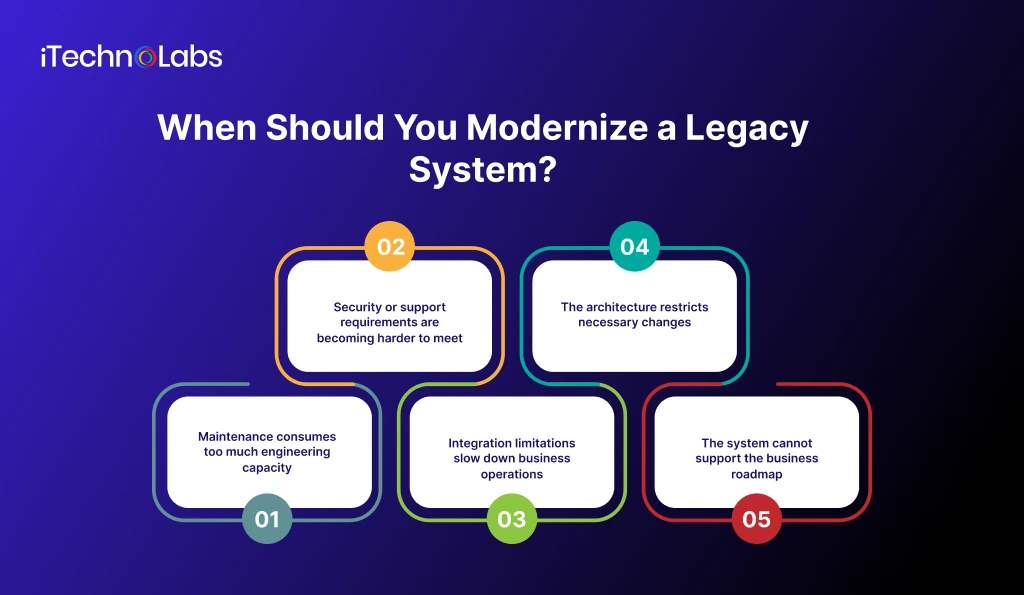
Modernization deserves serious consideration when the cost or risk of keeping a system unchanged begins to outweigh the value it delivers. Look for evidence across five areas.
1. Maintenance consumes too much engineering capacity
When developers spend a disproportionate amount of time understanding fragile code, fixing recurring defects, or maintaining outdated dependencies, less capacity remains for business improvements.
Review maintenance effort, recurring incidents, release delays, and the difficulty of onboarding engineers. Compare these findings with the business roadmap before deciding whether targeted refactoring or a larger architectural change is justified.
2. Security or support requirements are becoming harder to meet
Unsupported operating systems, runtimes, databases, and application components can create security and operational concerns. AWS identifies end of support, reliability issues, and the need for new functionality as reasons to assess applications for replatforming or other modernization options.
Inventory software versions, vendor support dates, known vulnerabilities, access controls, and patching constraints. Prioritize issues according to exposure and business impact. Do not assume that moving to the cloud automatically resolves application-level security problems.
3. Integration limitations slow down business operations
Older systems can become difficult to connect to modern CRM platforms, ERP modules, analytics environments, partner applications, and digital customer channels. Manual data transfers and duplicated records may indicate that the current integration model needs attention.
Map critical data flows and identify where information is delayed, duplicated, or dependent on manual intervention. Determine whether APIs, integration services, data pipeline changes, or replacement of a specific module would address the underlying problem.
4. The architecture restricts necessary changes
A tightly coupled application can make it difficult to change one component without affecting others. AWS guidance on decomposing monolithic applications recommends understanding business use cases, application structure, and dependencies before selecting components for decomposition.
Investigate release coordination, testing effort, failure propagation, and the ability to change individual business capabilities. Do not assume that every monolithic application should become a microservices architecture. A well-structured monolith can remain appropriate when it meets operational and business requirements.
5. The system cannot support the business roadmap
Expansion into new markets, changing workflows, additional transaction types, and AI initiatives can expose limitations that were not important when the system was first built.
Compare the system’s current capabilities with planned business requirements over the next few years. If essential initiatives require repeated workarounds or expensive changes, modernization may be necessary. If the system meets its requirements reliably, continued maintenance may remain the better decision.
Which Enterprise Software Modernization Approach Should You Choose?
Modernization is not a single technical method. AWS documents migration and modernization strategies that include refactoring, replatforming, repurchasing, rehosting, relocating, retaining, and retiring applications. Microsoft also describes modernization approaches such as replatforming, refactoring, and rearchitecting.
Use the following comparison as a starting point, then validate the choice against application dependencies, business requirements, security obligations, and available engineering capacity.
| Approach | What changes | Best suited to | Main consideration |
| Rehosting | Moves the application with limited application changes | Infrastructure relocation where the existing application remains suitable | Does not automatically improve application architecture |
| Replatforming | Moves to a new platform with selected changes | Applications that need a supported runtime or managed infrastructure | Platform changes still require compatibility and operational testing |
| Refactoring | Improves internal code structure while preserving core behaviour | Systems with useful business logic but difficult maintenance | Requires regression testing and clear boundaries |
| Rearchitecting | Changes major architectural patterns or components | Applications constrained by coupling, deployment, or integration design | Requires deeper design work and dependency management |
| Rebuilding | Recreates the application or selected capabilities | Systems whose fundamental design no longer meets business needs | Business rules and data migration can make replacement complex |
| Replacing | Adopts an existing commercial product or service | Capabilities that a suitable market product can meet | Validate fit, customization, licensing, and vendor dependency |
| Retaining or retiring | Keeps a system unchanged or decommissions it | Systems that remain useful, or have no continuing business need | Retained systems still require ownership and risk controls |
Avoid selecting a technology first and searching for a problem it can solve. A cloud migration, container platform, or microservices architecture should be justified by the requirements of the specific application.
How to Plan Enterprise Software Modernization
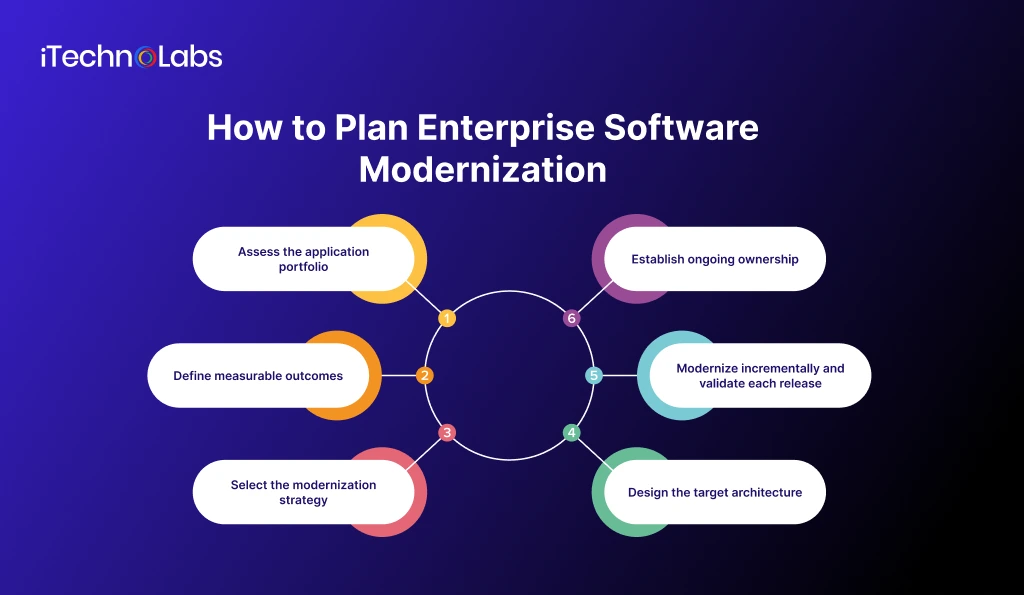
Step 1: Assess the application portfolio
Begin with an inventory of applications, owners, business functions, technologies, dependencies, support status, operating costs, and criticality. Include interfaces, databases, scheduled jobs, identity systems, reporting tools, and external services.
AWS recommends assessing application portfolios across business, functional, technical, financial, and digital readiness considerations. Its guidance also calls for understanding dependencies and identifying priority workloads.
This assessment helps distinguish applications that need immediate intervention from those that can remain in service or be retired.
Step 2: Define measurable outcomes
Establish a baseline before work begins. Depending on the problem, useful measures may include incident frequency, release lead time, recovery performance, infrastructure and maintenance expenditure, integration failure rates, or time spent on manual work.
The most useful measures will differ by organization. No improvement target should be set until the current baseline and business requirements have been validated.
Step 3: Select the modernization strategy
Evaluate each candidate against business value, technical complexity, dependency risk, security requirements, data migration needs, and implementation effort. Record why the chosen approach is preferable to the alternatives.
The most urgent application is not always the best first modernization project. A smaller, well-understood workload may be a better pilot if it can establish migration practices without exposing critical operations to unnecessary risk.
Step 4: Design the target architecture
Document application boundaries, integration contracts, data ownership, identity and access controls, deployment environments, monitoring, backup and recovery, and rollback procedures. Confirm how the modernized system will operate alongside components that remain unchanged.
Hybrid architectures are often part of a transition. Plan for the period when old and new components must exchange data and support the same business process.
Step 5: Modernize incrementally and validate each release
Start with a bounded workload or business capability. Test functional behaviour, performance, security, data integrity, integration compatibility, and recovery before expanding the migration.
AWS’s wave-based modernization guidance uses discovery, analysis, and phased implementation. This provides a reference for sequencing work around business priorities, dependencies, and complexity.
Use staged releases, clear acceptance criteria, monitoring, and a tested rollback plan. Define who can authorize the next migration stage and what evidence is required before proceeding.
Step 6: Establish ongoing ownership
Treat modernization as an operational change, not just a development project. Assign owners for application support, security patches, architecture decisions, service monitoring, documentation, and future enhancements.
Without clear ownership, a modernized system can accumulate the same maintenance problems that affected its predecessor.
What Risks Should Enterprise IT Leaders Manage?
Include these risks in the modernization plan and assign an owner to each.
- Business disruption: Schedule cutovers carefully, test rollback procedures, and agree on acceptable service interruption.
- Data integrity: Validate migrated records, reconciliation rules, historical data, and transaction consistency.
- Integration failures: Test upstream and downstream dependencies, including systems that cannot be changed at the same time.
- Security gaps: Review identities, permissions, secrets, encryption, logging, and patching requirements.
- Scope expansion: Separate essential requirements from optional improvements and manage changes through an agreed approval process.
- Knowledge loss: Document undocumented business rules and involve employees who understand the current system’s behaviour.
- Unclear benefits: Compare actual results with the baseline and revisit the modernization roadmap when assumptions prove incorrect.
Modernization risk is not determined by the age of the code alone. Business criticality, dependency complexity, data sensitivity, and the ability to recover from failure all influence the appropriate sequence of work.
How to Evaluate a Modernization Partner
If your internal team lacks the capacity or specialist skills to lead the work, evaluate partners on their ability to understand the existing environment before proposing a solution.
Ask prospective partners to explain how they will:
- Assess the current architecture, codebase, data, and integrations.
- Compare modernization options and document the tradeoffs.
- Define security controls, testing requirements, and rollback procedures.
- Plan staged delivery around operational constraints.
- Transfer documentation and technical knowledge to your team.
- Measure outcomes against an agreed baseline.
Treat these credentials and service descriptions as starting points for due diligence. Request relevant project references, team qualifications, security documentation, and a proposed delivery plan before making a selection. No project-specific modernization outcome is claimed in this article.
Give Your Legacy Systems a Clear Path Forward
At iTechnolabs, we provide custom software development, enterprise software development, and software integration services to help businesses build, modernize, and extend their digital products.
Every legacy environment presents different challenges. Your modernization strategy should reflect your architecture, existing integrations, security requirements, and business roadmap rather than follow a one-size-fits-all approach.
Our team can help you evaluate your existing software, identify modernization opportunities, and explore an approach aligned with your technical and operational priorities. Whether you need to improve an existing application, rework its architecture, or connect legacy systems with newer technologies, the first step is understanding what needs to change and why.
Final Words
Legacy system modernization is not simply about replacing old technology. It is about building a stronger foundation for business growth, improving system security, reducing technical constraints, and giving engineering teams the flexibility to respond to changing requirements. The right strategy depends on your existing architecture, business priorities, integration needs, and tolerance for operational risk.
Start with a clear assessment of your current systems, identify the constraints that matter most, and choose a modernization roadmap that balances immediate needs with long-term goals. A phased approach, supported by measurable objectives and careful migration planning, can help your organization move forward without introducing unnecessary complexity.
FAQs
1. What is enterprise software modernization?
Enterprise software modernization updates or changes existing business applications to better meet current requirements. It can involve upgrading technology, restructuring code, changing architecture, improving integrations, replacing components, or rebuilding selected capabilities. The appropriate approach depends on business value, application condition, technical dependencies, security requirements, and the cost and risk of continuing with the current system.
2. When should a company modernize a legacy system?
Modernization is worth assessing when maintenance demands increase, critical components lose vendor support, security risks become difficult to manage, integrations limit operations, or architecture prevents important business changes. The decision should follow a documented assessment of technical condition, business criticality, alternatives, and expected benefits rather than the age of the application alone.
3. Does legacy system modernization always require a complete rebuild?
No. Modernization can range from updating infrastructure or replacing an unsupported component to refactoring code or redesigning the application architecture. A complete rebuild is only one option. Retaining a system, improving selected modules, or replacing one business capability may be more appropriate when the existing application still provides valuable functionality.
4. How do you choose between rehosting, refactoring, and rearchitecting?
Choose based on the problem you need to solve. Rehosting primarily changes where an application runs. Refactoring improves its internal structure. Rearchitecting changes major design decisions to address limitations in behaviour, integration, or deployment. Assess dependencies, security requirements, future workloads, implementation effort, and operational constraints before committing to an approach.
5. How can organizations reduce modernization risk?
Begin with dependency mapping, clear requirements, security reviews, data validation, and a tested migration plan. Deliver in controlled stages, establish measurable acceptance criteria, and monitor the system during rollout. Assign owners for decisions and incidents, and maintain a rollback strategy appropriate to the application. The controls should reflect the system’s criticality and business impact.
6. Should an enterprise move its legacy software to the cloud?
Cloud migration may be appropriate when it supports defined infrastructure, operational, or business goals, but relocation alone does not guarantee better application architecture or lower costs. Evaluate workload compatibility, data residency, security, operating costs, resilience, integration requirements, and team readiness. Compare rehosting with replatforming, refactoring, replacement, and retention before choosing.











