Key Takeaways
- Pick a small patch to start. Home bakers in one city will fill up long before a site where anyone can sell anything.
- Settle your fee early. What you charge sellers decides a lot of what the app has to do, so sort it out before design starts.
- Shoppers, sellers and you each get your own screens. Most first-timers plan the shopper side in detail and forget the other two.
- For most founders, the slow part comes after the build, when they’re coaxing the first sellers to list and the first buyers to turn up.
- One delivery marketplace in our portfolio, built for many sellers, had a $50,000 to $70,000 budget and an 18 to 24 week plan.
To build a marketplace app, start by choosing one group of sellers and the buyers they serve. Settle on your fee, then plan a first version that does very little. After that, you build the shopping app, a dashboard for sellers and a control panel for yourself. Payments, seller sign-ups and a small launch come last.
Why bother now? People already shop this way. In the second quarter of 2026, online sales made up 17.1% of all US retail sales, according to U.S. Census Bureau data. Plenty of founders look at Etsy or Uber Eats and think, “I know a corner of the market that needs its own version.” Maybe it’s home bakers in your city, or used camera gear. Either way, you can plan the whole thing on paper before you spend a dollar on building it, and that’s where we’ll start.
Table of Contents
- What Is a Multi-Vendor Marketplace App?
- What Will People Buy and Sell on Yours?
- How Does the Marketplace Pay You?
- Do You Need Your Own App Yet, or Will a Store Builder Do?
- How to Build a Marketplace App, Step by Step
- Which Features Do You Need on Day One?
- How Long Will Your Marketplace App Take to Build?
- What Will a Marketplace App Cost You?
- What Mistakes Sink New Marketplaces?
- Why Choose iTechnolabs to Build Your Marketplace App?
- Conclusion
- Frequently Asked Questions
What Is a Multi-Vendor Marketplace App?
It’s an online shop where lots of independent sellers sell to buyers, and you run the place. You earn a small cut each time something sells.
Think of a weekend farmers’ market. You don’t grow the tomatoes. You rent out the stalls, keep the place clean and make sure nobody gets cheated. A marketplace app does the same thing on a phone screen.
That’s also what makes it different from a normal online store. In a normal store, you own the stock and ship every order yourself. On a marketplace, each seller looks after their own stock and posts their own parcels. Your work sits in the gaps between them. A buyer hunting for one ceramic mug should find it fast, and the money for it has to reach the right seller. When a parcel goes missing, you’re the one people email. You carry less stock, though you’ll have far more people to keep happy.
What Will People Buy and Sell on Yours?
Nearly every marketplace trades in one of four things. Work out which one is yours first, since a rental app and a services app need very different features.
| Type of marketplace | What changes hands | Everyday example |
| Products | Physical or digital goods | Etsy |
| Services | Someone’s time or skill | Fiverr, TaskRabbit |
| Rentals and bookings | Use of something for a while | Airbnb |
| Business to business | Bulk goods sold between companies | Alibaba |
Whichever type you pick, go narrow first. Amazon started out selling only books. Say you want to connect couples with wedding photographers. Starting with Toronto alone is far easier than trying to cover every creative job in every country. Get one city busy, then add the next.
How Does the Marketplace Pay You?
Your money plan comes before the design work. Sellers look at your fee before almost anything else, and the app has to be built to work it out on every order.
The common choices are simple. You can take a percentage of every sale. You can charge sellers a monthly fee to have a shop. A few charge sellers a little each time they post an item. Others sell paid spots, so a seller can pay to appear first when buyers search. Plenty of marketplaces mix two of these.
Before you settle on a number, test it on one sale. A seller sells a $40 candle and you keep 10%, so $4 is yours. Then the card company takes a few percent plus a small fixed charge on that order, and in most setups it comes out of your $4. How many candles would have to sell each month just to pay your bills? An afternoon with a spreadsheet will tell you, and plenty of founders end up changing their fee once they see the answer.
Do You Need Your Own App Yet, or Will a Store Builder Do?
You’ve got three realistic routes. Each one trades money and speed against how much control you get.
| Route | Good for | Watch out for |
| Ready-made store builder with a marketplace add-on (like Shopify) | Testing an idea cheaply and quickly | Monthly fees that grow, and limits on how things work |
| White-label marketplace app (an existing app with your name and colours on it) | Launching fast with your own branding | Your app looks and works much like others built on it |
| Custom-built app | Ideas that don’t fit a template, or plans to get big | Costs more at the start and takes longer to finish |
A store builder is a cheap way to learn whether anyone wants your marketplace at all. The time to move on is when it keeps getting in your way. Sellers ask for something it can’t do, say, or you notice the monthly bill is higher than owning an app outright would cost.
How to Build a Marketplace App, Step by Step
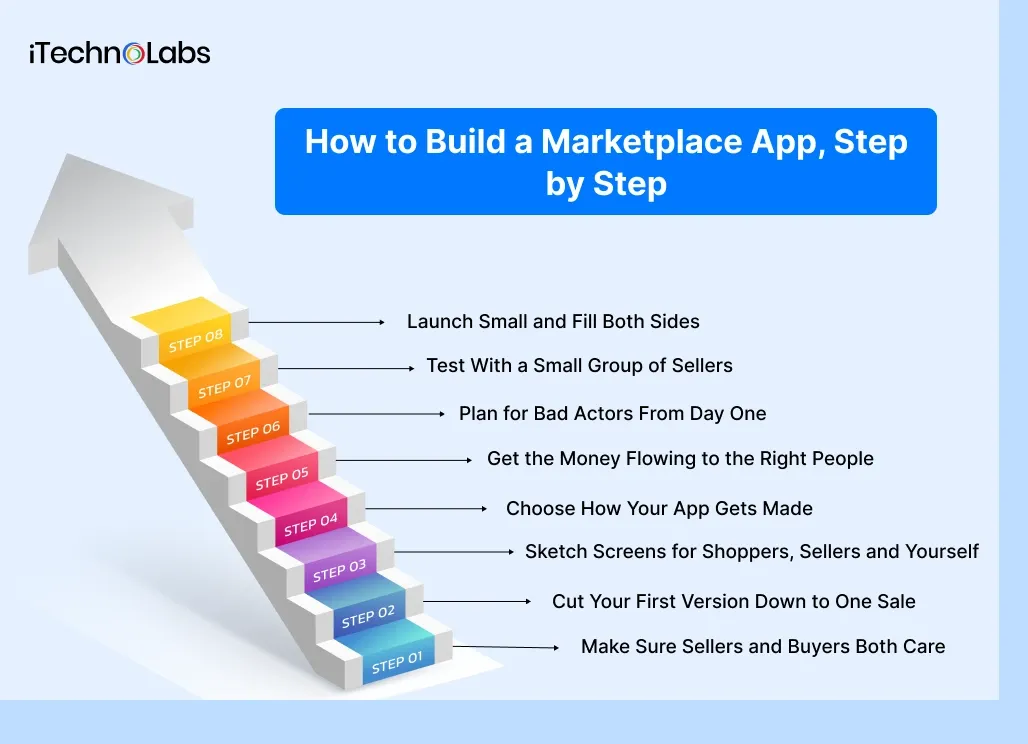
These eight steps run in rough order. You’ll probably end up working on some of them side by side.
Step 1: Make Sure Sellers and Buyers Both Care
Talk to people on each side before you build anything. Sellers can tell you where they sell today and how much that costs them. Ask what annoys them most about it, too. Buyers will tell you where they go looking and what they can never seem to find.
If the sellers you speak to don’t seem bothered, go back to the drawing board. Buyers tend to go wherever the good sellers are, and an empty shop won’t pull in either side.
Step 2: Cut Your First Version Down to One Sale
Picture one sale from start to finish. Someone lists a pair of boots. A buyer finds them and pays, the boots get posted, and the buyer leaves a review. Build that and nothing more for now. Chat, coupons, wish lists, and loyalty points can come later.
A version this small can launch in months, where a packed one can drag on for a year. If you’re unsure what to cut, our team can help you build a simple first version of your app around that one sale.
Step 3: Sketch Screens for Shoppers, Sellers and Yourself
Three kinds of people use a marketplace, and they need different screens.
The shopper app is the part everyone imagines, where people browse, search, buy and follow their order. Sellers need a dashboard for adding products, spotting new orders and checking their earnings. Then there’s your control panel, where you approve sellers, set fees, sort out refunds and keep an eye on sales. First-time founders tend to pour their effort into the shopper side and leave the other two thin. Sellers pick up on that quickly.
Step 4: Choose How Your App Gets Made
You’ll face two big choices here, and neither one needs a tech background.
First, do you need a phone app right away, or will a website do for now? Plenty of marketplaces start as a website because it’s quicker to change. Second, if you go with phone apps, you can build one app that runs on both iPhone and Android instead of building it twice. Our team often uses this approach for one app that runs on both iPhone and Android, and it saves real money for most startups.
Behind every screen there’s also a system that stores your listings, orders and accounts. Shoppers will never see this part, yet the whole marketplace sits on top of it. So ask whoever builds your app a plain question. What happens when 50 orders a day turns into 5,000?
Step 5: Get the Money Flowing to the Right People
Taking money on a marketplace is messier than in an ordinary shop. One buyer might pay for items from three sellers in a single checkout. That money has to be split, your fee taken out and each seller paid on time.
You don’t build this from scratch. Stripe Connect and PayPal both have tools built for paying lots of sellers from one checkout. Before a seller gets their first payout, these companies want to see ID and bank details. Some sellers grumble about that at sign-up. It’s worth it, since those checks keep scammers out and keep you covered.
Sales tax is worth a quick call to an accountant too. In some places, the marketplace, and not the seller, has to collect it.
Step 6: Plan for Bad Actors From Day One
Every marketplace attracts a few people trying to cheat it. Some sellers list things they don’t have. Some buyers swear a parcel never arrived when it did.
You can head off most of this with a few plain rules. Approve sellers before they go live. Show honest reviews. Hold the seller’s money until the buyer confirms delivery, and give people an easy way to report a problem. Look after customer data carefully as well. People are trusting you with their addresses and card details, and privacy laws in your customers’ countries will expect you to protect them.
Step 7: Test With a Small Group of Sellers
Before you open the doors, invite five to ten friendly sellers to use the real thing. Let them list real products and run real orders with buyers you know.
Something will break. A button won’t work on older phones, or a payout will land a day late. Far better to find that out with ten friendly sellers than with your first thousand customers.
Step 8: Launch Small and Fill Both Sides
Here’s the catch every marketplace faces. Buyers won’t come until there are sellers, and sellers won’t stay without buyers.
So start with sellers. Sign them up by hand, and if it helps, add their first few products for them. Keep your launch to one city or one product type so the shelves look full. Then bring in buyers through people you already know: local groups, newsletters, the sellers’ own customers. Etsy-sized numbers can come later. In the first few months, a few hundred happy buyers in one city will teach you more than a thin spread across ten.
Which Features Do You Need on Day One?
Some features have to be there when you open. Plenty of others can wait until people are actually using the app.
| Who | Must be there at launch | Add later |
| Shoppers | A search bar, product pages, a cart, safe checkout, order tracking and reviews | Saved favourites, messaging sellers, reward points |
| Sellers | Quick sign-up, a way to add products, alerts for new orders and a page showing their earnings | Sales charts, discount codes, uploading lots of products at once |
| You (the owner) | Seller approvals, fee settings, handling refunds and complaints, and a sales summary | In-depth reports, promotion tools, ranking sellers |
Anything that isn’t in that middle column can sit on the shelf for now. A month of real people using your app will tell you what’s missing far better than any wish list.
How Long Will Your Marketplace App Take to Build?
Expect roughly five to seven months for a custom marketplace app, counting from your first planning call to the day it goes live. The rough shape looks like this.
| Phase | What happens | Rough time |
| Planning | Agreeing on the first version, the money plan and who it’s for | 2 to 4 weeks |
| Design | Drawing every screen for shoppers, sellers and you | 3 to 5 weeks |
| Building | Making the apps, payments and control panel work | 10 to 16 weeks |
| Testing | Fixing problems with a small group of real sellers | 3 to 4 weeks |
| Launch | Going live in app stores and fixing early hiccups | About 2 weeks |
Here’s a real example. One iTechnolabs delivery marketplace had many sellers, a courier app with live tracking and an in-app wallet. It was planned for 18 to 24 weeks with a team of six developers. Going the store-builder route with a marketplace add-on is quicker. Some founders are live within a few weeks, as long as they’re happy to work inside the builder’s limits.
What Will a Marketplace App Cost You?
Your bill mostly comes down to how much you try to build before launch. Here’s the honest range.
A store builder with a marketplace add-on is the cheapest way in. Expect setup costs plus monthly fees that rise as you grow. A custom first version with the three core parts tends to start somewhere around $40,000. Add live delivery tracking, an in-app wallet or a separate courier app, and the price goes up. The delivery marketplace from our portfolio is a good example. Its budget was $50,000 to $70,000, and that covered iPhone, Android and the web.
Then there are the costs people forget to plan for:
- Payment company fees on every single order
- Monthly costs to keep the app online and running
- Getting listed in the app stores, which costs $99 a year with Apple and a one-off $25 with Google Play
- Time spent helping sellers who get stuck
- Updates when phones and app stores change their rules
You can get a rough figure for your own idea with our app cost calculator.
What Mistakes Sink New Marketplaces?
When new marketplaces fail, it’s rarely the code. Most trip over the same few things.
The biggest is trying to serve everyone at once, which leaves every category half empty. Close behind is building too much before launch. Founders spend a year on features, then learn that buyers wanted something simpler. Some charge sellers too much too early and wonder why nobody lists. If the seller dashboard is clunky, sellers slip back to wherever they used to sell, often without a word. Then there are founders who leave fraud checks for later. Later usually turns out to be the week a scammer finds them.
If you’re planning a food marketplace, our multi-restaurant marketplace guide covers the extra pieces that type needs, like delivery drivers and live tracking.
Why Choose iTechnolabs to Build Your Marketplace App?
We’ve built more than 500 apps used by over 50,000 people. Our 300+ developers work from offices in Markham, Calgary, Ottawa and Sheridan, Wyoming.
As a marketplace app development company, we build every part a marketplace needs. That means the shopper app, the seller app, a delivery app if you need one and your control panel. If you sell physical goods, our team also builds multi-vendor ecommerce apps with seller approvals, fee settings and order tracking built in.
We hold ISO 27001, an international standard for keeping data secure, and ISO 9001, a standard for quality in how work gets done. That matters when your app holds other people’s card details and home addresses. Twenty clients have reviewed our work on Clutch, and our average score there sits at a full 5.0 out of 5.
Conclusion
A marketplace app gets built one decision at a time, and the order you make them in matters. Start with a group of buyers and sellers you know well, and the narrower the better. Settle your fee and run it through a spreadsheet before a designer draws anything. Then keep your first version to a single sale, from a seller’s listing all the way to the buyer’s payment and review.
Once that’s clear, you can plan the shopper app, the seller dashboard and your own control panel. Payments go to a company that already handles them well, and your safety rules go in from day one instead of after the first problem. Test with a few friendly sellers. Then launch small, fill the shelves by hand if you have to and bring in buyers you already know how to reach.
You won’t need to write a line of code for any of it. Your edge is how well you know the people on both sides, plus the patience to let sellers and buyers build up over time. The app is the part you can hire help for. Want a second pair of eyes on your plan, or a clear figure for your first version? We’re happy to talk it through.

Frequently Asked Questions
1. How long does it take to build a marketplace app?
A custom marketplace app usually takes around five to seven months, covering planning, design, building, testing and launch. One iTechnolabs delivery marketplace was planned for 18 to 24 weeks. A store builder with a marketplace add-on can go live within a few weeks, but you get less control over how it works.
2. How much does a multi-vendor marketplace app cost?
It depends on how much you build first. A store builder with an add-on costs the least to start. A custom first version often begins around $40,000, and bigger builds cost more. One iTechnolabs delivery marketplace with many sellers was budgeted at $50,000 to $70,000 across iPhone, Android and the web.
3. Can I start with a website and add the phone apps later?
Yes, and many marketplaces do exactly that. A website is quicker to build and easier to change while you learn what buyers and sellers want. Once people use it regularly, add iPhone and Android apps. They connect to the same listings, orders and accounts, so nobody has to sign up twice.
4. How does the money get split between sellers?
The buyer pays once at checkout. A payment company built for marketplaces, such as Stripe Connect or PayPal, splits that money, keeps your fee aside and pays each seller their share. Sellers share ID and bank details before their first payout, which helps keep fraud low and protects your marketplace.
5. Should I use Shopify or build my own marketplace app?
Use a store builder like Shopify with a marketplace add-on if you’re still testing whether people want your idea. It’s cheaper and faster. Move to a custom app when sellers need features the add-on can’t offer. The other signal is monthly fees that cost more than owning your own app would.
6. How do I get my first sellers?
Reach out to them one by one. Pick a single city or product type, contact sellers who already sell there and offer to set up their first listings yourself. Low or zero fees for early sellers can help too. Once your shelves look full, bring in buyers through groups and contacts you already have.
7. Do I need separate apps for iPhone and Android?
Usually not. Most marketplaces today use one app that runs on both iPhone and Android, which saves time and money compared with building everything twice. Separate apps mostly make sense when you need very specific phone features. For a first version, a single shared app is almost always enough.