Key Takeaways
- Start with a defined patient problem and a specific clinical workflow instead of building every possible telehealth feature.
- Prioritize appointment booking, provider management, secure consultations, notifications, and appropriate access controls for an MVP.
- HIPAA applies to covered entities and business associates within its scope. Not every health application automatically falls under HIPAA.
- Assess applicable privacy laws, clinical requirements, third-party services, and integration needs before selecting your technology stack.
- A well-scoped MVP should prove that patients and providers can complete the intended care workflow safely and reliably before additional features are introduced.
Telemedicine app development involves building software that allows patients and healthcare professionals to connect remotely through features such as appointment scheduling, video consultations, secure messaging, and access to relevant medical information. A successful product also needs appropriate privacy controls, reliable integrations, and workflows that fit the healthcare service it supports.
For startup founders, the challenge is deciding which capabilities belong in the first release, which regulations apply to the intended product, and how to build an architecture that can support future growth without unnecessary complexity.
Table of Contents
- Define the Telemedicine Product Before Choosing Features
- Essential Telemedicine App Features
- Telemedicine Compliance: What Founders Need to Plan
- Security and Privacy by Design
- Integrations and Technology Architecture
- How to Build a Telemedicine App: A Practical Development Process
- How to Prioritize Your MVP Features
- Common Mistakes to Avoid
- Why Choose iTechnolabs for Telemedicine App Development?
- Conclusion
- FAQs
Define the Telemedicine Product Before Choosing Features
Begin telemedicine app development by identifying the users, the healthcare service, and the problem the product needs to solve.
A startup building a virtual primary care service has different requirements from a company creating a mental health platform or a remote specialist consultation service. The underlying technology may overlap, but the patient journey, provider workflow, integrations, and regulatory considerations can differ.
Choose the product model
Consider these common models:
- Direct to patient: Patients discover providers, book consultations, and attend virtual appointments.
- Provider-focused: Clinics or independent practitioners manage schedules, consultations, patient communication, and follow-ups.
- Specialty-focused: A platform supports a particular clinical service with its own intake, documentation, or monitoring requirements.
- Business-to-business: Healthcare organizations use the platform to provide virtual services to their existing patient populations.
Choosing one primary model helps prevent the MVP from becoming a collection of disconnected features designed for different buyers.
Map the core user journey
Document the complete workflow before writing code.
For example, a patient might create an account, find an eligible provider, complete an intake form, book an appointment, attend a consultation, receive follow-up instructions, and return to view relevant information.
The provider workflow should cover availability, patient context, consultation access, documentation, and follow-up tasks.
The planning question is simple: Can each intended user complete the most important task without unnecessary steps, confusing handoffs, or inappropriate access to sensitive information?
Essential Telemedicine App Features
Prioritize features according to their contribution to the core care journey, the risks they address, and the effort required to deliver them.
Patient app
- Registration and patient profiles:
Provide secure account creation, identity verification where required, profile management, and appropriate consent workflows. Collect only the information needed for the service.
- Appointment scheduling:
Let patients view provider availability, book or reschedule appointments, receive confirmations, and understand cancellation rules. Account for provider time zones and avoid double bookings.
- Video consultations:
Support appointment access, permission handling, connection status, and recovery when a call drops. Define whether audio-only consultations are appropriate for the intended service.
- Secure messaging and notifications:
Enable appropriate communication before and after consultations. Notifications should avoid exposing sensitive medical details on lock screens or shared devices.
Provider dashboard
Providers need tools to manage schedules, review permitted patient information, access appointments, document consultations, and coordinate follow-up care.
The dashboard should enforce role-based permissions and distinguish routine administrative actions from clinical activities. If multiple practitioners work within one organization, access should be restricted to the information appropriate for each user’s role.
Administrative and operational tools
Include user and provider management, appointment oversight, support workflows, access logs, and operational reporting where justified by the product.
Administrators should not automatically receive unrestricted access to clinical records simply because they manage the platform.
Features to consider after the MVP
The following capabilities may be valuable, but they should depend on the business model and validated user needs rather than being included by default.
- Electronic health record integration
- Prescription workflows where legally permitted
- Insurance eligibility and billing integrations
- Remote patient monitoring
- Multilingual interfaces
- Clinical reporting and analytics
- AI-supported documentation or administrative assistance
Add these capabilities when they solve a defined problem and the required integrations, safeguards, and operational responsibilities are understood.
Telemedicine Compliance: What Founders Need to Plan
Compliance requirements depend on the product, the organizations operating it, the information it handles, and the markets where the service is offered. A healthcare application should not be labelled compliant merely because it uses encryption or secure authentication.
HIPAA in the United States
The US Department of Health and Human Services explains that HIPAA Rules apply to covered entities and their business associates within the law’s scope. Covered providers and health plans using telehealth technology must account for applicable HIPAA requirements, including relevant vendor arrangements.
If your startup serves US healthcare providers, assess:
- Whether the organizations involved are covered entities or business associates.
- How protected health information is collected, stored, transmitted, and accessed.
- Whether relevant service providers need business associate agreements.
- How access controls, audit records, risk analysis, incident response, and data retention will work.
The Federal Trade Commission also maintains a Health Breach Notification Rule that can apply to certain health applications and related services outside HIPAA coverage. Being outside HIPAA does not automatically mean that a product has no health data obligations.
Canadian privacy requirements
Canada’s federal privacy framework includes the Personal Information Protection and Electronic Documents Act, known as PIPEDA. Its application depends on the organization, the activity, and the relevant jurisdiction. Provincial health information laws may also apply.
For Canadian launches, assess the applicable federal and provincial requirements with qualified privacy counsel. Define consent, collection, use, disclosure, retention, access requests, and breach response processes before production deployment.
Medical device considerations
The US Food and Drug Administration assesses software functions based on their intended purpose and regulatory status. Certain functions that meet the definition of a medical device may fall within FDA oversight, particularly where malfunction could pose risks to patient safety.
If your product includes diagnostic interpretation, treatment recommendations, or software that controls or works with a medical device, assess the relevant regulatory pathway early. Do not assume that every feature in a healthcare app has the same regulatory status.
Security and Privacy by Design
Security decisions affect the architecture, vendor selection, testing strategy, and cost of a telemedicine product. They are harder to address properly when left until the final weeks before launch.
Build a security plan around the actual data flows in the product.
Core safeguards to evaluate
- Authentication: Use appropriate identity verification, account recovery, session management, and stronger authentication where risk warrants it.
- Access controls: Restrict patient records and clinical functions according to user roles and responsibilities.
- Encryption: Protect sensitive data in transit and at rest using appropriate technical controls.
- Audit logging: Record relevant access and administrative events, with suitable retention and protection.
- Vendor assessment: Review video, messaging, analytics, cloud, and other third-party services for their access to sensitive information and their contractual responsibilities.
- Incident response: Define how security incidents are detected, investigated, escalated, and handled.
- Backup and recovery: Establish recovery procedures and test them against the product’s operational needs.
HHS telehealth guidance emphasizes the use of appropriate technology vendors and applicable business associate agreements when HIPAA requires them.
Map every system that receives or processes sensitive information, including services that may not be visible to the end user. Review analytics, error reporting, push notifications, and support tools as well as the main application.
Integrations and Technology Architecture
Choose integrations based on the product’s required workflows and the obligations attached to the information they process. The lowest effort integration is not always the right choice for a healthcare product.
| Integration | Why it matters | Planning consideration |
| Video and audio | Enables remote consultations | Privacy, connection reliability, vendor terms and fallback options |
| Electronic health records | Supports access to relevant clinical information | Data mapping, permissions, interoperability and error handling |
| Scheduling systems | Coordinates provider availability | Time zones, cancellations, conflicts and synchronization |
| Payments and billing | Supports commercial operations | Payment data handling, refunds and billing rules |
| Notifications | Sends reminders and appointment updates | Consent, privacy and sensitive information exposure |
| Analytics | Helps understand product usage | Data minimization, access and restrictions on sensitive data |
Each integration expands the number of systems that must be considered during security reviews, testing, and ongoing maintenance.
Choosing the technology stack
Select technologies after documenting performance, security, integration, and maintenance requirements.
- Mobile applications: Native iOS and Android development, Flutter, or React Native may fit depending on platform requirements and available engineering resources.
- Backend: A custom API and backend can coordinate accounts, appointments, permissions, notifications, and application workflows.
- Data storage: Select databases and storage services based on the data model, access patterns, security requirements, and recovery needs.
- Cloud infrastructure: Evaluate access controls, logging, deployment practices, availability requirements, and vendor obligations.
- Web dashboard: A browser-based interface can help providers and administrators manage appointments and operational workflows.
Cross-platform development may reduce duplicated application work, but it does not eliminate platform-specific testing, security reviews, or the need to validate integrations.
For a first release, prefer a clearly defined architecture over unnecessary microservices or speculative AI features. Keep the boundaries between patient data, administrative operations, clinical workflows, and external services explicit.
How to Build a Telemedicine App: A Practical Development Process
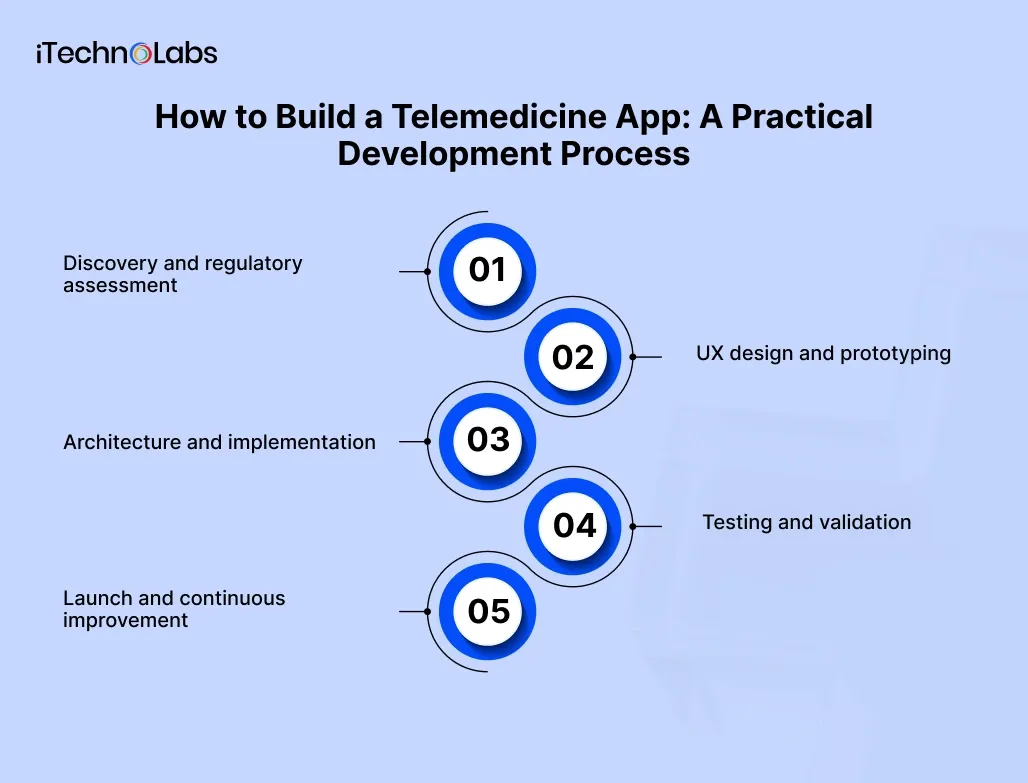
Use a staged process that validates product decisions before committing to the full implementation.
1. Discovery and regulatory assessment
Define the target users, care model, intended markets, core workflows, applicable requirements, and third-party dependencies. Document the MVP scope and the decisions that still need specialist review.
2. UX design and prototyping
Map the patient and provider journeys. Test appointment booking, consultation entry, consent, and recovery from common errors before development begins.
3. Architecture and implementation
Build the required applications, backend, permissions, integrations, and audit mechanisms against documented requirements. Keep unnecessary features out of the initial scope.
4. Testing and validation
Test role permissions, data flows, device compatibility, video connection failures, scheduling conflicts, recovery procedures, and security controls. Validate the workflows with intended users.
5. Launch and continuous improvement
Complete the required privacy, security, operational, and regulatory reviews. Monitor errors and service reliability, gather user feedback, and prioritize changes based on evidence.
A working prototype can demonstrate usability, but it does not prove that the production system meets security or regulatory requirements. Those need to be evaluated against the actual implementation and operating model.
How to Prioritize Your MVP Features
Evaluate each proposed feature against four criteria: user value, operational necessity, compliance or safety implications, and implementation effort.
| Feature | Suggested priority | Reason |
| Registration and appropriate authentication | Core | Establishes user identity and access |
| Appointment booking and provider availability | Core | Supports the main service workflow |
| Video consultations or another suitable remote care channel | Core for video-based care | Enables the intended consultation |
| Appropriate permissions and audit logging | Core | Supports protection and review of sensitive activity |
| Notifications and appointment reminders | Core or early follow up | Supports scheduling and communication |
| EHR integration | Depends on workflow | May be essential when existing clinical records are required |
| E-prescribing | Depends on service and jurisdiction | Requires specific workflow and regulatory assessment |
| AI clinical recommendations | Defer unless central to the product | Introduces additional validation and safety considerations |
| Remote monitoring | Defer unless central to the care model | Requires device, data, and operational planning |
This prioritization is a starting framework, not a universal feature list. A product that depends on existing clinical records cannot treat EHR integration as optional simply to reduce development scope.
What should determine launch readiness?
Define measurable acceptance criteria for the most important user journeys. Examples include successful appointment booking, correct permission enforcement, reliable consultation entry, and documented handling of failed connections.
Also define who will respond to technical incidents, how users can obtain support, and how the team will address newly discovered security issues.
Common Mistakes to Avoid
Address these risks during planning rather than waiting for user testing or launch.
- Building too many features: Expands scope before the core service has been validated. Start with the essential workflow.
- Treating compliance as a certification label: A vendor or cloud service cannot make the entire product compliant on its own. Assess the full system and operating practices.
- Ignoring third-party data flows: Video, analytics, notifications, and support services may introduce additional privacy considerations.
- Skipping failure scenarios: Test dropped calls, missed appointments, duplicate bookings, expired sessions, and unavailable integrations.
- Adding AI without a defined use case: Identify the problem, required data, potential clinical risks, and human oversight before selecting an AI capability.
- Leaving maintenance out of the plan: Budget for security updates, dependency changes, monitoring, support, and ongoing validation.
The strongest MVP is not necessarily the one with the fewest features. It is the one that delivers a complete, carefully validated core workflow without omitting safeguards that are necessary for its intended use.
Why Choose iTechnolabs for Telemedicine App Development?
iTechnolabs is an AI-focused software and mobile app development company that works with businesses building and modernizing digital products. Its documented capabilities include iOS, Android, Flutter, React Native, custom software development, and AI integration.
For a healthcare startup, selecting a development partner means evaluating more than coding capability. The team should understand the product requirements, integration dependencies, security considerations, and testing needed to prepare the application for its intended use.
Here is how iTechnolabs can support your telemedicine project:
- Mobile app development: iTechnolabs works with native iOS and Android development, Flutter, and React Native. Select the approach based on your MVP scope, device requirements, and long-term maintenance needs.
- Product discovery and feature planning: Define patient and provider journeys, prioritize essential functionality, and document requirements before implementation.
- Integration planning: Assess video consultation services, scheduling systems, payment providers, and electronic health record integrations according to your product requirements.
- Security-focused engineering: Establish access controls, appropriate data handling, audit logging, and security testing requirements as part of the development process. Specific regulatory compliance must be assessed and verified for the actual product.
- AI integration where appropriate: iTechnolabs offers AI development capabilities. Consider administrative automation or documentation support only where there is a defined use case and suitable safeguards.
Conclusion
Successful telemedicine app development starts with a clear understanding of patient needs, provider workflows, and the regulatory requirements that apply to the product. Choosing the right MVP features, planning secure data flows, and evaluating third-party integrations early can help startups avoid unnecessary complexity and make better development decisions.
Before development begins, define your core user journeys, identify the essential features, assess applicable privacy and security obligations, and establish measurable launch criteria. Expand the product as real user feedback and operational needs reveal where additional capabilities will create value.
The goal is not simply to launch a video consultation app. It is to build a dependable digital healthcare product that supports meaningful patient and provider interactions while protecting sensitive information.
FAQs
1. What is telemedicine app development?
Telemedicine app development is the process of designing, building, testing, and maintaining software that supports remote healthcare interactions. Depending on the product, it may include appointment booking, video consultations, secure messaging, patient information, provider dashboards, and integrations with clinical systems.
2. How much does it cost to build a telemedicine app?
The cost depends on the scope, platforms, integrations, security requirements, and clinical workflows. A basic appointment and consultation MVP differs substantially from a platform with EHR integration, multiple provider organizations, billing, and advanced clinical features. Obtain a scoped estimate before treating any budget as reliable.
3. How long does it take to develop a telemedicine app?
There is no single timeline that applies to every telemedicine product. Requirements discovery, interface design, application development, integrations, testing, and regulatory review all affect delivery. The timeline should be estimated after defining the MVP, technical dependencies, and validation requirements.
4. Does a telemedicine app need to be HIPAA compliant?
A telemedicine app needs to address HIPAA when its use falls within the law’s scope, including applicable relationships with covered entities and business associates. Other privacy and breach notification requirements may apply even when HIPAA does not.
5. Which features should a telemedicine MVP include?
Start with the capabilities needed to complete the intended care journey, commonly registration, appointment scheduling, provider access, consultations, appropriate notifications, and security controls. Add EHR integration, billing, prescribing, or monitoring when required by the service model and validated requirements.
6. Can AI be integrated into a telemedicine application?
AI can be used for software functions such as administrative assistance or documentation support, but the appropriate design depends on the intended use and associated risks. Some medical software functions may fall under regulatory oversight. Assess data handling, validation, human review, and applicable requirements before deployment.